| View previous topic :: View next topic |
| Author |
Message |
mars1
Junior

Joined: 07 May 2016
Posts: 7
|
 Posted: 25/11/2016 15:00 Post subject: RobotStudio v6.04.00.01 Posted: 25/11/2016 15:00 Post subject: RobotStudio v6.04.00.01 |
 |
|
RobotStudio v6.04.00.01
Download
http://cdn.robotstudio.com/install/RobotStudio_6.04.00.01.zip
1. Type regedit and press Enter
2. Look for
For 32 [HKEY_LOCAL_MACHINE \ SOFTWARE \ Microsoft \ SLP Services]
For 64 [HKEY_LOCAL_MACHINE \ SOFTWARE \ Wow6432Node \ Microsoft \ SLP Services]
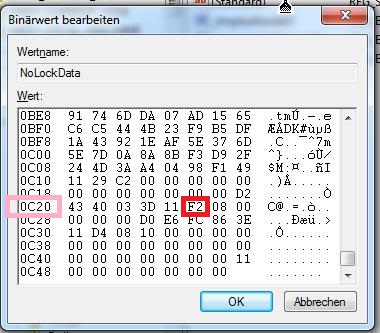
3. Double-click the right-hand key NoLockData
4. Change to value 0C20 position 6 to F2
5. Click OK Done
http://new.abb.com/products/robotics/robotstudio/downloads
 |
|
| Back to top |
|
 |
borlix
Junior
Joined: 13 Jul 2013
Posts: 5
|
| Posted: 01/12/2016 08:50 Post subject: |
|
|
| working ......nice, thx! |
|
| Back to top |
|
|
dani_val
Member junior

Joined: 27 Mar 2013
Posts: 75
|
| Posted: 14/12/2016 08:47 Post subject: |
|
|
Is working. Trail until 2040.
Is there any way to to the same with the PowerPacks? Palletising, etc? |
|
| Back to top |
|
|
klingan12
Junior
Joined: 06 Jan 2017
Posts: 4
|
| Posted: 07/01/2017 21:30 Post subject: |
|
|
noob questions, how to delete it in registry so i can get the 30 days trial active again?
after this action i would apply this solution above and test it.
I use revo uninstall and try to after the operate with revo, to install robotsudio 6.04 but the trial have expired.
Any solution with work around? |
|
| Back to top |
|
|
tarantella
Junior
Joined: 08 Jan 2017
Posts: 4
|
| Posted: 08/01/2017 14:25 Post subject: |
|
|
| klingan12 wrote: | noob questions, how to delete it in registry so i can get the 30 days trial active again?
after this action i would apply this solution above and test it.
I use revo uninstall and try to after the operate with revo, to install robotsudio 6.04 but the trial have expired.
Any solution with work around? |
try a registry cleaner |
|
| Back to top |
|
|
klingan12
Junior
Joined: 06 Jan 2017
Posts: 4
|
| Posted: 08/01/2017 16:46 Post subject: |
|
|
| Ok, I will try with cc-cleaner tomorrow. |
|
| Back to top |
|
|
klingan12
Junior
Joined: 06 Jan 2017
Posts: 4
|
| Posted: 10/01/2017 17:41 Post subject: |
|
|
| No sucess with cc-cleaner any other solution |
|
| Back to top |
|
|
sarkozy
Junior
Joined: 02 Jan 2017
Posts: 2
|
| Posted: 10/01/2017 20:32 Post subject: |
|
|
| klingan12 wrote: | | No sucess with cc-cleaner any other solution |
Try Start->Run>regedit and edit your registry as you want... |
|
| Back to top |
|
|
tanner
Member

Joined: 07 Jun 2015
Posts: 134
|
| Posted: 08/02/2017 19:46 Post subject: |
|
|
RobotStudio
http://new.abb.com/products/robotics/robotstudio/downloads
Download RobotStudio & RobotWare 6.04.01
Summary: Includes RobotWare and RobotStudio 6.04.01, the RobotWare add-ins for Positioners, Track Motion and Stand Alone Controller as well as the tools Mechanical Unit Manager, Test Signal Viewer and TuneMaster
http://cdn.robotstudio.com/install/RobotStudio_6.04.01.zip
PowerPacs
https://library.e.abb.com/public/1558eedcf10145f58d145fe7137667bb/ArcWelding%20PowerPac%206.04.exe
https://library.e.abb.com/public/8e7d7db0e93a4bb291658ea8085eb339/ABB%20Cutting%20PowerPac%206.04.exe
https://library.e.abb.com/public/8e7d7db0e93a4bb291658ea8085eb339/ABB%20Cutting%20PowerPac%206.04.exe
https://library.e.abb.com/public/cd63ef9f7ecf4d55a56fdcd673718100/ABB%20Machining%20PowerPac%206.04.exe
https://library.e.abb.com/public/6456ddc439af40b0832131aa88f4c2df/Machine%20Tending%20PowerPac%206.04.exe
https://library.e.abb.com/public/9e90e6321405427da416e5b34edfdc6e/ABB%20Painting%20PowerPac%206.02.01%20SP1.exe
https://library.e.abb.com/public/089726b89ae74a9096fc832729c62a6c/Palletizing%20PowerPac%206.04.exe
https://library.e.abb.com/public/6dc1fa64bae24c6b8a87434da88dabd8/Picking_PowerPac_6.04.zip |
|
| Back to top |
|
|
alalatu
Junior
Joined: 11 Apr 2016
Posts: 3
|
| Posted: 09/07/2017 12:51 Post subject: Help |
|
|
ii did all modification in regeidit, but after modification the 30 day license disapiard.
What i did wrong? |
|
| Back to top |
|
|
jarmster
Member junior
Joined: 12 Aug 2017
Posts: 70
|
| Posted: 12/08/2017 20:20 Post subject: |
|
|
| This works great.... |
|
| Back to top |
|
|
punisher5385
Junior
Joined: 22 Aug 2017
Posts: 3
|
| Posted: 30/08/2017 13:16 Post subject: |
|
|
Work Fine!
Tested with 6.05 and 6.04  |
|
| Back to top |
|
|
jarmster
Member junior
Joined: 12 Aug 2017
Posts: 70
|
| Posted: 04/09/2017 23:38 Post subject: |
|
|
| punisher5385 wrote: | Work Fine!
Tested with 6.05 and 6.04 |
And 6.05.02..  |
|
| Back to top |
|
|
alalatu
Junior
Joined: 11 Apr 2016
Posts: 3
|
| Posted: 13/10/2017 22:38 Post subject: |
|
|
| jarmster wrote: | | punisher5385 wrote: | Work Fine!
Tested with 6.05 and 6.04 |
And 6.05.02.. |
please tell me exactly how to edit that file.
i try to delete curent registration and put F2 and just to add F2, in same case my license from ABB -> options -> license are missing. |
|
| Back to top |
|
|
jarmster
Member junior
Joined: 12 Aug 2017
Posts: 70
|
| Posted: 29/10/2017 20:09 Post subject: |
|
|
| 6.06 sp1 is good too... |
|
| Back to top |
|
|
Karol
Junior
Joined: 12 Jan 2018
Posts: 1
|
| Posted: 12/01/2018 02:34 Post subject: |
|
|
| Not working for me, I have no trial license maybe thats why |
|
| Back to top |
|
|
jarmster
Member junior
Joined: 12 Aug 2017
Posts: 70
|
| Posted: 10/02/2018 18:54 Post subject: |
|
|
The trial license is installed in the registry when you install a fresh version of robotstudio. I started with 6.04 and every time I installed a new version, the trial license info carried over to the new copy. I would uninstall ALL copies of robotstudio then reinstall 6.04. Clean the registry before aswell.
Make the registry edits...Profit
btw...works on 6.06.01 Sp1 as well
The powerpacs work too... |
|
| Back to top |
|
|
pedroruiz
Junior
Joined: 15 Mar 2018
Posts: 2
|
| Posted: 16/04/2018 16:39 Post subject: |
|
|
 Version 6.06.01 Works perfectly !!! Version 6.06.01 Works perfectly !!!
tks
Brazil
 |
|
| Back to top |
|
|
jarmster
Member junior
Joined: 12 Aug 2017
Posts: 70
|
| Posted: 04/05/2018 00:52 Post subject: |
|
|
6.07.01 sp1 works fine aswell
Last edited by jarmster on 03/09/2018 13:12; edited 1 time in total |
|
| Back to top |
|
|
Mr-Robot
Junior
Joined: 26 Feb 2017
Posts: 2
|
| Posted: 24/08/2018 16:25 Post subject: Confirmed 6.07.01 |
|
|
| jarmster wrote: | | 6.07.01 works fine aswell |
RobotStudio license will expire in 9151 days. Thanks
**Make sure when you modify the reg you back it up first. When you change the 6th position only press delete once** |
|
| Back to top |
|
|
Joosy
Junior
Joined: 20 Jun 2012
Posts: 1
|
| Posted: 04/09/2018 11:41 Post subject: No it's not possible. |
|
|
No it's not possible.
Premium license not available (Canceled). You can still use the basic functions.
The basic functionality you get anyway free. But that does not make sense. |
|
| Back to top |
|
|
jarmster
Member junior
Joined: 12 Aug 2017
Posts: 70
|
| Posted: 11/09/2018 22:38 Post subject: |
|
|
Yes it does make sense and yes it does work. The basis of this work around is we are modifying the 30 day trial key so it works beyond 30 days. You modify the registry key with rs 6.04 and when you have everything installed, you update. Im on 6.07.01 sp1 good to 2044 with ALL the powerpacs. The basic functionality you speak of is being able to use the online functions but when you first install RS and any powerpac, its de lux functions are good for 30 days. If you have a previous installation of RS with an expired licence you must uninstall the the software and clean the registry of any old registry keys and start fresh.
Don't knock it till you try it |
|
| Back to top |
|
|
jr01
Junior
Joined: 09 Jul 2018
Posts: 1
|
| Posted: 25/09/2018 13:44 Post subject: |
|
|
Windows show alert: This copy of RobotStudio has not been actived. Click here for options.
but in RobotStudio license will expire in 9151 days
v6.07.01 SP1
Thks |
|
| Back to top |
|
|
mollydeep
Junior
Joined: 27 Sep 2018
Posts: 4
|
| Posted: 28/09/2018 10:02 Post subject: Powerpac expire date |
|
|
Why my powerpac will expire after 30 days???
I have installed Robotstudio 6.0.4, I have changed register and it will expire at 2044.
After I have installed powerpacs but they will expired after 30 days.
Did I do something wrong? |
|
| Back to top |
|
|
fotamecus
Member
Joined: 06 Nov 2017
Posts: 157
|
| Posted: 28/09/2018 22:47 Post subject: Re: Powerpac expire date |
|
|
| mollydeep wrote: | Why my powerpac will expire after 30 days???
I have installed Robotstudio 6.0.4, I have changed register and it will expire at 2044.
After I have installed powerpacs but they will expired after 30 days.
Did I do something wrong? |
Powerpack has a different license, that isn't neutralized by this regedit trick. |
|
| Back to top |
|
|
jarmster
Member junior
Joined: 12 Aug 2017
Posts: 70
|
| Posted: 29/09/2018 00:21 Post subject: |
|
|
The powerpacs will work aswell. You need to do the same edit to their key after you install it. The key just gets tacked on to the end of the original key. So find the same spot to edit on the new key.
Install Rs
edit key
Start and close RS
Install powerpac
edit key.....Same key just the new powerpac key is added on the end.
Start and close RS
Install next powerpac
repeat process
Its easier this way to do edits after every new powerpac install
I have all powerpacs installed and updated good till 2044
good luck
p.s I have never been able to edit a powerpac key that was released after the 6.04. meaning I wasn't able to mod the dispensing powerpac key because it was released after 6.04. You might be able to but I never put to much time into it but I have ALL the others installed and updated to their latest release.
Pss. I may have screwed up when to start and shutdown rs. I know I had to do it. Either after the power pac install or after the key edit. You can do it both times if you want just to be sure. |
|
| Back to top |
|
|
fotamecus
Member
Joined: 06 Nov 2017
Posts: 157
|
| Posted: 29/09/2018 18:19 Post subject: |
|
|
| jarmster wrote: | The powerpacs will work aswell. You need to do the same edit to their key after you install it. The key just gets tacked on to the end of the original key. So find the same spot to edit on the new key.
Install Rs
edit key
Start and close RS
Install powerpac
edit key.....Same key just the new powerpac key is added on the end.
Start and close RS
Install next powerpac
repeat process
Its easier this way to do edits after every new powerpac install
I have all powerpacs installed and updated good till 2044
good luck
p.s I have never been able to edit a powerpac key that was released after the 6.04. meaning I wasn't able to mod the dispensing powerpac key because it was released after 6.04. You might be able to but I never put to much time into it but I have ALL the others installed and updated to their latest release.
Pss. I may have screwed up when to start and shutdown rs. I know I had to do it. Either after the power pac install or after the key edit. You can do it both times if you want just to be sure. |
Good to know, Jamster.
I will try this procedure later, in a newer RS version. |
|
| Back to top |
|
|
mollydeep
Junior
Joined: 27 Sep 2018
Posts: 4
|
| Posted: 30/09/2018 09:09 Post subject: |
|
|
| jarmster wrote: | The powerpacs will work aswell. You need to do the same edit to their key after you install it. The key just gets tacked on to the end of the original key. So find the same spot to edit on the new key.
Install Rs
edit key
Start and close RS
Install powerpac
edit key.....Same key just the new powerpac key is added on the end.
Start and close RS
Install next powerpac
repeat process
Its easier this way to do edits after every new powerpac install
I have all powerpacs installed and updated good till 2044
good luck
p.s I have never been able to edit a powerpac key that was released after the 6.04. meaning I wasn't able to mod the dispensing powerpac key because it was released after 6.04. You might be able to but I never put to much time into it but I have ALL the others installed and updated to their latest release.
Pss. I may have screwed up when to start and shutdown rs. I know I had to do it. Either after the power pac install or after the key edit. You can do it both times if you want just to be sure. |
Hello
thank you for your help.
after powerpack installation I think the byte that I should change is no more the 0C20 but a new one.
How can I calculate the new byte address?
There is an offset or something like that?
Or do you have a registry example with everything installed?
Thank you very much and have a nice day |
|
| Back to top |
|
|
mollydeep
Junior
Joined: 27 Sep 2018
Posts: 4
|
| Posted: 30/09/2018 09:13 Post subject: |
|
|
| jarmster wrote: | The powerpacs will work aswell. You need to do the same edit to their key after you install it. The key just gets tacked on to the end of the original key. So find the same spot to edit on the new key.
Install Rs
edit key
Start and close RS
Install powerpac
edit key.....Same key just the new powerpac key is added on the end.
Start and close RS
Install next powerpac
repeat process
Its easier this way to do edits after every new powerpac install
I have all powerpacs installed and updated good till 2044
good luck
p.s I have never been able to edit a powerpac key that was released after the 6.04. meaning I wasn't able to mod the dispensing powerpac key because it was released after 6.04. You might be able to but I never put to much time into it but I have ALL the others installed and updated to their latest release.
Pss. I may have screwed up when to start and shutdown rs. I know I had to do it. Either after the power pac install or after the key edit. You can do it both times if you want just to be sure. |
Hello
thank you for your help.
after powerpack installation I think the byte that I should change is no more the 0C20 but a new one.
How can I calculate the new byte address?
There is an offset or something like that?
Or do you have a registry example with everything installed?
Thank you very much and have a nice day |
|
| Back to top |
|
|
jarmster
Member junior
Joined: 12 Aug 2017
Posts: 70
|
| Posted: 30/09/2018 13:13 Post subject: |
|
|
you need to edit in steps and start with 6.04. install RS and then edit the registry. Then add a powerpac and edit the registry.
I didn't fabricate this so I ultimately don't know the offsets, I just know that it works.
I tried to add the dispensing powerpac but I couldn't get it to work. I thought about posting my registry edits but there is enough info here that this shouldn't be an issue for anyone.
Just follow the instructions and start with 6.04 linked earlier in the thread. Use the Powerpacs posted earlier in the thread. Do it one step at a time.
When you get 6.04 installed and the powerpacs installed and all the edits to the registry made....Update to the latest and greatest.
0C20 is only the offset for the first RS edit. The other offsets will be further down the key but the layout is the same so its easy to find them and make those edits.
I say do it this way because I know it works. Things change with every revision and I don't want to see you waste your time.
Fuck it...
http://www.mediafire.com/file/bi978gzcgz00yid/RSREGMOD.reg/file
This is a copy of the registry modifications
http://www.mediafire.com/file/1cokxdz09f292w0/ABB-RobotStudio_6.07-Crack.doc/file
This is a copy of the autentic instructions I used to make the mods.
Search the registry mod in a hex editor for the hex values of f2 08 00 to see where the edits were made.
7 edits= 6 powerpacs and 1 RS key edits.
If you go into RS and manage the licence keys you can see that all the powerpacs have different keystrings and RS and all the converters share a common keystring…
I can't spoonfeed any better then this people....Your on your own
If someone wants to try to get the dispensing powerpac working that would be cool. I installed it awhile ago and its past the 30 days. It removes it's key from the nolockdata key after 30 days and I cant seem to add it. There hasn't been an update for it past 6.05 and I wasn't able to edit it before...I didn't really spend much time trying but someone with a fresh install may be able to figure it out with the info provided.... Good luck and let me know how you did... |
|
| Back to top |
|
|
|

 FAQ
FAQ Search
 Memberlist
 Usergroups
 Register
 Profile
 Log in to check your private messages
 Log in


