 |
plc.myforum.ro
PLCs users www.plc.myforum.ro!
|
| View previous topic :: View next topic |
| Author |
Message |
AnteSavilt
Member 2


Joined: 13 Feb 2018
Posts: 264
Location: Croatia
|
 Posted: 17/05/2021 19:06 Post subject: Windows 10 fail after installing the update 20H2 TIA Portal Posted: 17/05/2021 19:06 Post subject: Windows 10 fail after installing the update 20H2 TIA Portal |
 |
|
Why does setup of TIA Portal versions V13 SP2, V14 SP1 or V15.1 in Windows 10 fail after installing the update "20H2"?
https://support.industry.siemens.com/cs/document/109795924/
On Windows 10 systems with freshly installed October 2020 updates ("20H2"), an attempted initial setup of TIA Portal aborts with a generic error message.
The Windows 10 October 2020 Update ("20H2") was installed on a PC on which no other SIMATIC software products are installed. After that, one of the following versions of TIA Portal is to be set up for the first time:
V13 SP2
V14 SP1
V15.1
The setup aborts with the error message "An error occurred during setup.".
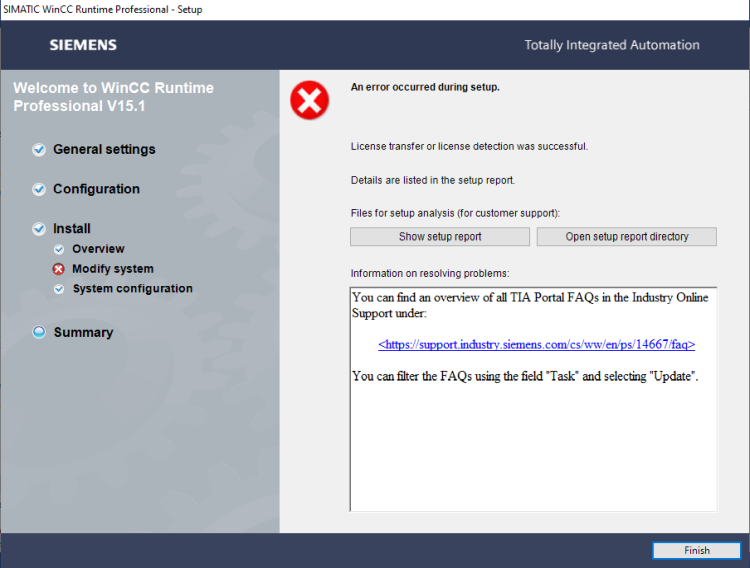
The setup report also contains the error message "|ERROR |ExecutionEngine::StartNextStepAsync() |(01) Execution has been canceled. Probably because of some process(es) running on the machine.".
Solution
The cause of the error message can be one of the following among others:
An outdated version of the Microsoft Edge browser
A current version of the Microsoft Edge browser is required for a successful setup.
To update, follow the procedure given in
https://support.industry.siemens.com/cs/document/109749283/which-microsoft-updates- (-security-updates-critical-updates-and-definition-updates-)-are-recommended-for-operating-simatic-wincc-(tia-portal)
No enablement of .NET 3.5
For a successful setup, .NET 3.5 must be enabled.
To enable .NET 3.5, follow the procedure described in
Which Windows functions must be activated in order to be able to install SIMATIC WinCC Unified?
https://support.industry.siemens.com/cs/document/109773589/which-windows-functions-must-be-activated-in-order-to-be-able-to-install-simatic-wincc-unified
https://support.industry.siemens.com/cs/document/10208766/how-do-you-clear-message-an-ole-error-has-occurred%E2%80%9D
https://support.industry.siemens.com/cs/document/109792367/how-do-you-perform-a-hard-reset-on-an-industrial-edge-device-in-case-of-malfunction |
|
| Back to top |
|
 |
|
|
You cannot post new topics in this forum
You cannot reply to topics in this forum
You cannot edit your posts in this forum
You cannot delete your posts in this forum
You cannot vote in polls in this forum
|
Powered by phpBB © 2001, 2005 phpBB Group
Fa-ti si tu propriul forum GRATUIT, pe www.myforum.ro |
 FAQ
FAQ Search
 Memberlist
 Usergroups
 Register
 Profile
 Log in to check your private messages
 Log in


