| View previous topic :: View next topic |
| Author |
Message |
mamiko
Member 2


Joined: 25 Dec 2017
Posts: 420
|
 Posted: 03/04/2023 08:39 Post subject: WinCC V8.0 Posted: 03/04/2023 08:39 Post subject: WinCC V8.0 |
 |
|
SIMATIC WinCC V8.0
Sales- and delivery release SIMATIC WinCC V8.0 incl. options
https://support.industry.siemens.com/cs/document/109816599/
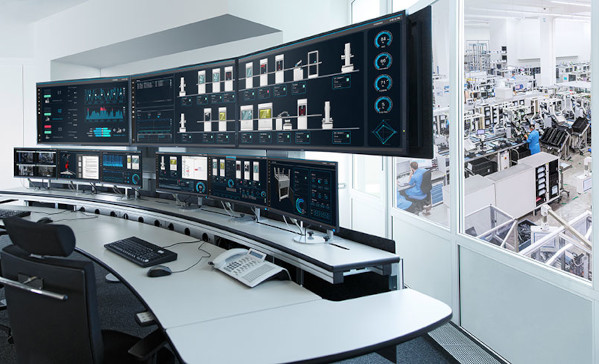
In addition to the WinCC basic packages of SIMATIC WinCC V8.0, the following WinCC options will be released / are compatible:
Delivery Release
| Quote: | WinCC/Server V8.0
WinCC/Redundancy V8.0
WinCC/Archive V8.0
WinCC/UserArchives V8.0
WinCC/WebNavigator V8.0
WinCC/DataMonitor V8.0
WinCC/Connectivity Pack V8.0
WinCC/Connectivity Station V8.0
WinCC/WebUX V8.0
WinCC/ODK V8.0
WinCC/IndustrialDataBridge V8.0
WinCC/Audit V8.0
WinCC/Change Control V8.0
WinCC/Calendar Scheduler V8.0
WinCC/Event Notifier V8.0
WinCC/Performance Monitor V8.0
WinCC/ProAgent V8.0
WinCC/Cloud Connect V8.0
WinCC/REST Connect V8.0 |
Application with the following products is given::
| Quote: | SIMATIC Net V18
SIMATIC ProDiag
SIMATIC InformationServer 2020 SP2
SIMATIC ProcessHistorian 2020 SP2 |
The delivery / compatibility test of the following options will be announced separately:
PM Add-Ons
| Quote: | SIMATIC Energy Manager Pro
SIMATIC TeleControl
|
Operating System
| Quote: | WinCC V8.0 supports the following Microsoft operating systems:
Windows 10 (64-Bit) Professional, Enterprise
Windows 11 (64-Bit) Professional, Enterprise
Windows Server 2019 (64-Bit) Standard, Datacenter
Windows Server 2022 (64-Bit) Standard, Datacenter
|
Under Windows 10 and Windows 11, the number of client connections within one server-client-system is limited to 3.
Functional enhancements of the basic system and the operations include amongst others:
2.3. Communication
| Quote: | Enhancement of the OPC UA Clients for methods
REST API for access to online variables and archive variables
REST-Connector for an "active sending" of WinCC data via REST
Communication channel for connection with OMRON PLCs
Communication channel for connection of SINUMERIK 840 NCU
|
2.4. Connection and interaction with WinCC Unified systems
| Quote: | Connection with online variables via WinCC Unified Collaboration
Implementation of WinCC Unified-screens via web client access with a special picture window
Integration of "Custom Web Controls" (compatible with WinCC Unified, WinCC PDLRT, WinCC WebNavigator and WinCC WebUX)
|
2.5. WebUX
| Quote: | Support of C-Scripts in screens
Usage of customized objects
Handling of client- or session-local variables
Configuration dialog for filter settings in alarm control
Integration of project-specific controls which have been implemented as Custom Web Control (CWC) |
2.6. System configuration and engineering
| Quote: | Direct linking of detail screens with faceplate types
Central administration of project and computer settings in the Configuration Studio
Certificate Manager for the management of the connection certificates for OPC UA, Web, ...
Simplified configuration of systems for WebNavigator and WebUX |
2.7. Runtime System
| Quote: | New WebBrowser-Control based on Chromium for integration of current web contents
Automatic creation of pop-up windows for runtime
3D control for display of 3D scenes incl. comprehensive methods for connection with the WinCC system
Activatable kiosk mode during system startup
WebNavigator via Client App and Download Hub independent of Internet Explorer |
2.8. WinCC Options
| Quote: | Application of the option package ProDiag
Enhancements in WinCC Audit like pre-defined comments, tracking of the Windows user administration, ...
OAUTH2 for sending e-mails with EventNotifier |
As of the sales release in March 2023, the WinCC Version V8.0 will be available under the mentioned conditions until March 2031 |
|
| Back to top |
|
 |
broddy
Junior

Joined: 14 Sep 2021
Posts: 2
|
| Posted: 03/04/2023 10:21 Post subject: |
|
|
Do you have links for this?
Could you share? |
|
| Back to top |
|
|
markodiaz
Junior
Joined: 08 Dec 2017
Posts: 18
|
| Posted: 03/04/2023 19:25 Post subject: SIMATIC WinCC V8.0 |
|
|
| broddy wrote: | Do you have links for this?
Could you share? |
SIMATIC WinCC V8.0
links
https://teraboxapp.com/s/1FmBSwpSsUgKC589cMcLosw |
|
| Back to top |
|
|
markodiaz
Junior
Joined: 08 Dec 2017
Posts: 18
|
| Posted: 05/04/2023 07:58 Post subject: SIMATIC WinCC V8.0 options download |
|
|
SIMATIC WinCC V8.0 options download
| Code: | WinCC/ODK V8.0
WinCC/IndustrialDataBridge V8.0
WinCC/Audit V8.0
WinCC/Calendar Scheduler V8.0
WinCC/Performance Monitor V8.0
WinCC/ProAgent V8.0
WinCC/ODK V8.0
SIMATIC_WinCC_AC_V8.0.iso |
download links
https://teraboxapp.com/s/1LsK2MqKA4_G8De6zTpxXXg |
|
| Back to top |
|
|
djabber
Junior
Joined: 02 Oct 2018
Posts: 12
|
| Posted: 05/04/2023 19:40 Post subject: Authorize Wincc v18 |
|
|
Authorize Wincc v18
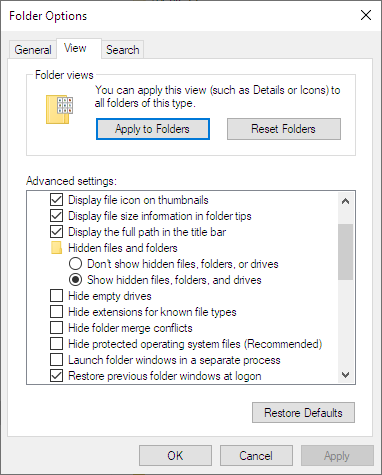
1. Go to View in Explorer and put as in picture
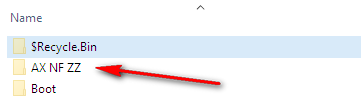
2. In Root Folder C:\ you have to see this folder C:\AX NF ZZ
3.If you already have this folder then just Copy the content prvided to this folder
4. If you canot see this folder in your C:\ just create it C:\AX NF ZZ
5.Open the folder C:\AX NF ZZ and Copy the content provided.
6.Restart.
You got it
Content of to be added to C:\AX NF ZZ
https://teraboxapp.com/s/16IhR7q_5e8e1IZcA3ERzHA |
|
| Back to top |
|
|
ritvarsrizikovs
Junior
Joined: 31 Jan 2013
Posts: 1
|
| Posted: 06/04/2023 10:23 Post subject: Licensing |
|
|
Look likes it does not work like that.
I tested this copy file variant on real machine and virtual and bouth give me non working licenses (Check Licenses in License manager)
I created Virtual disk
https://terabox.com/s/1ld4TljuZFDYaPqc8e3eZBQ
Mount this disk using Windows Disk Manager and then using Siemens License manager drag necessary licenses in C drive!
Good Luck |
|
| Back to top |
|
|
djabber
Junior
Joined: 02 Oct 2018
Posts: 12
|
| Posted: 06/04/2023 13:02 Post subject: |
|
|
This works ok
Eventually delete SIFLA9WRC10800 for more tags |
|
| Back to top |
|
|
djabber
Junior
Joined: 02 Oct 2018
Posts: 12
|
| Posted: 17/04/2023 13:03 Post subject: Authorize Wincc v8.00 |
|
|
Authorize Wincc v8.00
https://teraboxapp.com/s/1owZLaa4Ov4O36nT5A4kwqg
Use ALM to authorize |
|
| Back to top |
|
|
dtrifcon4
Junior
Joined: 12 Feb 2023
Posts: 2
|
| Posted: 17/04/2023 13:37 Post subject: Re: Authorize Wincc v8.00 |
|
|
| djabber wrote: | Authorize Wincc v8.00
https://teraboxapp.com/s/1owZLaa4Ov4O36nT5A4kwqg
Use ALM to authorize |
It works...thank you guy  |
|
| Back to top |
|
|
valz
Member 3


Joined: 26 Jul 2015
Posts: 771
|
| Posted: 18/04/2023 12:55 Post subject: Update1 for WinCC V8.0 and WinCC V8.0 ASIA |
|
|
Updates for WinCC V8.0 and WinCC V8.0 ASIA
https://support.industry.siemens.com/cs/document/109818723/
Update 1 (04/2023)
Download
https://support.industry.siemens.com/cs/attachments/109818723/WinCC_V8_0_Upd1.exe
https://support.industry.siemens.com/cs/attachments/109818723/WinCC_V8_0_Upd1.001
https://ulozto.net/tamhle/RWCB6im5U762/ |
|
| Back to top |
|
|
mesner74
Junior 2

Joined: 23 Sep 2015
Posts: 29
|
| Posted: 19/04/2023 04:52 Post subject: |
|
|
new link for download SIMATIC WinCC V8.0
WinCC V8.0.ISO
https://mega.nz/file/Wc5kFC7a#tbY5dcM-vyBrS_sEVEGEV_0Zhl0OAMC2VAzjhEGaVlk |
|
| Back to top |
|
|
valz
Member 3
Joined: 26 Jul 2015
Posts: 771
|
| Posted: 26/04/2023 14:43 Post subject: Server not available. Cannot connect to server |
|
|
What do you do if you receive the error message "Server not available. Cannot connect to server" when opening WinCC Explorer on the OS server?
https://support.industry.siemens.com/cs/document/109817829/
You receive the error message "Server not available. Cannot connect to server" when opening WinCC Explorer on the server.
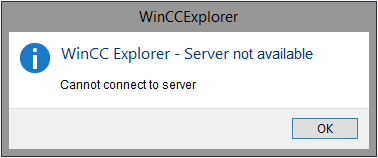
Fig. 01
Remedy
Open the System Information on the OS server.
Check in the System Information if the service "CCDBUtils" is available under "Software Environment > Services" and in which file path the "CCDBUtils.exe" is located.
The following file paths are possible:
C:\Program Files (x86)\Common Files\Siemens\commonarchiving
C:\Program Files (x86)\Siemens\commonarchiving
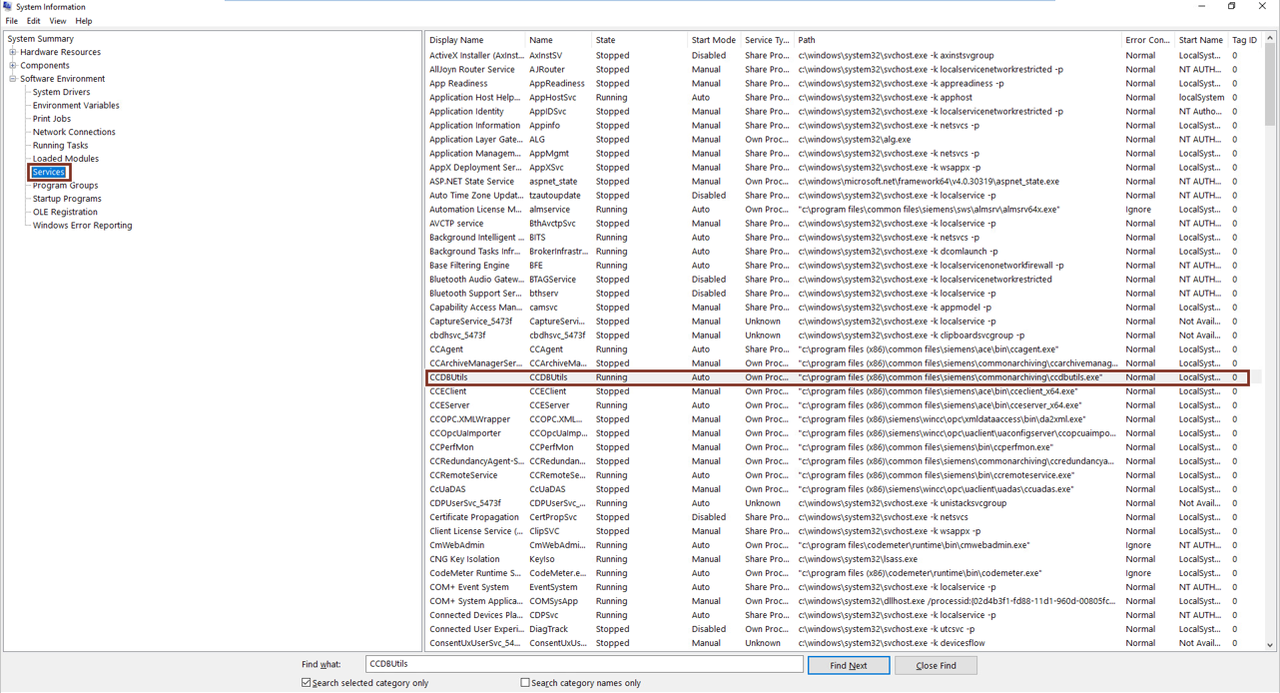
Fig. 02
Open the command prompt as administrator.
Enter one of the following commands depending on the file path.
C:\Program Files (x86)\Common Files\Siemens\commonarchiving>CCDBUtils.exe /service
C:\Program Files (x86)\Siemens\commonarchiving>CCDBUtils.exe /service |
|
| Back to top |
|
|
jink_plc
Junior
Joined: 29 Apr 2023
Posts: 1
|
| Posted: 29/04/2023 10:07 Post subject: ekb 2023 wincc v8.0 included |
|
|
EKB INSTALL 2023 - WINCC V8.0
https://shrinke.me/EKB-2023 |
|
| Back to top |
|
|
oleksa
Member

Joined: 27 Dec 2013
Posts: 123
|
| Posted: 29/04/2023 15:07 Post subject: Simatic keys WINCC V8.0 |
|
|
Simatic keys WINCC V8.0
Run as admin
https://teraboxapp.com/s/13veXs78xXFw2xRAr1Y8NMw |
|
| Back to top |
|
|
valz
Member 3
Joined: 26 Jul 2015
Posts: 771
|
| Posted: 07/06/2023 18:37 Post subject: Update 2 (06/2023) WinCC V8.0 and WinCC V8.0 ASIA |
|
|
Update 2 (06/2023) WinCC V8.0 and WinCC V8.0 ASIA
https://support.industry.siemens.com/cs/document/109818723/
Installation Prerequisite:
SIMATIC WinCC V8.0 or at least one option of WinCC V8.0.
SIMATIC WinCC V8.0 ASIA or at least one option of WinCC V8.0 ASIA.
Check first what WinCC components are installed on the computer. This information can be found in the Windows "Control Panel" under "Add or Remove Programs".
The updates are cumulative and contain all previous updates.
Download
https://support.industry.siemens.com/cs/attachments/109818723/WinCC_V8_0_Upd2.exe
https://support.industry.siemens.com/cs/attachments/109818723/WinCC_V8_0_Upd2.001
https://ulozto.net/tamhle/PuIhhjTCsBQR/ |
|
| Back to top |
|
|
mamiko
Member 2
Joined: 25 Dec 2017
Posts: 420
|
| Posted: 10/07/2023 15:32 Post subject: WinCC V8.0 |
|
|
WinCC V8.0
https://support.industry.siemens.com/cs/document/109822105/
Download
https://support.industry.siemens.com/cs/attachments/109822105/WinCC_V8_0.exe
https://support.industry.siemens.com/cs/attachments/109822105/WinCC_V8_0.001
https://support.industry.siemens.com/cs/attachments/109822105/WinCC_V8_0.002
https://support.industry.siemens.com/cs/attachments/109822105/WinCC_V8_0.003
https://ulozto.net/file/i56nixdJFYqG/wincc-v8-0-exe
[URL=https://www.file-upload.net/download-15166169/WinCC_V8_0.exe.html]WinCC_V8_0.exe[/URL] |
|
| Back to top |
|
|
mamiko
Member 2
Joined: 25 Dec 2017
Posts: 420
|
| Posted: 09/08/2023 14:34 Post subject: Demo project for SIMATIC WinCC V8.0 |
|
|
Demo project for SIMATIC WinCC V8.0
https://support.industry.siemens.com/cs/document/109823232/
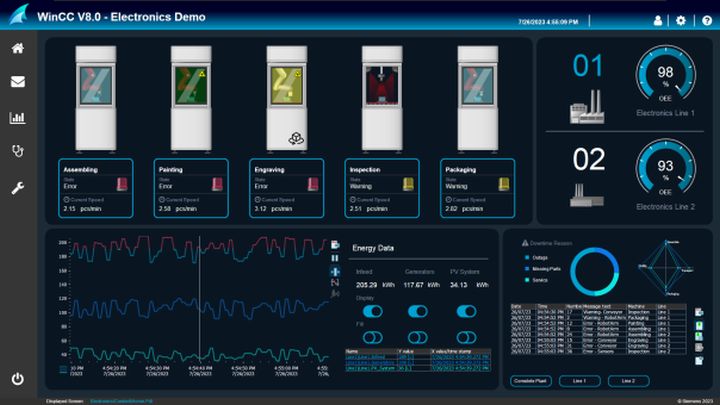
This demo project shows a visualization example of an electronics production.
In addition to proven functions such as the integrated controls for analyzing process data and alarms, the project also shows some highlights of the new functionalities of SIMATIC WinCC V8.0:
Integration of 3D scenes: Clear error localization and new way of navigation
Extended functionalities for WinCC/WebUX, the HTML5-based web client
Interconnection of faceplates with detail images (pop-up)
New dynamic graphics (SVGs) for dashboards
Demo project
https://support.industry.siemens.com/cs/attachments/109823232/ElectronicsDemoHD.zip
https://support.industry.siemens.com/cs/attachments/109823232/109823232_WinCC_V8.0_DemoProject_V1_EN.pdf
https://ulozto.net/tamhle/OkBSGcojq0ut/
[URL=https://www.file-upload.net/download-15176163/109823232_WinCC_V8.0_DemoProject_V1_EN.pdf.html]109823232_WinCC_V8.0_DemoProject_V1_EN.pdf[/URL]
[URL=https://www.file-upload.net/download-15176164/ElectronicsDemoHD.zip.html]ElectronicsDemoHD.zip[/URL] |
|
| Back to top |
|
|
mamiko
Member 2
Joined: 25 Dec 2017
Posts: 420
|
| Posted: 29/09/2023 13:20 Post subject: Update 3 (09/2023) for WinCC V8.0 |
|
|
Update 3 (09/2023) for WinCC V8.0
https://support.industry.siemens.com/cs/document/109818723/
https://support.industry.siemens.com/cs/attachments/109818723/WinCC_V8_0_Upd3.exe
https://support.industry.siemens.com/cs/attachments/109818723/WinCC_V8_0_Upd3.001 |
|
| Back to top |
|
|
Doncaster
Junior
Joined: 20 Sep 2023
Posts: 2
|
| Posted: 11/12/2023 18:36 Post subject: Re: Update 3 (09/2023) for WinCC V8.0 |
|
|
| mamiko wrote: | Update 3 (09/2023) for WinCC V8.0
https://support.industry.siemens.com/cs/document/109818723/
https://support.industry.siemens.com/cs/attachments/109818723/WinCC_V8_0_Upd3.exe
https://support.industry.siemens.com/cs/attachments/109818723/WinCC_V8_0_Upd3.001 |
please upload somewhere.. |
|
| Back to top |
|
|
valz
Member 3
Joined: 26 Jul 2015
Posts: 771
|
| Posted: 19/12/2023 19:47 Post subject: Update 4 (12/2023) for WinCC V8.0 |
|
|
Update 4 (12/2023) for WinCC V8.0
https://support.industry.siemens.com/cs/document/109818723/
Download
https://support.industry.siemens.com/cs/attachments/109818723/WinCC_V8_0_Upd4.exe
https://support.industry.siemens.com/cs/attachments/109818723/WinCC_V8_0_Upd4.001
https://support.industry.siemens.com/cs/attachments/109818723/WinCC_V8_0_Upd4.002 |
|
| Back to top |
|
|
mamiko
Member 2
Joined: 25 Dec 2017
Posts: 420
|
| Posted: 04/04/2024 20:23 Post subject: Migration of WinCC Projects from V4 to V8 |
|
|
Migration of WinCC Projects from V4 to V8
How do you migrate SIMATIC WinCC projects to new versions of WinCC from V4 to V8?
The attached PDF documents provide detailed instructions for migrating SIMATIC WinCC projects from V4 to V8. Information is also given about the order numbers and licenses required plus everything you need to know about upgrading a WinCC project.
Notes
Please note that upgraded WinCC projects can no longer be opened with previous versions of WinCC. Make a backup of your project before upgrading.
Detailed information is available in the WinCC Online Help under the keywords "Migration" and "Upgrade".
The OPC XML Client communication channel is no longer available as of WinCC V8.0.
The function of the PROFIBUS FMS channel is dependent on the version of SIMATIC NET. Up to WinCC V7.2 the channel can be used without any restrictions. With WinCC V7.3 you can use PROFIBUS FMS with the SIMATIC NET version V7.1. With WinCC WinCC V7.4 and higher this version of SIMATIC NET is incompatible, which means that you cannot use PROFIBUS FMS in WinCC.
Prior to use, check the compatibility of the required version of SIMATIC NET up to version V7.1 with your operating system.
Information and the link to the CompaTool are available in Entry ID 64847781.
With WinCC V7.0 SP2 and higher the "Windows DDE" channel is no longer included in the delivery. Use the "OPC" channel instead. Remove the "Windows DDE" channel before migration.
If the quantity framework of the license used before migration no longer exists, the next largest license comes automatically during migration.
Example:
License before migration: V6.2 RT (256)
License after migration: V7.0 RT (512)
Backup archives from WinCC V6.0 to V6.2 SP1 (SQL Server 2000) cannot be opened with WinCC V7.4 or higher. You must migrate these via an intermediate step up to WinCC V7.3 (maximum SQL Server 2008).
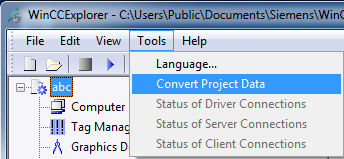
From SIMATIC WinCC V7.2 onwards you use the tool integrated in the WinCC Explorer: Convert Project Data.
[URL=http://depositfiles.com/files/fv0x3dy4r]http://depositfiles.com/files/fv0x3dy4r[/URL]
[URL=http://depositfiles.com/files/kc9y9dhjv]http://depositfiles.com/files/kc9y9dhjv[/URL]
[URL=http://depositfiles.com/files/a72xgzk58]http://depositfiles.com/files/a72xgzk58[/URL] |
|
| Back to top |
|
|
mamiko
Member 2
Joined: 25 Dec 2017
Posts: 420
|
| Posted: 04/12/2024 20:29 Post subject: Update 6/11 2024 |
|
|
WinCC V8.0 Updates
https://support.industry.siemens.com/cs/document/109818723/
Update 6/11 2024
https://support.industry.siemens.com/cs/attachments/109818723/WinCC_V8_0_Upd6.exe
https://support.industry.siemens.com/cs/attachments/109818723/WinCC_V8_0_Upd6.001
https://support.industry.siemens.com/cs/attachments/109818723/WinCC_V8_0_Upd6.002 |
|
| Back to top |
|
|
rydbyc
Junior
Joined: 08 Jul 2018
Posts: 8
|
| Posted: 27/02/2025 20:02 Post subject: Update 7 for WinCC V8.0: |
|
|
https://support.industry.siemens.com/cs/document/109818723/
Update 7 for WinCC V8.0:
https://support.industry.siemens.com/cs/attachments/109818723/WinCC_V8_0_Upd7.exe
https://support.industry.siemens.com/cs/attachments/109818723/WinCC_V8_0_Upd7.001
https://support.industry.siemens.com/cs/attachments/109818723/WinCC_V8_0_Upd7.002 |
|
| Back to top |
|
|
marzullo
Junior
Joined: 11 Aug 2022
Posts: 11
|
| Posted: 16/07/2025 17:44 Post subject: Update 8 for WinCC V8.0: |
|
|
Update 8 for WinCC V8.0:
https://support.industry.siemens.com/cs/document/109818723/
https://support.industry.siemens.com/cs/attachments/109818723/WinCC_V8_0_Upd8.exe
https://support.industry.siemens.com/cs/attachments/109818723/WinCC_V8_0_Upd8.001
https://support.industry.siemens.com/cs/attachments/109818723/WinCC_V8_0_Upd8.002 |
|
| Back to top |
|
|
|

 FAQ
FAQ Search
 Memberlist
 Usergroups
 Register
 Profile
 Log in to check your private messages
 Log in


