 |
plc.myforum.ro
PLCs users www.plc.myforum.ro!
|
| View previous topic :: View next topic |
| Author |
Message |
grig100
Member 3


Joined: 01 Jan 2015
Posts: 752
|
 Posted: 05/09/2018 13:35 Post subject: WinCC RT Advanced TIA V13, 14, 15 Graphic I/O fields layers Posted: 05/09/2018 13:35 Post subject: WinCC RT Advanced TIA V13, 14, 15 Graphic I/O fields layers |
 |
|
In the WinCC Runtime Advanced, why are Controls, Symbolic I/O fields and the Graphic I/O fields in the foreground although they are assigned to a lower layer?
https://support.industry.siemens.com/cs/document/109478146/
Controls, Symbolic I/O fields and Graphic I/O fields are in the foreground in front of basic objects.
The behavior of the screen objects in versions V14, V14 SP1 and V15 is identical to that of version V13.
In a screen, the screen objects are always assigned to one of 32 layers. These show the ranking. Objects in Layer 31 are displayed in the foreground and objects of lower layers are displayed in the background. This applies to basic objects and elements.
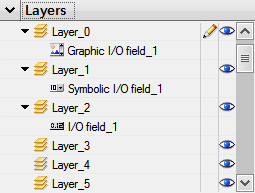
Fig. 01
Commonalities between V12 and V13
Controls are always displayed in the foreground regardless of the assigned layer.

Fig. 02
Therefore, do not use basic objects or elements on the Controls interface.
Differences between V12 and V13
In TIA Portal V12 the I/O fields are always displayed in the background regardless of the assigned layer on the interface of Symbolic I/O fields and Graphic I/O fields.

Fig. 03
In TIA Portal V13 the ranking of the basic objects and elements corresponds to the order of the layers. |
|
| Back to top |
|
 |
|
|
You cannot post new topics in this forum
You cannot reply to topics in this forum
You cannot edit your posts in this forum
You cannot delete your posts in this forum
You cannot vote in polls in this forum
|
Powered by phpBB © 2001, 2005 phpBB Group
Fa-ti si tu propriul forum GRATUIT, pe www.myforum.ro |
 FAQ
FAQ Search
 Memberlist
 Usergroups
 Register
 Profile
 Log in to check your private messages
 Log in


