 |
plc.myforum.ro
PLCs users www.plc.myforum.ro!
|
| View previous topic :: View next topic |
| Author |
Message |
valz
Member 3


Joined: 26 Jul 2015
Posts: 771
|
 Posted: 20/09/2022 16:17 Post subject: WinCC OPC UA server create or delete CA certificates Posted: 20/09/2022 16:17 Post subject: WinCC OPC UA server create or delete CA certificates |
 |
|
How do you create or delete CA certificates of the OPC UA server and client in WinCC?
https://support.industry.siemens.com/cs/document/109765628/
With SIMATIC WinCC V7 you have to delete existing certificates before you can update certificates.
Create new client certificates
Move/backup the previously accepted client certificates. The certificates are available in the OPC installation path:
Version Certificate path
WinCC V7.3 …\Siemens\WinCC\opc\UAWrapper\PKI\CA\private
…\Siemens\WinCC\opc\UAWrapper\PKI\CA\certs
WinCC V7.4
and higher …\Siemens\WinCC\opc\UAClient\PKI\OPCUA\certs
…\Siemens\WinCC\opc\UAClient\PKI\OPCUA\private
Delete the required existing certificate. New certificates are not generated until the previous certificates are deleted.
Execute the Windows command prompt (cmd.exe) as administrator.
Change the directory path in the command prompt to the installation path of the OPC UA application. For example, in the table below (in step 5) for WinCC V7.4, change the directory path as follows:
cd C:\Programs (x86)\Siemens\WinCC\opc\UAClient\UaConfigServer.
Remark
In case of an error in the above path change, put the path in double quotes (""):
cd "C:\Programs (x86)\Siemens\WinCC\opc\UAClient\UaConfigServer".
Execute the following command to create new certificates:
Version Folder path Command
WinCC V7.3 ...\Siemens\WinCC\opc\UAWrapper MakeCert.bat
WinCC V7.4 Importer certificate:
...\Siemens\WinCC\opc\UAClient\UaConfigServer CcUACertGenerator.exe /CreateCertificate
DAS certificate:
…\Siemens\WinCC\opc\UAClient\UaDAS CcUaDAS.exe /CreateCertificate
WinCC V7.4.SP1
and higher Importer certificate:
...\Siemens\WinCC\opc\UAClient\UaConfigServer CCOpcUaImporter.exe /CreateCertificate
DAS certificate:
…\Siemens\WinCC\opc\UAClient\UaDAS CcUaDAS.exe /CreateCertificate
On the partner servers, the new client certificates must be configured as trustworthy again.
Create a new server certificate
Move/backup the previously accepted server certificates. The certificates are available in the OPC installation path:
Version Certificate path
WinCC V7.3/ V7.4 …\Siemens\WinCC\opc\UAServer \PKI\CA\certs
…\Siemens\WinCC\opc\UAServer\PKI\CA\private
WinCC V7.4 SP1
and higher …\Siemens\WinCC\opc\UAServer\PKI\OPCUA\certs
…\Siemens\WinCC\opc\UAServer\PKI\OPCUA\private
Delete the required existing certificate. New certificates are not generated until the previous certificates are deleted.
Execute the Windows command prompt (cmd.exe) as administrator.
Change the directory path in the command prompt to the installation path of the OPC UA application.
For example, in the table below (in step 5) for WinCC V7.4, change the directory path as follows:
cd C:\Programs (x86)\Siemens\WinCC\opc\UAServer..
Remark
In case of an error in the above path change, try putting the path in dublu quotes (""):
cd "C:\Programs (x86)\Siemens\WinCC\opc\UAServer".
Execute the following command to create the certificates, which creates a new PKI folder.
Version Folder path Command
WinCC V7.3/V7.4 ...\Siemens\WinCC\opc\UAServer OPCUAServerWinCC.exe -service
WinCC V7.4 SP1
and higher ...\Siemens\WinCC\opc\UAServer OPCUAServerWinCC.exe /CreateCertificate
On the client systems, the new server certificates must be configured as trustworthy again.
Delete previous certificates
Move/backup the previous certificates. The certificates are available in the following paths:
Client certificates
Version Certificate path
WinCC V7.3 …\Siemens\WinCC\opc\UAWrapper\PKI\CA\certs
…\Siemens\WinCC\opc\UAWrapper\PKI\CA\private
WinCC V7.4
and higher …\Siemens\WinCC\opc\UAClient\PKI\OPCUA\certs
…\Siemens\WinCC\opc\UAClient\PKI\OPCUA\private
Server certificates
Version Certificate path
WinCC V7.3/ V7.4 …\Siemens\WinCC\opc\UAServer \PKI\CA\certs
…\Siemens\WinCC\opc\UAServer\PKI\CA\private
WinCC V7.4.SP1
and higher …\Siemens\WinCC\opc\UAServer\PKI\OPCUA\certs
…\Siemens\WinCC\opc\UAServer\PKI\OPCUA\private
Delete the existing required certificates one by one from the folders specified in the table above.
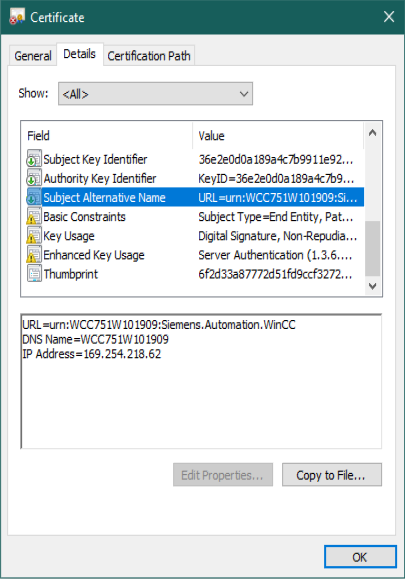
Generate server certificates via IP address
Move/backup the previously accepted server certificates. The certificates are available in the OPC installation path:
Version Certificate path
WinCC V7.5 SP1 + Upd 5 and higher …\Siemens\WinCC\opc\UAServer\PKI\OPCUA\certs
…\Siemens\WinCC\opc\UAServer\PKI\OPCUA\private
Delete the required existing certificate. New certificates are not generated until the previous certificates are deleted.
Open the XML file "C:\Program Files (x86)\Siemens\WinCC\opc\UAServer\OpcUaServerWinCC.xml"
Add the required IP address in the XML file in the item "<IPAddresses>" as item "<IPAddress>" (here: line 196), for example:
<IPAddresses>
<IPAddress>1.2.3.4</IPAddress>
</IPAddresses>
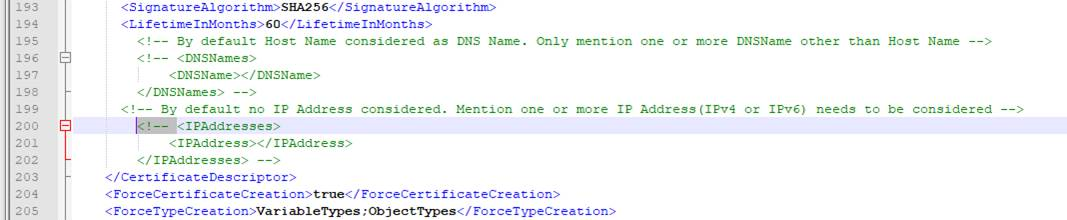
Fig. 1
Remove the opening ("<!--") and closing ("-->") comment markers around the "<IPAddresses>" item (here: line 200 and line 202).
Open the Windows Command Prompt as Administrator.
In the command prompt change to the installation folder of the OPC UA application. (For WinCC V7.5 SP1 Upd 5 this is "cd C:\Program Files (x86)\Siemens\WinCC\opc\UAServer".)
If necessary, put the path in double quotes "".
Execute the following command to produse the certificates, which creates a new PKI folder:
Version WinCC V7.5 SP1 + Upd 5
Directory ...\Siemens\WinCC\opc\UAServer
Command OPCUAServerWinCC.exe /CreateCertificate
On the client systems, the new server certificates must be configured as trustworthy again
 |
|
| Back to top |
|
 |
|
|
You cannot post new topics in this forum
You cannot reply to topics in this forum
You cannot edit your posts in this forum
You cannot delete your posts in this forum
You cannot vote in polls in this forum
|
Powered by phpBB © 2001, 2005 phpBB Group
Fa-ti si tu propriul forum GRATUIT, pe www.myforum.ro |
 FAQ
FAQ Search
 Memberlist
 Usergroups
 Register
 Profile
 Log in to check your private messages
 Log in


