 |
plc.myforum.ro
PLCs users www.plc.myforum.ro!
|
| View previous topic :: View next topic |
| Author |
Message |
valz
Member 3


Joined: 26 Jul 2015
Posts: 771
|
 Posted: 10/05/2022 12:53 Post subject: Win-IMS LOHER Dynavert and SINAMICS G180 com software Posted: 10/05/2022 12:53 Post subject: Win-IMS LOHER Dynavert and SINAMICS G180 com software |
 |
|
Converter software LOHER Dynavert and SINAMICS G180 - communication software Win-IMS (Inverter Management Software) for the connection between a PC and the Converter
https://support.industry.siemens.com/cs/document/36640055/
The clearly structured PC operating program Win-IMS for communication between a PC and converter via USB adapter RS232, RS485, PROFIBUS DP, PROFINET IO or modem includes the following functions:
Prompted commissioning and operator control
Online/offline parameterization
Oscilloscope function
You can toggle between parameter and terminal strip view at any time
Function and message generators
Can be selected from various operating interface languages
Extensive conversion and comparison functions
Comments can be entered for all function terminals and messages
Upread and download
RS 485 bus system with up to 253 converters connected to a PC
ASCII import of all parameters for automatic generation of parameter sets
Expert system capable of learning
System requirements:
Operating system: Windows 7 or Windows 10, either 32 bit or 64 bit
CPU/clock frequency/RAM: See the minimum requirements for the PC operating system
Screen resolution: Optimized for 1152x864 pixels
Font size: Optimized for 96 dpi
PROFIBUS: Softing PROFIBUS driver 5.46.16 (optional, included in the setup)
PROFINET: HMS IP Config Tool 3.2.1.1 (optional, included in the setup)
https://support.industry.siemens.com/cs/attachments/36640055/setup_IMS_11C0155-AM36.exe
https://ulozto.net/file/QpyPE4zlkL4r/setup-ims-11c0155-am36-exe
https://anonfiles.com/nem9U6ecy6/setup_IMS_11C0155-AM36_exe
[URL=https://veryfiles.com/2einp99kju6k]setup_IMS_11C0155-AM36.exe - 36.5 MB[/URL] |
|
| Back to top |
|
 |
valz
Member 3
Joined: 26 Jul 2015
Posts: 771
|
| Posted: 10/05/2022 12:54 Post subject: SINAMICS G180: Convert a parameter file |
|
|
SINAMICS G180: Convert a parameter file
https://support.industry.siemens.com/cs/document/109810682/
These instructions describe how to transfer a parameter file from a SINAMICS G180 converter to one with a different version or with a different power class.
Read these instructions before you handle the drive and then follow the instructions.
1. Open the old parameter file with the Inverter Management Software (IMS),
https://support.industry.siemens.com/cs/document/36640055/
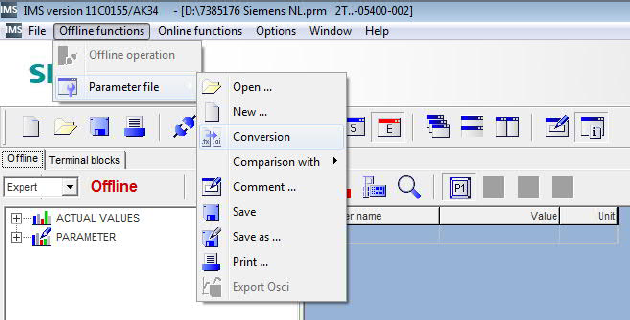
2. Click on "Offline functions”, “Parameter file” and choose “Conversion”.
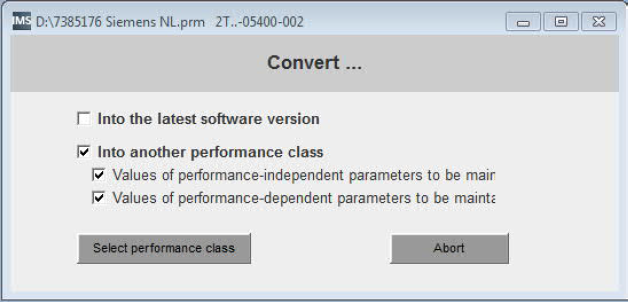
3. Choose following option and press the button “Select performance class”.
4. Choose the converter series (a) which you will use in the future (e.g. SINAMICS G180) and the correct converter type (b).
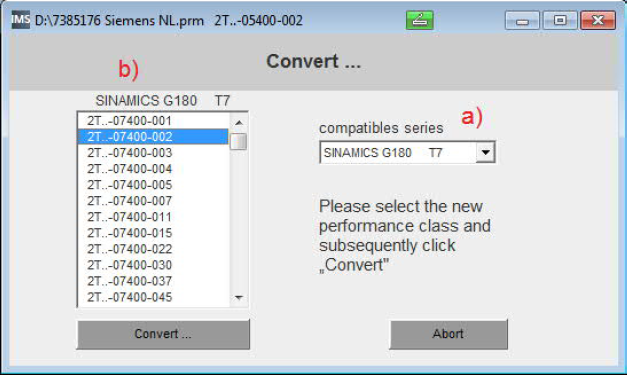
5. Press the "Convert …" button and save the parameter file afterwards.
6. Now it is possible to use the old parameters for the new converter type. |
|
| Back to top |
|
|
|
|
You cannot post new topics in this forum
You cannot reply to topics in this forum
You cannot edit your posts in this forum
You cannot delete your posts in this forum
You cannot vote in polls in this forum
|
Powered by phpBB © 2001, 2005 phpBB Group
Fa-ti si tu propriul forum GRATUIT, pe www.myforum.ro |
 FAQ
FAQ Search
 Memberlist
 Usergroups
 Register
 Profile
 Log in to check your private messages
 Log in


