 |
plc.myforum.ro
PLCs users www.plc.myforum.ro!
|
| View previous topic :: View next topic |
| Author |
Message |
mamiko
Member 2


Joined: 25 Dec 2017
Posts: 420
|
 Posted: 24/04/2023 19:35 Post subject: Which modules support the "S7 Routing" function in Posted: 24/04/2023 19:35 Post subject: Which modules support the "S7 Routing" function in |
 |
|
Which modules support the "S7 Routing" function in S7 subnets?
https://support.industry.siemens.com/cs/document/584459/
The following information supports you in your configuration if you need modules for S7 Routing.
S7 Routing in S7 subnets is possible via Ethernet, PROFIBUS and MPI subnets. With the PG/PC you can reach devices over and beyond subnet limits.
Examples for S7 routing:
Download user programs
Download hardware configurations
Run test and diagnostic functions
Examples for S7 Routing
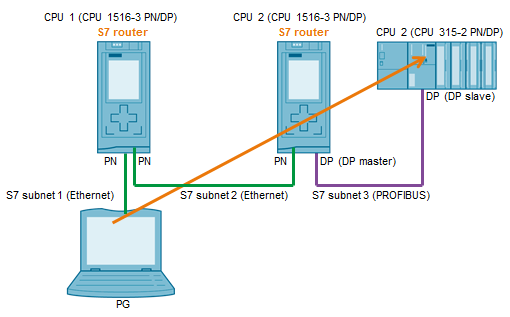
The following figure shows the access from a PG to PROFIBUS via Ethernet.
Requirements for S7 Routing
The CPUs, CMs and CPs support the "S7 Routing" function.
All the devices using the gateway must receive information about which subnets can be reached via which routes (= routing information). The devices receive the routing information through downloading the hardware configuration in the CPUs.
In the case of a topology with several subnets you must keep to the following order when downloading: First you download the hardware configuration into the CPUs that are connected to the same subnet as the PG/PC; then you download the CPUs of the other subnets one after the other starting with the nearest subnet through to the most distant.
The PG/PC with which you wish to set up a connection via a gateway is assigned to the subnet to which it is physically connected.
For PROFIBUS subnets: The CPU must either be configured as a DP master or if it is configured as DP slave, the check box "Test, commissioning and routing" must be checked in the Properties of the DP interface of the DP slave.
For S7-1500 CPUs: At the second interface you must configure a PN/IE subnet so that the CPU recognizes that "S7 Routing" is to be executed.
SIMATIC S7 CPUs
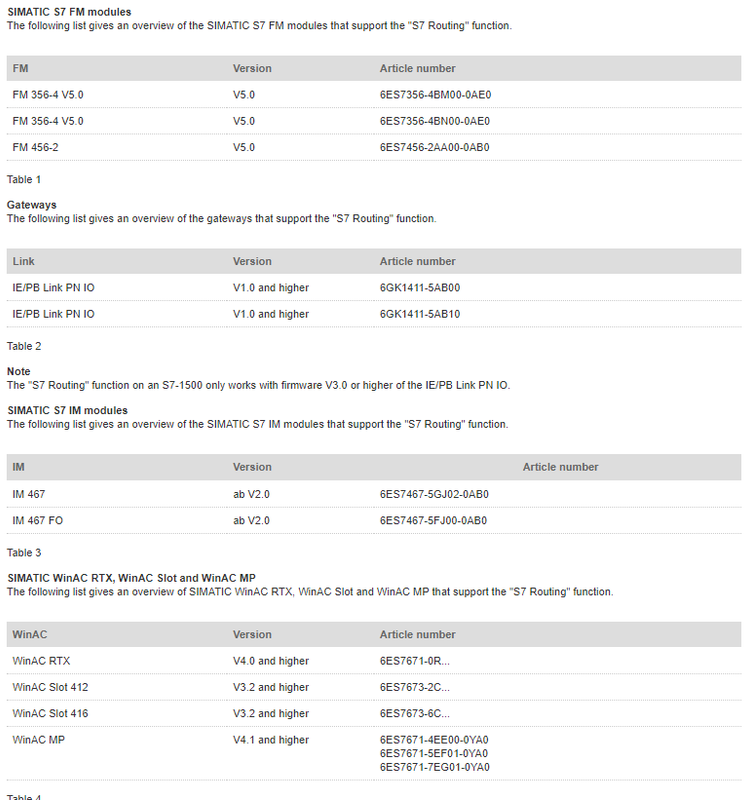
The following list gives an overview of the SIMATIC S7 CPUs that support the "S7 Routing" function.
https://support.industry.siemens.com/cs/attachments/584459/584459_overview_cpus_en.pdf
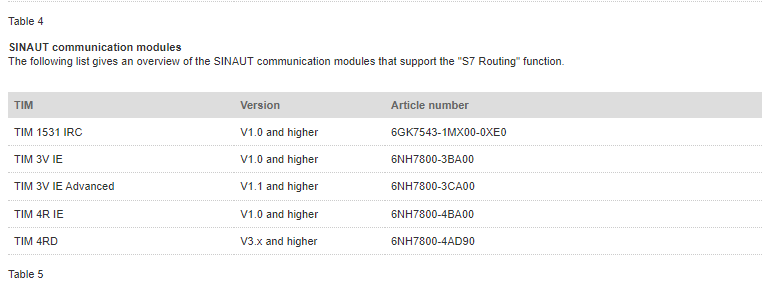
Communication processors (CPs)
https://support.industry.siemens.com/cs/attachments/584459/584459_overview_cps_en.pdf
Note
If you send data from an Engineering Station that is connected to PROFINET to field devices via PROFIBUS, then you use the "Data record routing" function. Further information about the "Data record routing" function is available in https://support.industry.siemens.com/cs/document/7000978/what-is-the-difference-between-normal-routing-and-data-record-routing
The target station does not have to support the "S7 Routing" function. The Basic Panels are the exceptions here. The Basic Panels cannot be a routing destination.
Further Information
Entry 109474569 gives instructions for making an S7 station configured in STEP 7 V5.x routing-compatible for an S7 station configured in the TIA Portal.
https://support.industry.siemens.com/cs/document/109474569/how-do-you-enable-cross-project-s7-routing-in-the-tia-portal-and-in-step-7-v5-x
https://support.industry.siemens.com/cs/document/2383206/what-requirements-must-be-fulfilled-and-what-should-i-watch-out-for-when-executing-routing |
|
| Back to top |
|
 |
mamiko
Member 2
Joined: 25 Dec 2017
Posts: 420
|
| Posted: 24/04/2023 19:41 Post subject: SIMATIC S7 Routing |
|
|
What requirements must be fulfilled and what should I watch out for when executing Routing?
https://support.industry.siemens.com/cs/document/2383206/
Description:
The following requirements must be fulfilled for the "Routing" function with SIMATIC S7 modules via MPI, PROFIBUS and Industrial Ethernet connections:
Software requirements:
MPI and PROFIBUS connections:
At least STEP 7 V5.0+SP1, however a current version of STEP 7 is recommended.
For the Softnet PROFIBUS cards (CP 5411 (ISA), CP 5511 (PCMCIA), CP 5611 (PCI), CP 5611 (on board)) you don't need any other drivers, because they are provided by STEP 7.
For the Hardnet PROFIBUS cards (CP 5412(A2) (ISA), CP 5613/5614 (PCI)) you need the associated drivers from the SIMATIC NET CD.
Industrial Ethernet connections:
At least STEP 7 V5.0+SP1, however a current version of STEP 7 is recommended.
With CP1612/ CP1512 ,CP1515 and commercially available network cards you need a current release of the SIMATIC NET Softnet IE PG driver (at least Softnet IE PG V3.1).
With CP1613 and CP1413 you need the products SIMATIC NET IE PG 1613 and SIMATIC NET IE PG1413 respectively.
For implementation of a TS Adapter:
TeleService S7 V5.0 or higher.
Hardware requirements:
You need routing-compatible modules. Refer to Entry ID 584459 for routing-compatible modules, or take them directly from the hardware catalog of the STEP 7 Hardware Configuration.
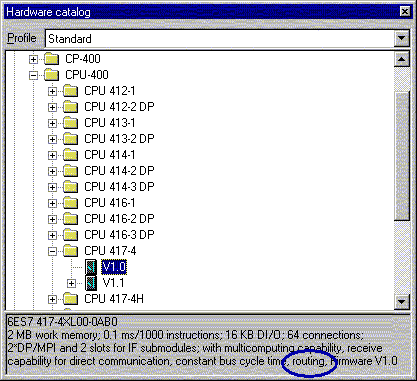
Fig. 01
You still need one of the Online CPs mentioned under "Software requirements" or the TS Adapter V5.0 or a PC Adapter V5.0.
Note:
The last module that is to be addressed via the routing function does not have to be routing-compatible.
If you wish to route via an S7 CPU which is configured as a PROFIBUS DP slave, you have to activate the "Test, Commissioning, Routing" option in the HWCONFIG > DP interface properties > "Operating Mode" tab. You can also find this information in the STEP7 Online Help ("Operating Mode" tab).
Configuration procedure:
You must configure all the stations that lie between the Start device and the target device in one STEP 7 project.
No.1 Procedure
Insert a station of the type "PG/PC".
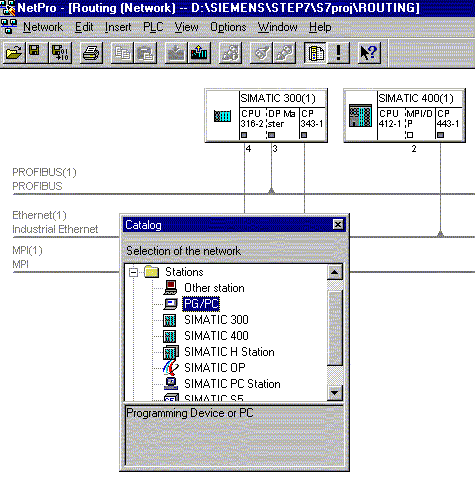
Fig. 02
2 Configure all the physically available network connections (MPI, PROFIBUS, Industrial Ethernet) in NETPRO or in the HW Config. This also applies for networks that are not directly in the path, but are connected to the route stations. This does not mean that you must use all the interfaces available. You must only configure the communication connections that are also physically available.
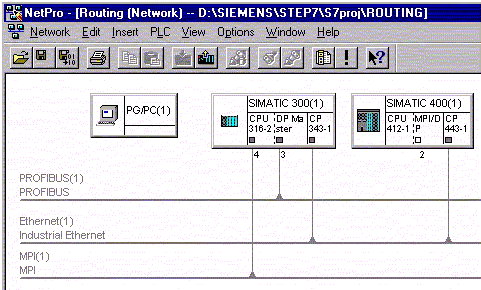
Fig. 03
3 Open the Properties of the "PG/PC station" by double-clicking the PG/PC object.
4 Switch to the "Interfaces" tab and lucrate a new node ("New" button). From the list that is displayed select the type of your node and acknowledge with "OK".
5 From the next window you select the network that is physically connected to your PG/PC. If you have not yet configured a network, then you must do it now.
Warning:
The "PG/PC station" must be given the same address as set in the program "Set PG/PC interface" (also applies for CP 1413 and CP 1613).
6 Switch to the "Assignment" tab and assign the Routing entry point to your PG/PC.
First you select the node in the "Configured Interfaces:" pane and then in the second pane you specify the CP or the PC Adapter with the relevant network identification via which you want to go online.
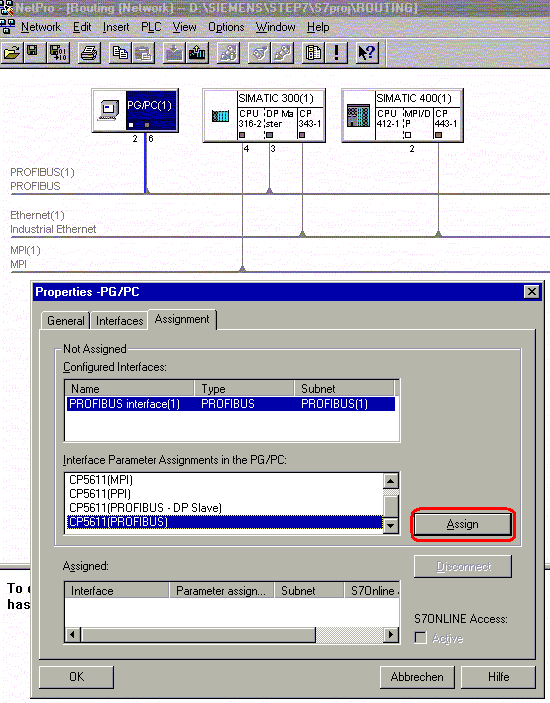
Fig. 04
7 Save and compile your network configuration.
8 Transfer your configuration into the CPU.
9 Create an online connection via the offline project.
This cannot be done via "Accessible Nodes".
Sample configurations:
Routing with modem and TS Adapter
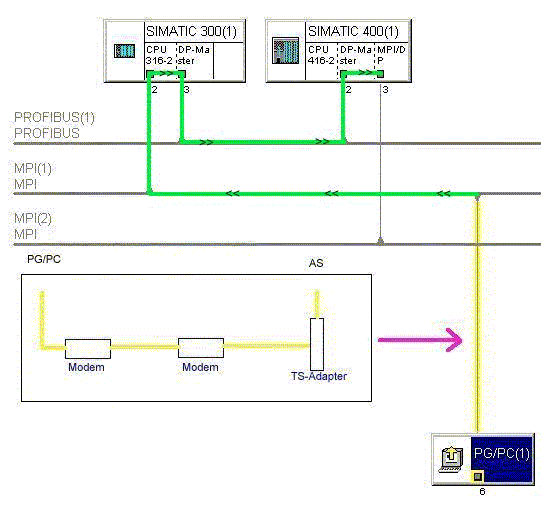
Fig. 05
Routing with ISDN Router:
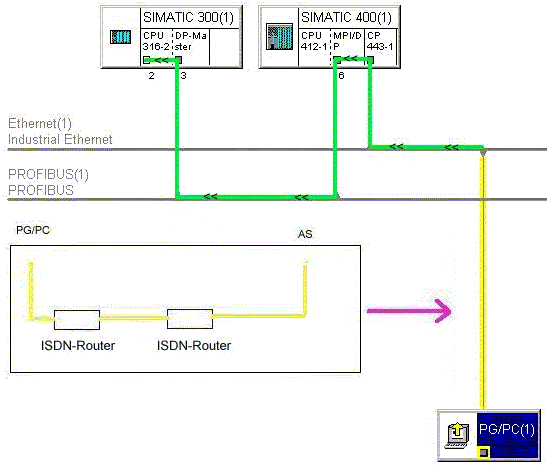
Fig. 06 |
|
| Back to top |
|
|
mamiko
Member 2
Joined: 25 Dec 2017
Posts: 420
|
| Posted: 24/04/2023 19:50 Post subject: enable cross-project S7 Routing in the TIA Portal STEP 7 V5 |
|
|
How do you enable cross-project S7 Routing in the TIA Portal and in STEP 7 V5.x?
https://support.industry.siemens.com/cs/document/109474569/
The instructions below how to make an S7 station configured in STEP 7 V5.x routing-compatible for an S7 station configured in the TIA Portal.
The "S7 Routing" function permits you to access lower-level subnets from the PG/PC via a SIMATIC station. In this way there can also be routing from Industrial Ethernet to PROFIBUS. This is not IP routing for all services, but S7 routing for S7 connections only. This also includes PG connections.
The S7 routing is configured in the TIA Portal by default as soon as different subnets are configured. In STEP 7 V5.x, however, an additional configuration must be made in NetPro as described in this entry
https://support.industry.siemens.com/cs/document/2383206/what-requirements-must-be-fulfilled-and-what-should-i-watch-out-for-when-executing-routing
Instructions
The instructions below show how to make an S7 station configured in STEP 7 V5.x routing-compatible for an S7 station configured in the TIA Portal.
Steps for STEP 7 V5.x
Create a SIMATIC S7 station in STEP 7 V5.x, for example a SIMATIC 300 station with CPU 315-2 PN/DP, as a proxy for the controller configured in the TIA Portal, S7-1500 CPU, for instance.
Set the interface of the CPU 315-2 PN/DP to exactly the IP address and PROFIBUS address which you configured in the TIA Portal for the S7-1500 CPU.
In NetPro you configure the S7 Routing as in Entry 2383206.
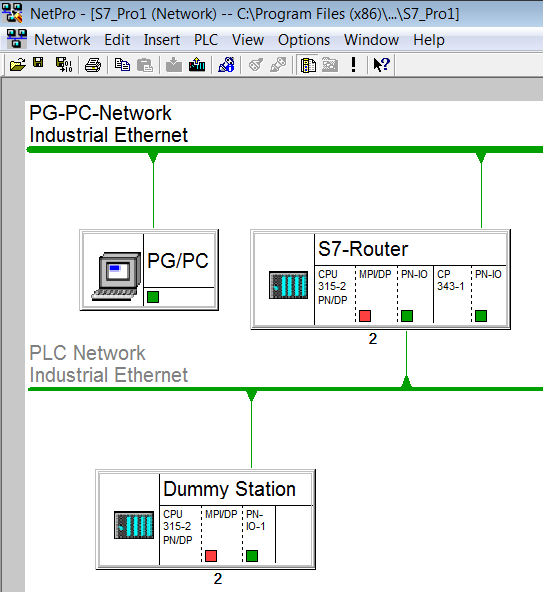
Fig. 1
Double-click the Industrial Ethernet network "PG-PC Network", which connects the PG/PC with the controller that is already routing-compatible, in order to open the Properties dialog.
Note the S7 subnet ID
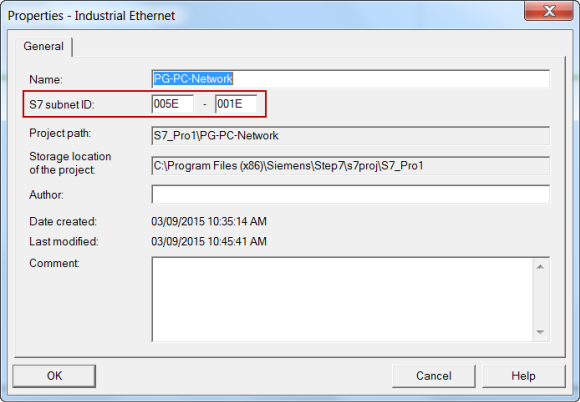
Fig. 2
Likewise note the S7 subnet ID of the Industrial Ethernet network "PLC Network".
Download the configuration of the S7 Routing station from NetPro.
Steps for the TIA Portal
In the TIA Portal you create a SIMATIC S7 station with the same hardware configuration as the S7 Routing station. It does not matter whether the modules match the existing configuration in article number and firmware. However, all the modules (CPU und CPs) associated with the S7 Routing must be slotted in the right slots and must have the same IP addresses and PROFIBUS addresses as in the configuration in STEP 7 V5.x.
Mark the Industrial Ethernet network "PG-PC-Network" that connects the PG/PC with the S7 Routing station. The properties of the network are displayed in the inspector window.
Enter the S7 subnet ID which is already configured in STEP 7 V5.x.
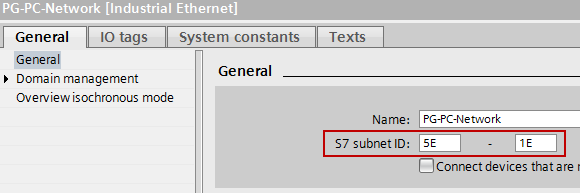
Fig. 4
Likewise take the S7 subnet ID for the Industrial Ethernet network "PLC Network" from STEP 7 V5.x.
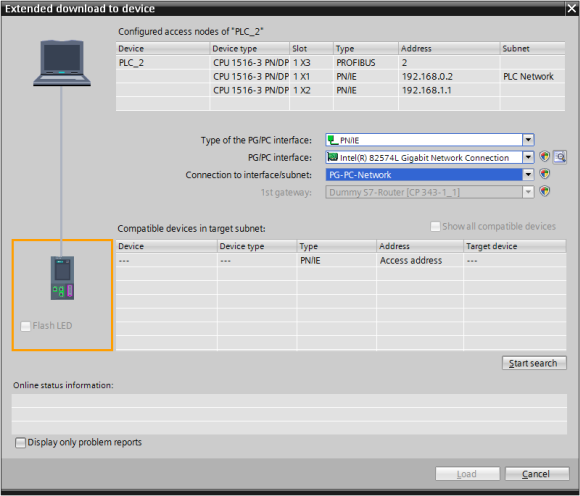
Download the configuration of the target system, S7-1500 CPU, for example, from the TIA Portal. To download from the TIA Portal via S7 Routing, in the "Extended download" dialog you specify that you are connected to the higher-level network and are using the S7 Routing station gateway.
 |
|
| Back to top |
|
|
|
|
You cannot post new topics in this forum
You cannot reply to topics in this forum
You cannot edit your posts in this forum
You cannot delete your posts in this forum
You cannot vote in polls in this forum
|
Powered by phpBB © 2001, 2005 phpBB Group
Fa-ti si tu propriul forum GRATUIT, pe www.myforum.ro |
 FAQ
FAQ Search
 Memberlist
 Usergroups
 Register
 Profile
 Log in to check your private messages
 Log in


