 |
plc.myforum.ro
PLCs users www.plc.myforum.ro!
|
| View previous topic :: View next topic |
| Author |
Message |
valz
Member 3


Joined: 26 Jul 2015
Posts: 771
|
 Posted: 26/04/2023 14:49 Post subject: VPN connection on a SCALANCE M800 / S615 via TCP Posted: 26/04/2023 14:49 Post subject: VPN connection on a SCALANCE M800 / S615 via TCP |
 |
|
How to enable a VPN connection on a SCALANCE M800 / S615 via TCP event?
https://support.industry.siemens.com/cs/document/109818271/
You can make sure that remote access to your plant or the individual plant components is not permanent by making the switching automatic. You can achieve this using a TCP event, for example. As output source for the TCP event you can use any device that is able to send a variable TCP packet to your security appliance, for example a PC, HMI or CPU.
Requirements
The firmware version of the security appliance must be V7.2 or higher
An established VPN connection
How to establish a VPN connection is described in
https://support.industry.siemens.com/cs/attachments/26662448/26662448_Remote_Networks_Overview_DOKU_V4_1_en.pdf
https://support.industry.siemens.com/cs/attachments/26662448/Archiv.zip
https://support.industry.siemens.com/cs/document/109476153/remote-access-to-simatic-hmi-operator-panels
Procedure
General Configuration
Enter the IP address of your device in the browser to open the configuration settings.
Enable the TCP event under the menu item "System > TCP Event".
Assign a user name and password.
Specify the port number. This is specified as the destination port when the TCP connection is established.
Select "VPN" as the event.
Confirm your configuration with "Set Values".
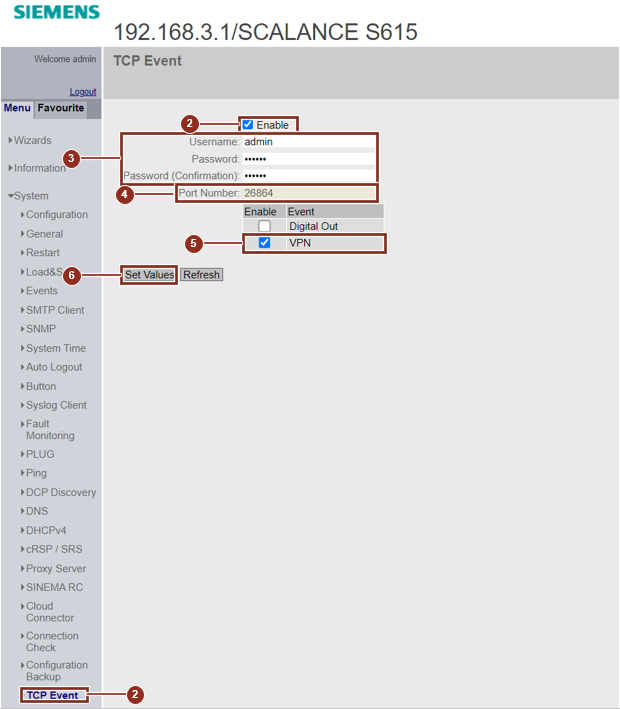
Fig. 01
Configuration for SINEMA RC
Disable the option "Enable SINEMA RC".
Under the menu item "System > SINEMA RC" select the option "TCP Event" as "Type of connection".
Confirm your configuration with "Set Values".
Enable the option "Enable SINEMA RC".
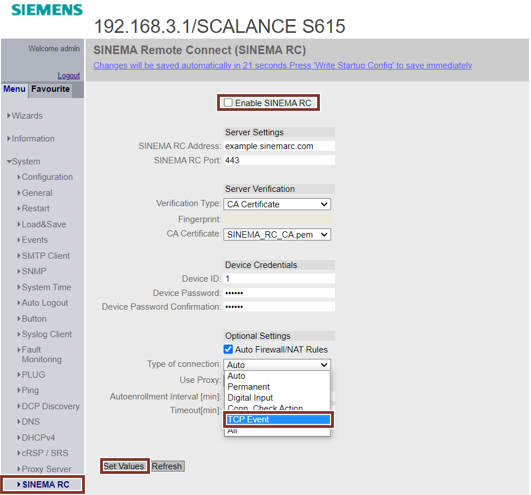
Fig. 02
Note
Nevertheless, the connection for the configuration change takes place immediately. Only the secured VPN connection is enabled and disabled via TCP event.
Configuration for IPSec
Navigate to the "Connections" tab under the menu item "Security > IPSec VPN".
For the "Operation" setting, select the "start on TCP" option.
Confirm your configuration with "Set Values".
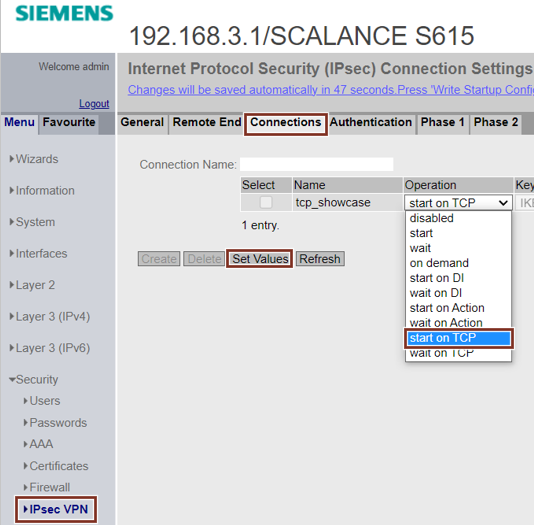
Fig. 03
Configuration for OpenVPN
Proceed in the same way as described for IPSec. The setting is available under "Security > OpenVPN".
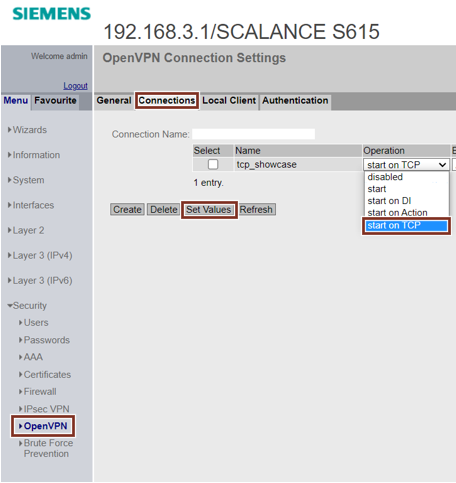
Fig. 04
Note
This option cannot yet be executed for OpenVPN with firmware V7.2, the function will be delivered with the new version.
Structure of the TCP packet
To use the TCP event, you must establish a TCP connection with the IP address of the device and the configured destination port.
The TCP packet is bound to a fixed syntax with the following structure:
“Username”#”Password”#”Command Code”#”VPN Type”;”Activate/Deactivate”; “Connection”
Parameter Value range
Username Pre-configured user name
Password Pre-configured password
Command Code Must be 108 for the VPN connection
VPN Type 1 (IPSec), 2 (OpenVPN), 3 (SINEMA RC)
Activate/Deactivate 1 (Activate), 2 (Deactivate)
Connection Connection Name, * (All Connections)
Example
Username: admin
Password: password
Command Code: 108
VPN Type: OpenVPN
Activate/Deactivate: Activate
Connection: All Connections
TCP Packet: admin#password#108#2;1;*
Note
There is no response from the device via the TCP connection.
Further Information
https://support.industry.siemens.com/cs/document/109815243/wlan-roaming-with-scalance-wum-via-tcp
https://support.industry.siemens.com/cs/attachments/109815243/109815243_WLAN_Roaming_V10_en.pdf
https://support.industry.siemens.com/cs/attachments/109815243/ScalanceW_TriggeredRoaming.zip |
|
| Back to top |
|
 |
|
|
You cannot post new topics in this forum
You cannot reply to topics in this forum
You cannot edit your posts in this forum
You cannot delete your posts in this forum
You cannot vote in polls in this forum
|
Powered by phpBB © 2001, 2005 phpBB Group
Fa-ti si tu propriul forum GRATUIT, pe www.myforum.ro |
 FAQ
FAQ Search
 Memberlist
 Usergroups
 Register
 Profile
 Log in to check your private messages
 Log in


