| View previous topic :: View next topic |
| Author |
Message |
akbar_torkashwand
Member

Joined: 09 Nov 2018
Posts: 228
|
 Posted: 11/01/2019 11:47 Post subject: upload program from TP35ET SUETRON HMI Posted: 11/01/2019 11:47 Post subject: upload program from TP35ET SUETRON HMI |
 |
|
I want to upload program from TP35ET SUETRON HMI
I have TSWin 4.4 software.
can I upload program from HMI?
and which cable I need to upload? |
|
| Back to top |
|
 |
jiurfa
Junior

Joined: 06 Jan 2019
Posts: 2
|
| Posted: 11/01/2019 19:37 Post subject: |
|
|
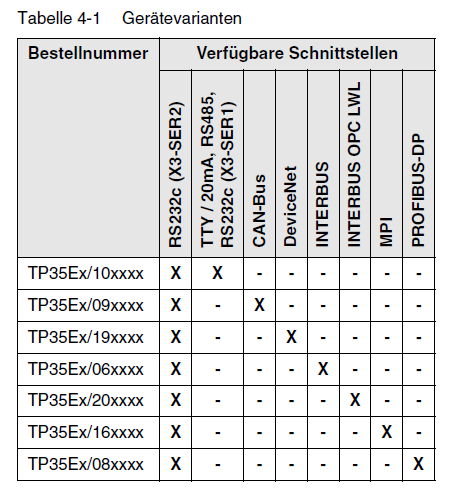
https://anonfile.com/85m4s3q9b2/tesimod_tp35et_pdf |
|
| Back to top |
|
|
akbar_torkashwand
Member
Joined: 09 Nov 2018
Posts: 228
|
| Posted: 14/01/2019 10:34 Post subject: |
|
|
Can I use usb to serial converter to upload from this HMI?
I have Windows XP virtual.Is't suitable to upload from HMI? |
|
| Back to top |
|
|
duduq
Junior
Joined: 04 Jan 2018
Posts: 4
|
| Posted: 14/01/2019 15:38 Post subject: |
|
|
| Try but if not work use a standard RS232c cable.. |
|
| Back to top |
|
|
akbar_torkashwand
Member
Joined: 09 Nov 2018
Posts: 228
|
| Posted: 14/01/2019 16:32 Post subject: |
|
|
I tried with USB to serial cable in Windows virtual XP .It's not work.
How can I see parameter of communication port of my hmi?
or how can I go SETUP of my hmi?[/img] |
|
| Back to top |
|
|
duduq
Junior
Joined: 04 Jan 2018
Posts: 4
|
| Posted: 14/01/2019 17:46 Post subject: |
|
|
Loading Procedure on Windows CE Operating System
During the startup phase the operating device makes it possible to modify the configuration with the cursor keys and the enter key.
The operating device has 3 operating modes:
– Natural (no key is pressed)
– Setup Main (Key Enter was pressed)
– Administration (Cursor key followed by Enter key was pressed) |
|
| Back to top |
|
|
akbar_torkashwand
Member
Joined: 09 Nov 2018
Posts: 228
|
| Posted: 15/01/2019 12:32 Post subject: |
|
|
My HMI is TP35ET.I don't find Cursor key and Enter key.
where are these keys? |
|
| Back to top |
|
|
duduq
Junior
Joined: 04 Jan 2018
Posts: 4
|
| Posted: 18/01/2019 08:49 Post subject: |
|
|
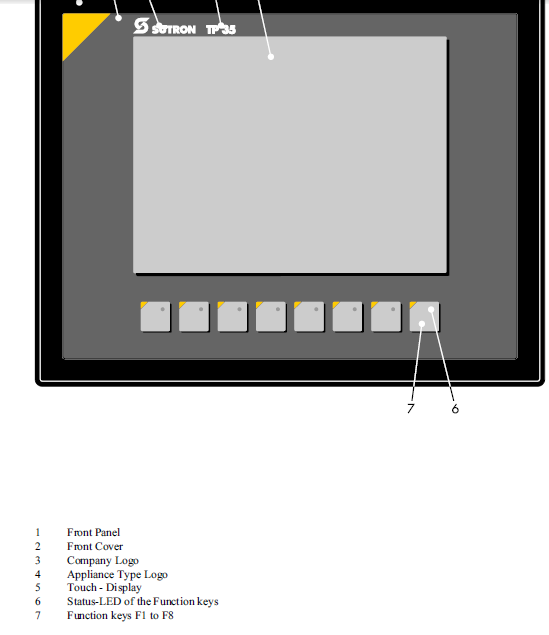 |
|
| Back to top |
|
|
akbar_torkashwand
Member
Joined: 09 Nov 2018
Posts: 228
|
| Posted: 18/01/2019 11:14 Post subject: |
|
|
Thanks so much.
I think these keys are F1 to F8 .I want to go to setup of my HMI and see setting of com port.
you said me I can go to set up with this Procedure
Administration (Cursor key followed by Enter key was pressed)
now I cann't find Cursor key and Enter key. |
|
| Back to top |
|
|
duduq
Junior
Joined: 04 Jan 2018
Posts: 4
|
| Posted: 19/01/2019 00:13 Post subject: |
|
|
The key functions can be freely assigned to a softkey functionality, either as direct access
keys for menu control or to activate a function in the controller.
use switch for download activation
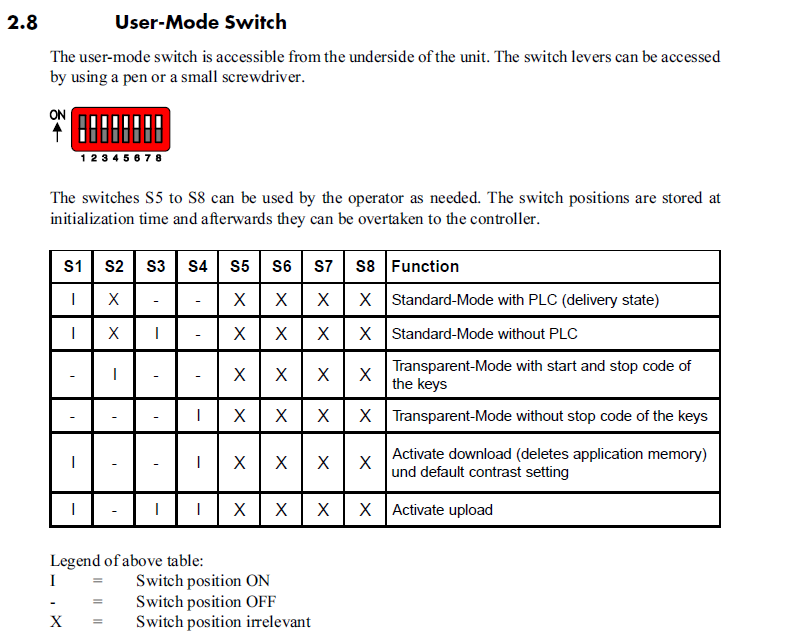 |
|
| Back to top |
|
|
akbar_torkashwand
Member
Joined: 09 Nov 2018
Posts: 228
|
| Posted: 21/01/2019 08:38 Post subject: |
|
|
Thanks so much. I did this setting. But I couldn't connect to HMI.
In my screen HMI appear upload message.
I need setting serial port in my HMI.
baud rate?
parity?
stop bite?
How can I find it?
[/img] |
|
| Back to top |
|
|
jiurfa
Junior
Joined: 06 Jan 2019
Posts: 2
|
| Posted: 22/01/2019 18:49 Post subject: |
|
|
not working on VM.
Use XP |
|
| Back to top |
|
|
akbar_torkashwand
Member
Joined: 09 Nov 2018
Posts: 228
|
| Posted: 25/01/2019 18:44 Post subject: |
|
|
I used real windows XP and real serial port.
I used serial cable that explain in manual of HMI
PC HMI
2--------2
3--------3
5---------7
7--------5
8--------4
4-1-6 short circuit in PC side
I adjust dip switch to upload mode.after that "upload" massage appeared in HMI screen.
but I couldn't upload from HMI
what should I do? |
|
| Back to top |
|
|
brefyk
Junior
Joined: 26 Jul 2018
Posts: 3
|
| Posted: 08/04/2020 17:45 Post subject: |
|
|
look into
http://www.suetron.de/manuals.103.en.html
User Manual Programming of TesiMod Operating Terminals
Valid for: TSwin 2.35 and up
http://www.suetron.de/doc/80860026_30011QK0.pdf
http://plc.myforum.ro/3-vt2448.html |
|
| Back to top |
|
|
|

 FAQ
FAQ Search
 Memberlist
 Usergroups
 Register
 Profile
 Log in to check your private messages
 Log in


