| View previous topic :: View next topic |
| Author |
Message |
mojo
Senior

Joined: 01 Oct 2011
Posts: 2404
|
 Posted: 24/12/2011 22:40 Post subject: Unpassword Twido Posted: 24/12/2011 22:40 Post subject: Unpassword Twido |
 |
|
In Twido password allowed the digits 0 - 9 and letters A-Z of length 8.
Password 00000000 As the project is: 132135121116127131127118.
Further Mathematics.
149163138145148155128121 - 132135121116127131127118 = 17028017029021024001003
The numbers in groups of three divide.
If the front after the first digit immediately to zero then you need to add a zero.
Highlighted in the second example in large print.
Sample:
Password: Alameh13
<Password>149163138145148155128121</Password>
A___ l ___a__m__e__h___1___3
170 280 170 290 210 240 010 030
Password: 1qwerty5
<Password>133168160137161167168123</Password>
1___q___w___e__r___t___y__5
010 330 390 210 340 360 410 05 |
|
| Back to top |
|
 |
tintin2005
Junior

Joined: 06 Apr 2012
Posts: 3
|
| Posted: 23/01/2014 22:35 Post subject: |
|
|
hi man!
is there any solution for active protection bit?
i can read the24 256 eeprom content and i can see the password and if the protection bit active or not.
if the protection bit active i can upload nothing.
if i edit the protection bit from 01 to 00 is necessary to do some math "checksum calculation" and i don´t know how to do it.
i will ppost some print screen of dumps i made and comparison between them.
the rose background coloured zones are the only changes when changing the security settings.
[URL=http://s239.photobucket.com/user/tintin2005tintin2005/media/uploadprotect_1.jpg.html]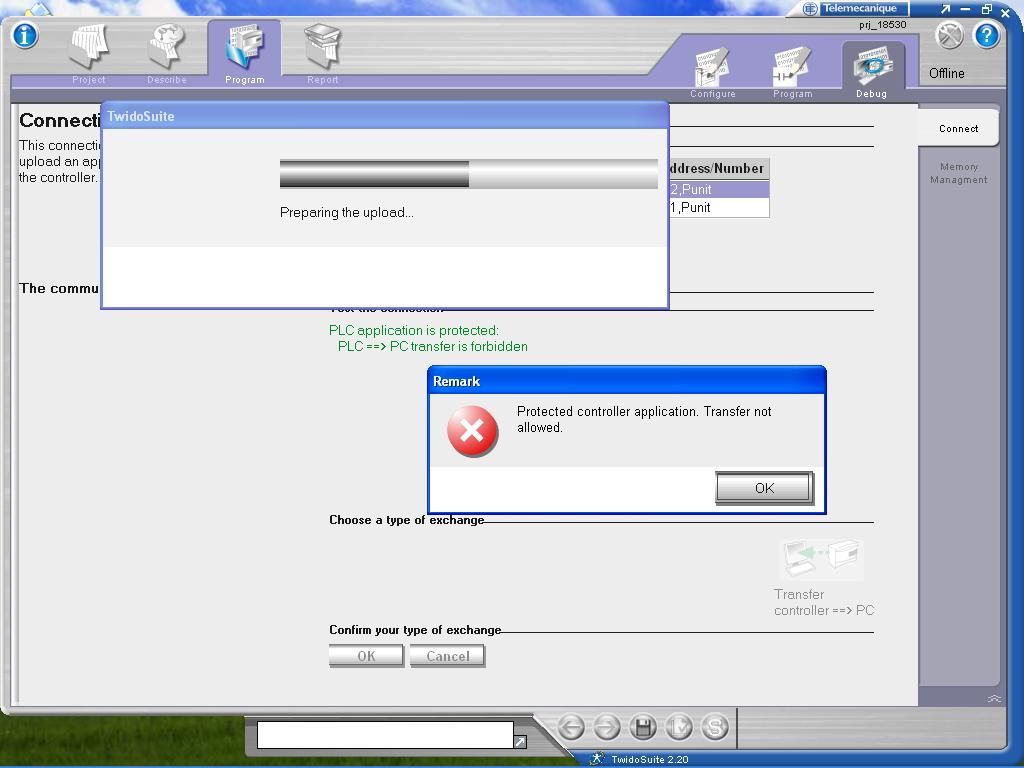 [/URL] [/URL]
[URL=http://s239.photobucket.com/user/tintin2005tintin2005/media/compare_1.jpg.html]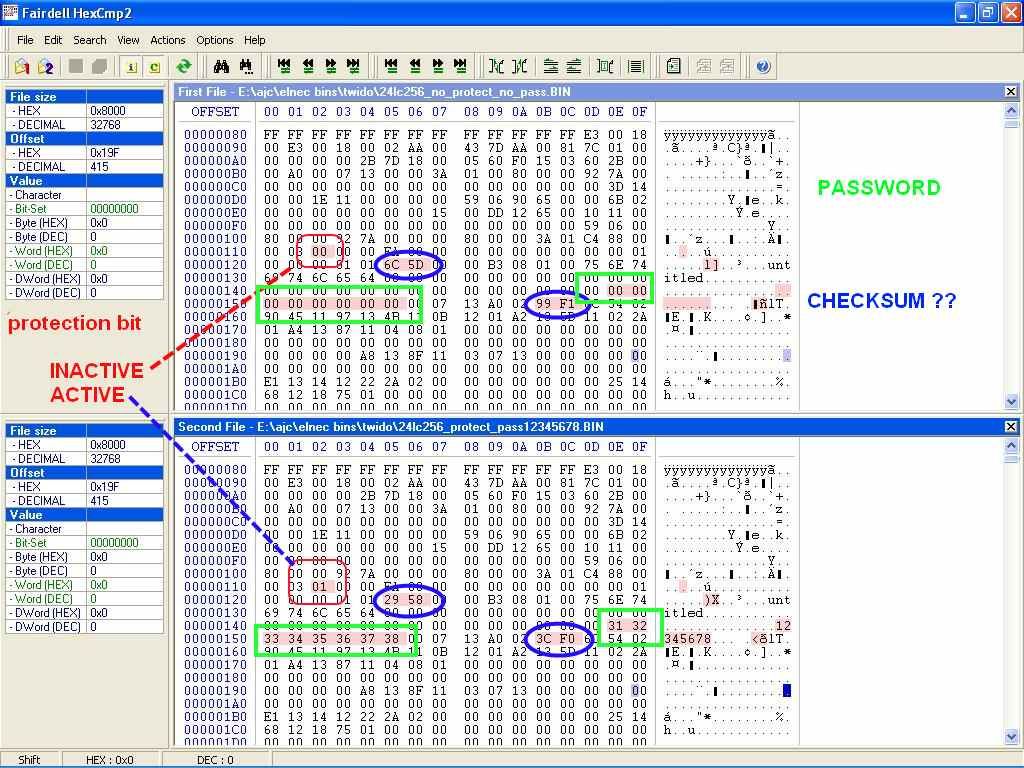 [/URL] [/URL]
[URL=http://s239.photobucket.com/user/tintin2005tintin2005/media/compare_protect_1.jpg.html]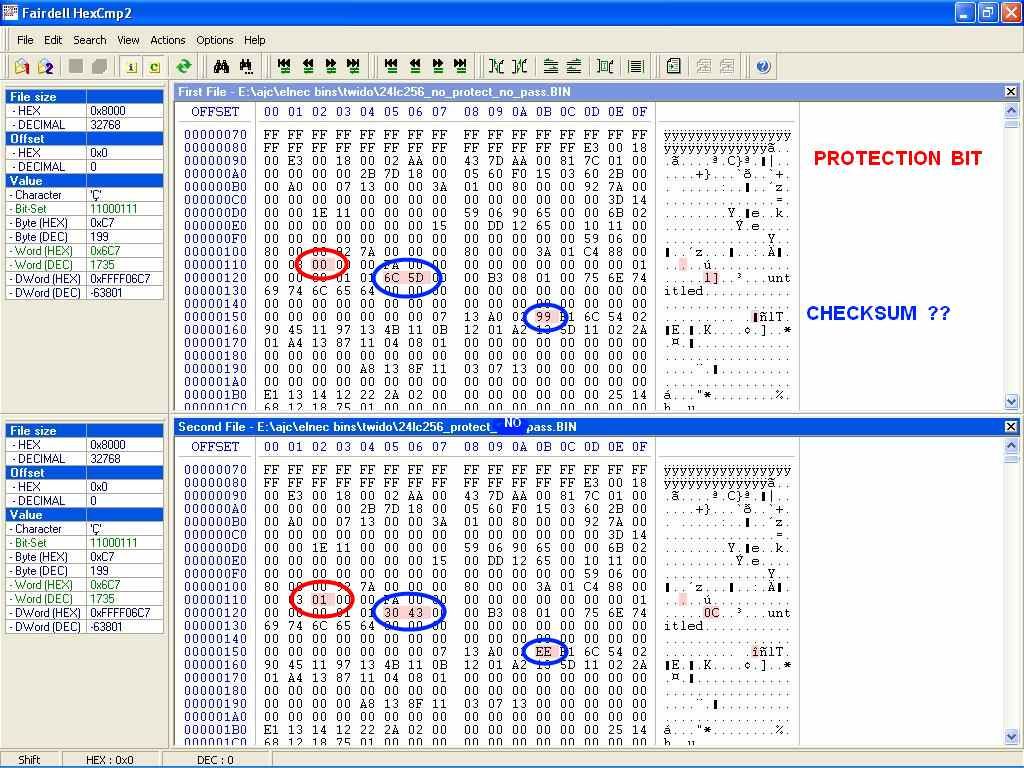 [/URL] [/URL]
[URL=http://s239.photobucket.com/user/tintin2005tintin2005/media/compare_protect.jpg.html] [/URL] [/URL]
how can we calculate the CHECKSUMS ?
after this we write it to the eeprom and we can upload the plc program normally.
can you help with it?
regards |
|
| Back to top |
|
|
selftester
Member 2


Joined: 10 Aug 2013
Posts: 430
|
| Posted: 25/01/2014 14:53 Post subject: |
|
|
try this..
http://www.checksumcalculator.com/ |
|
| Back to top |
|
|
boqfa
Junior
Joined: 02 Oct 2018
Posts: 2
|
| Posted: 27/02/2020 10:16 Post subject: |
|
|
| tintin2005 wrote: | hi man!
is there any solution for active protection bit?
i can read the24 256 eeprom content and i can see the password and if the protection bit active or not.
if the protection bit active i can upload nothing.
if i edit the protection bit from 01 to 00 is necessary to do some math "checksum calculation" and i don´t know how to do it.
i will ppost some print screen of dumps i made and comparison between them.
the rose background coloured zones are the only changes when changing the security settings.
[URL=http://s239.photobucket.com/user/tintin2005tintin2005/media/uploadprotect_1.jpg.html][/URL]
[URL=http://s239.photobucket.com/user/tintin2005tintin2005/media/compare_1.jpg.html][/URL]
[URL=http://s239.photobucket.com/user/tintin2005tintin2005/media/compare_protect_1.jpg.html][/URL]
[URL=http://s239.photobucket.com/user/tintin2005tintin2005/media/compare_protect.jpg.html][/URL]
how can we calculate the CHECKSUMS ?
after this we write it to the eeprom and we can upload the plc program normally.
can you help with it?
regards |
hellp
did you solve the pass. |
|
| Back to top |
|
|
|

 FAQ
FAQ Search
 Memberlist
 Usergroups
 Register
 Profile
 Log in to check your private messages
 Log in


