| View previous topic :: View next topic |
| Author |
Message |
daysleeper15
Junior

Joined: 06 Nov 2017
Posts: 19
|
 Posted: 16/01/2019 12:21 Post subject: TP 277 6" factory reset Posted: 16/01/2019 12:21 Post subject: TP 277 6" factory reset |
 |
|
Hello all.
I'm searching for factory reset procedure for a TP 277 6" panel 6AV6643-0AA01-1AX0.
Is it available with ProSave as for KTP600?
Is it possible to flash the system with the usb port as for KTP700?
In the manual I didn't find any specific chapter for factory reset.
Thank you. |
|
| Back to top |
|
 |
Voroseloff
Junior
Joined: 14 Jan 2019
Posts: 1
|
| Posted: 16/01/2019 14:16 Post subject: |
|
|
With Prosave from WinCC Flexible the procedure is almost the same..
https://support.industry.siemens.com/cs/document/23335365/simatic-hmi-hmi-device-tp-277-op-277- (wincc-flexible)?dti=0&lc=en-WW
https://support.industry.siemens.com/cs/attachments/23335365/ba_tpop_277_en_en-US.pdf
https://support.industry.siemens.com/cs/attachments/213289/k_ops_25.pdf
How do you do an operating system update on operator panels or perform a "Reset to factory settings"?
https://support.industry.siemens.com/cs/document/19701610/how-do-you-do-an-operating-system-update-on-operator-panels-or-perform-a-reset-to-factory-settings
https://support.industry.siemens.com/cs/document/21847868/which-external-storage-media-can-you-use-with-the-current-simatic-panels-and-which-memory-card-interfaces-do-they-have
USB Recovery (Reset to factory) Mode for 2nd Generation Basic Panels
https://support.industry.siemens.com/cs/document/109744950/usb-recovery- (reset-to-factory)-mode-for-2nd-generation-basic-panels |
|
| Back to top |
|
|
daysleeper15
Junior
Joined: 06 Nov 2017
Posts: 19
|
| Posted: 25/01/2019 09:49 Post subject: |
|
|
with WinCC 14 no image were available for TP277.
any shortcut?  |
|
| Back to top |
|
|
daysleeper15
Junior
Joined: 06 Nov 2017
Posts: 19
|
| Posted: 01/07/2019 14:57 Post subject: |
|
|
Hello.
I search in many thread but seems to be few information about this panel.
what I don't understand is with USB Recovery (Reset to factory) Mode for 2nd Generation Basic Panels what image I need to have for TP277 and where this is available.
I didn't found it neither in the Siemens official support site.
Any suggestion?
thank you |
|
| Back to top |
|
|
AtexGo
Junior
Joined: 08 Jun 2019
Posts: 6
|
| Posted: 01/07/2019 18:28 Post subject: |
|
|
TP277 has a Windows CE5.0 Operating System.
Install WinCC Flexible 2008 SP3 or SP5
On path you can find Images of Panels
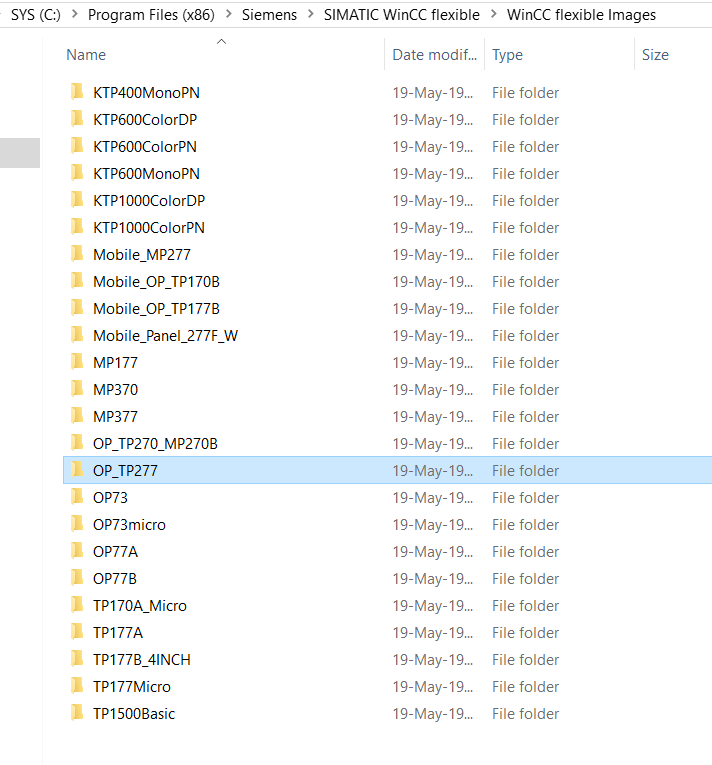

C:\Program Files\Siemens(x86)\SIMATIC WinCC flexible\WinCC flexible Images\OP_TP277\...
Use
WinCC Flexible > Transfer > OS Update (OS = Windows CE)
and update your TP277 System
You can use also ProSave and an serial cable..
Read manuals
https://support.industry.siemens.com/cs/document/19701610/how-do-you-do-an-operating-system-update-on-operator-panels-or-perform-a-reset-to-factory-settings |
|
| Back to top |
|
|
daysleeper15
Junior
Joined: 06 Nov 2017
Posts: 19
|
| Posted: 02/07/2019 10:59 Post subject: |
|
|
Did it!
Thank you AtexGo.
Always usefull, great forum.
 |
|
| Back to top |
|
|
plcbeginner
Junior
Joined: 02 Jun 2022
Posts: 2
|
| Posted: 02/06/2022 21:36 Post subject: |
|
|
Hello,
I have similar problem with this tip of HMI (TP 277 6"), but in my case this panel stuck on bootloader on begining ethernet and serial port are not active at all.
Is there any suggestion how can I fix this problem ? |
|
| Back to top |
|
|
000groe
Junior
Joined: 24 Jun 2022
Posts: 4
|
| Posted: 23/07/2022 18:42 Post subject: |
|
|
Try a USB Cable
https://adegis.com/media/asset/1e79967a4dd41f0d0c9900ba6e663eece12ba5969dd6ca23773ed791d33e14e5.pdf |
|
| Back to top |
|
|
|

 FAQ
FAQ Search
 Memberlist
 Usergroups
 Register
 Profile
 Log in to check your private messages
 Log in


