 |
plc.myforum.ro
PLCs users www.plc.myforum.ro!
|
| View previous topic :: View next topic |
| Author |
Message |
valz
Member 3


Joined: 26 Jul 2015
Posts: 771
|
 Posted: 10/11/2022 18:00 Post subject: time synchronization of the CPU to UTC PCS 7 TeleControl Posted: 10/11/2022 18:00 Post subject: time synchronization of the CPU to UTC PCS 7 TeleControl |
 |
|
How do you set up the time synchronization of the CPU to UTC time when using PCS 7 TeleControl and IEC 60870-5?
https://support.industry.siemens.com/cs/document/109814323/
If the IEC 60870-5 message is used in PCS 7, the CPs of the RTUs (Remote Terminal Units) are synchronized by default to the local winter time by the PCS 7 TeleControl channel. Only if the system time of the S7-1200 is synchronized to UTC, the time stamp in the diagnostic buffer is displayed with the correct local time and time-controlled actions are triggered at the correct time.
You can write the time of the CP into a data block of the CPU. You can correct the time zone to the local time zone and set it as the system time for the CPU.
The following figure shows an example of how you can implement the function in a function block. A download to the library containing this block is available at the end of the entry.
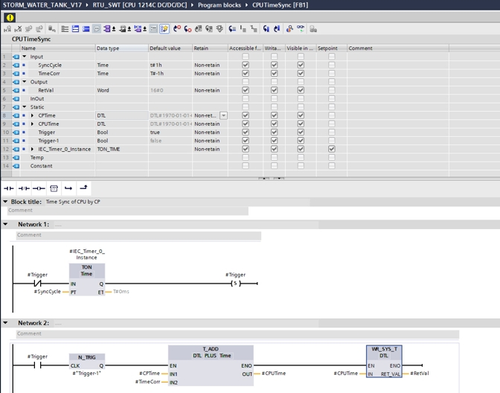
Fig. 01
Function of the block
The start value for "Trigger" is "true". This ensures that the time after CPU restart and after first loading of the block is synchronized.
Subsequently, the integrated timer synchronizes again and again according to the time that can be set at the "SyncCycle" input. "Trigger" is set after this time has elapsed.
When the trigger is set, the CP writes its current time stamp into the "CPTime" area of the DB of the function block. Afterwards the CP sets "Trigger" to 0. This setting to 0 restarts the timer on the one hand and on the other hand the negative edge of "Trigger" causes the time stamp for the CPU to be recalculated once and to be taken over as system time by the system function.
The correction value for the time calculation can be specified at the "TimeCorr" input. In the Central European Winter Time zone (UTC+1), TimeCorr is set to "t#-1h".
Procedure for using the block
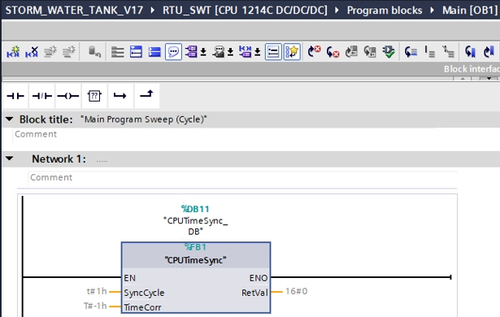
Fig. 02
Open the device configuration.
Select the CP.
In the Properties, select the "General" tab and open "CP time".
Set the check mark for "CP time to CPU".
Assign the parameter "Trigger" of the block to the time trigger variable and the parameter "CPTime" to the CP time variable.
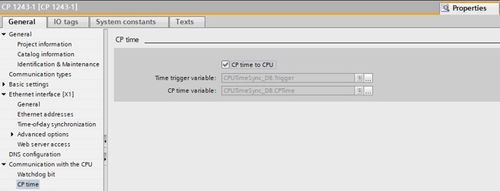
Download
https://support.industry.siemens.com/cs/attachments/109814323/TimeSync.zip |
|
| Back to top |
|
 |
|
|
You cannot post new topics in this forum
You cannot reply to topics in this forum
You cannot edit your posts in this forum
You cannot delete your posts in this forum
You cannot vote in polls in this forum
|
Powered by phpBB © 2001, 2005 phpBB Group
Fa-ti si tu propriul forum GRATUIT, pe www.myforum.ro |
 FAQ
FAQ Search
 Memberlist
 Usergroups
 Register
 Profile
 Log in to check your private messages
 Log in


