| View previous topic :: View next topic |
| Author |
Message |
gamax
Member

Joined: 15 Jul 2016
Posts: 131
|
 Posted: 03/06/2021 11:32 Post subject: TIA Portal V17 Posted: 03/06/2021 11:32 Post subject: TIA Portal V17 |
 |
|
TIA Portal V17
https://support.industry.siemens.com/cs/document/109784438/
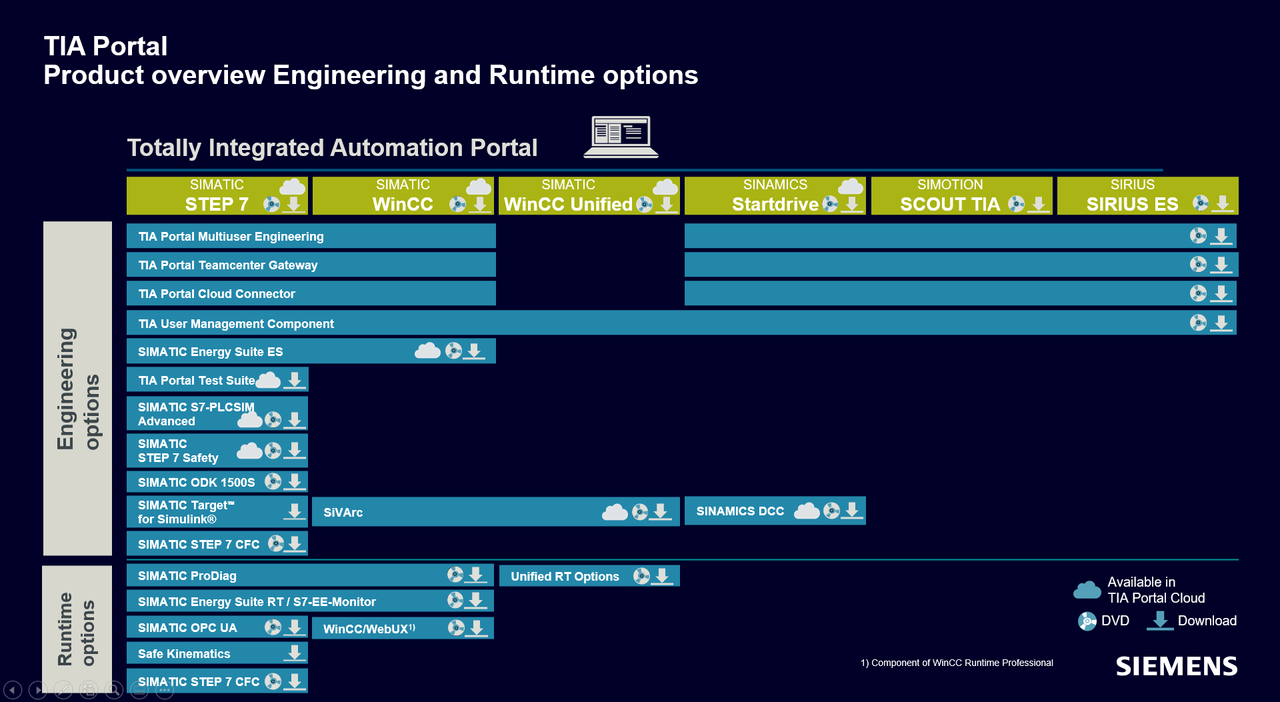
new functions :
https://support.industry.siemens.com/cs/attachments/109784438/TIA-Portal-V17--Highlights--TechSlides-2021-05-14-EN.pdf
SIMATIC STEP 7 V17 (inkl. PLCSIM) / STEP 7 Safety V17 / WinCC V17
https://support.industry.siemens.com/cs/document/109784440
SIMATIC WinCC V17 Runtimes
https://support.industry.siemens.com/cs/document/109793105
WinCC Unified V17 PI Options
https://support.industry.siemens.com/cs/document/109792169
SINAMICS Startdrive V17
https://support.industry.siemens.com/cs/document/109794362
SINAMICS DCC V17
https://support.industry.siemens.com/cs/document/109782920
SIMOCODE ES V17
https://support.industry.siemens.com/cs/document/109793078
Soft Starter ES V17
https://support.industry.siemens.com/cs/document/109793076
SIMATIC Energy Suite V17
https://support.industry.siemens.com/cs/document/109792370
SIMATIC PLCSIM Advanced V4.0
https://support.industry.siemens.com/cs/document/109795016
SIMATIC Target V5.0 (Available shortly)
https://support.industry.siemens.com/cs/document/109784444
SIMATIC Visualization Architect V17
https://support.industry.siemens.com/cs/document/109772966
TIA Portal Test Suite V17
https://support.industry.siemens.com/cs/document/109793099
===================================================
SIMATIC STEP 7 incl. Safety, S7-PLCSIM and WinCC V17
https://support.industry.siemens.com/cs/document/109784440/
Information on STEP 7 and WinCC
https://support.industry.siemens.com/cs/attachments/109784440/ReadMe_STEP7_WinCC_V17_enUS.pdf
https://support.industry.siemens.com/cs/attachments/109784440/ReadMe_Safety_V17_deDE_enUS.pdf
https://support.industry.siemens.com/cs/attachments/109784440/ReadMe_PLCSIM_enUS.pdf
STEP 7 Basic/Professional, STEP 7 Safety Basic/Advanced and WinCC Basic/Comfort/Advanced and WinCC Unified:
| Code: | STEP 7 Basic
STEP 7 Professional
STEP 7 Safety Basic
STEP 7 Safety Advanced
WinCC Basic
WinCC Comfort
WinCC Advanced
WinCC Unified |
DVD 1 Setup STEP 7 Basic / Prof. STEP 7 Safety Basic / Advanced WinCC Basic / Comfort / Advanced / Unified Engineering
https://support.industry.siemens.com/cs/attachments/109784440/TIA_Portal_STEP7_Prof_Safety_WINCC_Adv_Unified_V17.iso
DVD 2 Hardware Support Packages, Open Source Software, Tools
https://support.industry.siemens.com/cs/attachments/109784440/TIA_Portal_STEP7_Prof_Safety_WINCC_DVD_2_V17.iso
DVD 3 / 4 WinCC Panel Images WinCC Legacy Panel Images (only available as download)
https://support.industry.siemens.com/cs/attachments/109784440/SIMATIC_WinCC_Panel_Images_V17.iso
https://support.industry.siemens.com/cs/attachments/109784440/SIMATIC_WinCC_Legacy_Panel_Images_V17.iso
================================================
STEP 7 Basic/Professional, STEP 7 Safety Basic/Advanced and WinCC Professional:
| Code: | STEP 7 Basic
STEP 7 Professional
STEP 7 Safety Basic
STEP 7 Safety Advanced
WinCC Basic
WinCC Comfort
WinCC Advanced
WinCC Professional |
DVD 1 Setup STEP 7 Basic / Prof. STEP 7 Safety Basic / Advanced WinCC Professional
https://support.industry.siemens.com/cs/attachments/109784440/TIA_Portal_STEP7_Prof_Safety_WINCC_Prof_V17.iso
DVD 2 Hardware Support Packages, Open Source Software, Tools
https://support.industry.siemens.com/cs/attachments/109784440/TIA_Portal_STEP7_Prof_Safety_WINCC_DVD_2_V17.iso
DVD 3 / 4 WinCC Panel Images WinCC Legacy Panel Images (only available as download)
https://support.industry.siemens.com/cs/attachments/109784440/SIMATIC_WinCC_Panel_Images_V17.iso
https://support.industry.siemens.com/cs/attachments/109784440/SIMATIC_WinCC_Legacy_Panel_Images_V17.iso
=====================================================
S7-PLCSIM :
https://support.industry.siemens.com/cs/attachments/109784440/SIMATIC_S7-PLCSIM_V17.iso
=====================================================
SIMATIC WinCC Runtime Advanced / SIMATIC WinCC Unified PC Runtime V17
https://support.industry.siemens.com/cs/document/109793105/
Download:
WinCC Unified PC Runtime V17:
https://support.industry.siemens.com/cs/attachments/109793105/SIMATIC_WinCC_Unified_PC_V17.iso
WinCC Runtime Advanced V17:
https://support.industry.siemens.com/cs/attachments/109793105/SIMATIC_WinCC_Runtime_Advanced_V17.iso
=====================================================
TIA Portal - An Overview of the Most Important Documents and Links - Controller
https://support.industry.siemens.com/cs/document/65601780/
https://cache.industry.siemens.com/dl/dl-media/780/65601780/att_922050/v4/65601780_TIA_Portal_InformationCenter_web/start.htm#/en |
|
| Back to top |
|
 |
gamax
Member
Joined: 15 Jul 2016
Posts: 131
|
| Posted: 03/06/2021 11:33 Post subject: TIA Portal Test Suite Advanced V17 |
|
|
TIA Portal Test Suite Advanced V17
https://support.industry.siemens.com/cs/document/109793099/
TIA Portal Test Suite Advanced V17
https://support.industry.siemens.com/cs/attachments/109793099/TIA_Portal_TestSuiteAdvanced_V17.ISO
TIA Portal Openness: Automation of engineering workflows
https://support.industry.siemens.com/cs/document/109792902/
TIA Portal Openness is a programming interface (API) to automate engineering tasks in TIA Portal:
Access to TIA Portal objects via API methods
Import / export interface and data exchange
Possible workflows are project generation, project verification, maintenance and much more.
The following TIA Portal products and options support TIA Portal Openness:
STEP 7, STEP 7 Safety
WinCC Unified, WinCC Professional (nur Basic/Comfort/Mobile Panels und RT Advanced)
SIMATIC Visualization Architect (SiVArc), Startdrive, SIMOTION SCOUT TIA, SINUMERIK, Version Control Interface
With TIA Portal V17.0 follows: Test Suite, Multiuser, User Management & Access Control (UMAC) |
|
| Back to top |
|
|
gamax
Member
Joined: 15 Jul 2016
Posts: 131
|
| Posted: 03/06/2021 11:34 Post subject: SIMATIC Visualization Architect V16 |
|
|
SIMATIC Visualization Architect V16
https://support.industry.siemens.com/cs/document/109772966/simatic-visualization-architect-v16-trial-download
Download
https://support.industry.siemens.com/cs/attachments/109772966/SiVarc_V16.exe
https://support.industry.siemens.com/cs/attachments/109772966/SiVArc_Readme_V16_enUS.pdf |
|
| Back to top |
|
|
gamax
Member
Joined: 15 Jul 2016
Posts: 131
|
| Posted: 03/06/2021 11:38 Post subject: |
|
|
SIMATIC S7-PLCSIM V17
https://mega.nz/file/1a5gFD5B#7wVz_kuGLrPw41YQH5mZvnxlmqUxkIbPb8IvTy-xTss
SIMATIC_WinCC_Runtime_Advanced_V17.iso
https://mega.nz/file/ZO43xaRT#pU6O-naLFfiuIKVDkmXhBR2KVOic3z15bQUGIR1Jfdg
SIMATIC_WinCC_Unified_PC_V17.iso
https://mega.nz/file/xHwFyAQQ#loziyWJvD6oLzEHmg0fKdvvcUAcvFTBLqJZz0fgNzaU
snoduouf  |
|
| Back to top |
|
|
gamax
Member
Joined: 15 Jul 2016
Posts: 131
|
| Posted: 03/06/2021 11:43 Post subject: SINAMICS Startdrive V17 |
|
|
SINAMICS Startdrive V17
https://support.industry.siemens.com/cs/document/109794362/
Startdrive V17
| Code: | Operates with STEP 7 V17 and WinCC V17 in a single framework
Can be installed on a computer in parallel to another version of Startdrive V12 to V16
Can be installed on the same computer as SINAMICS MICROMASTER STARTER
As from TIA Portal project version V13 SP1, projects can be directly upgraded to V17. Updating of previous project versions (V11 ... V13) is on the basis of the TIA Portal products used in the project (e.g. STEP 7, Startdrive) in version V13 SP1 or V13 SP2 (latest update recommended).
Important note
TIA Portal project versions V13 SP1 ... V16 are upgraded to project version V17 using TIA Portal V17. If you wish to work with or edit a TIA Portal project version V13 SP1 ... V16, then we recommend an additional installation of the corresponding software for TIA Portal V17.
Operating system
Windows 10 (64-bit)
Windows 10 Professional Version 1909, 2004, 2009/20H2
Windows 10 Enterprise 1909, 2004, 2009/20H2
Windows 10 IoT Enterprise 2016 LTSB
Windows 10 IoT Enterprise 2019 LTSC
Windows Server (64-bit)
Windows Server 2016 Standard (full installation)
Windows Server 2019 Standard (full installation)
Supported virtualization platforms
VMware vSphere Hypervisor (ESXi) 6.7
VMware Workstation 15.5.0
VMware Player 15.5.0
Microsoft Hyper-V Server 2019
The following security programs are compatible with Startdrive V17:
Virus scanner
Symantec Endpoint Protection 14.2
Trend Micro Office Scan 12.0
McAfee Endpoint Security (ENS) 10.6
Kaspersky Endpoint Security 11.3
Windows Defender
Qihoo 360 "Safe Guard 12.1" + "Virus Scanner"
Encryption software
Microsoft BitLocker
Host-based intrusion detection system:
McAfee Application Control 8.2 |
Download
https://support.industry.siemens.com/cs/attachments/109794362/Startdrive_Advanced_V17.iso |
|
| Back to top |
|
|
gamax
Member
Joined: 15 Jul 2016
Posts: 131
|
| Posted: 03/06/2021 11:44 Post subject: SIMATIC S7-PLCSIM Advanced V4.0 |
|
|
S7-PLCSIIM Advanced V3.0
https://support.industry.siemens.com/cs/document/109776014/
https://support.industry.siemens.com/cs/attachments/109776014/SIMATIC_PLCSIM_Advanced_V3_Upd2.exe
SIMATIC S7-PLCSIM Advanced V4.0
https://support.industry.siemens.com/cs/document/109795016/
Highlights SIMATIC S7-PLCSIM Advanced V4.0
The following functions are now available with SIMATIC S7-PLCSIM Advanced V4.0:
Supporting additnoal S7-1500 CPU Types:
S7-1500 H/R CPUs im RUN Solo Betrieb
S7-1500 ET 200pro CPUs
SIMATIC Drive Controller
S7-1518 T/TF
S7-1500 SIPLUS Extreme CPUs
Supports secure communication for OPC UA, Open User (OUC) and https web server connections.
Supports up to 128 UDP multicast connections, DNS and DHCP as with the hardware CPU with firmware version V2.9
The installation program replaces the WinPCap driver with the NpCap driver
Compatible with TIA Portal projects from versions V14 to V17
Supports CPU firmware versions V1.8 – V2.9
S7-PLCSIM Advanced V4.0 supports following Operating Systems:
| Code: | Windows 10 Home Version 1909
Windows 10 Home Version 2004
Windows 10 Home Version 2009/20H2
Windows 10 Professional Version 1909
Windows 10 Professional Version 2004
Windows 10 Professional Version 2009/20H2
Windows 10 Enterprise Version 1909
Windows 10 Enterprise Version 2004
Windows 10 Enterprise Version 2009/20H2
Windows 10 Enterprise 2016 LTSB
Windows 10 Enterprise 2019 LTSC
Windows Server 2016 Standard (Full installation)
Windows Server 2019 Standard (Full installation)
Supported virtualization platforms:
VMware vSphere Hypervisor (ESXi) 6.7
VMware Workstation Pro 15.5.0
VMware Player 15.5.0
Microsoft Hyper-V Server 2019
|
https://support.industry.siemens.com/cs/attachments/109795016/s7plcsim_advanced_readme_en-US.pdf
https://support.industry.siemens.com/cs/attachments/109795016/SIMATIC_PLCSIM_Advanced_V4.iso
https://anonfiles.com/h2JcC6ycu8/SIMATIC_PLCSIM_Advanced_V4_iso
gingomoraxh |
|
| Back to top |
|
|
gamax
Member
Joined: 15 Jul 2016
Posts: 131
|
| Posted: 05/07/2021 18:04 Post subject: SIMATIC WinCC Unified Plant Intelligence Optionen V17 |
|
|
SIMATIC WinCC Unified Plant Intelligence Optionen V17
https://support.industry.siemens.com/cs/document/109792169/
To use the SIMATIC WinCC Unified Plant Intelligence options, SIMATIC WinCC Unified V17 must be installed
https://support.industry.siemens.com/cs/attachments/109792169/ReadmeWCCUPFICALenUS.pdf
https://support.industry.siemens.com/cs/attachments/109792169/InstallNotesPIOptionsenUS.pdf
Download
SIMATIC WinCC Unified Performance Insight V17
https://support.industry.siemens.com/cs/attachments/109792169/SIMATIC_WinCC_Unified_PerformanceInsight_V17.iso
SIMATIC WinCC Unified Calendar
https://support.industry.siemens.com/cs/attachments/109792169/SIMATIC_WinCC_Unified_Calendar_V17.iso
WinCC Unified Runtime Update for WinCC Unified PC Runtime V17:
https://support.industry.siemens.com/cs/document/109792166/
Download
https://support.industry.siemens.com/cs/attachments/109792166/ReadmeRTUniUpdateenUS.pdf
https://support.industry.siemens.com/cs/attachments/109792166/DVD_WinCC_Unified_Runtime_OptionUpdate_V17.exe |
|
| Back to top |
|
|
AnteSavilt
Member 2


Joined: 13 Feb 2018
Posts: 264
Location: Croatia
|
| Posted: 03/08/2021 17:59 Post subject: Generation HMI-Screens/Screen Obj. in WinCC Unif. with Excel |
|
|
Automatic Generation of HMI-Screens and Screen Objects in WinCC Unified with Excel
https://support.industry.siemens.com/cs/document/109792619/
WinCC Unified Engineering offers the possibility to generate screens externally in the visualization via Microsoft Excel. You will learn how to use the tools and the interface, as well as how to use them efficiently for the Unified Comfort Panel.
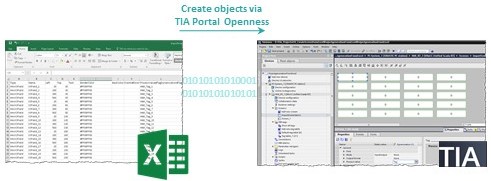
SIMATIC WinCC Unified is the new visualization system with which you can successfully master the challenges of digitalization in machine and system engineering. State-of-the-art hardware and software technologies make this possible now and in the future. Tried and tested engineering in the TIA Portal, the latest web technology, and high performance reserves for the coming year combine with the freedom to implement your ideas how you want.
The Excel Importer provides you with a tool for generating screens. SIMATIC WinCC Unified offers the possibility to generate screens via the TIA Portal Openness interface using Excel lists that are easy to maintain. You can design these to meet your specific needs.
This application example shows you:
how to use the tool via the Openness interface
how to design your Excel list as per your requirements
the possibilities for automatic generation
which requirements must be met for using the application
Advantages
Time and cost effective screen generation
Minimal expenditure in assigning object properties
Repetitive activities can be bypassed and quickly implemented
Documentation and sample project
https://support.industry.siemens.com/cs/attachments/109792619/109792619_Excel_Importer_V1_DOC_en.pdf
https://support.industry.siemens.com/cs/attachments/109792619/109792619_Excel_Importer_V1_CODE.zip
https://support.industry.siemens.com/cs/document/109792619/automatic-generation-of-hmi-screens-and-screen-objects-in-wincc-unified-with-excel
https://ulozto.net/tamhle/iusLI20uVqTj/
https://anonfiles.com/nbI2m9A5uf/109792619_Excel_Importer_V1_CODE_zip
https://anonfiles.com/paI2m2A3uc/109792619_Excel_Importer_V1_DOC_en_pdf
TIA Portal - An Overview of the Most Important Documents and Links - Visualization
https://support.industry.siemens.com/cs/document/109780282/
Documentation for SIMATIC HMI
https://support.industry.siemens.com/cs/document/109744536/ |
|
| Back to top |
|
|
duuq23
Junior

Joined: 28 Aug 2018
Posts: 1
|
| Posted: 09/08/2021 18:02 Post subject: Data2Unified Add-in |
|
|
Data2Unified Add-in
https://support.industry.siemens.com/cs/document/109770510/data2unified-add-in
Continue to use the project contents you have created when switching over to SIMATIC WinCC Unified and save time during engineering with the “Data2Unified” add-in.
SIMATIC WinCC Unified is the all-new visualization system from Siemens for automation applications. The SIMATIC WinCC Unified System consists of the SIMATIC WinCC visualization software and the new SIMATIC HMI Unified Comfort Panels.
The “Data2Unified” add-in offers you the possibility to convert your configuration contents into a WinCC Unified configuration so that you do not have to recreate the contents of your previous configurations from scratch.
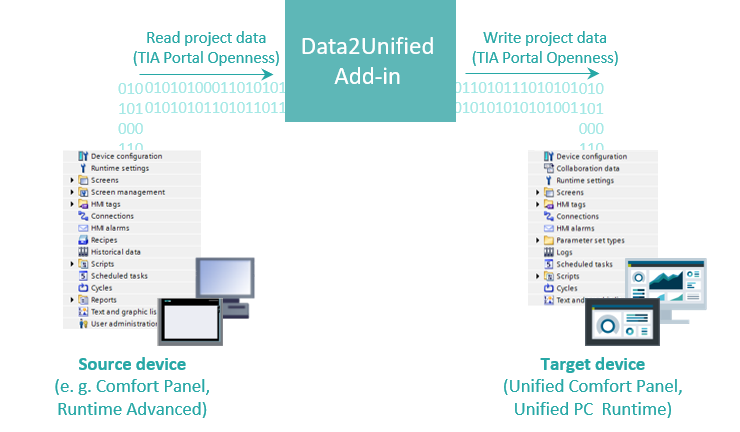
In the current version of the “Data2Unified” add-in, the following contents are supported for conversion to SIMATIC WinCC Unified:
Screen objects of type "Basic objects" (e.g. Text box, Rectangle) and "Elements" (e.g. Button, I/O field)
Animations on the supported screen objects
Screens
Screen management (e.g. Templates, Pop-up screens, Slide-in Screens)
HMI tags, except UDT structures
HMI alarms
Note
The “Data2Unified” add-in is under continuous development (see last changes), which will gradually support additional TIA Portal project elements.
The link to download the latest version of the add-in is available within this article.
Download Data2Unified Add-in V1.3.0.0
https://support.industry.siemens.com/cs/attachments/109770510/109770510_Data2Unified_Add-in_V1_3_0_0.zip
https://support.industry.siemens.com/cs/attachments/109770510/109770510_Data2Unified_Manual_DOC_V13_en.pdf
https://anonfiles.com/n48bm9Bbud/109770510_Data2Unified_Add-in_V1_3_0_0_zip
https://ulozto.net/tamhle/aErHOWLqcGYx/ |
|
| Back to top |
|
|
AnteSavilt
Member 2
Joined: 13 Feb 2018
Posts: 264
Location: Croatia
|
| Posted: 05/10/2021 13:01 Post subject: Updates for STEP 7 V17, S7-PLCSIM V17 und WinCC V17 |
|
|
Updates for STEP 7 V17, S7-PLCSIM V17 und WinCC V17
https://support.industry.siemens.com/cs/document/109784441/
This Update is valid for the following products on TIA Portal
| Code: | STEP 7 Basic/Professional V17
S7-PLCSIM V17
WinCC Basic/Comfort/Advanced/Professional/Unified V17 |
Download update1
https://support.industry.siemens.com/cs/attachments/109784441/Totally_Integrated_Automation_Portal_V17_Upd1.iso
Updates for HMI Operator Panels (Panel Images)
https://support.industry.siemens.com/cs/document/109746530/
Download update1
https://support.industry.siemens.com/cs/attachments/109746530/109746530_Unified_Comfort_Panel_Images_V17_0_Upd_1.exe
Updates for WinCC Advanced Runtime V17
https://support.industry.siemens.com/cs/document/109800912/
Download update1
https://support.industry.siemens.com/cs/attachments/109800912/SIMATIC_WinCC_Runtime_Advanced_V17_Upd1.iso
Updates for WinCC Professional Runtime V17
https://support.industry.siemens.com/cs/document/109800913/
Download update1
https://support.industry.siemens.com/cs/attachments/109800913/SIMATIC_WinCC_Runtime_Professional_V17_Upd1.iso
Updates for SIMATIC WinCC Unified PC/runtime V17
https://support.industry.siemens.com/cs/document/109792166/
Download update1
https://support.industry.siemens.com/cs/attachments/109792166/SIMATIC_WinCC_Unified_PC_V17_Upd1.iso
https://support.industry.siemens.com/cs/attachments/109792166/DVD_WinCC_Unified_Runtime_OptionUpdate_V17.exe
Updates for SIMATIC Energy Suite V17
https://support.industry.siemens.com/cs/document/109792371
Download update1
Updates for TIA-Project Sever V17
https://support.industry.siemens.com/cs/document/109800915/
Download update1
https://support.industry.siemens.com/cs/attachments/109800915/TIA_Portal_Project_Server_V17_Upd1.exe
Updates for SIMATIC ProSave V17
https://support.industry.siemens.com/cs/document/10347815/
Download update1
https://support.industry.siemens.com/cs/attachments/10347815/SIMATIC_ProSave_V16_Upd1.exe |
|
| Back to top |
|
|
valz
Member 3


Joined: 26 Jul 2015
Posts: 771
|
| Posted: 19/10/2021 13:25 Post subject: How to start an external program with GUI WinCC Unified V17 |
|
|
How to start an external program with GUI from WinCC Unified?
https://support.industry.siemens.com/cs/document/109798677/
Other Windows application programs (like Notepad, Word, Excel, PowerPoint, Adobe Acrobat Reader, Notepad++ etc. ) can be started from WinCC Unified by activating the OpenPipe function.
Note
Only programs on the WinCC Runtime Server are started.
Requirements for WinCC Unified V17
The Windows user must be included in the "SMATIC HMI" group.
The batch program "StartOpenPipe.bat" must be enabled.
Automatic start of the Runtime must be ensured.
Description of how to enable "OpenPipe" and ensure autostart of Runtime
Add the Windows user to the "SIMATIC HMI" group.
Right-click "This PC" > Manage > Local Users and Groups.
Enable the batch program:
- To enable the batch program, the "node.exe" program must be included in the following folder structure.
‘C:\Program Files\Siemens\Automation\WinCCUnified\WebRH\bin\node.exe’
- Under C:\, făcute the "Tools" program folder.
- Copy the "SubscribeTagValue_StartProgram.js" script into the folder:
C:\Tools\
- Copy the batch program "StartOpenPipe.bat" into the Autostart of Windows.
Press Win +R. The execution window opens. Execute the "Shell:Startup" command. The Autostart folder of Windows opens.
Enable Autostart of the Runtime:
- Open the SIMATIC Runtime Manager.
- Enable the Autostart for the project.
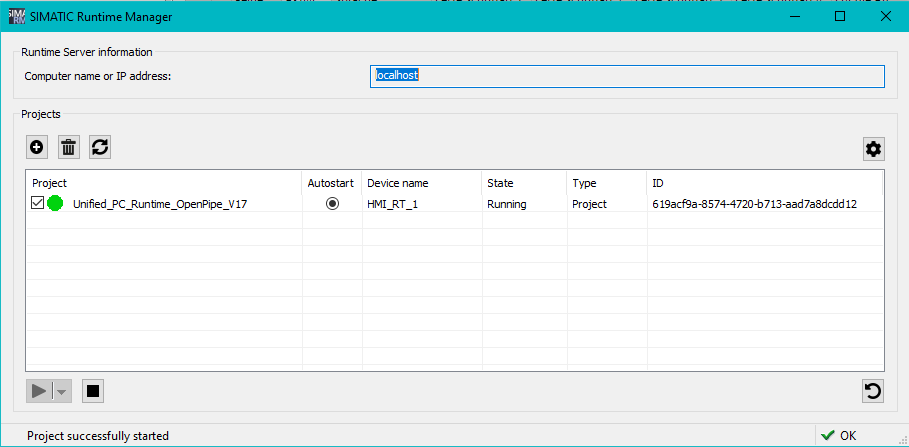
Restart the computer.
The Runtime of the project starts automatically. Windows starts the batch program in the Autostart. The "StartOpenPipe.bat" program window opens. You can now start external programs from WinCC Unified via "OpenPipe".
Notes
To be able to start programs via OpenPipe from WinCC Unified, the program window "StartOpenPipe.bat" must be permanently open.
https://support.industry.siemens.com/cs/attachments/109798677/OpenPipe_V17.zip
https://ulozto.net/file/6JwdQ9gXXSZ0/openpipe-v17-zip |
|
| Back to top |
|
|
valz
Member 3
Joined: 26 Jul 2015
Posts: 771
|
| Posted: 24/01/2024 19:24 Post subject: SIMATIC WinCC Unified - Toolbox V17 |
|
|
SIMATIC WinCC Unified - Toolbox V17
https://support.industry.siemens.com/cs/document/109770480/
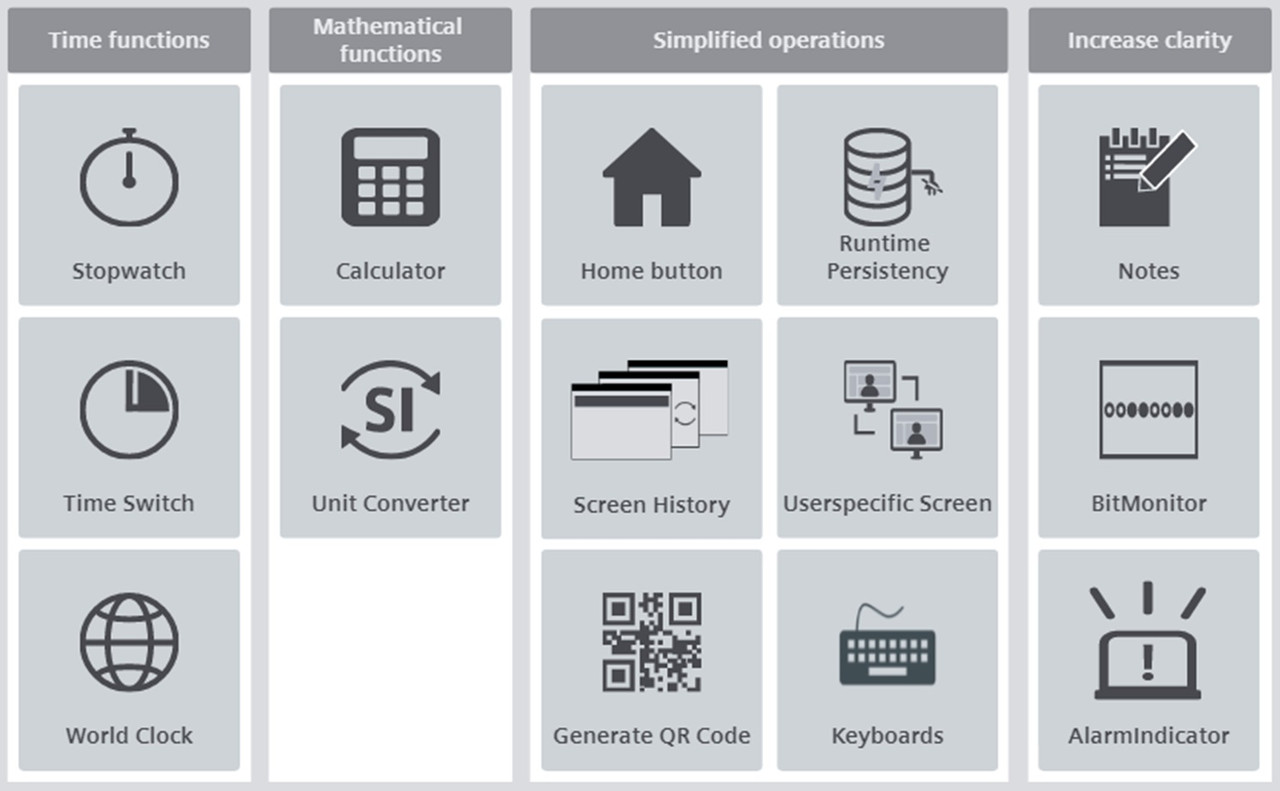
The toolbox for SIMATIC WinCC Unified from Siemens Industry Online Support provides many useful tools that can make everyday work much easier.
The various tools are available in a global library and can thus be easily integrated into your visualization. This tools are created for the WinCC Unified PC runtime, but they are also compatible with the Unified Comfort Panels (file paths may need to be modified). This saves you valuable development time, which you would otherwise have to invest in developing your own tools.
The toolbox currently contains tools in four different subject areas.
Downloads
https://support.industry.siemens.com/cs/attachments/109770480/109770480_Toolbox_WinCC_Unified_V17_DOC_V21_en.pdf
https://support.industry.siemens.com/cs/attachments/109770480/109770480_LUnifiedToolbox_V17.zip
https://support.industry.siemens.com/cs/attachments/109770480/109770480_Toolbox_WinCC_Unified_V17.zip
[URL=https://www.file-upload.net/download-15260083/109770480_Toolbox_WinCC_Unified_V17.zip.html]109770480_Toolbox_WinCC_Unified_V17.zip[/URL]
[URL=https://www.file-upload.net/download-15260082/109770480_LUnifiedToolbox_V17.zip.html]109770480_LUnifiedToolbox_V17.zip[/URL]
[URL=https://www.file-upload.net/download-15260081/109770480_Toolbox_WinCC_Unified_V17_DOC_V21_en.pdf.html]109770480_Toolbox_WinCC_Unified_V17_DOC_V21_en.pdf[/URL] |
|
| Back to top |
|
|
mamiko
Member 2

Joined: 25 Dec 2017
Posts: 420
|
| Posted: 30/01/2024 16:26 Post subject: Demo project for SIMATIC WinCC Unified V17 |
|
|
Demo project for SIMATIC WinCC Unified V17 and SIMATIC HMI Unified Comfort Panels V17
https://support.industry.siemens.com/cs/document/109776633/
Current demo projects available for SIMATIC WinCC Unified and SIMATIC HMI Unified Comfort Panel
Demo project for SIMATIC WinCC Unified V17 with Collaboration
https://support.industry.siemens.com/cs/attachments/109776633/2022_02_28_PC_DemoProjekt_V17_2_WithCollaboration.zip
Demo project for SIMATIC WinCC Unified V17 without Collaboration
https://support.industry.siemens.com/cs/attachments/109776633/2022_02_28_PC_DemoProjekt_V17_2_Without_Collaboration.zip
Documentation & videos
https://support.industry.siemens.com/cs/attachments/109776633/SIMATIC_WinCC_Unified_V17_DemoProject_EN_2022_02_08.pdf
Dearchive the project and load it to the device:
https://support.industry.siemens.com/cs/attachments/109776633/01_Demo_project_Setup.mp4
Use the project in Runtime:
https://support.industry.siemens.com/cs/attachments/109776633/02_Demo_project_UsageAndFeatures.mp4
Advantages and features in the project:
https://support.industry.siemens.com/cs/attachments/109776633/03_Demo_project_NewFeatures.mp4
[URL=https://www.file-upload.net/download-15262585/02_Demo_project_UsageAndFeatures1.mp4.html]02_Demo_project_UsageAndFeatures1.mp4[/URL]
[URL=https://www.file-upload.net/download-15262586/2022_02_28_PC_DemoProjekt_V17_2_Without_Collaboration1.zip.html]2022_02_28_PC_DemoProjekt_V17_2_Without_Collaboration1.zip[/URL]
[URL=https://www.file-upload.net/download-15262584/03_Demo_project_NewFeatures1.mp4.html]03_Demo_project_NewFeatures1.mp4[/URL]
[URL=https://www.file-upload.net/download-15262589/2022_02_28_PC_DemoProjekt_V17_2_WithCollaboration1.zip.html]2022_02_28_PC_DemoProjekt_V17_2_WithCollaboration1.zip[/URL]
[URL=https://www.file-upload.net/download-15262588/01_Demo_project_Setup1.mp4.html]01_Demo_project_Setup1.mp4[/URL]
[URL=https://www.file-upload.net/download-15262587/SIMATIC_WinCC_Unified_V17_DemoProject_EN_2022_02_081.pdf.html]SIMATIC_WinCC_Unified_V17_DemoProject_EN_2022_02_081.pdf[/URL] |
|
| Back to top |
|
|
mamiko
Member 2
Joined: 25 Dec 2017
Posts: 420
|
| Posted: 23/07/2024 20:31 Post subject: WinCC Unified: Manual and Updates |
|
|
WinCC Unified: Manual and Updates
https://support.industry.siemens.com/cs/document/109961592/
Overview of the manuals for SIMATIC WinCC Unified Engineering, SIMATIC WinCC Unified PC Runtime, HMI Unified Comfort Panel and HMI Unified Basic Panel. |
|
| Back to top |
|
|
|

 FAQ
FAQ Search
 Memberlist
 Usergroups
 Register
 Profile
 Log in to check your private messages
 Log in


