| View previous topic :: View next topic |
| Author |
Message |
gaty
Member


Joined: 01 Mar 2017
Posts: 188
|
 Posted: 11/02/2020 20:15 Post subject: TIA Portal v16 Add-Ins Posted: 11/02/2020 20:15 Post subject: TIA Portal v16 Add-Ins |
 |
|
TIA Portal Add-Ins
https://support.industry.siemens.com/cs/document/109773999/
Add-ins give you the opportunity to expand the functionality of the TIA Portal. With the installation of "TIA Portal Openness" you have the possibility to use add-ins.
Summary
Add-ins offer a convenient way to expand the functionality of the TIA Portal via the Openness API.
Add-ins are written as .NET programs.
Add-ins can be conveniently passed on in a company and even distributed to third-party providers.
Installation
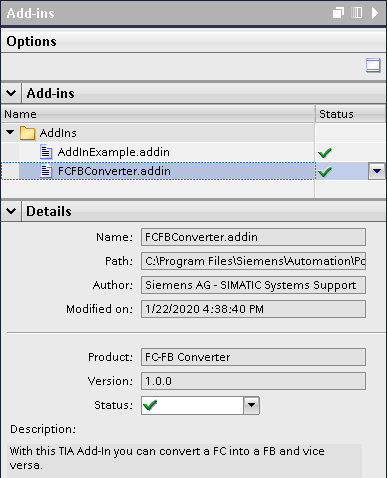
Install add-ins by copying the ".addin" file into the "AddIns" folder in the installation directory of the TIA Portal.
Activate or deactivate add-ins in the "Add-ins" task card (add-ins are deactivated by default).
Further information on the add-in such as the author, description or the required authorizations are also displayed in the "Add-ins" task card.
Usage
Add-ins can be used in the following areas in the TIA Portal:
| Code: | Project navigation
Library view
Version control interface
Device and network view
In the following is an add-in template. You can use the template to develop your own add-ins. |
TIA Portal add-in template
https://support.industry.siemens.com/cs/attachments/109773999/109773999_TIA_Add-In_Template_1.0.0_CODE.zip
FC-FB-Converter
https://support.industry.siemens.com/cs/attachments/109773999/109773999_TIA_Add-In_FC-FB_Converter_1.0.0_APPL.zip
https://support.industry.siemens.com/cs/attachments/109773999/109773999_TIA_Add-In_FC-FB_Converter_1.0.0_CODE.zip
Here you will find further information on handling and creating add-ins:
https://support.industry.siemens.com/cs/mdm/109773506?c=128474251915&lc=en-WW
links
https://ulozto.net/tam/edit/a11d1467-8ebb-48f3-99f5-a5bb847b815b
[url=https://www13.zippyshare.com/v/DiF1oIQj/file.html]109773999_TIA_Add-In_FC-FB_Converter_1.0.0_CODE.zip[/url]
[url=https://www13.zippyshare.com/v/FXJwqriI/file.html]109773999_TIA_Add-In_FC-FB_Converter_1.0.0_APPL.zip[/url]
[url=https://www13.zippyshare.com/v/cFmr5jEu/file.html]109773999_TIA_Add-In_Template_1.0.0_CODE.zip[/url]
[URL=https://www.file-upload.net/download-13898976/109773999_TIA_Add-In_FC-FB_Converter_1.0.0_CODE.zip.html]109773999_TIA_Add-In_FC-FB_Converter_1.0.0_CODE.zip[/URL]
[URL=https://www.file-upload.net/download-13898978/109773999_TIA_Add-In_FC-FB_Converter_1.0.0_APPL.zip.html]109773999_TIA_Add-In_FC-FB_Converter_1.0.0_APPL.zip[/URL]
[URL=https://www.file-upload.net/download-13898977/109773999_TIA_Add-In_Template_1.0.0_CODE.zip.html]109773999_TIA_Add-In_Template_1.0.0_CODE.zip[/URL]
[URL=https://www.file-upload.net/download-13898980/STEP7andWinCCEngineeringV16-Introductiontoprogrammingadd-ins.pdf.html]STEP7andWinCCEngineeringV16-Introductiontoprogrammingadd-ins.pdf[/URL]
[URL=https://www.file-upload.net/download-13898981/STEP7andWinCCEngineeringV16-Runningadd-ins.pdf.html]STEP7andWinCCEngineeringV16-Runningadd-ins.pdf[/URL]
[URL=https://www.file-upload.net/download-13898982/STEP7andWinCCEngineeringV16-Overviewofthe_Add-ins_taskcard.pdf.html]STEP7andWinCCEngineeringV16-Overviewofthe_Add-ins_taskcard.pdf[/URL]
[URL=https://www.file-upload.net/download-13898983/STEP7andWinCCEngineeringV16-Enablinganddisablingadd-ins.pdf.html]STEP7andWinCCEngineeringV16-Enablinganddisablingadd-ins.pdf[/URL] |
|
| Back to top |
|
 |
valz
Member 3


Joined: 26 Jul 2015
Posts: 771
|
| Posted: 15/04/2020 18:58 Post subject: TIA Portal Add-Ins |
|
|
TIA Portal Add-Ins
Add-ins integrate seamlessly into the TIA Portal environment.
Add-ins can be run without knowledge of higher programming languages.
Add-ins are context sensitive. This means that they only appear for the selected objects in a TIA Portal project.
Add-ins can also perform Windows system functions, file or network operations, and interact with other applications.
Usage
Add-ins can be used in the following areas in the TIA Portal:
Project navigation
Library view
Version control interface
Device and network view
Examples
In the following is an add-in template. You can use the template to develop your own add-ins.
https://support.industry.siemens.com/cs/mdm/109773506?c=128474251915&lc=en-WW
TIA Portal add-in template
https://support.industry.siemens.com/cs/attachments/109773999/109773999_TIA_Add-In_Template_1.0.0_CODE.zip
FC-FB-Converter: Change program blocks from FC to FB and vice-versa
https://support.industry.siemens.com/cs/attachments/109773999/109773999_TIA_Add-In_FC-FB_Converter_1.0.2_APPL.zip
https://support.industry.siemens.com/cs/attachments/109773999/109773999_TIA_Add-In_FC-FB_Converter_1.0.2_CODE.zip
VCI Git Connector: Connects VCI workspace to a Git repository
https://support.industry.siemens.com/cs/attachments/109773999/109773999_TIA_Add-In_VCI_Git_Connector_1.0.0_APPL.zip
https://support.industry.siemens.com/cs/attachments/109773999/109773999_TIA_Add-In_VCI_Git_Connector_1.0.0_CODE.zip
Download
https://ulozto.net/tamhle/5nFDPqw4ZE9N
mirror
https://vshare.is/t771Edpfo3/109773999_TIA_Add-In_VCI_Git_Connector_1.0.0_CODE_zip
https://vshare.is/x07eEdpeod/109773999_TIA_Add-In_FC-FB_Converter_1.0.2_CODE_zip
https://vshare.is/zf76E0pbob/109773999_TIA_Add-In_Template_1.0.0_CODE_zip
https://vshare.is/707eEfp6o0/109773999_TIA_Add-In_VCI_Git_Connector_1.0.0_APPL_zip
https://vshare.is/9377E2p2o4/109773999_TIA_Add-In_FC-FB_Converter_1.0.2_APPL_zip
mirror
[URL=https://www.file-upload.net/download-14003289/109773999_TIA_Add-In_VCI_Git_Connector_1.0.0_CODE.zip.html]109773999_TIA_Add-In_VCI_Git_Connector_1.0.0_CODE.zip[/URL]
[URL=https://www.file-upload.net/download-14003290/109773999_TIA_Add-In_VCI_Git_Connector_1.0.0_APPL.zip.html]109773999_TIA_Add-In_VCI_Git_Connector_1.0.0_APPL.zip[/URL]
[URL=https://www.file-upload.net/download-14003291/109773999_TIA_Add-In_FC-FB_Converter_1.0.2_APPL.zip.html]109773999_TIA_Add-In_FC-FB_Converter_1.0.2_APPL.zip[/URL]
[URL=https://www.file-upload.net/download-14003292/109773999_TIA_Add-In_FC-FB_Converter_1.0.2_CODE.zip.html]109773999_TIA_Add-In_FC-FB_Converter_1.0.2_CODE.zip[/URL]
[URL=https://www.file-upload.net/download-14003293/109773999_TIA_Add-In_Template_1.0.0_CODE.zip.html]109773999_TIA_Add-In_Template_1.0.0_CODE.zip[/URL]
mirror
https://openload.cc/34HbE3pcof/109773999_TIA_Add-In_FC-FB_Converter_1.0.2_CODE_zip
https://openload.cc/5cHaE4p4o1/109773999_TIA_Add-In_VCI_Git_Connector_1.0.0_CODE_zip
https://openload.cc/79H7E1pdo0/109773999_TIA_Add-In_Template_1.0.0_CODE_zip
https://openload.cc/B2HfEdpaoc/109773999_TIA_Add-In_VCI_Git_Connector_1.0.0_APPL_zip
https://openload.cc/DcH2E6pfo6/109773999_TIA_Add-In_FC-FB_Converter_1.0.2_APPL_zip |
|
| Back to top |
|
|
maersk
Member 3

Joined: 17 Aug 2014
Posts: 891
|
| Posted: 28/01/2021 15:42 Post subject: TIA Add-In Tester |
|
|
TIA Add-In Tester
https://support.industry.siemens.com/cs/document/109783096/
During the development of a TIA Add-In, the TIA Add-In Tester can be used to test and debug the Add-In without installation & activation in the TIA Portal.
The TIA Add-In Tester allows you to test a TIA Add-In during development without having to install & activate it in the TIA Portal. The TIA Add-In to be tested is loaded in the TIA Add-In Tester as an Openness Application, connected to the TIA Portal, and executed.
https://i.postimg.cc/PJrTYBq4/tiaaddintester.png
Fig. 1: TIA Add-In Tester
Using the TIA Add-In Tester, it is possible to set breakpoints in the TIA Add-In. The code of the TIA Add-In can, therefore, be run through line by line, and errors can be identified before it is installed and activated in the TIA Portal.
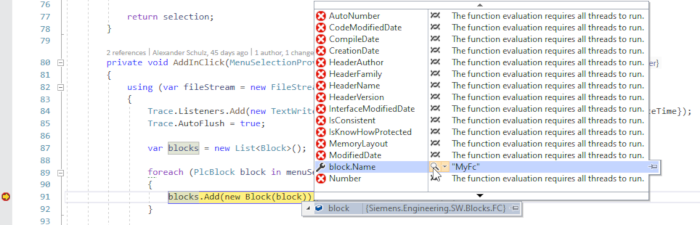
Fig. 2: Debugging of a TIA Add-In
TIA Portal add-ins
https://support.industry.siemens.com/cs/document/109773999/
S7-1500R/H AddIn
https://support.industry.siemens.com/cs/document/109769093/
Data2Unified Add-in
https://support.industry.siemens.com/cs/document/109770510/
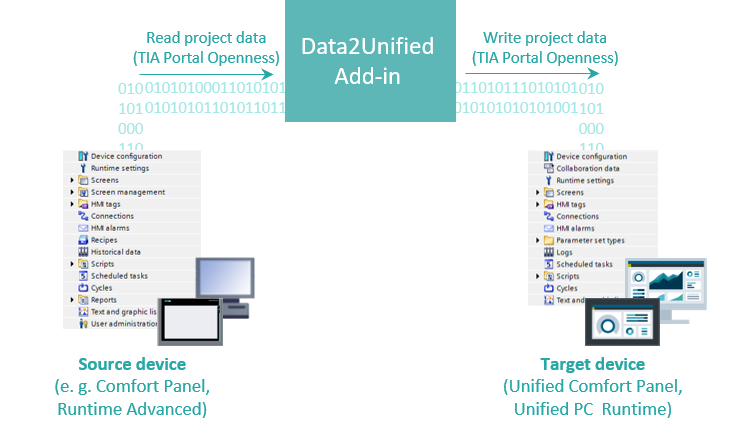
Continue to use the project contents you have created when switching over to SIMATIC WinCC Unified and save time during engineering with the “Data2Unified” add-in.
SIMATIC WinCC Unified is the all-new visualization system from Siemens for automation applications. The SIMATIC WinCC Unified System consists of the SIMATIC WinCC visualization software and the new SIMATIC HMI Unified Comfort Panels.
The “Data2Unified” add-in offers you the possibility to convert your configuration contents into a WinCC Unified configuration so that you do not have to recreate the contents of your previous configurations from scratch.
Requirements
Microsoft Visual Studio
TIA Portal from V16
Download
https://ulozto.net/tamhle/5vhpAwMigIFa/
https://fastshare.cz/15671004/tcgatewayenus.pdf
https://fastshare.cz/15671005/wcc-preference-en-us.pdf
https://fastshare.cz/15671008/step-7-wincc-v16-enus-en-us.pdf
https://fastshare.cz/15671009/wcc-options-en-us.pdf
https://fastshare.cz/15671010/wcc-communication-en-us.pdf
https://fastshare.cz/15671011/winccvisualizingprocessesrtu-en-us.pdf
https://fastshare.cz/15671012/109768002-umsteigerleitfaden-comfort-zu-unifiedcomfort-v10-doc-en.pdf
https://fastshare.cz/15671013/109770510-data2unified-manual-doc-v12-en.pdf
https://fastshare.cz/15671014/109770510-data2unified-add-in-v1-2-0-0.zip
https://fastshare.cz/15671015/109769093-s7-1500rh-addin-code-v1-1.zip
https://fastshare.cz/15671016/109769093-s7-1500rh-addin-doc-v1-1-en.pdf
https://fastshare.cz/15671017/109773999-tia-add-in-vci-git-connector-1.0.0-code.zip
https://fastshare.cz/15671018/109773999-tia-add-in-vci-git-connector-1.0.0-appl.zip
https://fastshare.cz/15671019/109773999-tia-add-in-fc-fb-converter-1.0.2-code.zip
https://fastshare.cz/15671020/109773999-tia-add-in-fc-fb-converter-1.0.2-appl.zip
https://fastshare.cz/15671021/109773999-tia-add-in-template-1.0.0-code-1-.zip
https://fastshare.cz/15671022/109779415-tia-add-in-getting-started-software-v1-1.zip
https://fastshare.cz/15671023/109779415-tia-add-in-getting-started-doc-v1-1-en.pdf
https://fastshare.cz/15671024/109773999-tia-add-in-template-1.0.0-code.zip
https://fastshare.cz/15671025/109783096-tiaaddintester-app-v1.0.61176.4406.zip
https://fastshare.cz/15671026/109783096-tiaaddintester-doc-v10-en.pdf
https://anonfiles.com/R6gdy0D5p1/TcGatewayenUS_pdf
https://anonfiles.com/Veg6y3Dfpe/WCC_Options_en-US_pdf
https://anonfiles.com/f8hcy9D6pc/109768002_Umsteigerleitfaden_Comfort_zu_UnifiedComfort_V10_DOC_en_pdf
https://anonfiles.com/h7h6y0Dfp4/WCC_PReference_en-US_pdf
https://anonfiles.com/j3hay4D4p6/109770510_Data2Unified_Add-in_V1_2_0_0_zip
https://anonfiles.com/l8h7ycDfp3/109769093_S7_1500RH_AddIn_CODE_V1_1_zip
https://anonfiles.com/n8h2yaD3p8/109769093_S7_1500RH_AddIn_DOC_V1_1_en_pdf
https://anonfiles.com/pchaybDap0/109773999_TIA_Add-In_VCI_Git_Connector_1.0.0_CODE_zip
https://anonfiles.com/r2hby9D5p7/109770510_Data2Unified_Manual_DOC_V12_en_pdf
https://anonfiles.com/tbh3y7D0p8/109773999_TIA_Add-In_FC-FB_Converter_1.0.2_CODE_zip
https://anonfiles.com/vbhayeD2p8/WCC_Communication_en-US_pdf
https://anonfiles.com/x8h6y2Ddp6/109773999_TIA_Add-In_Template_1.0.0_CODE_1_zip
https://anonfiles.com/19hbyeD2pe/109773999_TIA_Add-In_VCI_Git_Connector_1.0.0_APPL_zip
https://anonfiles.com/5bh5y8D7p9/109773999_TIA_Add-In_FC-FB_Converter_1.0.2_APPL_zip
https://anonfiles.com/74h2ydDep3/109773999_TIA_Add-In_Template_1.0.0_CODE_zip
https://anonfiles.com/99hfyaD0pa/WinCCVisualizingProcessesRTU_en-US_pdf
https://anonfiles.com/Bch3y8Dbp3/109779415_TIA_Add-In_Getting_Started_Software_V1_1_zip
https://anonfiles.com/Deh6y7D2p6/109783096_TiaAddInTester_APP_V1.0.61176.4406_zip
https://anonfiles.com/F2h9y7D5pd/109783096_TiaAddInTester_DOC_V10_en_pdf
https://anonfiles.com/J0h4y2D8p5/109779415_TIA_Add-In_Getting_Started_DOC_V1_1_EN_pdf
https://anonfiles.com/T1jfy1D7p2/STEP_7_WinCC_V16_enUS_en-US_pdf |
|
| Back to top |
|
|
atomik
Member junior


Joined: 07 Jun 2017
Posts: 79
|
| Posted: 07/06/2021 19:01 Post subject: S7-1500R/H AddIn |
|
|
S7-1500R/H AddIn
https://support.industry.siemens.com/cs/document/109769093/
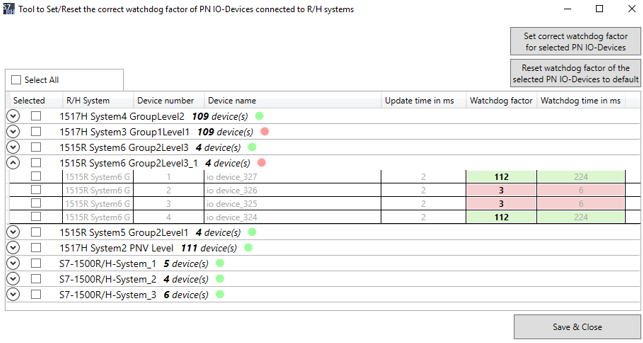
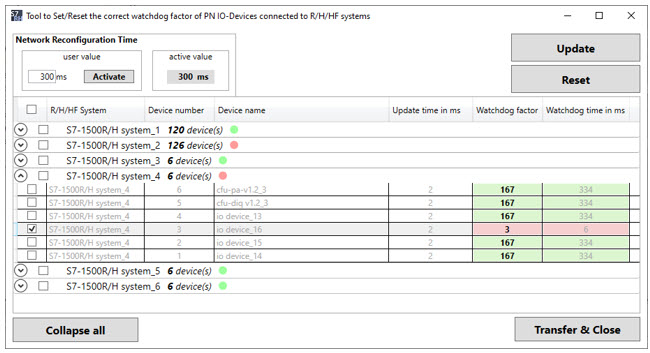
To connect a PROFINET device to a redundant system S7-1500R/H/HF, it is necessary to set the correct watchdog time for each device. The S7-1500R/H Add-In, as a context menu function for each PN IO device connected to an R/H/HF system, calculates the correct factor and updates it in the settings.
The S7-1500R/H Add-In expands the shortcut menu of the project tree in the TIA Portal and facilitates the automatic configuration of the watchdog factor on PN IO devices of the selected R/H/HF systems, either as a simple progress dialog or as a list display.
Documentation and Addin file
[url=http://www.girlshare.ro/3770062761.3]109769093_S7_1500RH_AddIn_DOC_V1_2_en.pdf[/url]
[url=http://www.girlshare.ro/3770062762.4]109769093_S7_1500RH_AddIn_CODE_V1_2_TIAP_V17.zip[/url]
[url=http://www.girlshare.ro/3770062763.5]109769093_S7_1500RH_AddIn_CODE_V1_2_TIAP_V16.zip[/url] |
|
| Back to top |
|
|
|

 FAQ
FAQ Search
 Memberlist
 Usergroups
 Register
 Profile
 Log in to check your private messages
 Log in


