 |
plc.myforum.ro
PLCs users www.plc.myforum.ro!
|
| View previous topic :: View next topic |
| Author |
Message |
Clotyx
Junior

Joined: 23 Jun 2022
Posts: 1
|
 Posted: 24/06/2022 09:17 Post subject: TIA Portal Export Graphics Tool Posted: 24/06/2022 09:17 Post subject: TIA Portal Export Graphics Tool |
 |
|
Export Graphics Tool: Exporting graphics from WinCC (TIA Portal) to a local directory
https://support.industry.siemens.com/cs/document/109562021/
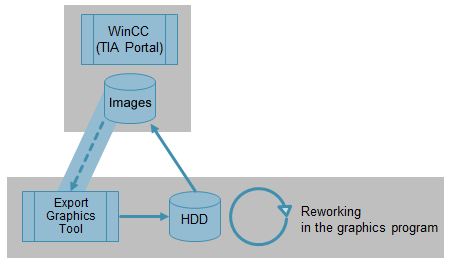
With this tool you can export graphics from the "Graphics Collection" of a WinCC (TIA Portal) configuration and then edit them with an image processing program.
The Microsoft Windows operating system provides "MS Paint" for editing graphics. This software is sufficient for minor changes to graphics. In order to use external graphics editing programs with a greater range of functions, the existing graphics must first be exported.
The "Export Graphics Tool" exports all graphics from an existing WinCC (TIA Portal) configuration to a directory of your choice. The tool retains the original file type and the object properties (e.g., transparency). After editing, the graphics are re-inserted into the configuration.
The supplied documentation describes all the steps necessary to use the "Export Graphics Tool".
https://support.industry.siemens.com/cs/attachments/109562021/109562021_TIA_Export_Graphics_Tool_DOC_v40_en.pdf
Export Graphics Tool code V16
https://support.industry.siemens.com/cs/attachments/109562021/109562021_TIA_Export_Graphics_Tool_V16.zip
CODE archive
Export Graphics Tool code V15.1
https://support.industry.siemens.com/cs/attachments/109562021/109562021_TIA_Export_Graphics_Tool_V15_CODE.zip
Export Graphics Tool code V15
https://support.industry.siemens.com/cs/attachments/109562021/109562021_TIA_Export_Graphics_Tool_V15_CODE.zip
WinCC V14 and V14 SP1
https://support.industry.siemens.com/cs/attachments/109562021/109562021_TIA_Export_Graphics_Archive_CODE.zip
What is the meaning of the warning "The '...' graphic is used in different resolutions. ..." when compiling a WinCC (TIA Portal) project?
https://support.industry.siemens.com/cs/document/109478773/
In WinCC (TIA Portal), how do you edit graphics which are used in faceplates?
https://support.industry.siemens.com/cs/document/104077044/
https://ulozto.net/tamhle/AIL9oSbDgV6U/
[URL=https://www.file-upload.net/download-14954121/109562021_TIA_Export_Graphics_Archive_CODE.zip.html]109562021_TIA_Export_Graphics_Archive_CODE.zip[/URL]
[URL=https://www.file-upload.net/download-14954119/109562021_TIA_Export_Graphics_Tool_V15_CODE.zip.html]109562021_TIA_Export_Graphics_Tool_V15_CODE.zip[/URL]
[URL=https://www.file-upload.net/download-14954120/109562021_TIA_Export_Graphics_Tool_V15.1_CODE.zip.html]109562021_TIA_Export_Graphics_Tool_V15.1_CODE.zip[/URL]
[URL=https://www.file-upload.net/download-14954123/109562021_TIA_Export_Graphics_Tool_DOC_v40_en.pdf.html]109562021_TIA_Export_Graphics_Tool_DOC_v40_en.pdf[/URL]
[URL=https://www.file-upload.net/download-14954122/109562021_TIA_Export_Graphics_Tool_V16.zip.html]109562021_TIA_Export_Graphics_Tool_V16.zip[/URL] |
|
| Back to top |
|
 |
|
|
You cannot post new topics in this forum
You cannot reply to topics in this forum
You cannot edit your posts in this forum
You cannot delete your posts in this forum
You cannot vote in polls in this forum
|
Powered by phpBB © 2001, 2005 phpBB Group
Fa-ti si tu propriul forum GRATUIT, pe www.myforum.ro |
 FAQ
FAQ Search
 Memberlist
 Usergroups
 Register
 Profile
 Log in to check your private messages
 Log in


