| View previous topic :: View next topic |
| Author |
Message |
ffstest
Junior

Joined: 10 Apr 2019
Posts: 4
|
 Posted: 11/04/2019 01:30 Post subject: Swapping EEPROM from PLC?? Posted: 11/04/2019 01:30 Post subject: Swapping EEPROM from PLC?? |
 |
|
Hello,
Unfortunately I have a S7-200 SMART (SR40 CPU) v2.01 on a machine from China that has a dead output. I cannot read nor write to the PLC because of Level 4 protection.
Is it possible to swap the EEPROM to another working PLC (without burned output) of the same tip to keep the program and parameters?
The program is level 4 protected and the manufacturer of the machine out of business.
I hope EEPROM swap could work or is there a way to downgrade to level 3 on the SMART S7-200 v2.01? I could modify the program to use another output which is fine (unused)
Any clues will greatly help!
Thank you very much!!!
Steve |
|
| Back to top |
|
 |
luke
Junior 2

Joined: 11 May 2014
Posts: 27
|
| Posted: 11/04/2019 05:50 Post subject: |
|
|
The standard S7-200 SMART CPU models support standard, commercial microSDHC cards with a capacity ranging from 4 GB to 16 GB using the FAT32 file system format. You can use a microSDHC card as a program transfer card for portable storage for your program and project data.
https://anonfile.com/WeF6B7bfn3/s7-200_SMART_system_manual_en-US_pdf |
|
| Back to top |
|
|
ffstest
Junior
Joined: 10 Apr 2019
Posts: 4
|
| Posted: 11/04/2019 13:08 Post subject: |
|
|
| luke wrote: | The standard S7-200 SMART CPU models support standard, commercial microSDHC cards with a capacity ranging from 4 GB to 16 GB using the FAT32 file system format. You can use a microSDHC card as a program transfer card for portable storage for your program and project data.
https://anonfile.com/WeF6B7bfn3/s7-200_SMART_system_manual_en-US_pdf |
Thank you for the manual but I cannot transfer any program neither UPLOAD or DOWNLOAD (To SD card or to the computer )since the level 4 prohibit this. They ask a password if I want to STOP the PLC from STEP7 SMART MICRO/WIN software.
 |
|
| Back to top |
|
|
ffstest
Junior
Joined: 10 Apr 2019
Posts: 4
|
| Posted: 11/04/2019 16:12 Post subject: |
|
|
I took a picture to show you what I am talking about for Level 4 System Block Security.

The manufacturer of the machine locked any operation on the PLC with this security... how to bypass or possible to swap to another PLC ?
Thanks a lot!
Steve |
|
| Back to top |
|
|
luke
Junior 2
Joined: 11 May 2014
Posts: 27
|
| Posted: 11/04/2019 19:12 Post subject: |
|
|
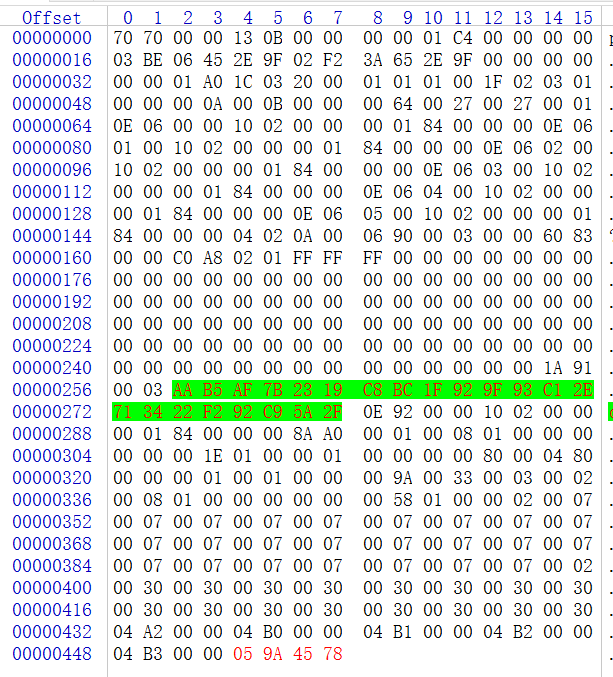
try something like
https://anonfile.com/q3z2T2ben2/S7200CN_V7_rar |
|
| Back to top |
|
|
ffstest
Junior
Joined: 10 Apr 2019
Posts: 4
|
| Posted: 11/04/2019 20:01 Post subject: |
|
|
I see you modified the bin hex at offset starting at 448 ---> 05 9A 45 78
What it does?
Thanks for the software but it is for 200 CN series.
I have S7-200 SMART SR40 CPU with ethernet programming. There is no serial PPI or USB possible.
More like this --->>> http://www.plcjiemi.com/smart.htm (translate to your language) but it's very expensive.
Our machine PLC configuration:


Thanks luke for all the time you took to reply! 
Steve |
|
| Back to top |
|
|
|

 FAQ
FAQ Search
 Memberlist
 Usergroups
 Register
 Profile
 Log in to check your private messages
 Log in


