| View previous topic :: View next topic |
| Author |
Message |
kna1512
Junior

Joined: 23 Feb 2015
Posts: 15
Location: Europe
|
 Posted: 25/02/2015 23:34 Post subject: Studio 5000 + Emulate 5000 activation Posted: 25/02/2015 23:34 Post subject: Studio 5000 + Emulate 5000 activation |
 |
|
Dear all
Is there anyone who can help me to activate studio 5000 v21 and Emulate 5000.
I have read almost all the notes. some of which are not understandable to me probably because I am not a software expert. I recently bought a used ControlLogix and would learn about it. Therefore I am desperate to get started in a studio 5000. I really appreciate all the incoming feedback.
Thanks in advance |
|
| Back to top |
|
 |
psgama
Member junior

Joined: 24 Mar 2014
Posts: 81
|
| Posted: 26/02/2015 02:46 Post subject: |
|
|
| Full Version number of studio please. There is a difference between 21.00.00 and 21.03.01 |
|
| Back to top |
|
|
kna1512
Junior
Joined: 23 Feb 2015
Posts: 15
Location: Europe
|
| Posted: 26/02/2015 10:19 Post subject: |
|
|
psgama
Thanks for your feedback.
It is v21.00.03 and i am using windows-8 |
|
| Back to top |
|
|
psgama
Member junior
Joined: 24 Mar 2014
Posts: 81
|
| Posted: 27/02/2015 04:07 Post subject: |
|
|
Have you tried the following?
Credit to fake plc
| Code: |
Note the new Studio 5000 V21.0.0.0 now uses digital signatures to protect the files.
This method will work for now.
Factory Activation Software 3.51.0.0040
Using FLEXnet Licensing v11.10.0.3 build 96515 i86_n3 (lmgr.lib)
Patch to allow licenses
Hexedit flexsvr.exe at address E4D0
From 55 8B EC 83 E4 F8 81 EC To 33 C0 40 89 45 FC 48 C3
Patch to accept licenses
Hexedit C:\Program Files\Common Files\Rockwell\FTACommon.dll at address 40FB9
From 34 02 To 30 90
Patch to bypass digital signature check
Hexedit C:\Program Files\Rockwell Software\Studio 5000\Launcher\ActivationInterop.dll at address 5C86
Hexedit C:\Program Files\Rockwell Software\Studio 5000\Logix Designer\ENU\v21\Bin\LogixDesigner.exe at address 1DFAF6 (V21.0.0)
Hexedit C:\Program Files\Rockwell Software\RSLinx\RSLINX.EXE at address D9092 (V3.51.10.00)
From 0F 85 46 03 00 00 To E9 2C 00 00 00 90
It now shows a message stating that files have been tampered with.
The following will remove these messages
Patch to bypass digital signature warning message
Hexedit C:\Program Files\Rockwell Software\Studio 5000\Launcher\ftastub.dll at address FCD
Hexedit C:\Program Files\Rockwell Software\Studio 5000\Logix Designer\ENU\v21\Bin\ftastub.dll at address FCD
Hexedit C:\Program Files\Rockwell Software\RSLinx\FTAStub.dll at address FCD
From 40 03 To 09 00
Licenses
FEATURE RS5K_700.exe flexsvr 1.0 permanent 10 VENDOR_STRING=8283999999 \
HOSTID=ANY vendor_info="PRODUCT_NAME:RS5K_700.exe" SN=8283999999 \
SIGN="0088 4C88 9999 CCCC 1122 3344 5566 7700 FFFF FFFF FFFF \
FFFF FFFF FFFF FFFF"
FEATURE RSLINX.EXE flexsvr 1.0 permanent 10 VENDOR_STRING=8283999999 \
HOSTID=ANY vendor_info="PRODUCT_NAME:RSLINX.EXE" SN=8283999999 \
SIGN="00BF 8888 9999 CCCC 1122 3344 5566 7700 FFFF FFFF FFFF \
FFFF FFFF FFFF FFFF"
FEATURE RSLINX.GW flexsvr 1.0 permanent 10 VENDOR_STRING=8283999999 \
HOSTID=ANY vendor_info="PRODUCT_NAME:RSLINX.EXE Gateway" SN=8283999999 \
SIGN="00CF 8888 9999 CCCC 1122 3344 5566 7700 FFFF FFFF FFFF \
FFFF FFFF FFFF FFFF"
FEATURE RSLINX.SN flexsvr 1.0 permanent 10 VENDOR_STRING=8283999999 \
HOSTID=ANY vendor_info="PRODUCT_NAME:RSLINX.EXE SN" SN=8283999999 \
SIGN="00DF 8888 9999 CCCC 1122 3344 5566 7700 FFFF FFFF FFFF \
FFFF FFFF FFFF FFFF"
FEATURE RS5K_GLX.exe flexsvr 1.0 permanent 10 VENDOR_STRING=8283999999 \
HOSTID=ANY vendor_info="PRODUCT_NAME:RS5K_GLX.exe" SN=8283999999 \
SIGN="00EF 8888 9999 CCCC 1122 3344 5566 7700 FFFF FFFF FFFF \
FFFF FFFF FFFF FFFF"
FEATURE RS5K_MLP.exe flexsvr 1.0 permanent 10 VENDOR_STRING=8283999999 \
HOSTID=ANY vendor_info="PRODUCT_NAME:RS5K_MLP.exe" SN=8283999999 \
SIGN="00FF 8888 9999 CCCC 1122 3344 5566 7700 FFFF FFFF FFFF \
FFFF FFFF FFFF FFFF"
FEATURE RS5K_000.exe flexsvr 1.0 permanent 10 VENDOR_STRING=8283999999 \
HOSTID=ANY vendor_info="PRODUCT_NAME:RS5K_700.exe" SN=8283999999 \
SIGN="009F 8888 9999 CCCC 1122 3344 5566 7700 FFFF FFFF FFFF \
FFFF FFFF FFFF FFFF"
|
|
|
| Back to top |
|
|
kna1512
Junior
Joined: 23 Feb 2015
Posts: 15
Location: Europe
|
| Posted: 27/02/2015 12:48 Post subject: |
|
|
Hi psgama
I have almost done with hexedit all files. but have no idea how to activate the studio 5000 . would you please be patiently tell me what to do in the next step. To be honest I don't know what to do with here
Licenses
FEATURE RS5K_700.exe flexsvr 1.0 permanent 10 VENDOR_STRING=8283999999 \
HOSTID=ANY vendor_info="PRODUCT_NAME:RS5K_700.exe" SN=8283999999 \
SIGN="0088 4C88 9999 CCCC 1122 3344 5566 7700 FFFF FFFF FFFF \
FFFF FFFF FFFF FFFF"
FEATURE RSLINX.EXE flexsvr 1.0 permanent 10 VENDOR_STRING=8283999999 \
HOSTID=ANY vendor_info="PRODUCT_NAME:RSLINX.EXE" SN=8283999999 \
SIGN="00BF 8888 9999 CCCC 1122 3344 5566 7700 FFFF FFFF FFFF \
FFFF FFFF FFFF FFFF"
FEATURE RSLINX.GW flexsvr 1.0 permanent 10 VENDOR_STRING=8283999999 \
HOSTID=ANY vendor_info="PRODUCT_NAME:RSLINX.EXE Gateway" SN=8283999999 \
SIGN="00CF 8888 9999 CCCC 1122 3344 5566 7700 FFFF FFFF FFFF \
FFFF FFFF FFFF FFFF"
FEATURE RSLINX.SN flexsvr 1.0 permanent 10 VENDOR_STRING=8283999999 \
HOSTID=ANY vendor_info="PRODUCT_NAME:RSLINX.EXE SN" SN=8283999999 \
SIGN="00DF 8888 9999 CCCC 1122 3344 5566 7700 FFFF FFFF FFFF \
FFFF FFFF FFFF FFFF"
FEATURE RS5K_GLX.exe flexsvr 1.0 permanent 10 VENDOR_STRING=8283999999 \
HOSTID=ANY vendor_info="PRODUCT_NAME:RS5K_GLX.exe" SN=8283999999 \
SIGN="00EF 8888 9999 CCCC 1122 3344 5566 7700 FFFF FFFF FFFF \
FFFF FFFF FFFF FFFF"
FEATURE RS5K_MLP.exe flexsvr 1.0 permanent 10 VENDOR_STRING=8283999999 \
HOSTID=ANY vendor_info="PRODUCT_NAME:RS5K_MLP.exe" SN=8283999999 \
SIGN="00FF 8888 9999 CCCC 1122 3344 5566 7700 FFFF FFFF FFFF \
FFFF FFFF FFFF FFFF"
FEATURE RS5K_000.exe flexsvr 1.0 permanent 10 VENDOR_STRING=8283999999 \
HOSTID=ANY vendor_info="PRODUCT_NAME:RS5K_700.exe" SN=8283999999 \
SIGN="009F 8888 9999 CCCC 1122 3344 5566 7700 FFFF FFFF FFFF \
FFFF FFFF FFFF FFFF" |
|
| Back to top |
|
|
psgama
Member junior
Joined: 24 Mar 2014
Posts: 81
|
| Posted: 27/02/2015 17:48 Post subject: |
|
|
If you have windows 7
click start, search services.msc
Find Factory Talk Activation Service.
Hit Stop
Go to C:\Users\Public\Documents\Rockwell Automation\Activations
open ftasystem.lic in notepad
Paste the contents inside after
# Rockwell Software Activation File
# Copyright (c) 2012 Rockwell Automation Technologies, Inc. All Rights Reserved
SERVER XXXXXX
USE_SERVER XXXXXX
VENDOR flexsvr
But before the FTA System Placeholder
Start the activation service back up.
Now licenses should be available
If you have XP same steps, but it will be C:\Documents and Settings\All Users\ ect ect |
|
| Back to top |
|
|
kna1512
Junior
Joined: 23 Feb 2015
Posts: 15
Location: Europe
|
| Posted: 27/02/2015 18:04 Post subject: |
|
|
| psgama wrote: | If you have windows 7
click start, search services.msc
Find Factory Talk Activation Service.
Hit Stop
Go to C:\Users\Public\Documents\Rockwell Automation\Activations
open ftasystem.lic in notepad
Paste the contents inside after
# Rockwell Software Activation File
# Copyright (c) 2012 Rockwell Automation Technologies, Inc. All Rights Reserved
SERVER XXXXXX
USE_SERVER XXXXXX
VENDOR flexsvr
But before the FTA System Placeholder
Start the activation service back up.
Now licenses should be available
If you have XP same steps, but it will be C:\Documents and Settings\All Users\ ect ect |
Many thanks for all the detailed instructions. I use w8
I have successfully activated studio 5000 v21 but I can not run RSLogix due. An error message as shown below. have you or others an idea of what the error is. I have forgotten something.
Fatal Error!
Application Path: C:\Program Files (x86)\Rockwell Software\Studio 5000\Logix Designer\ENU\v21\Bin\LogixDesigner.exe
Elapsed execution time: 26 seconds
Version: V21.00.00 (Release)
Source File: unknown
Line Number: -1
Function/Method: unknown
OS Version: Unrecognized OS 64-bit ( - Build 9200)
Thread Id: 00000604 (1540)
Error 0xc0000005 (-1073741819)
EXCEPTION_ACCESS_VIOLATION - An "access violation" exception was generated.
No project file is currently open. |
|
| Back to top |
|
|
kna1512
Junior
Joined: 23 Feb 2015
Posts: 15
Location: Europe
|
| Posted: 27/02/2015 22:44 Post subject: |
|
|
Yeeesssss it works now 
Thank you so much dear psgama. I am very grateful for your help and wish beste for you. |
|
| Back to top |
|
|
stevek
Junior

Joined: 22 Mar 2015
Posts: 2
|
| Posted: 25/03/2015 23:02 Post subject: Access Error |
|
|
| kna1512, What did you do to solve the "access violation error"? I have the same issue after patching. Activation worked but cannot open or făurite an project. Thank you. |
|
| Back to top |
|
|
kna1512
Junior
Joined: 23 Feb 2015
Posts: 15
Location: Europe
|
| Posted: 26/03/2015 16:02 Post subject: Re: Access Error |
|
|
| stevek wrote: | | kna1512, What did you do to solve the "access violation error"? I have the same issue after patching. Activation worked but cannot open or create an project. Thank you. |
I solved the problem by using win7, Good luck |
|
| Back to top |
|
|
stevek
Junior
Joined: 22 Mar 2015
Posts: 2
|
| Posted: 26/03/2015 20:08 Post subject: Access Violation |
|
|
Thank you KNA1512 for your reply, unfortunately I'm already running win7.
Anyone solved this before?
[url=http://www.99poze.ro/p/98ada7ca7a8d4f6cfe88f27d07e6e07a.jpg]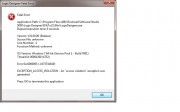 [/url]+ [/url]+ |
|
| Back to top |
|
|
kna1512
Junior
Joined: 23 Feb 2015
Posts: 15
Location: Europe
|
| Posted: 27/03/2015 01:36 Post subject: Re: Access Violation |
|
|
| stevek wrote: | Thank you KNA1512 for your reply, unfortunately I'm already running win7.
Anyone solved this before?
[url=http://www.99poze.ro/p/98ada7ca7a8d4f6cfe88f27d07e6e07a.jpg][/url]+ |
I can only recommend you to re-install and remember to stop all the files that belong to rockwell and factorytalk in Task " manager - service" before using hex editor. Read and do precis as psgama has described in his post |
|
| Back to top |
|
|
JimminyJim
Junior
Joined: 15 Jul 2015
Posts: 1
|
| Posted: 15/07/2015 09:25 Post subject: |
|
|
Did you find a solution for this? I am getting the same error message when I start a project and Logix Designer loads.
Im running Windows 7 64-bit. But it doesn't raise that as the problem.
This is the error I get:
Fatal Error!
Application Path: C:\Program Files (x86)\Rockwell Software\Studio 5000\Logix Designer\ENU\v21\Bin\LogixDesigner.exe
Elapsed execution time: 20 seconds
Version: V21.00.00 (Release)
Source File: RxServices.cpp
Line Number: 591
Function/Method: RxServicesInit
OS Version: Windows 7 64-bit ( - Build 7600)
Thread Id: 000019c8 (6600)
Error 0x80030005 (-2147287035)
0x80030005 - Access Denied.
No project file is currently open. |
|
| Back to top |
|
|
raspik
Junior 2

Joined: 20 Jan 2015
Posts: 31
|
| Posted: 15/07/2015 16:20 Post subject: |
|
|
| JimminyJim wrote: | Did you find a solution for this? I am getting the same error message when I start a project and Logix Designer loads.
Im running Windows 7 64-bit. But it doesn't raise that as the problem.
This is the error I get:
Fatal Error!
Application Path: C:\Program Files (x86)\Rockwell Software\Studio 5000\Logix Designer\ENU\v21\Bin\LogixDesigner.exe
Elapsed execution time: 20 seconds
Version: V21.00.00 (Release)
Source File: RxServices.cpp
Line Number: 591
Function/Method: RxServicesInit
OS Version: Windows 7 64-bit ( - Build 7600)
Thread Id: 000019c8 (6600)
Error 0x80030005 (-2147287035)
0x80030005 - Access Denied.
No project file is currently open. |
errors source
http://ddkonline.blogspot.ro/2009/07/fix-sql-reporting-services-2008-error.html
http://codeverge.com/asp.net.config-deploy/system.runtime.interopservices.comexcep/282664
http://forums.asp.net/t/1321769.aspx?System+Runtime+InteropServices+COMException+0x80030005+Access+Denied |
|
| Back to top |
|
|
balu
Junior
Joined: 23 Nov 2018
Posts: 1
|
| Posted: 11/10/2019 10:36 Post subject: |
|
|
| Try to run as administrator |
|
| Back to top |
|
|
|

 FAQ
FAQ Search
 Memberlist
 Usergroups
 Register
 Profile
 Log in to check your private messages
 Log in


