 |
plc.myforum.ro
PLCs users www.plc.myforum.ro!
|
| View previous topic :: View next topic |
| Author |
Message |
valz
Member 3


Joined: 26 Jul 2015
Posts: 771
|
 Posted: 02/12/2022 13:58 Post subject: STEP 7 (TIA Portal) uploading when project version no matche Posted: 02/12/2022 13:58 Post subject: STEP 7 (TIA Portal) uploading when project version no matche |
 |
|
What options are available in STEP 7 (TIA Portal) for uploading when the project version in the CPU no longer matches the version on your PG/PC?
https://support.industry.siemens.com/cs/document/97554052/
Use the functions in the "Online" menu if you want to download the project data from the device to your programing device.
Description
It might happen that a STEP 7 (TIA Portal) project has been created in a CPU with a different (newer or older) version than installed on your PG/PC and has been loaded into the device. If you wish to continue processing or save the STEP 7 (TIA Portal) project, you need the functions that are available in the "Online" menu. The scope of functions varies slightly between the different versions of STEP 7 (TIA Portal).
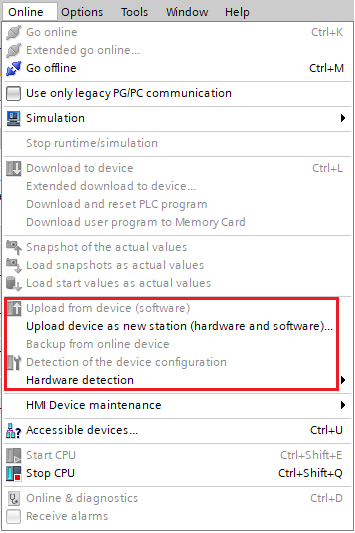
Fig. 1
Table 1 below gives you an overview of which online functions are available under "Upload from device (software)".
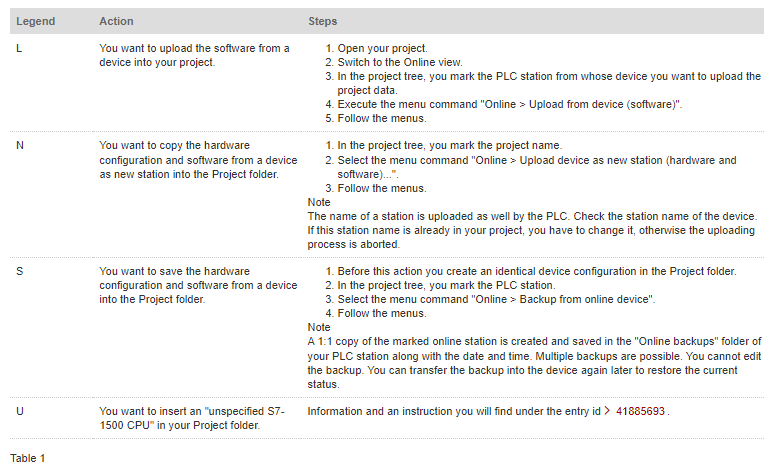
If you want to load a STEP 7 (TIA Portal) program from a CPU into your programming device whose version is different to the version with which it was created and loaded into the CPU, the following table presents the combination options. Here you have an overview of which online functions are possible for the upload in this context. The designations in Table 2 correspond to the legend in Table 1.
Note
If you upgrade a project from version V14 or V14 SP1 to version V15/V15.1, you can then connect devices online that were loaded with version V14 or V14 SP1. The blocks of these devices remain functional and do not have to be recompiled.
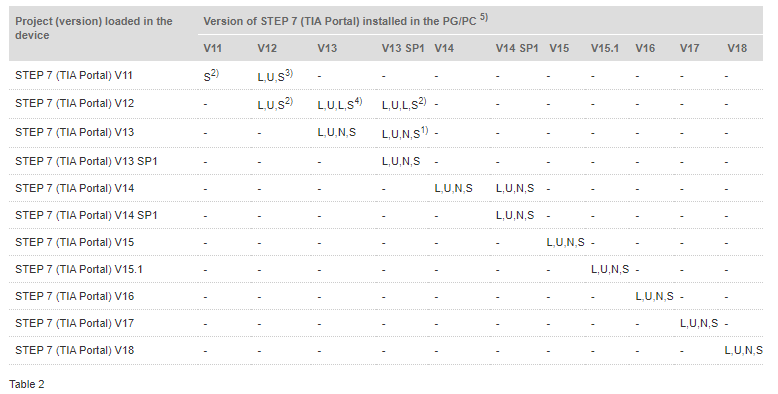
1) Only in Compatibility mode.
The Compatibility mode is no longer supported in TIA Portal V14 and higher.
2) "S" only for the S7-300/S7-400 CPUs
3) "S" only for the S7-300/S7-400 CPUs, "L" for all S7 CPUs in Compatibility mode
4) "L" possible in Compatibility mode, "S" only for the S7-300/S7-400 CPUs.
5) The Online & Diagnostics via the Online accesses is version independent and always functions.
Note on the upload
During the upload, STEP 7 (TIA Portal) checks whether or not the project data has been created on the device with a different version to the open version of the TIA Portal. Refer also to the information in the STEP 7 (TIA Portal) Online Help:
If the project data has been created with a different product version, the "Preview for the download from device" dialog gives information about whether all the conditions have been fulfilled for the loading. If necessary, select a command in the selection menu in the "Action" column. As soon as the view has been updated and loading is possible, the "Upload from device" button is enabled.
If data blocks have been created in a different product version of the TIA Portal, you can only edit the global data blocks. You have to edit the instance data blocks via the function block.
The hardware configuration in the device must be created in STEP 7 (TIA Portal) V12 or higher, otherwise you cannot load the hardware configuration.
Further Information
More information on the topic of "Loading the project data from the CPU into the programming device" is available in the following table:
https://support.industry.siemens.com/cs/document/109476392/how-do-you-upgrade-projects-in-tia-portal-v14-and-higher-that-you-created-with-previous-versions-of-tia-portal
https://support.industry.siemens.com/cs/document/41885693/in-step-7- (tia-portal)-how-do-you-load-the-program-blocks-with-the-plc-tags-and-plc-data-types-from-the-cpu-into-the-programming-device
https://support.industry.siemens.com/cs/document/82169157/in-step-7- (tia-portal)-v13-sp1-how-do-you-load-project-data-from-a-device-that-has-been-configured-with-step-7-(tia-portal)-v12-sp1-or-v13
https://support.industry.siemens.com/cs/document/66027369/how-do-you-do-a-program-upload-in-step-7- (tia-portal)-v12-when-the-device-has-been-configured-with-step-7-v11
SIMATIC STEP 7 Basic/Professional V17 and SIMATIC WinCC V17 Manual
https://support.industry.siemens.com/cs/attachments/109798671/STEP_7_WinCC_V17_enUS_en-US.pdf |
|
| Back to top |
|
 |
|
|
You cannot post new topics in this forum
You cannot reply to topics in this forum
You cannot edit your posts in this forum
You cannot delete your posts in this forum
You cannot vote in polls in this forum
|
Powered by phpBB © 2001, 2005 phpBB Group
Fa-ti si tu propriul forum GRATUIT, pe www.myforum.ro |
 FAQ
FAQ Search
 Memberlist
 Usergroups
 Register
 Profile
 Log in to check your private messages
 Log in


