 |
plc.myforum.ro
PLCs users www.plc.myforum.ro!
|
| View previous topic :: View next topic |
| Author |
Message |
phucuong23192
Junior 2

Joined: 22 Apr 2015
Posts: 32
|
 Posted: 13/11/2015 07:46 Post subject: SQL and Report Excel For win cc professional V13 Posted: 13/11/2015 07:46 Post subject: SQL and Report Excel For win cc professional V13 |
 |
|
I want to connect SQL by script Wincc V13 and exports Excel follow Template of me. Please Help me information about this issues. I very thanks for your help and share.  |
|
| Back to top |
|
 |
carlito
Member 2

Joined: 02 Feb 2014
Posts: 374
|
| Posted: 14/11/2015 00:00 Post subject: Re: SQL and Report Excel For win cc professional V13 |
|
|
| phucuong23192 wrote: | | I want to connect SQL by script Wincc V13 and exports Excel follow Template of me. Please Help me information about this issues. I very thanks for your help and share. |
use ConnString, with Windows Authentication.
| Code: | | "Provider=SQLOLEDB.1;Data Source=MiPC\WinCC; Initial Catalog=MiBD; Integrated Security=SSPI;Persist Security Info=True" |
|
|
| Back to top |
|
|
phucuong23192
Junior 2
Joined: 22 Apr 2015
Posts: 32
|
| Posted: 14/11/2015 06:34 Post subject: Re: SQL and Report Excel For win cc professional V13 |
|
|
| carlito wrote: | | phucuong23192 wrote: | | I want to connect SQL by script Wincc V13 and exports Excel follow Template of me. Please Help me information about this issues. I very thanks for your help and share. |
use ConnString, with Windows Authentication.
| Code: | | "Provider=SQLOLEDB.1;Data Source=MiPC\WinCC; Initial Catalog=MiBD; Integrated Security=SSPI;Persist Security Info=True" |
|
thank you. But I hope you help me with document about this issue. or project about wincc V13sp1 connect SQL and report Excel.  |
|
| Back to top |
|
|
stromboli
Junior

Joined: 30 May 2015
Posts: 15
|
| Posted: 14/11/2015 18:05 Post subject: |
|
|
How can you graphically display the contents of the tag archive of a Comfort Panel or the WinCC Runtime Advanced on the PC without WinCC (TIA Portal)?
https://support.industry.siemens.com/cs/document/60520367/how-can-you-graphically-display-the-contents-of-the-tag-archive-of-a-comfort-panel-or-the-wincc-runtime-advanced-on-the-pc-without-wincc-%28tia-portal%29?dti=0&lc=en-WW
Export of WinCC / CAS Archive Data using the WinCC OLE DB Provider
https://support.industry.siemens.com/cs/document/35840700/export-of-wincc-cas-archive-data-using-the-wincc-ole-db-provider?dti=0&lc=en-WW
| Code: |
Dim strSQLServer, strDatabase
strSQLServer = HMIRuntime.Tags("@ServerName").Read
If InStr(strSQLServer, "/") Then
For X = Len(strSQLServer) To 1 Step -1
If Mid(strSQLServer, X, 1) = "/" Then
strSQLServer = Left(strSQLServer, X - 1)
Exit For
End If
Next
End If
Dim hilf
Set hilf = HMIRuntime.Tags("@DatasourceNameRT")
hilf.Read
strDatabase = hilf.Value
strConnectionString = "Provider=SQLOLEDB.1;Integrated Security=SSPI;Persist Security Info=False;" & _
"Initial Catalog=" & strDatabase & ";" & _
"Data Source=" & strSQLServer & "\WINCC"
Set objConnection = CreateObject("ADODB.Connection")
objConnection.ConnectionString = strConnectionString
objConnection.CursorLocation = 3
objConnection.Open
'Attach The Record Set To The Connection
Set oRs = CreateObject("ADODB.Recordset")
Set objCommand = CreateObject("ADODB.Command")
objCommand.CommandType = 1
Set objCommand.ActiveConnection = objConnection
StartDate = "2015-07-07 00:00:00"
EndDate = "2015-07-07 12:00:00"
strSQL = "TAG:R,'arhive_m1\m1_current_t2',"& StartDate & EndDate & ",TimeStep=0,258"
objCommand.CommandText = strSQL
Set oRs = objCommand.Execute |
How do you access an SQL database in WinCC Runtime Advanced using a script?
SQL databases are accessed in WinCC Runtime Advanced by means of scripts, except when archiving tags or messages.
In order to access an SQL database, there must be a database created in the SQL server.
WinCC Runtime Advanced acts as an SQL client.
https://support.industry.siemens.com/cs/document/61883659/how-do-you-access-an-sql-database-in-wincc-runtime-advanced-using-a-script?dti=0&lc=en-WW
https://support.industry.siemens.com/cs/attachments/61883659/61883659_WinCC_RuntimeAdv_access_SQL_via_script_DOCU_en.pdf
https://support.industry.siemens.com/cs/attachments/61883659/61883659_WinCC_RuntimeAdv_access_SQL_via_script_PROJ.zip
Runnability and test environment
The following table lists the components that have been used to făurite this entry and verify the functions described.
PC operating system: Microsoft Windows 7 SP1
HMI software: WinCC Advanced V13 Sp1
HMI system: WinCC Advanced Runtime V13 SP1
How do you log tags and messages with WinCC Advanced V11 in an SQL database?
https://support.industry.siemens.com/cs/document/61886098/how-do-you-log-tags-and-messages-with-wincc-advanced-v11-in-an-sql-database?dti=0&lc=en-WW
https://support.industry.siemens.com/cs/attachments/61886098/61886098_WinCC_Adv_Archivierung_SQL_Datenbank_en.pdf
https://support.industry.siemens.com/cs/attachments/61886098/Project_2012-07-19.zip
The screens and downloads in this FAQ response were created with WinCC Advanced V11 SP2.
Find examples with:
What options do you have for exporting a database in SIMATIC WinCC?
SIMATIC WinCC/Connectivity Pack
https://support.industry.siemens.com/cs/document/19300688/what-options-do-you-have-for-exporting-a-database-in-simatic-wincc?dti=0&lc=en-WW
or
SIMATIC WinCC/IndustrialDataBridge
https://support.industry.siemens.com/cs/document/21980374/delivery-release-simatic-winccindustrialdatabridge-v6.1?dti=0&lc=en-WW |
|
| Back to top |
|
|
stromboli
Junior
Joined: 30 May 2015
Posts: 15
|
| Posted: 14/11/2015 18:18 Post subject: |
|
|
PC-based Automation: Simple Migration of S7-300/S7-400 - projects to S7-1500 Software Controller or WinAC RTX with TIA Portal (STEP 7 and WinCC)
https://support.industry.siemens.com/cs/document/67121011/pc-based-automation-simple-migration-of-s7-300s7-400-projects-to-s7-1500-software-controller-or-winac-rtx-with-tia-portal-%28step-7-and-wincc%29?dti=0&lc=en-US
PC-based Automation: S7-1500 Software Controller or WinAC RTX in Combination with Drive Control, Safety, Database Connection and Visualization with TIA Portal
https://support.industry.siemens.com/cs/document/62521281/pc-based-automation-s7-1500-software-controller-or-winac-rtx-in-combination-with-drive-control-safety-database-connection-and-visualization-with-tia-portal?dti=0&lc=en-US |
|
| Back to top |
|
|
stromboli
Junior
Joined: 30 May 2015
Posts: 15
|
| Posted: 14/11/2015 18:30 Post subject: |
|
|
ScriptDB
| Code: | Function ProcesoBD(AW,SD,ED,Query)
Dim objConnection,objConnection2,objConnection3
Dim objCommand, objCommand2,objCommand3
Dim objRecordset, objRecordset2,objRecordset3
Dim strConnectionString,strConnectionString2,strConnectionString3
Dim strSQL,strSQL2,strSQL3
Dim m,n,s,V,t
Dim Fill,WordName,j, Actual, OneBefore
Dim StartDate,EndDate
Dim Y1,M1,Dia1,Hr1,N1,S1
Dim Y2,M2,Dia2,Hr2,N2,S2
Dim MachineNameRT, DSNRT, Pro,DSN,DS,NombreTag,Ventana
Const TableName = "Comparacion"
Const DataBaseName = "GT5000"
Const ServerName = "TAMSA_SERVER_01\WINCC"
If Query=1 Then
Y1=DatePart("yyyy",SD)
M1=DatePart("m",SD)
Dia1=DatePart("d",SD)
Hr1=DatePart("h",SD)
N1=DatePart("n",SD)
S1=DatePart("s",SD)
Y2=DatePart("yyyy",ED)
M2=DatePart("m",ED)
Dia2=DatePart("d",ED)
Hr2=DatePart("h",ED)
N2=DatePart("n",ED)
S2=DatePart("s",ED)
Dia1=Right("00" & Dia1,2)
M1=Right("00" & M1,2)
N1=Right("00" & N1,2)
Hr1=Right("00" & Hr1,2)
S1=Right("00" & S1,2)
Dia2=Right("00" & Dia2,2)
M2=Right("00" & M2,2)
N2=Right("00" & N2,2)
Hr2=Right("00" & Hr2,2)
S2=Right("00" & S2,2)
StartDate="'" & Y1 & "-" & M1 & "-" & Dia1 & " "_
& Hr1 &":" & N1 & ":" & S1 & "',"
EndDate= "'" & Y2 & "-" & M2 & "-" & Dia2 & " "_
& Hr2 &":" & N2 & ":" & S2 & "'"
'HMIRuntime.Tags("FechaInicio").Write StartDate
'HMIRuntime.Tags("FechaFin").Write EndDate
Else
StartDate=SD
EndDate=ED
End If
'CONEXIÓN A LA BASE DE DATOS
strSQL = "Tag:R,'Drives\"&AW&"',"& StartDate & EndDate & ",TimeStep=0,258"
HMIRuntime.Tags("FechaInicio").Write strSQL
Set MachineNameRT = HMIRuntime.Tags("@LocalMachineName")
Set DSNRT = HMIRuntime.Tags("@DatasourceNameRT")
'Preparando el string de conexión
Pro="Provider=WinCCOLEDBProvider.1;"
'Primera instalcio de WinCCOLEDB
DSN="Catalog=" & DSNRT.Read & ";"
'Nombre de la BD WinCC
DS= "Data Source=" & MachineNameRT.Read & "\WinCC" 'Data Source
'Construcción de cadena completa
'strConnectionString = Pro + DSN + DS
strConnectionString = "Provider=WinCCOLEDBProvider.1;Catalog=CC_TAMSA_10_10_08_09_19_06R;Data Source=TAMSA_SERVER_01\WinCC"
Set objConnection = CreateObject("ADODB.Connection")
objConnection.ConnectionString = strConnectionString
objConnection.CursorLocation=3
objConnection.Open
Set objRecordSet = CreateObject("ADODB.Recordset")
Set objCommand = CreateObject("ADODB.Command")
With objCommand
.ActiveConnection = objConnection
.CommandText=strSQL
End With
Set objRecordset = objCommand.Execute
m = objRecordset.Fields.Count
'LECTURA DE CONTENIDOS HISTORICOS
If (m>0) Then
'CONEXION A LA BD PROPIA
strConnectionString2= "Provider=SQLOLEDB.1;Data Source=" & ServerName &";Initial Catalog=" & DataBaseName &";integrated security=SSPI;persist security info=True;"
Set objConnection2 = CreateObject("ADODB.Connection")
objConnection2.ConnectionString = strConnectionString2
objConnection2.CursorLocation=3
objConnection2.Open
objRecordset.movelast
Do While (Not objRecordset.BOF)And (Not n=11)
V = objRecordset.Fields(2).Value
'DateName="Date"&CStr(n+1)
Fill=1
WordName="WSH"&CStr(n+1)
HMIRuntime.Tags(WordName).Write (V)
's = objRecordset.Fields(1).Value-(5/24)
s = objRecordset.Fields(1).Value
s=IS_GetLocal (s)
'HMIRuntime.Tags(DateName).Write s
s=DatePart("yyyy",s)&"/"&DatePart("m",s)&"/"&DatePart("d",s)&" "&DatePart("h",s)&":"&DatePart("n",s)&":"&DatePart("s",s)
strSQL2 = "INSERT INTO "&TableName&"(Id,Fecha,Valor,CambioBit0,CambioBit1,CambioBit2,CambioBit3,CambioBit4,CambioBit5,CambioBit6,CambioBit7,CambioBit8,CambioBit9,CambioBit10,CambioBit11,CambioBit12,CambioBit13,CambioBit14,CambioBit15) VALUES ('"&AW&"-"&CStr(n+1)&"','"&s&"',"&V&",0,0,0,0,0,0,0,0,0,0,0,0,0,0,0,0)"
Set objCommand2 = CreateObject("ADODB.Command")
objCommand2.ActiveConnection = objConnection2
objCommand2.CommandText = strSQL2
Set objRecordset2 = objCommand2.Execute
objRecordset.MovePrevious
n=n+1
Loop
Set objCommand2 = Nothing
objConnection2.Close
Set objRecordset2 = Nothing
Set objConnection2 = Nothing
Set objConnection3 = CreateObject("ADODB.Connection")
objConnection3.ConnectionString = strConnectionString2
objConnection3.CursorLocation=3
objConnection3.Open
'DETECCION DE ESTADOS PARA DESPLIEGUE DE MENSAJES
For t=1 To 10
For j=0 To 15
Actual=HMIRuntime.Tags("WSH"&CStr(t)).Read
OneBefore=HMIRuntime.Tags("WSH"&CStr(t+1)).Read
If ((Actual And Fill)=Fill And (OneBefore And Fill)=0)Then
strSQL3 = "UPDATE "&TableName&" Set CambioBit"&CStr(j)&"=1 WHERE Id='"&AW&"-"&CStr(t)&"';"
Set objCommand3 = CreateObject("ADODB.Command")
objCommand3.ActiveConnection = objConnection3
objCommand3.CommandText = strSQL3
Set objRecordset3 = objCommand3.Execute
Else
If ((OneBefore And Fill)=Fill And (Actual And Fill)=0)Then
strSQL3 = "UPDATE "&TableName&" Set CambioBit"&CStr(j)&"=2 WHERE Id='"&AW&"-"&CStr(t)&"';"
Set objCommand3 = CreateObject("ADODB.Command")
objCommand3.ActiveConnection = objConnection3
objCommand3.CommandText = strSQL3
Set objRecordset3 = objCommand3.Execute
End If
End If
Fill=Fill*2
Next
Fill=1
Next
Set objCommand3 = Nothing
objConnection3.Close
Set objRecordset3 = Nothing
Set objConnection3 = Nothing
Set objCommand = Nothing
objConnection.Close
Set objRecordset = Nothing
Set objConnection = Nothing
OrdenaFechas(Query)
Else
Set objCommand = Nothing
objConnection.Close
Set objRecordset = Nothing
Set objConnection = Nothing
End If
If Query=0 Then
End If
End Function |
|
|
| Back to top |
|
|
stromboli
Junior
Joined: 30 May 2015
Posts: 15
|
| Posted: 14/11/2015 18:36 Post subject: |
|
|
Realizate Database
| Code: | Sub OnClick(ByVal Item)
Dim conn, rst, SQL_Table
Set conn = CreateObject("ADODB.Connection")
Set rst = CreateObject("ADODB.Recordset")
'Open data source
conn.Open " Provider=MSDASQL;DSN=Sample_DSN2;UID=;PWD=;"
If Err.Number <> 0 Then
ShowSystemAlarm "Error #" & Err.Numnber & " " & Err.Description
Err.Clear
Set conn = Nothing
Exit Sub
End If
'Create databse. Here name is entered by user
'OR name can be entered directly eg- SQL_Table = "CREATE DATABASE Database2"
SQL_Table = "CREATE DATABASE " & HMIRuntime.Tags("Database_Name").Read
Set rst = conn.Execute(SQL_Table)
If Err.Number <> 0 Then
ShowSystemAlarm "Error #" & Err.Numnber & " " & Err.Description
Err.Clear
conn.Close
Set conn = Nothing
Set rst = Nothing
Exit Sub
End If
conn.Close
Set conn = Nothing
Set rst = Nothing
End Sub |
Create Table
| Code: |
Sub OnClick(ByVal Item)
Dim conn, rst, SQL_Table
Set Conn = CreateObject("ADODB.Connection")
Set rst = CreateObject("ADODB.RecordSet")
conn.Open = " Provider=MSDASQL;Initial Catalog= " & HMIRuntime.Tags("Database_Name").Read & "; DSN=Sample_DSN2;UID=;PWD=;"
If Err.Number <> 0 Then
ShowSystemAlarm "Error #" & Err.Number & " " & Err.Description
Err.Clear
Set conn = Nothing
Exit Sub
End If
SQL_Table = "CREATE TABLE " & HMIRuntime.Tags("Table").Read & "(Nr INT, " & HMIRuntime.Tags("COLUMN1").Read & " CHAR(30), " & HMIRuntime.Tags("COLUMN2").Read & " INT, " & HMIRuntime.Tags("COLUMN3").Read & " INT)"
'SQL_Table = "CREATE TABLE " & HMIRuntime.Tags("Table").Read & "(Nr INT, COL1 INT, COL2 INT, COL3 INT)"
Set rst = conn.Execute(SQL_Table)
If Err.Number <> 0 Then
ShowSystemAlarm "Error #" & Err.Number & " " & Err.Description
Err.Clear
conn.Clear
Set conn = Nothing
Set rst = Nothing
Exit Sub
End If
End Sub |
Delete Database
| Code: |
Sub OnClick(ByVal Item)
Dim conn, rst, SQL_Table
Set conn = CreateObject("ADODB.Connection")
Set rst = CreateObject("ADODB.RecordSet")
conn.Open " Provider=MSDASQL;DSN=Sample_DSN2"
If Err.Number <> 0 Then
ShowSystemAlarm "Error #" & Err.Number & " " & Err.Description
Err.Clear
Set conn = Nothing
Exit Sub
End If
SQL_Table = "DROP DATABASE " & HMIRuntime.Tags("Del_Database_Name").Read
Set rst = conn.Execute(SQL_Table)
If Err.Number <> 0 Then
ShowSystemAlarm "Error #" & Err.Number & " " & Err.Description
Err.Clear
conn.Close
Set conn = Nothing
Set rst = Nothing
Exit Sub
End If
conn.Close
Set conn = Nothing
Set rst = Nothing
End Sub |
Delete Table
| Code: | Sub OnClick(ByVal Item)
Dim conn, rst, SQL_Table
Set conn = CreateObject("ADODB.Connection")
Set rst = CreateObject("ADODB.Recordset")
conn.Open = "Provider=MSDASQL;Initial Catalog= " & HMIRuntime.Tags("Del_Table_Database").Read & "; DSN=Sample_DSN2;UID=;PWD=;"
If Err.Number <> 0 Then
ShowSystemAlarm "Error #" & Err.Number & " " & Err.Description
Err.Clear
Set conn = Nothing
Exit Sub
End If
SQL_Table = "DROP TABLE " & HMIRuntime.Tags("Del_Table_name").Read
Set rst = conn.Execute(SQL_Table)
If Err.Number <> 0 Then
ShowSystemAlarm "Error #" & Err.Number & " " & Err.Description
Err.Clear
conn.Clear
Set conn = Nothing
Set rst = Nothing
Exit Sub
End If
conn.Close
Set conn = Nothing
Set rst = Nothing
End Sub |
Read From Table
| Code: |
Sub OnClick(Byval Item)
Dim conn, rst, SQL_Table
Dim VAL1, VAL2, VAL3, VAL4
Set conn = CreateObject("ADODB.Connection")
Set rst = CreateObject("ADODB.RecordSet")
conn.Open = "Provider=MSDASQL;Initial Catalog= " & HMIRuntime.Tags("Database_Name").Read & "; DSN=Sample_DSN2;UID=;PWD=;"
If Err.Number <> 0 Then
ShowSystemAlarm "Error #" & Err.Number & " " & Err.Description
Err.Clear
Set conn = Nothing
Exit Sub
End If
SQL_Table = "SELECT * FROM " & HMIRuntime.Tags("Table_To_Read").Read & " WHERE Nr = " & HMIRuntime.Tags("Read_data_no").Read
'strSQL = "Select * from WINCC_DATA" & " where ID = " & HMIRuntime.Tags("no").Read
Set rst = conn.Execute(SQL_Table)
If Err.Number <> 0 Then
ShowSystemAlarm "Error #" & Err.Number & " " & Err.Description
Err.Clear
Set conn = Nothing
Set rst = Nothing
Exit Sub
End If
If Not (rst.EOF And rst.BOF) Then
rst.MoveFirst
VAL1 = rst.Fields(0).Value
HMIRuntime.Tags("Read_data_no").Write VAL1
VAL2 = rst.Fields(1).Value
HMIRuntime.Tags("read_str").Write VAL2
VAL3 = rst.Fields(2).Value
HMIRuntime.Tags("Read_Int1").Write VAL3
VAL4 = rst.Fields(3).Value
HMIRuntime.Tags("Read_Int2").Write VAL4
rst.Close
Else
ShowSystemAlarm "Data no doesn't exists!"
End If
conn.Close
Set conn = Nothing
Set rst = Nothing
End Sub |
Write To Table
| Code: | Sub OnClick(ByVal Item)
Dim conn, rst, SQL_Table
Set conn = CreateObject("ADODB.Connection")
Set rst = CreateObject("ADODB.RecordSet")
conn.Open = "Provider=MSDASQL;Initial Catalog= " & HMIRuntime.Tags("Database_Name").Read & "; DSN=Sample_DSN2;UID=;PWD=;"
If Err.Number <> 0 Then
ShowSystemAlarm "Error #" & Err.Number & " " & Err.Description
Err.Clear
Set conn = Nothing
Exit Sub
End If
SQL_Table = "SELECT * FROM " & HMIRuntime.Tags("Table_to_write").Read & " WHERE Nr = " & HMIRuntime.Tags("WRITE_TO_NO").Read
'strSQL = "Select * from WINCC_DATA" & " where ID = " & HMIRuntime.Tags("no").Read
Set rst = conn.Execute(SQL_Table)
If Err.Number <> 0 Then
ShowSystemAlarm "Error #" & Err.Number & " " & Err.Description
Err.Clear
Set conn = Nothing
Set rst = Nothing
Exit Sub
End If
If Not (rst.EOF And rst.BOF) Then
ShowSystemAlarm "data no. exists already !"
rst.Close
Else
SQL_Table = "INSERT INTO " & HMIRuntime.Tags("Table_to_write").Read & " Values (' " & HMIRuntime.Tags("WRITE_TO_NO").Read & " ' , ' " & HMIRuntime.Tags("string_val").Read & " ' , ' " & HMIRuntime.Tags("Int1").Read & " ' , ' " & HMIRuntime.Tags("Int2").Read & " ')"
Set rst = conn.Execute(SQL_Table)
End If
conn.Close
Set conn = Nothing
Set rst = Nothing
End Sub |
|
|
| Back to top |
|
|
phucuong23192
Junior 2
Joined: 22 Apr 2015
Posts: 32
|
| Posted: 02/12/2015 04:26 Post subject: |
|
|
| stromboli wrote: | Create Database
| Code: | Sub OnClick(ByVal Item)
Dim conn, rst, SQL_Table
Set conn = CreateObject("ADODB.Connection")
Set rst = CreateObject("ADODB.Recordset")
'Open data source
conn.Open " Provider=MSDASQL;DSN=Sample_DSN2;UID=;PWD=;"
If Err.Number <> 0 Then
ShowSystemAlarm "Error #" & Err.Numnber & " " & Err.Description
Err.Clear
Set conn = Nothing
Exit Sub
End If
'Create databse. Here name is entered by user
'OR name can be entered directly eg- SQL_Table = "CREATE DATABASE Database2"
SQL_Table = "CREATE DATABASE " & HMIRuntime.Tags("Database_Name").Read
Set rst = conn.Execute(SQL_Table)
If Err.Number <> 0 Then
ShowSystemAlarm "Error #" & Err.Numnber & " " & Err.Description
Err.Clear
conn.Close
Set conn = Nothing
Set rst = Nothing
Exit Sub
End If
conn.Close
Set conn = Nothing
Set rst = Nothing
End Sub |
Create Table
| Code: |
Sub OnClick(ByVal Item)
Dim conn, rst, SQL_Table
Set Conn = CreateObject("ADODB.Connection")
Set rst = CreateObject("ADODB.RecordSet")
conn.Open = " Provider=MSDASQL;Initial Catalog= " & HMIRuntime.Tags("Database_Name").Read & "; DSN=Sample_DSN2;UID=;PWD=;"
If Err.Number <> 0 Then
ShowSystemAlarm "Error #" & Err.Number & " " & Err.Description
Err.Clear
Set conn = Nothing
Exit Sub
End If
SQL_Table = "CREATE TABLE " & HMIRuntime.Tags("Table").Read & "(Nr INT, " & HMIRuntime.Tags("COLUMN1").Read & " CHAR(30), " & HMIRuntime.Tags("COLUMN2").Read & " INT, " & HMIRuntime.Tags("COLUMN3").Read & " INT)"
'SQL_Table = "CREATE TABLE " & HMIRuntime.Tags("Table").Read & "(Nr INT, COL1 INT, COL2 INT, COL3 INT)"
Set rst = conn.Execute(SQL_Table)
If Err.Number <> 0 Then
ShowSystemAlarm "Error #" & Err.Number & " " & Err.Description
Err.Clear
conn.Clear
Set conn = Nothing
Set rst = Nothing
Exit Sub
End If
End Sub |
Delete Database
| Code: |
Sub OnClick(ByVal Item)
Dim conn, rst, SQL_Table
Set conn = CreateObject("ADODB.Connection")
Set rst = CreateObject("ADODB.RecordSet")
conn.Open " Provider=MSDASQL;DSN=Sample_DSN2"
If Err.Number <> 0 Then
ShowSystemAlarm "Error #" & Err.Number & " " & Err.Description
Err.Clear
Set conn = Nothing
Exit Sub
End If
SQL_Table = "DROP DATABASE " & HMIRuntime.Tags("Del_Database_Name").Read
Set rst = conn.Execute(SQL_Table)
If Err.Number <> 0 Then
ShowSystemAlarm "Error #" & Err.Number & " " & Err.Description
Err.Clear
conn.Close
Set conn = Nothing
Set rst = Nothing
Exit Sub
End If
conn.Close
Set conn = Nothing
Set rst = Nothing
End Sub |
Delete Table
| Code: | Sub OnClick(ByVal Item)
Dim conn, rst, SQL_Table
Set conn = CreateObject("ADODB.Connection")
Set rst = CreateObject("ADODB.Recordset")
conn.Open = "Provider=MSDASQL;Initial Catalog= " & HMIRuntime.Tags("Del_Table_Database").Read & "; DSN=Sample_DSN2;UID=;PWD=;"
If Err.Number <> 0 Then
ShowSystemAlarm "Error #" & Err.Number & " " & Err.Description
Err.Clear
Set conn = Nothing
Exit Sub
End If
SQL_Table = "DROP TABLE " & HMIRuntime.Tags("Del_Table_name").Read
Set rst = conn.Execute(SQL_Table)
If Err.Number <> 0 Then
ShowSystemAlarm "Error #" & Err.Number & " " & Err.Description
Err.Clear
conn.Clear
Set conn = Nothing
Set rst = Nothing
Exit Sub
End If
conn.Close
Set conn = Nothing
Set rst = Nothing
End Sub |
Read From Table
| Code: |
Sub OnClick(Byval Item)
Dim conn, rst, SQL_Table
Dim VAL1, VAL2, VAL3, VAL4
Set conn = CreateObject("ADODB.Connection")
Set rst = CreateObject("ADODB.RecordSet")
conn.Open = "Provider=MSDASQL;Initial Catalog= " & HMIRuntime.Tags("Database_Name").Read & "; DSN=Sample_DSN2;UID=;PWD=;"
If Err.Number <> 0 Then
ShowSystemAlarm "Error #" & Err.Number & " " & Err.Description
Err.Clear
Set conn = Nothing
Exit Sub
End If
SQL_Table = "SELECT * FROM " & HMIRuntime.Tags("Table_To_Read").Read & " WHERE Nr = " & HMIRuntime.Tags("Read_data_no").Read
'strSQL = "Select * from WINCC_DATA" & " where ID = " & HMIRuntime.Tags("no").Read
Set rst = conn.Execute(SQL_Table)
If Err.Number <> 0 Then
ShowSystemAlarm "Error #" & Err.Number & " " & Err.Description
Err.Clear
Set conn = Nothing
Set rst = Nothing
Exit Sub
End If
If Not (rst.EOF And rst.BOF) Then
rst.MoveFirst
VAL1 = rst.Fields(0).Value
HMIRuntime.Tags("Read_data_no").Write VAL1
VAL2 = rst.Fields(1).Value
HMIRuntime.Tags("read_str").Write VAL2
VAL3 = rst.Fields(2).Value
HMIRuntime.Tags("Read_Int1").Write VAL3
VAL4 = rst.Fields(3).Value
HMIRuntime.Tags("Read_Int2").Write VAL4
rst.Close
Else
ShowSystemAlarm "Data no doesn't exists!"
End If
conn.Close
Set conn = Nothing
Set rst = Nothing
End Sub |
Write To Table
| Code: | Sub OnClick(ByVal Item)
Dim conn, rst, SQL_Table
Set conn = CreateObject("ADODB.Connection")
Set rst = CreateObject("ADODB.RecordSet")
conn.Open = "Provider=MSDASQL;Initial Catalog= " & HMIRuntime.Tags("Database_Name").Read & "; DSN=Sample_DSN2;UID=;PWD=;"
If Err.Number <> 0 Then
ShowSystemAlarm "Error #" & Err.Number & " " & Err.Description
Err.Clear
Set conn = Nothing
Exit Sub
End If
SQL_Table = "SELECT * FROM " & HMIRuntime.Tags("Table_to_write").Read & " WHERE Nr = " & HMIRuntime.Tags("WRITE_TO_NO").Read
'strSQL = "Select * from WINCC_DATA" & " where ID = " & HMIRuntime.Tags("no").Read
Set rst = conn.Execute(SQL_Table)
If Err.Number <> 0 Then
ShowSystemAlarm "Error #" & Err.Number & " " & Err.Description
Err.Clear
Set conn = Nothing
Set rst = Nothing
Exit Sub
End If
If Not (rst.EOF And rst.BOF) Then
ShowSystemAlarm "data no. exists already !"
rst.Close
Else
SQL_Table = "INSERT INTO " & HMIRuntime.Tags("Table_to_write").Read & " Values (' " & HMIRuntime.Tags("WRITE_TO_NO").Read & " ' , ' " & HMIRuntime.Tags("string_val").Read & " ' , ' " & HMIRuntime.Tags("Int1").Read & " ' , ' " & HMIRuntime.Tags("Int2").Read & " ')"
Set rst = conn.Execute(SQL_Table)
End If
conn.Close
Set conn = Nothing
Set rst = Nothing
End Sub |
|
tks ALL |
|
| Back to top |
|
|
stromboli
Junior
Joined: 30 May 2015
Posts: 15
|
| Posted: 26/06/2019 11:27 Post subject: Export archive data using SIMATIC WinCC/Connectivity Pack |
|
|
Export of archive data using the SIMATIC WinCC/Connectivity Pack (OLE DB Provider)
https://support.industry.siemens.com/cs/document/38132261/export-of-archive-data-using-the-simatic-wincc-connectivity-pack- (ole-db-provider)
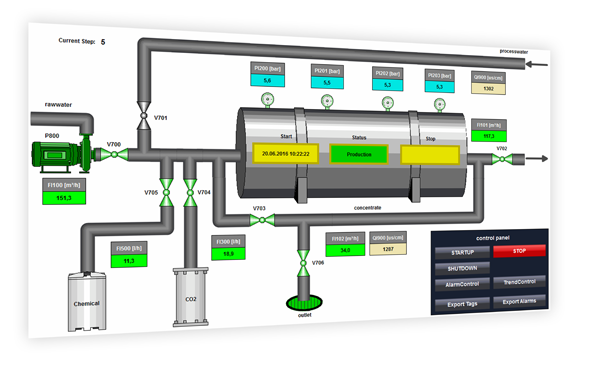
The application example shows a reverse osmosis plant. The plant has a motor and several valves to control the flows within the plant. The mapping of the analog measuring points, the states of valves and motors, as well as the states of the system, is carried out via VB script. The procedures for the state and analog measurement loop simulation are called via triggered actions. Thus a complete simulation of the reverse osmosis plant is guaranteed. The values of the analog measuring points are stored via a process value archive and the status messages via a alarm archive.
Various solutions are conceivable
Export via VB-Script from the WinCC Runtime
Export via MS SQL Management Studio
Export via Excel client
For the export the option SIMATIC WinCC\Connectivity Pack was used in the application example. The WinCC OLE DB provider is used to access the compressed and binary-coded WinCC archive data. The application example shows three solutions for exporting archive data, which are also described in the documentation for the application example.
Export via VB-Script from the WinCC Runtime
With the WinCC project engineering for this application example, the export of the WinCC archive data into a CSV file is realized. The corresponding procedures were created with VB script.
Export via MS SQL Management Studio
You can view the WinCC database archives directly via MS SQL Management Studio. In addition to visualization, this offers the possibility to export SQL databases in various formats. The application example describes the export of the WinCC archive data into a CSV file.
Export via Excel client
In this application example we provide you with two Excel clients for download:
• The "Osmosis" client has a similar representation as the WinCC project of the application example and is also optimized for it.
• The "Universal" client can be used independently of the respective WinCC project.
The Excel clients for this application example are used to export the WinCC archive data to Excel. The corresponding procedures were created with Excel macros (VBA) and contain the following functions depending on the client:
- Automatic readout of most of the information required to establish the connection
- Establishing a Connection using the OLE DB Provider
- Reading the data from the WinCC runtime database of an OS server
- Individual compilation of process value and alarm information
- Possibility of interpolation in case of missing values (process values)
- Access to the archives of different languages (alarms)
- Use of filters such as time span and message type (alarms)
Documentation and example project
Documentation of reverse osmosis plant:
https://support.industry.siemens.com/cs/attachments/38132261/38132261__Application_Reverse_Osmosis_DOC_en.pdf
Example project WinCC V7.4 SP1:
https://support.industry.siemens.com/cs/attachments/38132261/38132261_Application_Reverse_Osmosis_PROJ.zip
Excel clients
https://support.industry.siemens.com/cs/attachments/38132261/38132261_Application_Reverse_Osmosis_XLS.zip
Further information
Application example “Export of WinCC/CAS archive data with a separate application”
https://support.industry.siemens.com/cs/document/35840700/export-of-wincc-cas-archive-data-with-a-separate-application
Application example “WinCC/IndustrialDataBridge: Writing data from SIMATIC WinCC or from SIMATIC controllers in MS Office files”
https://support.industry.siemens.com/cs/document/109483465/wincc-industrialdatabridge%3a-writing-data-from-simatic-wincc-or-from-simatic-controllers-in-ms-office-files
Application example "OPC UA ExcelClient for WinCC V7.4 SP1"
https://support.industry.siemens.com/cs/document/109752976/opc-ua-excel-client-for-wincc-v7.4-sp1 |
|
| Back to top |
|
|
|
|
You cannot post new topics in this forum
You cannot reply to topics in this forum
You cannot edit your posts in this forum
You cannot delete your posts in this forum
You cannot vote in polls in this forum
|
Powered by phpBB © 2001, 2005 phpBB Group
Fa-ti si tu propriul forum GRATUIT, pe www.myforum.ro |
 FAQ
FAQ Search
 Memberlist
 Usergroups
 Register
 Profile
 Log in to check your private messages
 Log in


