| View previous topic :: View next topic |
| Author |
Message |
kurusaray
Junior 2

Joined: 26 Jan 2014
Posts: 26
|
 Posted: 26/01/2014 11:25 Post subject: SIWAREX WP231 APLICATION HELP Posted: 26/01/2014 11:25 Post subject: SIWAREX WP231 APLICATION HELP |
 |
|
Hello
Siemensin wp231 with the touch panel using the TIA Portal V12 Siwarex a
I need help about this demo application, I'd appreciate it.
The following illustration shows the data I want to check with the plc.
1.No of load cells
2.Weight unit
3.Gain load cell (mV)
4.Nominal load one load cell
5.Maximum weight
6.No points of support |
|
| Back to top |
|
 |
rott
Senior

Joined: 23 Aug 2011
Posts: 2266
|
| Posted: 29/01/2014 18:40 Post subject: |
|
|
| thanks ygor... |
|
| Back to top |
|
|
kurusaray
Junior 2
Joined: 26 Jan 2014
Posts: 26
|
| Posted: 29/01/2014 19:39 Post subject: |
|
|
| Thanks ygor. Very good document |
|
| Back to top |
|
|
kurusaray
Junior 2
Joined: 26 Jan 2014
Posts: 26
|
| Posted: 31/01/2014 17:21 Post subject: |
|
|
Hello.
Siwatool program looks at the current value of the weight in kg. I show this value as Newton? |
|
| Back to top |
|
|
kurusaray
Junior 2
Joined: 26 Jan 2014
Posts: 26
|
| Posted: 07/02/2014 20:06 Post subject: |
|
|
I want to connect with RS 485 , siwarex module 4 pieces. This must be how to link.
[T+] [T-] [D'+] [D'-] [D+] [D-] |
|
| Back to top |
|
|
maersk
Member 3


Joined: 17 Aug 2014
Posts: 891
|
| Posted: 04/08/2015 19:12 Post subject: |
|
|
| kurusaray wrote: | Hello.
Siwatool program looks at the current value of the weight in kg. I show this value as Newton? |
You can transorm as you want.
1 kgf =
9.80665 newtons
http://www.convertunits.com/from/kgf/to/newton |
|
| Back to top |
|
|
maersk
Member 3
Joined: 17 Aug 2014
Posts: 891
|
| Posted: 04/08/2015 19:14 Post subject: |
|
|
| kurusaray wrote: | I want to connect with RS 485 , siwarex module 4 pieces. This must be how to link.
[T+] [T-] [D'+] [D'-] [D+] [D-] |
Probably you need serial communication cards ..what IDE do you use? |
|
| Back to top |
|
|
maersk
Member 3
Joined: 17 Aug 2014
Posts: 891
|
| Posted: 04/08/2015 19:23 Post subject: How can you make a legal-for-trade weight display for SIWARE |
|
|
How can you make a legal-for-trade weight display for SIWAREX WP231
https://support.industry.siemens.com/cs/document/109478864/how-can-you-make-a-legal-for-trade-weight-display-for-siwarex-wp231
Hardware Requirements:
The SIMATIC CPU used must always have a PROFINET interface, Ethernet CPs cannot be used.
Possible operator panels are Windows CE-based SIMATIC operator panels containing an Ethernet interface and on which the .net CF 3.5 framework can be executed (e.g.SIMATIC Comfort Touch Panels). SIMATIC basic and key panels cannot be used.
Following components are required:
Software SecureDisplay for legal-for-trade display
https://support.industry.siemens.com/cs/attachments/109477602/SecureDisplay.zip
Firmware SIWAREX WP231
Release V 3.0.0 / Mai 2015
https://support.industry.siemens.com/dl/files/231/75231231/att_848968/v1/WP231_FW_3_0_0.zip
or
http://www.datafilehost.com/d/18afced9
This version is mandatory for legal-for-trade scales with SIWAREX WP231. The firmware update can be done with SIWATOOL V7 software
https://support.industry.siemens.com/cs/attachments/75231231/FAQS_WP2xx_firmware_update_EN.pdf
In addition, two SIWATOOL V7 data base files are included in the .zip-archive. These need to be copied into the SIWATOOL installation folder like described in the information.
TIA Portal project „Ready_for_Use“ & function block library for SIWAREX WP231
https://support.industry.siemens.com/cs/attachments/66825585/READY_FOR_USE_LEGAL_FOR_TRADE.zip
This example project is prepared for legal-for-trade scales together with the display SecureDisplay. Please note that legal-for-trade faceplates must match the approval certificate.
The .zip-file includes the following components:
TIA Portal V13 SP1 project with SIWAREX WP231 – TP700 Comfort – S7-1214 CPU V2.2
TIA Portal V13 SP1 project with SIWAREX WP231 – TP700 Comfort – S7-1214 CPU V3
TIA Portal V13 SP1 project with SIWAREX WP231 – TP700 Comfort – S7-1214 CPU V4
https://support.industry.siemens.com/cs/attachments/66825585/READY_FOR_USE_S7.zip
The .zip-file includes the following components:
TIA Portal V12 SP1 project with SIWAREX WP231 – TP 700 Comfort - S7-1214 CPU V2.2 (migratable to TIA V13)
TIA Portal V12 SP1 project with SIWAREX WP231 – TP 700 Comfort - S7-1214 CPU V3 (migratable to TIA V13)
TIA Portal V13 project with SIWAREX WP231 – TP 700 Comfort - S7-1214 CPU V4
TIA Portal V12 SP1 function block library for CPU V2.2 and V3.0
TIA Portal V13 function block library for CPU V2.2, V3.0 and V4.0
https://support.industry.siemens.com/cs/attachments/66825585/READY_FOR_USE_MODBUS.zip
The .zip-file includes the following components:
TIA Portal V12 SP1 project with SIWAREX WP231 and directly connected TP700 Comfort Panel (Modbus-TCP-connection)
TP700 Restore Image, for direct download to TP700 Comfort via memory card / usb flash drive without TIA Portal software
ATTENTION:
If the Restore-Image is used, the IP-address of the WP231 needs to be 192.168.0.21 (factory default)! |
|
| Back to top |
|
|
maersk
Member 3
Joined: 17 Aug 2014
Posts: 891
|
| Posted: 04/08/2015 19:28 Post subject: SIWAREX_Configurations_Package_04_2014_7MH4138-1AK01 |
|
|
from forum
SIWAREX_Configurations_Package_04_2014_7MH4138-1AK01
http://www.datafilehost.com/d/0dde569c |
|
| Back to top |
|
|
maersk
Member 3
Joined: 17 Aug 2014
Posts: 891
|
| Posted: 04/08/2015 19:47 Post subject: Logging user data by means of RFID with the SIMATIC S7-1200 |
|
|
Logging user data by means of RFID with the SIMATIC S7-1200 (Set 13)
https://support.industry.siemens.com/cs/document/96784939/logging-user-data-by-means-of-rfid-with-the-simatic-s7-1200-%28set-13%29
In the packaging industry, containers provided with RFID transponders are to be filled and written with user data, such as content, pieces, weight....
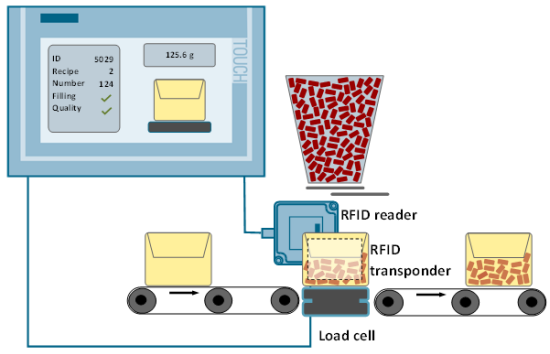
The automation solution shall fulfill the following requirements:
Reading out the user data when the RFID transponder is detected
Reading out the unique serial number (UID) and integrating it into the production process (logging via data log function)
Switching between manual and automatic mode
Manual mode: manual editing and writing of user data
Automatic mode: automatic writing of user data of the filling during production
Ensuring the production process: even when the transponder is not detected, the filling process has to be continued and the error is displayed
Operator control and monitoring via an HMI touch panel
Solution
With this set, the set 6 is expanded by the RFID functionality.
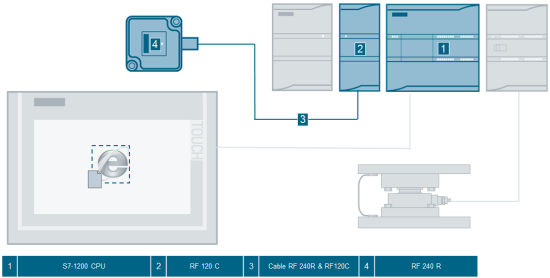
The SIMATIC S7-1200 controller family offers the optimal combination for direct operation of Siemens RFID and code reading systems with the RF120C communication module.
With the help of the economical RFID reader RF240R, ISO 15693-compatible transponders can be read out and written in single tag mode.
The ISO transponders MDS D261 are self-adhesive and have an 8 byte, unique serial number (UID, read only) and a 256 byte EEPROM user memory.
The application is realized with the TIA Portal V13 Update 2 and is operated either via the SIMATIC HMI TP700 Comfort or its simulation.
The production data of the filling is written to the transponders in automatic mode.
In manual mode there is the option to test the RFID functionality on its own (even without real hardware setup with weighing technology).
https://support.industry.siemens.com/cs/attachments/96784939/96784939_S7-1200_RF120C_Set13_Flyer_v1d1_en.pdf
Logging user data by means of RFID (Set 13)
https://support.industry.siemens.com/cs/attachments/96784939/96784939_S7-1200_RF120C_Set13_DOKU_v1d1_en.pdf
Project file for TIA Portal V13 Update 2
https://support.industry.siemens.com/cs/attachments/96784939/96784939_S7-1200_RF120C_Set13_CODE_v1d1.zip
Last edited by maersk on 27/08/2019 16:10; edited 1 time in total |
|
| Back to top |
|
|
maersk
Member 3
Joined: 17 Aug 2014
Posts: 891
|
| Posted: 05/08/2015 19:53 Post subject: Legal-for-trade weight display for SIWAREX FTA in TIA Portal |
|
|
How can you make a legal-for-trade weight display for SIWAREX FTA
https://support.industry.siemens.com/cs/document/25296061/getting-started-s7-project-for-siwarex-fta-%28step-7-classic-and-tia-portal%29
Following components are required:
Software SecureDisplay for legal-for-trade display
https://support.industry.siemens.com/cs/attachments/109477602/SecureDisplay.zip
Firmware for Siwarex FTA
V8-5-2: Support of the new legal-for-trade display “SecureDisplay”.
For products: 7MH4900-2AA01; 7MH4900-2AY21
Firmware for certification according to national authorisation: WFT1_V5-3-8.bin ( 357 KB )
https://support.industry.siemens.com/cs/attachments/27202582/SWFT1_V5-3-8.bin
Firmare for certification with MID certificates: SWFT1_V7_4_4.bin (363KB)
https://support.industry.siemens.com/cs/attachments/27202582/SWFT1_V7-4-4.bin
Firmware for support of SecureDisplay: SWFT1_V8-5-2.zip (171,2 KB)
https://support.industry.siemens.com/cs/attachments/27202582/SWFT1_V8-5-2.zip
Getting started S7 project for SIWAREX FTA (Step 7 Classic and TIA-Portal)
This getting started project shows an example of how a SIWAREX FTA can be integrated into a
S7 system. It contains an S7 program with integration of SIWAREX FTA and message system. It also contains a visualization to operate a SIWAREX FTA. The set points and weighing parameters can be changed. A calibration is also possible.
Following Getting Started projects are available:
1.STEP7 Classic project for legal-for-trade applications according to MID
The SIWAREX FTA module must contain the firmware version 5.3.1 or higher.
https://support.industry.siemens.com/cs/attachments/25296061/FTA_GETTING_STARTED_S7.zip
2. TIA-Portal Getting Started project for a scale without legal-for-trade
https://support.industry.siemens.com/cs/attachments/25296061/FTA_GETTING_STARTED_TIA_V11.zip
https://support.industry.siemens.com/cs/attachments/25296061/FTA_GETTING_STARTED_TIA_V12.zip
https://support.industry.siemens.com/cs/attachments/25296061/FTA_GETTING_STARTED_TIA_V12_SP1.zip
https://support.industry.siemens.com/cs/attachments/25296061/FTA_GETTING_STARTED_TIA_V13_SP1_UPD2.zip
3. TIA-Portal Project Getting Started for calibratable scales for use together with the legal-for-trade display SecureDisplay.
The SIWAREX FTA module must contain the firmware version 8.5.1 or higher
https://support.industry.siemens.com/cs/attachments/25296061/TIA_Project_SIWAREX_FTA_LEGAL_FOR_TRADE.zip
4. Step 7 project with TIA-Portal for TP700 for calibratable scales
The SIWAREX FTA module must contain the firmware version 8.5.1 or higher
https://support.industry.siemens.com/cs/attachments/25296061/S7_TIA_Project_SIWAREX_FTA_LEGAL_FOR_TRADE.zip |
|
| Back to top |
|
|
maersk
Member 3
Joined: 17 Aug 2014
Posts: 891
|
| Posted: 05/08/2015 20:51 Post subject: |
|
|
SIWATOOL.ZIP 538.1 MB
U_S7_7MH4950-1AK01
MC_S7_200_7MH4930-0AK01
FTC_PCS_7MH4900-3AK61
FTC_S7_7MH4900-3AK01_1_Belt_scale
FTC_S7_7MH4900-3AK02_Loss_in_weight_Flow_meter
FTA_PCS7_7MH4900-2AK61
FTA_S7_7MH4900-2AK01
SIWAREX_MULTIFILL_7MH4900-2AM01
SIWAREX_MULTISCALE_7MH4900-2AL01
CS_S7_7MH4910-0AK01
| Code: | | https://mega.co.nz/#!jt5gVI5Y!xiz-R2R_y59JswGIVJaOn5Yg686vfX1WkW0bvvnQkdc |
|
|
| Back to top |
|
|
rajume06
Member junior

Joined: 06 Jun 2012
Posts: 82
Location: Bangladesh
|
| Posted: 13/10/2016 11:10 Post subject: |
|
|
Do you have configuration file for "Configuration Package
SIWAREX WP231 7MH4960-2AK01" |
|
| Back to top |
|
|
maersk
Member 3
Joined: 17 Aug 2014
Posts: 891
|
| Posted: 28/03/2017 14:22 Post subject: function block library for SIWAREX WP231 |
|
|
TIA Portal project „Ready_for_Use“ & function block library for SIWAREX WP231
https://support.industry.siemens.com/cs/document/66825585/tia-portal-project-%E2%80%9Eready_for_use%E2%80%9C-function-block-library-for-siwarex-wp231
TIA Portal V13 SP1 and V14 project with SIWAREX WP231 – TP700 Comfort – S7-1214 PLC V2.2
TIA Portal V13 SP1 and V14 project with SIWAREX WP231 – TP700 Comfort – S7-1214 PLC V3
TIA Portal V13 SP1 and V14 project with SIWAREX WP231 – TP700 Comfort – S7-1214 PLC V4
https://support.industry.siemens.com/cs/attachments/66825585/READY_FOR_USE_LEGAL_FOR_TRADE.zip
TIA Portal V12 SP1 project with SIWAREX WP231 and directly connected TP700 Comfort Panel (Modbus-TCP-connection)
TP700 Restore Image, for direct download to TP700 Comfort via memory card / usb flash drive without TIA Portal software
TIA Portal V13 SP1 and V14 project with SIWAREX WP231 – TP 700Comfort - S7-1214 PLC V2.2
https://support.industry.siemens.com/cs/attachments/66825585/ready_for_use_modbus.zip
TIA Portal V13 SP1 and V14 project with SIWAREX WP231 – TP 700 Comfort - S7-1214 PLC V3
TIA Portal V13 SP1 and V14 project with SIWAREX WP231 – TP 700 Comfort - S7-1214 PLC V4
TIA Portal V13 SP1 and V14 function block library for S7-1200 PLC V2.2, V3.0 and V4.0
https://support.industry.siemens.com/cs/attachments/66825585/ready_for_use_s7.zip |
|
| Back to top |
|
|
dll
Junior 2
Joined: 31 Mar 2017
Posts: 39
|
| Posted: 05/05/2017 10:37 Post subject: |
|
|
latest firmware for SIWAREX WP321 Release V 1.2.0 / May 2017
7MH4138-6AA00-0BA0_V01.02.00.zip (1,5 MB)
An update to firmware version V1.2.0 is recommended. The .upd file can be loaded via the standard mechanisms of TIA Portal.
In addition, two SIWATOOL V7 data base files are included in the .zip-archive. These need to be copied into the SIWATOOL installation folder like described in the information.
Changes compared V1.0.1:
New sample rate of 600Hz (1,66ms) selectable in DR10.
Function "automatic calibration" optimized: can be performed now with a non-empty scale and/or negative digits.
Calibration procedure with three calibration points optimized.
https://cache.industry.siemens.com/dl/files/358/109747358/att_918895/s1/7MH4138-6AA00-0BA0_V01.02.00.zip |
|
| Back to top |
|
|
grig100
Member 3

Joined: 01 Jan 2015
Posts: 752
|
| Posted: 15/05/2017 15:22 Post subject: TIA Portal Project „Ready-for-use“ for SIWAREX WP321 |
|
|
TIA Portal Project „Ready-for-use“ for SIWAREX WP321
https://support.industry.siemens.com/cs/document/94109373/
Ready-for-use TIA Portal
TIA Portal V13 SP1 UPD9 and V14 SP1 example project (S7-1511 and KTP700 Basic) in German, English, French, Spanish and Italian consisting of HMI visualization and WP321 function block (multiinstance ability).
https://support.industry.siemens.com/cs/attachments/94109373/SIWAREX_WP321_READY_FOR_USE_TIA.zip
TIA Portal V13 SP1 UPD9 and V14 example project (S7-315-2 PN/DP and TP700 Comfort) in German, English and French consisting of HMI visualization and WP321 function block (multiinstance ability). Please use / copy the function block included in the project for all other CPU of the 300 and 400 series as well.
https://support.industry.siemens.com/cs/attachments/94109373/WP321_TP700_CPU315-PN_TIA_ready_for_use.zip
Ready-for-use-small TIA Portal
TIA Portal V13 SP1 UPD9 and V14 example project (S7-1511 and TP700 Comfort) in German, English, French, Spanish and Italian consisting of HMI visualization and WP321 function block (multiinstance ability) with lower memory demand. This function block has the the data records 3, 6, 10 and 14 available only, which allow the commissioning of the scale, the definition of the limits, as well as the selection of the process values read by cyclic I/O communication.
All further data records, as well as the advanced error message system and the multiplexed commands 1, 2 and 3 are not available by this type of function block!
https://support.industry.siemens.com/cs/attachments/94109373/SIWAREX_WP321_READY_FOR_USE_SMALL_TIA.zip
Library TIA Portal
TIA Portal V13 SP1 UPD9 and V14 SP1 global block library with all available WP321 function blocks.
ATTENTION: It’s important to choose the right project/library relating to the CPU firmware version!
https://support.industry.siemens.com/cs/attachments/94109373/SIWAREX_WP321_BLOCK_LIBRARY.zip
Ready-for-use SIMATIC Manager
The Simatic-Manager project-archive (SIMATIC Manager V5.5 SP4 is required) includes a ready-to-use project with a SIWAREX WP321 connected to a CPU 315-PN/DP and a HMI (KTP600 Basic) with WP321 function block (multiinstance ability). Please use / copy the function block included in the project for all other CPU of the 300 and 400 series as well.
https://support.industry.siemens.com/cs/attachments/94109373/wp321_ktp600_basic_cpu315-2pndp_simatic_manager_v5_5sp4.zip
Ready-for-use-small SIMATIC Manager
The Simatic-Manager project-archive (SIMATIC Manager V5.5 SP4 is required) includes a ready-to-use project with a SIWAREX WP321 connected to a CPU 315-PN/DP and a HMI (KTP600 Basic) with WP321 function block (multiinstance ability) with lower memory demand. This function block provides access to the data records 3, 6, 10 and 14 only, which allow the commissioning of the scale, the definition of the limits, as well as the selection of the process values read by cyclic I/O communication.
All further data records, as well as the advanced error message system and the multiplexed commands 1, 2 and 3 are not available with this type of function block!
https://support.industry.siemens.com/cs/attachments/94109373/WP321_S_S7315_KTP600_classic.zip |
|
| Back to top |
|
|
maersk
Member 3
Joined: 17 Aug 2014
Posts: 891
|
| Posted: 27/08/2019 16:13 Post subject: Firmware SIWAREX WP231 |
|
|
Firmware SIWAREX WP231
https://support.industry.siemens.com/cs/document/75231231/firmware-siwarex-wp231
Release V 3.2.0 / August 2019
https://support.industry.siemens.com/cs/attachments/75231231/WP231_FW_3_2_0.zip |
|
| Back to top |
|
|
shailesh284
Junior

Joined: 16 Nov 2018
Posts: 6
|
| Posted: 05/09/2019 16:50 Post subject: Please somebody upload software for WP231 |
|
|
7MH4900-1AK01
Service and commissioning software SIWATOOL V4 and V7 for SIWAREX weighing modules
https://mall.industry.siemens.com/mall/en/uk/Catalog/Product/7MH4900-1AK01 |
|
| Back to top |
|
|
HARZZOTG
Junior
Joined: 28 Jun 2019
Posts: 1
|
| Posted: 06/09/2019 06:01 Post subject: |
|
|
from forum
SIWAREX_Configurations_Package_04_2014_7MH4138-1AK01
http://www.datafilehost.com/d/0dde569c
SIWATOOL.ZIP 538.1 MB
U_S7_7MH4950-1AK01
MC_S7_200_7MH4930-0AK01
FTC_PCS_7MH4900-3AK61
FTC_S7_7MH4900-3AK01_1_Belt_scale
FTC_S7_7MH4900-3AK02_Loss_in_weight_Flow_meter
FTA_PCS7_7MH4900-2AK61
FTA_S7_7MH4900-2AK01
SIWAREX_MULTIFILL_7MH4900-2AM01
SIWAREX_MULTISCALE_7MH4900-2AL01
CS_S7_7MH4910-0AK01
https://mega.co.nz/# !jt5gVI5Y!xiz-R2R_y59JswGIVJaOn5Yg686vfX1WkW0bvvnQkdc |
|
| Back to top |
|
|
AnteSavilt
Member 2


Joined: 13 Feb 2018
Posts: 264
Location: Croatia
|
| Posted: 31/03/2020 16:35 Post subject: SIWAREX WP321 TIA Portal Project „Ready-for-use“ |
|
|
TIA Portal Project „Ready-for-use“ for SIWAREX WP321
https://support.industry.siemens.com/cs/document/94109373/
https://ulozto.net/tamhle/CGNjn3zLPYt5
https://anonfile.com/n3gaPckao7/WP321_S_S7315_KTP600_classic_zip
https://anonfile.com/XdgfPak2o9/WP321_S7_Classic_zip
https://anonfile.com/Peh6Pdk5o6/WP321_S7300_DR_KTP700_zip
https://anonfile.com/VahaPdk3o5/WP321_BLOCK_LIBRARY_zip
https://anonfile.com/19i1Pbkcod/WP321_S7-1500_DRS_KTP700_DE_EN_FR_ES_IT_zip
https://anonfile.com/H7i5Pck0o9/WP321_S7-1500_DR_KTP700_DE_EN_FR_ES_IT_zip |
|
| Back to top |
|
|
valz
Member 3

Joined: 26 Jul 2015
Posts: 771
|
| Posted: 01/07/2022 17:35 Post subject: SIWAREX FTA in the PCS 7 environment |
|
|
Compound Dosing with SIWAREX FTA in the PCS 7 environment
https://support.industry.siemens.com/cs/document/98754973/
Dosing operations are often required in process automation. Different methods are used depending on the requirements of the process. Each method requires electronic weighing systems that vary according to the required task. The SIWAREX FTA and SIWAREX U have been approved for use in the PCS 7 environment as an electronic weighing system.
Task
In the process industry, a common use of the electronic weighing system is the dosing of one or more substances in a reactor.
The dosing operation should be, as much as possible:
accurate
fast
adaptable to various substance properties, in the limited context
Solution
The following Application Example describes the application of a compound dosage in the PCS 7 environment. Three different components are to be dosed into a reactor according to the recipe.
The dosing functions are controlled directly by the SIWAREX FTA.
In this process, the following requirements are imposed on the solution:
Reactor Weight (empty) = dead load
Accuracy ± 300g
Status and tolerance display after each dosing
Monitoring of the individual dosing steps
(tare, coarse/fine signal, tolerance checking, dosing completed, ...)
Automatic optimization of cut-off points for coarse and fine signals for the individual components
Increased process safety by monitoring the limit value signal
(evaluation in the AS and horn triggering on site)
Quality assurance by logging the time stamp, product name, time and weight
(possible via CompactFlash card in the SIWAREX FTA)
Displays the current plenar load on location via analog value display (4-20 mA)
The current Application Example provides a template that comprises all typical components, their control system and the necessary logic.
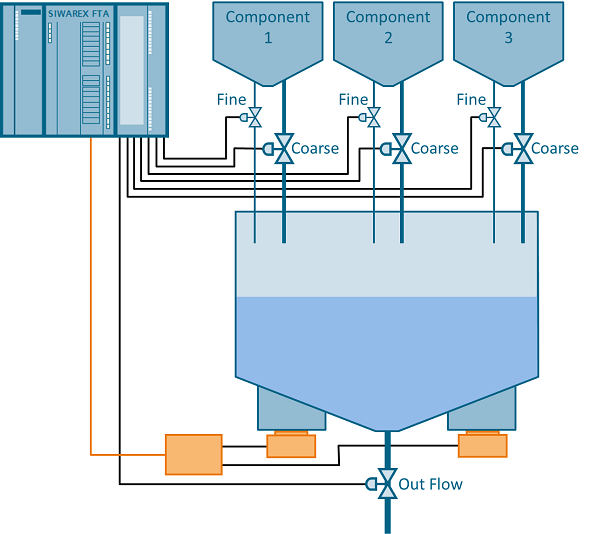
The following configuration example enables you to significantly restrânge your engineering effort when using PCS 7 standard agents while improving performance. You can use this solution for both new configurations as well as for integration into existing projects. The required hardware and software products are all made by Siemens and guarantee the compatibility, actuality and upgrade options you are accustomed to.
When using the SIWAREX FTA - Advanced Process Library you also get the following benefits:
A reduction of the knowledge necessary to develop applications
A decrease in the configuration effort
Flexible installation and customization through reusability of the program structures used
Guaranteed Siemens support
Standardized and tested solutions
Engineering in a familiar PCS 7 environment
Library module with online help (F1) in German and English
Setup in German and English
Validity
SIWAREX FTA - Advanced Process Library
SIMATIC PCS 7 V9.1
Download
https://support.industry.siemens.com/cs/attachments/98754973/98754973_SIWAREX_FTA_PCS7.zip
https://support.industry.siemens.com/cs/attachments/98754973/98754973_pcs7_siwarex_fta_V91_en.pdf
Further information
Manual "SIWAREX FTA PCS 7 Advanced Process Library
https://support.industry.siemens.com/cs/attachments/86535496/Manual_PCS7_FTA_PCSV8_APL_eng_V1.pdf
Device manual "SIWAREX FTA - Weighing Electronics for Automatic Scale"
https://support.industry.siemens.com/cs/attachments/17970155/Manual_FTA_en_211.pdf
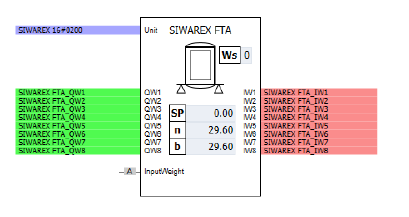
For testing this application, you can use the SIMIT project together with the PCS 7 project. The SIMIT project includes a SIWAREX FTA component which simulates the behavior of a real SIWAREX FTA module:
https://ulozto.net/tamhle/iyOt9pinLGgc/
[URL=https://www.file-upload.net/download-14958924/Manual_FTA_en_211.pdf.html]Manual_FTA_en_211.pdf[/URL]
[URL=https://www.file-upload.net/download-14958922/Manual_PCS7_FTA_PCSV8_APL_eng_V1.pdf.html]Manual_PCS7_FTA_PCSV8_APL_eng_V1.pdf[/URL]
[URL=https://www.file-upload.net/download-14958923/98754973_pcs7_siwarex_fta_V91_en.pdf.html]98754973_pcs7_siwarex_fta_V91_en.pdf[/URL]
[URL=https://www.file-upload.net/download-14958928/98754973_SIWAREX_FTA_PCS7.zip.html]98754973_SIWAREX_FTA_PCS7.zip[/URL] |
|
| Back to top |
|
|
valz
Member 3
Joined: 26 Jul 2015
Posts: 771
|
| Posted: 05/08/2022 16:16 Post subject: SIWAREX WP321 Ready-for-use |
|
|
TIA Portal Project „Ready-for-use“ for SIWAREX WP321
https://support.industry.siemens.com/cs/document/94109373/
Ready-for-use TIA Portal
https://ulozto.net/tamhle/iQGKLj2YuEV0/
[URL=https://www.file-upload.net/download-14980023/WP321_Token.zip.html]WP321_Token.zip[/URL]
[URL=https://www.file-upload.net/download-14980025/WP321_READY_FOR_USE_MultiPlex_V1.3.zip.html]WP321_READY_FOR_USE_MultiPlex_V1.3.zip[/URL]
[URL=https://www.file-upload.net/download-14980024/WP321_S_S7315_KTP600_classic.zip.html]WP321_S_S7315_KTP600_classic.zip[/URL]
[URL=https://www.file-upload.net/download-14980026/WP321_S7_Classic.zip.html]WP321_S7_Classic.zip[/URL]
[URL=https://www.file-upload.net/download-14980027/WP321_BLOCK_LIBRARY.zip.html]WP321_BLOCK_LIBRARY.zip[/URL]
[URL=https://www.file-upload.net/download-14980028/WP321_S7-1500_DRS_KTP700_DE_EN_FR_ES_IT.zip.html]WP321_S7-1500_DRS_KTP700_DE_EN_FR_ES_IT.zip[/URL]
[URL=https://www.file-upload.net/download-14980029/WP321_S7300_DR_KTP700.zip.html]WP321_S7300_DR_KTP700.zip[/URL]
[URL=https://www.file-upload.net/download-14980031/WP321_S7-1500_DR_KTP700_DE_EN_FR_ES_IT.zip.html]WP321_S7-1500_DR_KTP700_DE_EN_FR_ES_IT.zip[/URL]
[URL=https://www.file-upload.net/download-14980033/SIWATOOL_V7.ZIP.html]SIWATOOL_V7.ZIP[/URL] |
|
| Back to top |
|
|
mamiko
Member 2

Joined: 25 Dec 2017
Posts: 420
|
| Posted: 14/02/2023 22:59 Post subject: Siwarex ready to use projects |
|
|
Siwarex ready to use projects
new links
[URL=https://www.file-upload.net/download-15096187/8xWP241_TP700_V120_MBUS_TIA_V14_UPD3.zip.html]8xWP241_TP700_V120_MBUS_TIA_V14_UPD3.zip[/URL]
[URL=https://www.file-upload.net/download-15096189/TIA_Portal_WP251_KTP700_Basic.zip.html]TIA_Portal_WP251_KTP700_Basic.zip[/URL]
[URL=https://www.file-upload.net/download-15096188/S7-1214_WP251_KTP700BASIC_MULTIPLEX.zip.html]S7-1214_WP251_KTP700BASIC_MULTIPLEX.zip[/URL]
[URL=https://www.file-upload.net/download-15096192/TIA_Portal_WP251_TP700_Comfort_LEGAL_FOR_TRADE.zip.html]TIA_Portal_WP251_TP700_Comfort_LEGAL_FOR_TRADE.zip[/URL]
[URL=https://www.file-upload.net/download-15096191/MBUS_WP251_TP700COMFORT_8xMULTIPLEX_V16.zip.html]MBUS_WP251_TP700COMFORT_8xMULTIPLEX_V16.zip[/URL]
[URL=https://www.file-upload.net/download-15096190/MBUS_WP251_TP700comfort_LEGAL_FOR_TRADE.zip.html]MBUS_WP251_TP700comfort_LEGAL_FOR_TRADE.zip[/URL]
[URL=https://www.file-upload.net/download-15096193/FAQ_WP351_Library_Token_en.pdf.html]FAQ_WP351_Library_Token_en.pdf[/URL]
[URL=https://www.file-upload.net/download-15096195/WP351_READY_FOR_USE_MultiPlex.zip.html]WP351_READY_FOR_USE_MultiPlex.zip[/URL]
[URL=https://www.file-upload.net/download-15096194/WP351_READY_FOR_USE.zip.html]WP351_READY_FOR_USE.zip[/URL]
[URL=https://www.file-upload.net/download-15096196/WP351_READY_FOR_USE_LEGAL_FOR_TRADE.zip.html]WP351_READY_FOR_USE_LEGAL_FOR_TRADE.zip[/URL]
[URL=https://www.file-upload.net/download-15096198/WP351_Library_Token.zip.html]WP351_Library_Token.zip[/URL]
[URL=https://www.file-upload.net/download-15096202/ready_for_use_modbus.zip.html]ready_for_use_modbus.zip[/URL]
[URL=https://www.file-upload.net/download-15096201/READY_FOR_USE_LEGAL_FOR_TRADE.zip.html]READY_FOR_USE_LEGAL_FOR_TRADE.zip[/URL]
[URL=https://www.file-upload.net/download-15096204/ready_for_use_s7.zip.html]ready_for_use_s7.zip[/URL]
https://teraboxapp.com/s/1HI_QY0yPi5wKP_wvLDeFjA |
|
| Back to top |
|
|
dswez
Junior
Joined: 25 Jan 2023
Posts: 6
Location: NL
|
| Posted: 14/08/2023 12:32 Post subject: SIWAREX PCS7 AddOn Library for PCS7 ISO |
|
|
Hi
Does anyone have an ISO for the SIWAREX PCS7 AddOn Library for PCS7?
7MH4900-1AK61
This CD contains the block library for PCS7 V8.1 (or higher), V9.0 and V9.1; For SIWAREX FTA, FTC, U, WP321.
thanks in advance if anyone has this
_________________
Many thanks |
|
| Back to top |
|
|
marzullo
Junior
Joined: 11 Aug 2022
Posts: 11
|
| Posted: 26/02/2025 20:02 Post subject: TIA Portal Project „Ready-for-use“ for SIWAREX WP321 |
|
|
TIA Portal Project „Ready-for-use“ for SIWAREX WP321
https://support.industry.siemens.com/cs/document/94109373/
Ready-for-use-small TIA Portal
Library TIA Portal
Ready-for-use SIMATIC Manager
Ready-for-use-small SIMATIC Manager
TIA Portal example project to program several SIWAREX WP321 in one project.
TIA portal library for Siwarex WP321 to limit the simultaneously use of system function data record read and / or write
[URL=https://www.file-upload.net/download-15459983/WP321_Token.zip.html]WP321_Token.zip[/URL]
[URL=https://www.file-upload.net/download-15459985/WP321_READY_FOR_USE_MultiPlex_V1.3.zip.html]WP321_READY_FOR_USE_MultiPlex_V1.3.zip[/URL]
[URL=https://www.file-upload.net/download-15459984/WP321_S_S7315_KTP600_classic.zip.html]WP321_S_S7315_KTP600_classic.zip[/URL]
[URL=https://www.file-upload.net/download-15459986/WP321_S7_Classic.zip.html]WP321_S7_Classic.zip[/URL]
[URL=https://www.file-upload.net/download-15459987/WP321_BLOCK_LIBRARY.zip.html]WP321_BLOCK_LIBRARY.zip[/URL]
[URL=https://www.file-upload.net/download-15459988/WP321_S7-1500_DR_HMI_DE_EN_FR_ES_IT.zip.html]WP321_S7-1500_DR_HMI_DE_EN_FR_ES_IT.zip[/URL]
[URL=https://www.file-upload.net/download-15459990/WP321_S7-1500_DRS_KTP700_DE_EN_FR_ES_IT.zip.html]WP321_S7-1500_DRS_KTP700_DE_EN_FR_ES_IT.zip[/URL]
[URL=https://www.file-upload.net/download-15459989/WP321_S7300_DR_KTP700.zip.html]WP321_S7300_DR_KTP700.zip[/URL] |
|
| Back to top |
|
|
|

 FAQ
FAQ Search
 Memberlist
 Usergroups
 Register
 Profile
 Log in to check your private messages
 Log in


