 |
plc.myforum.ro
PLCs users www.plc.myforum.ro!
|
| View previous topic :: View next topic |
| Author |
Message |
valz
Member 3


Joined: 26 Jul 2015
Posts: 771
|
 Posted: 18/08/2023 13:03 Post subject: SITOP OPC UA Excel C# SITOP PSU8600 / SITOP UPS1600 Posted: 18/08/2023 13:03 Post subject: SITOP OPC UA Excel C# SITOP PSU8600 / SITOP UPS1600 |
 |
|
SITOP OPC UA Excel C# application for SITOP PSU8600 / SITOP UPS1600
Stand-alone OPC UA Excel client for accessing the OPC UA Servers of the SITOP PSU8600 and SITOP UPS1600. The client is used to present the OPC UA functionality in connection with the SITOP PSU8600 and SITOP UPS1600 and shall enable a first contact with OPC UA in the SITOP environment.
The OPC UA Server of the SITOP PSU8600 and UPS1600 provides the device with a uniform, standardized communication interface that can be used independently of various OPC UA Clients.
The OPC UA application is a stand-alone Microsoft Excel C# application that works as an OPC UA Client. The application can be run independently of the TIA Portal.
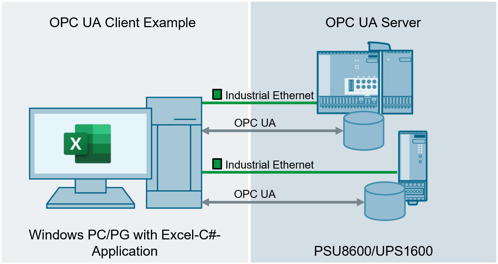
Client-example for the OPC UA-Server of the SITOP PSU8600/UPS1600
The OPC UA Client was programmed in the C# programming language using Microsoft Visual Studio Professional 2022. For this purpose, the application uses the freely accessible OPC UA .NET-Stack of the OPC Foundation as well as the Siemens developed Helper-API 109737901.
Microsoft Excel is used as the user and display interface.
Layout and functionality of the application are specifically adapted to the hardware setup of a SITOP PSU8600 with basic unit (4 outputs) and buffer module (100ms), as well as a UPS1600 with a battery module (UPS1100, alternatively BAT1600). It is not necessary to have both hardware setups available to use the application.
To be able to use the OPC UA Client, you must activate the OPC UA Server of the power supplies and făcute a user with sufficient permissions. The default password of the user "admin" must be changed. It cannot be used for access.
The application requires full ead and write permissions. Therefore, there must be no remote connection to a controller.
Download
https://support.industry.siemens.com/cs/attachments/109755330/109755330_OPC_UA_Excel_Application_V4.0_DOC_en.pdf
https://support.industry.siemens.com/cs/attachments/109755330/109755330_OPC_UA_Excel_Application_V4.0.zip
https://ulozto.net/tamhle/lYgDHefORbTW/
[URL=https://www.file-upload.net/download-15179102/109755330_OPC_UA_Excel_Application_V4.0.zip.html]109755330_OPC_UA_Excel_Application_V4.0.zip[/URL]
[URL=https://www.file-upload.net/download-15179101/109755330_OPC_UA_Excel_Application_V4.0_DOC_en.pdf.html]109755330_OPC_UA_Excel_Application_V4.0_DOC_en.pdf[/URL] |
|
| Back to top |
|
 |
|
|
You cannot post new topics in this forum
You cannot reply to topics in this forum
You cannot edit your posts in this forum
You cannot delete your posts in this forum
You cannot vote in polls in this forum
|
Powered by phpBB © 2001, 2005 phpBB Group
Fa-ti si tu propriul forum GRATUIT, pe www.myforum.ro |
 FAQ
FAQ Search
 Memberlist
 Usergroups
 Register
 Profile
 Log in to check your private messages
 Log in


