| View previous topic :: View next topic |
| Author |
Message |
maersk
Member 3


Joined: 17 Aug 2014
Posts: 891
|
 Posted: 22/02/2016 19:57 Post subject: SINEMA Server V13 + SP1 software Posted: 22/02/2016 19:57 Post subject: SINEMA Server V13 + SP1 software |
 |
|
SINEMA Server V13 + SP1 software (including 21-day trial license) download
https://support.industry.siemens.com/cs/document/109482912/sinema-server-v13-sp1-software-%28including-21-day-trial-license%29-download
The SINEMA SERVER software was specifically developed for industrial applications.

It provides the option of representing networks completely and monitoring them.
Using SNMP and simultaneous diagnostics via SIMATIC and PROFINET mechanisms, many aspects of plant diagnostics can be reproduced in only one tool. The acquired data is stored in a long-term archive and can be evaluated and displayed as necessary.
The specified network diagnostics can also be integrated seamlessly in HMI/SCADA systems (e.g. WinCC, PCS 7) using OPC UA and Web mechanisms.
https://support.industry.siemens.com/cs/attachments/109482912/Readme.htm
https://support.industry.siemens.com/cs/attachments/109482912/SINEMA_Server_V13SP1.exe?useHistoryAPI=false
https://support.industry.siemens.com/dl/files/912/109482912/att_869300/v3/SINEMA_Server_V13SP1.exe
https://support.industry.siemens.com/dl/files/912/109482912/att_869297/v2/SINEMA_Server_V13SP1.001
https://support.industry.siemens.com/dl/files/912/109482912/att_869298/v2/SINEMA_Server_V13SP1.002
https://support.industry.siemens.com/dl/files/912/109482912/att_869299/v2/SINEMA_Server_V13SP1.003
SIMATIC NET Network management SINEMA Server - Operating Instructions
https://cache.industry.siemens.com/dl/files/957/109482957/att_869387/v1/BA_SINEMA-Server-V13_76.pdf |
|
| Back to top |
|
 |
maersk
Member 3
Joined: 17 Aug 2014
Posts: 891
|
| Posted: 22/02/2016 21:10 Post subject: SINEMA Server V13 SP2 |
|
|
SINEMA Server V13 SP1
[URL=https://userscloud.com/gpkrpv32ny9r]SINEMA_Server_V13_SP1.part1.rar - 450.0 MB[/URL]
[URL=https://userscloud.com/phsj2veehmic]SINEMA_Server_V13_SP1.part2.rar - 450.0 MB[/URL]
[URL=https://userscloud.com/vnmt8mt34262]SINEMA_Server_V13_SP1.part3.rar - 450.0 MB[/URL]
[URL=https://userscloud.com/cgzqcoadlel3]SINEMA_Server_V13_SP1.part4.rar - 61.5 MB[/URL]
SINEMA Server V13 SP2
[URL=https://userscloud.com/w0bf391ulor1]SINEMA_Server_V13SP2.part1.rar - 450.0 MB[/URL]
[URL=https://userscloud.com/ua0z12zixomq]SINEMA_Server_V13SP2.part2.rar - 450.0 MB[/URL]
[URL=https://userscloud.com/rq1wfci17t3s]SINEMA_Server_V13SP2.part3.rar - 450.0 MB[/URL]
[URL=https://userscloud.com/qwoi2jqq097s]SINEMA_Server_V13SP2.part4.rar - 222.2 MB[/URL]
Last edited by maersk on 30/06/2017 17:45; edited 2 times in total |
|
| Back to top |
|
|
grig100
Member 3

Joined: 01 Jan 2015
Posts: 752
|
| Posted: 01/10/2016 12:00 Post subject: SINEMA Server V13 + SP2 Software (inkl. 21 Tage Trial Lizenz |
|
|
SINEMA Server V13 + SP2 Software (inkl. 21 Tage Trial Lizenz) Download
https://support.industry.siemens.com/cs/document/109741833/sinema-server-v13-sp2-software- (inkl-21-tage-trial-lizenz)-download
https://support.industry.siemens.com/cs/attachments/109741833/OSS_SINEMAServer_V13SP2.pdf
https://support.industry.siemens.com/dl/files/833/109741833/att_897390/v1/SINEMA_Server_V13SP2.exe |
|
| Back to top |
|
|
maersk
Member 3
Joined: 17 Aug 2014
Posts: 891
|
| Posted: 30/06/2017 15:33 Post subject: SINEMA Server: call functions via URLs |
|
|
How can you call functions easily via URLs in SINEMA Server?
https://support.industry.siemens.com/cs/document/89073770/
If you want easy and direct access to websites of the SINEMA server, you can use the option of calling the function via URL. The Excel file in this entry helps you to generate these specific URLs.
Using URLs, SINEMA server websites (topology or device list, for example) can be called directly in a browser and/or an HMI SCADA system like WinCC. In this case, the user name and password for authorization are also transferred in the URL. All the possible commands are listed in the SINEMA Server manual.
To use the commands, the "Server access via URL" permission must be granted to the user group (Fig. 1). For security reasons this permission is not granted to any user group by default.
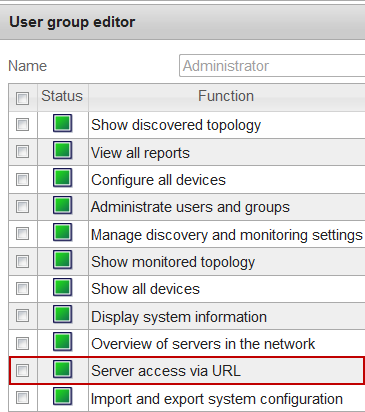
Fig. 01
SINEMA Server URL Builder
You can download the Excel file under Download. The file helps you when generating specific addresses.
The following versions are available:
Excel file "SINEMA Server V12 URL builder" for SINEMA Server V12
Excel file "SINEMA Server V13+SP1+SP2 URL builder" for SINEMA Server V13, V13 SP1, V13 SP2
Excel file "SINEMA ServerV14 URL builder" for SINEMA Server V14
You enter the data of your SINEMA server in the document and you can then copy the relevant URL from the document as required.
Note
The number of users that can call via a URL function simultaneously on a Management Station is limited per Management Station.
The maximum number of sessions is defined as below for the different versions of SINEMA Server.
SINEMA Server V12: 10
SINEMA Server V13, V13 SP1, V13 SP2: 50
An overview of the calls and users already registered is given under "Logged in" in "Administration > User".
User scenario 1
You have a SINEMA Server that is already configured. You would now like to give the group with the permission a link that makes administration of the SINEMA server as fast as possible.
The login data of the server:
IP: 217.xxx.xxx.xxx
Port: 8080
User: Administrator
Password: xxxx
Open the desired Excel file.
Under "General settings" you specify the login data for the SINEMA server. Here you enter the password in plain text. The password is also transferred in plain text even when transferring from the browser to the SINEMA server.
For the connection you select either "http://" or "https://".
Through the drop-down menu you assign "no" to the "onlycontentarea" switch in order to provide the administrator with the complete area of the SINEMA server.

Fig. 02
Note
Do not save the document with the specified user name and password! For security reasons, do not use the Administrator Account!
Copy the link provided under "Topology" to the address line of your browser. Press the "Enter" key to call the SINEMA server in the current Topology view.
There is no need for separate login or switching to Topology view.
User scenario 2
You have a SINEMA Server V12 that is already configured. You have created a separate view for the service engineer, in which is displayed the segment of the network he is concerned with. You do not want the service engineer to be able to change the screen or make any other settings on the installed server.
The login data of the server:
IP: 271.xxx.xxx.xxx
Port: 8080
User: Spectator
Password: xxxx
Open the desired Excel file.
Under "General settings" you specify the login data for the SINEMA server. Here you enter the password in plain text. The password is also transferred in plain text even when transferring from the browser to the SINEMA server.
For the connection you select either "http://" or "https://".
Through the drop-down menu you assign "yes" to the "onlycontentarea" switch in order to provide only the desired view to the "Spectator" user.

Fig. 03
Under "View" you enter the name of the view ("Ring" in this case).

Fig. 04
Copy the link provided (marked in Fig. 05) into the address line of the your browser.
Confirm with the "Enter" key and the SINEMA Server is called in the specified view.
Separate login is not necessary and only the selected view is displayed (see Fig. 05).

Fig. 05
Download
https://support.industry.siemens.com/cs/attachments/89073770/sinemaserverv12_url_builder_v2.zip
https://support.industry.siemens.com/cs/attachments/89073770/SINEMA_Server_V13SP1SP2_URL_builder_V1.1.zip
https://support.industry.siemens.com/cs/attachments/89073770/SINEMA_Server_V14_URL-Builder.zip
SINEMA Server V12 manual
https://support.industry.siemens.com/cs/document/74875659/
SINEMA Server V13 (SP1, SP2) manual
https://support.industry.siemens.com/cs/document/109741758/
SINEMA Server V14 manual
https://support.industry.siemens.com/cs/document/109748278/ |
|
| Back to top |
|
|
|

 FAQ
FAQ Search
 Memberlist
 Usergroups
 Register
 Profile
 Log in to check your private messages
 Log in


