 |
plc.myforum.ro
PLCs users www.plc.myforum.ro!
|
| View previous topic :: View next topic |
| Author |
Message |
berthold
Junior

Joined: 01 Feb 2018
Posts: 6
|
 Posted: 08/02/2018 21:07 Post subject: SINEMA Remote Connect Client V1.0 ... V3.0 Posted: 08/02/2018 21:07 Post subject: SINEMA Remote Connect Client V1.0 ... V3.0 |
 |
|
SINEMA Remote Connect Client V1.0 SP3 HF1 .
The download contains: Installation files for the SINEMA Remote Connect Client OSS information Batch files for mass roll-out
With this release of SINEMA Remote Connect Client V1.0 SP3 HF1, installation on Windows 10 with SecureBoot is now also supported.
https://support.industry.siemens.com/cs/document/109755543/
SINEMA Remote Connect Client V1.0 SP3 HF1
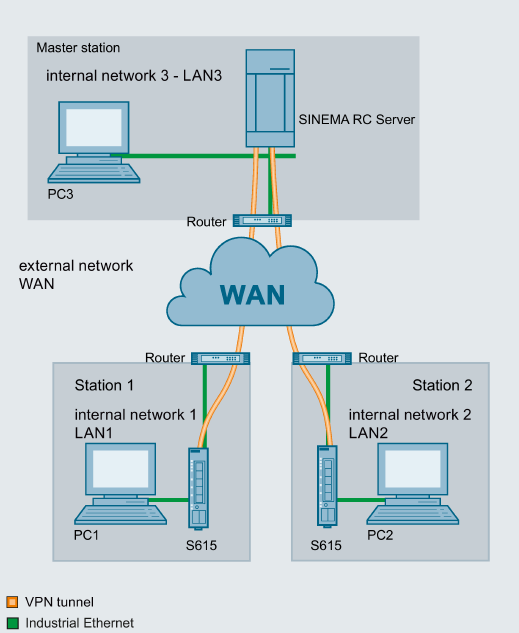
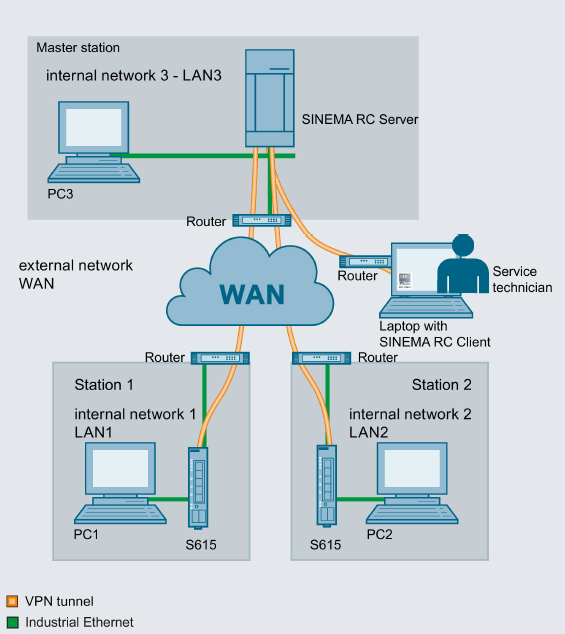
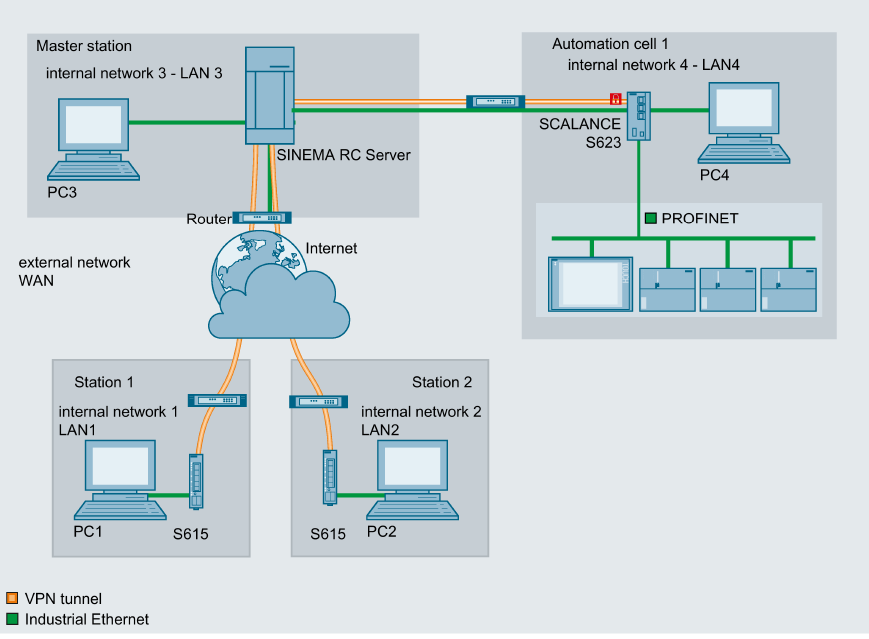
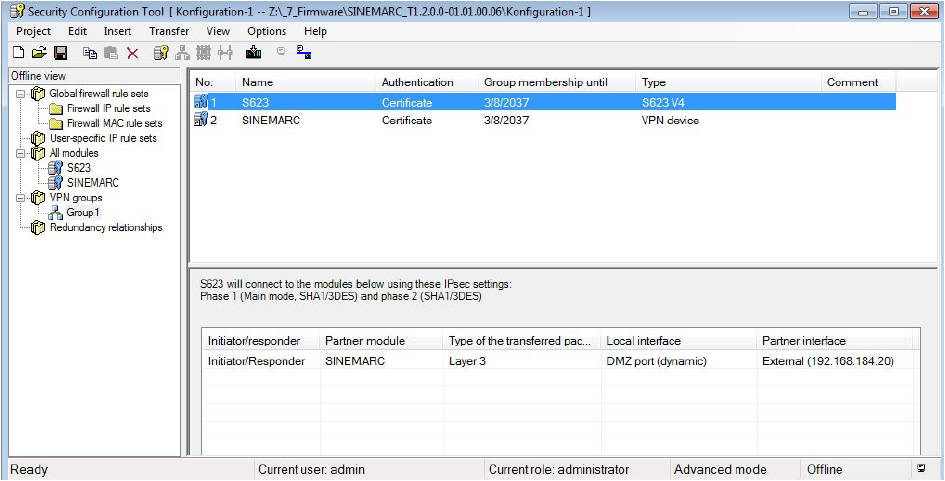
The SINEMA Remote Client is an OpenVPN client for optimal connection to the SINEMA RC server.
https://support.industry.siemens.com/cs/attachments/109755543/OSS_SINEMA-RC-Client_86.html
https://support.industry.siemens.com/cs/attachments/109755543/SRC_Client_V1.0.3.1-01.01.00.30.zip
mirror
[URL=https://userscloud.com/1ebvumbpnp6v]SRC_Client_V1.0.3.1-01.01.00.30.zip - 236.6 MB[/URL]
The current Windows updates are a prerequisite for installing the SINEMA Remote Connect Client.
Check whether your operating system is up to date before installing the SINEMA RC Client.
For Windows 7/8/8.1, please ensure that KB3033929
If you have already installed version 1.0 SP2 or SP3 of the Client on a Windows 10 system, first uninstall the Client and OpenVPN driver before installing Client V1.0 SP3 HF1. |
|
| Back to top |
|
 |
berthold
Junior
Joined: 01 Feb 2018
Posts: 6
|
| Posted: 30/03/2021 18:08 Post subject: SINEMA Remote Connect V3.0 SP1 |
|
|
SINEMA Remote Connect V3.0 SP1
https://support.industry.siemens.com/cs/document/109793790/
The following is offered for download:
Upgrade installation file for SINEMA Remote Connect Server V3.0 SP1
Installation files for SINEMA Remote Connect Client V3.0
(including UMC server installation)
Optional: VMWare Tools V3.0 for installation via update routine
Optional: OSS packages used
SINEMA Remote Connect, the management platform for remote networks, is a server application for establishing secure connections between users, widely distributed plants and machines. SINEMA Remote Connect enables management and establishment of tunnel connections (VPN).
V3.0 of SINEMA Remote Connect provides the option to install the SINEMA Remote Connect Server in a cloud environment for the first time. Amazon Web Services and Microsoft Azure are released and tested cloud systems.
With this version, it is also possible to enable a REST-API (automation interface), which can provide significantly increased productivity through automation. This means that relevant configurations (e.g. adding devices/groups, enabling/disabling users, setting up servers, configuring parameters) can now easily and efficiently be performed automatically instead of manually if required. You can develop your own corresponding scripts/programs for this. The REST-API (must be purchased separately with a license) also allows a flow of information from SINEMA Remote Connect into your own systems, e.g. to enable monitoring (e.g. integrating data from SINEMA Remote Connect into your own statistics/dashboards). To use the API interface, please note that a one-time additional license is required in the SINEMA RC server (SINEMA RC API license - 6GK1724-3VH03-0BV0). For test purposes, a one-time 14-day trial version can be activated.
The SINEMA Remote Connect Client license via the Automation License Manager is replaced by a new central client license which is imported into the SINEMA Remote Connect Server and managed there. The license model, whereby each PC connected to the server on which the SINEMA Remote Connect Client is licensed, has not changed. Only the location of license management has changed. As soon as a SINEMA Remote Connect Client connects to the server, a client license is occupied for this client on the server. Please ensure that there is a sufficient number of available client licenses on the server. If the new SINEMA Remote Connect Client is installed on the same host in numeroase virtual machines, only one license is occupied in global for the virtual machines. Please note that a license migration is necessary before the server update. This is explained in greater detail in the migration process under "Item 3. Download".
New functions:
SINEMA Remote Connect Server V3.0 SP1
Installation of the SINEMA Remote Connect Server in cloud systems (cloud systems released by Siemens: Amazon Web Services and Microsoft Azure)
REST-API (automation interface) for significantly increased productivity through automation, as relevant configurations (e.g. adding devices/groups, enabling/disabling users, setting up servers, configuring parameters) can now be performed automatically. The REST-API allows a flow of information from SINEMA Remote Connect into your own systems.
Central distribution of the client software by uploading the client software to the server by the administrator and downloading of the software for each client user
Central handling of client licenses in the server (client licenses no longer need to be manually distributed using USB flash drives). Caution, migration of the licenses is required!
Online Software Delivery (OSD) of the client licenses (immediate download of software and licenses)
New uniform design of the user interface
New clear menu structure
Access to the Web-based Management via the WAN interface can be disabled optionally
Access to the Web-based Management is also possible via IPv6 address
The IP address of the SINEMA Remote Connect Server can also be flexibly assigned via DHCP
The boot partition can be selected in the Web-based Management
The minimum hard disk size was reduced to 20 GB
The information text for identification of the server can be stored on the start page
Central upload of own logo, to be shown in the clients, possible in the server
Newly created users can be forced by the role/password policy to change their password on first login
Due to the above-mentioned security-related changes, an update of existing installations is recommended.
SINEMA Remote Connect Client V3.0
Optimization of the user interface and performance
Server management with quick selection of frequently used servers (address / user name) from a list
Central distribution of client software by downloading from the SINEMA Remote Connect Server
Central handling of client licenses in the server (client licenses no longer need to be manually distributed using USB flash drives). Caution, migration of the licenses is required!
New uniform design of the user interface
GUI can be switched to Chinese
Supported operating systems: Windows 10 Pro, Enterprise, Windows Server 2016, 2019 (64-bit)
Due to the above-mentioned security-related changes, an update of existing installations is recommended
Download Server V3.0.1.0
https://support.industry.siemens.com/cs/attachments/109793790/SINEMARC_V3.0.1.0-01.01.00.02.zip
Download Client V3.0.0.0
https://support.industry.siemens.com/cs/attachments/109793790/SINEMA_RC_Client_V3_0.zip
Download VMware Tools V3.0.0
https://support.industry.siemens.com/cs/attachments/109793790/SRC_VmwareToolsPackages_3_0.zip
OSS package download
https://support.industry.siemens.com/cs/attachments/109793790/oss_packages.zip
https://support.industry.siemens.com/cs/attachments/109793790/OSS_SINEMA-RC-Client_86.pdf
https://support.industry.siemens.com/cs/attachments/109793790/OSS_SINEMA-RC_86.pdf
https://support.industry.siemens.com/cs/attachments/109793790/ReadMe_OSS_SINEMA-RC-open-vm-tools_86.pdf
https://ulozto.net/tamhle/oF5twtzmFNbP/ |
|
| Back to top |
|
|
|
|
You cannot post new topics in this forum
You cannot reply to topics in this forum
You cannot edit your posts in this forum
You cannot delete your posts in this forum
You cannot vote in polls in this forum
|
Powered by phpBB © 2001, 2005 phpBB Group
Fa-ti si tu propriul forum GRATUIT, pe www.myforum.ro |
 FAQ
FAQ Search
 Memberlist
 Usergroups
 Register
 Profile
 Log in to check your private messages
 Log in


