 |
plc.myforum.ro
PLCs users www.plc.myforum.ro!
|
| View previous topic :: View next topic |
| Author |
Message |
gert
Member 3


Joined: 02 Jan 2015
Posts: 645
|
 Posted: 14/04/2022 18:02 Post subject: SINEMA RC Client from a VMWare Posted: 14/04/2022 18:02 Post subject: SINEMA RC Client from a VMWare |
 |
|
How do you access a remote installation via the SINEMA RC Client from a VMWare with an older operating system?
https://support.industry.siemens.com/cs/document/109805982/
It is necessary to make some settings in order to access a remote installation from a VMWare with an older operating system that is no longer being updated via the SINEMA RC Client.
The following figure shows how to access the remote subnet from VMWare via the SINEMA RC client. The VMWare connects to the SINEMA RC server and to protected devices on the remote subnet via the SINEMA RC client.
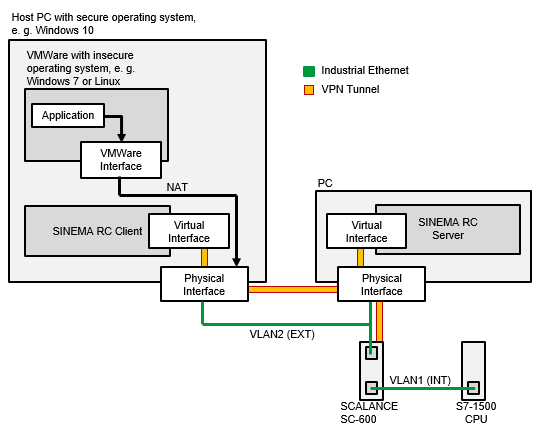
Fig. 1
The following documentation provides instructions for setting up access from VMWare to the remote subnet via the SINEMA RC client.
https://support.industry.siemens.com/cs/attachments/109805982/109805982_SINEMA_RC_Zugriff_aus_VMware_en.pdf
Setting up a secure VPN Connection between SINEMA Remote Connect Client, SCALANCE S615 and SINEMA Remote Connect Server
https://support.industry.siemens.com/cs/document/109479599/
This application example shows how to establish a secure VPN connection between a service technician with a mobile device and an automation cell over the Internet with the aid of SINEMA Remote Connect.
Due to increased networking through Ethernet, remote diagnostics and/or remote maintenance are of great importance in modern automation systems. Today’s Internet access mechanisms (wireless, broadband) and the security components from Siemens are an ideal combination for industrial remote communication.
A VPN tunnel is the typical way to establish a secure connection between two networks (e.g., automation networks or individual devices).
A VPN is a virtual, logical private network based on a publicly accessible infrastructure. Only communication partners that belong to this private network can communicate with each other and exchange information and data.
This application shows the user how to establish a secure connection between two networks over the Internet with the aid of Siemens’ Security Products portfolio.
Solution
This solution to implement the task is based on SINEMA Remote Connect Appliance and requires the SINEMA Remote Connect Server as software.
A PC/notebook computer with the SINEMA Remote Connect Client and the SCALANCE S615 serve as remote ends.
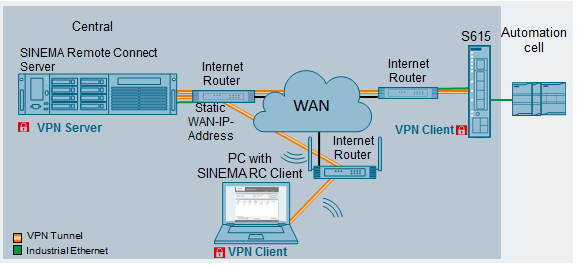
Characteristics
The solution described in this application has the following characteristics:
User management and connection management via a central server application.
Secure and easy dial-in to the plants from anywhere in the world.
Controlled, encrypted data traffic between users, widely distributed plants and machines through a VPN tunnel.
Verification of the SINEMA Remote Connect Server by the CA certificate.
Low investment and operating costs for monitoring and controlling remotely connected substations.
High degree of security for machines and plants through the implementation of the cell protection concept.
Protocol-independent, IP-based communication.
Easiest connection of terminal units (SCALANCE S615) and SINEMA Remote Connect Client (requires little IT know-how).
Documentation
https://support.industry.siemens.com/cs/attachments/109479599/109479599_S615_RCClient_RC_StatischeIP_DOKU_V10_en.pdf |
|
| Back to top |
|
 |
|
|
You cannot post new topics in this forum
You cannot reply to topics in this forum
You cannot edit your posts in this forum
You cannot delete your posts in this forum
You cannot vote in polls in this forum
|
Powered by phpBB © 2001, 2005 phpBB Group
Fa-ti si tu propriul forum GRATUIT, pe www.myforum.ro |
 FAQ
FAQ Search
 Memberlist
 Usergroups
 Register
 Profile
 Log in to check your private messages
 Log in


