| View previous topic :: View next topic |
| Author |
Message |
Automaneng
Junior

Joined: 29 Jul 2018
Posts: 14
|
 Posted: 08/06/2019 14:25 Post subject: SINAMICS V20 Torque control Posted: 08/06/2019 14:25 Post subject: SINAMICS V20 Torque control |
 |
|
Dears
I'm facing an issue
i have V20 drive installed on sanding roll for wood application, and the speed need for sanding is so slow around 10 HZ
Now I'm facing issue that sometimes the sanding roll stops moving due to friction and force of the wood board but it doesn't stop on any alarm which is natural as the motor is big (22 kw) and the AMPs withdrawn is small so when it face high friction it doesn't overload the motor
Now what i want is to find solution to prevent the motor from stopping when facing high friction from the wood
May be to fix the torque coming out of the drive
So would you kindly help me to find solution for this issue |
|
| Back to top |
|
 |
SHLED
Junior
Joined: 22 Mar 2019
Posts: 5
|
| Posted: 08/06/2019 17:58 Post subject: |
|
|
One way eventually to keep speed with PID-Control
https://support.industry.siemens.com/cs/document/109483275/sinamics-v20%3A-pid-control
https://support.industry.siemens.com/cs/attachments/109483275/SINAMICS_V20_PID_Functionality_V1.pdf
Another is to use Supertorque or hammer mode with an digital input.
P3352[0...2] Extra torque startup mode
This parameter defines when the super torque function becomes
active.
= 0: Enabled on first run after power-up
= 1: Enabled on every run
= 2: Enabled by digital input (enable source is defined by
P3351; 0 = never enabled, 1 = enabled on every run)
Starting the motor in hammer start mode
Functionality
This startup mode applies a sequence of torque pulses to start the motor.
Typical application field
Very sticky pumps
https://megaupload.nz/f9t13au4ne/sinamics_v20_pdf |
|
| Back to top |
|
|
Automaneng
Junior
Joined: 29 Jul 2018
Posts: 14
|
| Posted: 09/06/2019 10:23 Post subject: |
|
|
Thanks for the feedback
But if i want to apply the PID function
for this kind of application what would be the sutibule analog sensor to have the PID feedback from the motor |
|
| Back to top |
|
|
Antilla
Junior
Joined: 25 Jan 2019
Posts: 2
|
| Posted: 09/06/2019 21:43 Post subject: |
|
|
| DC Tachogenerator |
|
| Back to top |
|
|
gert
Member 3


Joined: 02 Jan 2015
Posts: 645
|
| Posted: 31/05/2020 17:23 Post subject: SINAMICS V: Positioning of a V20 using S7-200 USS®-protocol |
|
|
SINAMICS V: Positioning of a V20 using S7-200 (Step7-Micro/WIN) with USS®-protocol
https://support.industry.siemens.com/cs/document/65688720/
Communication between an inverter and a PLC is often required in a diversity of general motion control applications. Taking reciprocating motions for example, communication between a controller (S7-200)and a frequency inverter (SINAMICS V20) takes place with the aid of the USS protocol.
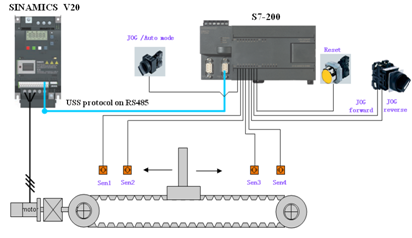
Motion control requirements:
Switch off the Jog/Auto mode button. Switch on the Jog Left or Jog Right button and the motor can run at 30Hz.
Switch on the Jog/Auto mode button, the toothed belt reciprocates between the positions of sen1and senr4 automatically.
To improve the stability of the system, there are two deceleration signals sen2 and sen3, the motor speed within the positions of sen2 and sen3 is not less than 50Hz, and the speed is changed to 35Hz in other positions.
If the drive displays a fault code, the fault light will light. And press the reset button can reset fault light.
Solution
The sensor signals are read into the PLC via digital input modules.
PLC deals with these digital inputs and issues commands to the inverter.
Downloads
https://support.industry.siemens.com/cs/attachments/65688720/SINAMICS_V20_connect_to_S7-200_via_USS_en.pdf
https://support.industry.siemens.com/cs/attachments/65688720/s7-200-V20.zip
https://support.industry.siemens.com/cs/attachments/65688720/Electrical_schematic_diagram.zip
https://ulozto.net/tamhle/nvHxTqf0slKj
https://bayfiles.com/j4odd44boe/s7-200-v20_zip
https://bayfiles.com/lcocd84eoa/02_attachment_G110_to_V20_pdf
https://bayfiles.com/n2o3d649o9/electrical_schematic_diagram_zip
https://bayfiles.com/r0o3d043o3/sinamics_v20_connect_to_s7-200_via_uss_en_pdf |
|
| Back to top |
|
|
gert
Member 3
Joined: 02 Jan 2015
Posts: 645
|
| Posted: 31/05/2020 17:25 Post subject: SINAMICS V20: PID-Control |
|
|
SINAMICS V20: PID-Control
https://support.industry.siemens.com/cs/document/109483275/
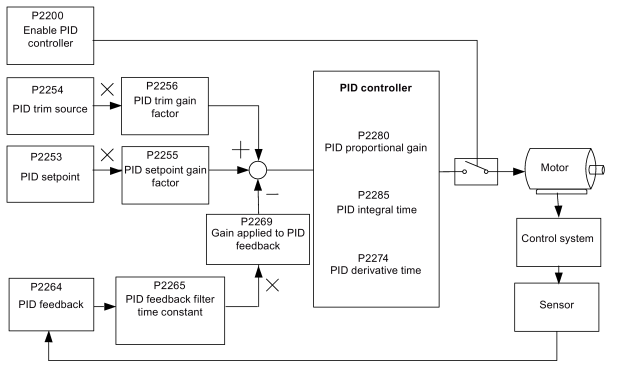
The standard application SINAMICS V20 PID-Control offers the possibility to implement the integrated PID controller from a V20 in the usage for technologicall applications.
In technological applications like the regulation for water / air flows using pumps and ventilators there are additional controller in the drive unit necessary. For this kind of regulation free available PID controller are qualified to operate this regulations.
For this task the standard application SINAMICS V20 PID-Control can be used. The application offers the following functions:
Connection and commissioning of the V20
Including and commissioning of the PID Controller
BOP usage and bus connection
https://support.industry.siemens.com/cs/attachments/109483275/SINAMICS_V20_PID_Functionality_V1.pdf |
|
| Back to top |
|
|
gert
Member 3
Joined: 02 Jan 2015
Posts: 645
|
| Posted: 31/05/2020 17:26 Post subject: SINAMICS V20 with a SIMATIC S7-1200/1500 via USS |
|
|
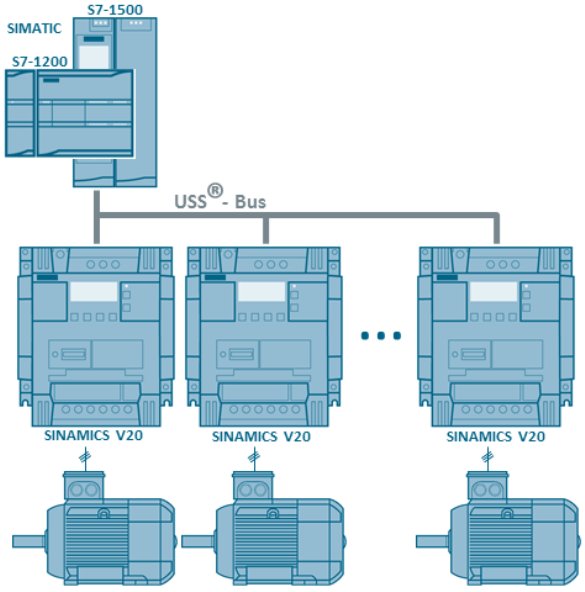
Simple Control of a SINAMICS V20 with a SIMATIC S7-1200/1500 via USS
https://support.industry.siemens.com/cs/document/109480894/
Block for simple control (process data exchange) of a V20 with an S7-1200 or S7-1500 via USS.
The SINAMICS V20 drives are to be controlled by a SIMATIC S7-1200 or S7-1500 via the RS485 interface and using USS® (Universal Serial Interface protocol).
Documentation and Sample Project
https://support.industry.siemens.com/cs/attachments/109480894/109480894_V20USS_at_S712001500_DOC_V1d0_TIAV13SP1_en.pdf
https://support.industry.siemens.com/cs/attachments/109480894/109480894_V20USS_at_S7-1200_V15.zip
https://support.industry.siemens.com/cs/attachments/109480894/109480894_V20USS_at_S7-1500_V15.zip
https://support.industry.siemens.com/cs/attachments/109480894/109480894_V20USS_at_S71200.zip
https://support.industry.siemens.com/cs/attachments/109480894/109480894_V20USS_at_S71500.zip
https://ulozto.net/tamhle/pKOm70KQhCZX
https://bayfiles.com/n8k0d245od/109480894_V20USS_at_S7-1200_V15_zip
https://bayfiles.com/rdk9d440oc/109480894_V20USS_at_S7-1500_V15_zip
https://bayfiles.com/v3k3d14ao8/109480894_V20USS_at_S712001500_DOC_V1d0_TIAV13SP1_en_pdf
https://bayfiles.com/xck7d64boc/109480894_V20USS_at_S71200_zip
https://bayfiles.com/zbk7de43o2/109480894_V20USS_at_S71500_zip |
|
| Back to top |
|
|
gert
Member 3
Joined: 02 Jan 2015
Posts: 645
|
| Posted: 31/05/2020 17:29 Post subject: SINAMICS V: Speed Control of a V20 with S7-1200 via USS |
|
|
SINAMICS V: Speed Control of a V20 with S7-1200 (TIA Portal) via USS® protocol/MODBUS RTU with HMI
https://support.industry.siemens.com/cs/document/63696870/
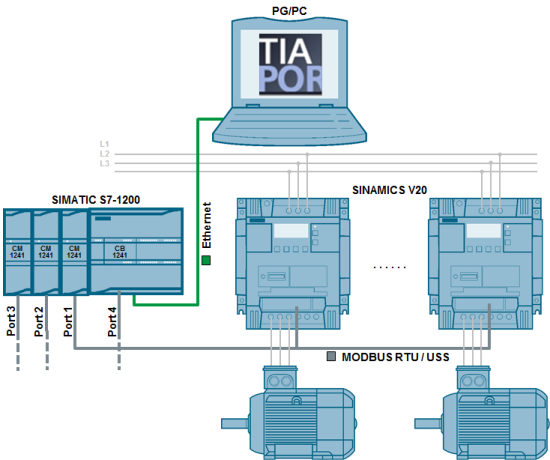
Speed control of a SINAMICS V20 with a SIMATIC S7-1200 CPU via USS- and MODBUS-communication.
SINAMICS V20
The SINAMICS V20 is compactly designed and can be adjusted individually to the requirements of the application as well as the demands of the users via various options (such as external BOP, connecting cables, filters, brake resistors, shielding, ...). The compact and rezistent devices are tailored for the operation of pumps, fans, compressors and conveyor systems, as well as for simple drive tasks in the processing and production industry.
USS communication
Cyclic write/read access of a SIMATIC S7-1200 to selected SINAMICS V20 process/control data whose transmission is supported by a STEP 7 system instruction.
Acyclic write/read access of a SIMATIC S7-1200 to selected SINAMICS V20 data that is exchanged via parameter accesses via STEP 7 system instruction.
Connections of up to 64 drives are possible.
MODBUS communication
Cyclic write/read access of a SIMATIC S7-1200 to selected SINAMICS V20 process/control data that can be triggered via a STEP 7 system instruction via MODBUS register numbers.
Acyclic write/read access of a SIMATIC S7-1200 to all SINAMICS V20 data that can be triggered via a STEP 7 system instruction via MODBUS register numbers.
Connection of up to 128 drives possible (with repeaters, expansion to 988 drives possible).
The above tasks are supported by a simulated KTP600 operator panel in PG/PC so that you can control the drives via their control word bits, specify speed setpoint values, monitor status bits and read out actual speed values. You can furthermore conveniently read out and change a number of inverter data and parameters.
Solution
Via up to three communication modulesCM1241 added to the SIMATIC S7-1200 and one communication board CB1241, a USS®or MODBUS communication can be established to SINAMICS V20 drives.
USS communication
Per port up to 16 drives can be operated.
The user function blocks use the STEP7 system instructions USS_PORT, USS_DRV, USS_RPM and USS_WPM.
MODBUS communication
Per port up to 32 drives can be operated (with repeaters up to 247). The user function blocks use the STEP7 system instructions MB_COMM_LOAD and MB_MASTER.
Downloads for USS®-communication
https://support.industry.siemens.com/cs/attachments/63696870/63696870_v20_at_s7-1200_uss_v1d2_en.pdf
https://support.industry.siemens.com/cs/attachments/63696870/63696870_v20_at_s7-1200_uss_v1d2_short-docu_en.pdf
https://support.industry.siemens.com/cs/attachments/63696870/63696870_V20_at_S7-1200_USS_proj_V15.zip
https://support.industry.siemens.com/cs/attachments/63696870/63696870_V20_at_S7-1200_USS_lib_V15.zip
https://support.industry.siemens.com/cs/attachments/63696870/63696870_V20_at_S7-1200_USS_proj_V14.zip
https://support.industry.siemens.com/cs/attachments/63696870/63696870_V20_at_S7-1200_USS_lib_V14.zip
https://support.industry.siemens.com/cs/attachments/63696870/63696870_v20_at_s7-1200_uss_proj_v13_v1d2.zip
https://support.industry.siemens.com/cs/attachments/63696870/63696870_v20_at_s7-1200_uss_lib_v13_v1d2.zip
https://support.industry.siemens.com/cs/attachments/63696870/63696870_v20_at_s7-1200_uss_proj_v12_v1d1.zip
https://support.industry.siemens.com/cs/attachments/63696870/63696870_v20_at_s7-1200_uss_lib_v12_v1d1.zip
https://support.industry.siemens.com/cs/attachments/63696870/63696870_v20_at_s7-1200_uss_proj_v11_v1d1.zip
https://support.industry.siemens.com/cs/attachments/63696870/63696870_v20_at_s7-1200_uss_lib_v11_v1d1.zip
Downloads for MODBUS-communication
https://support.industry.siemens.com/cs/attachments/63696870/63696870_v20_at_s7-1200_mb_v1d2_en.pdf
https://support.industry.siemens.com/cs/attachments/63696870/63696870_v20_at_s7-1200_mb_v1d2_short-docu_en.pdf
https://support.industry.siemens.com/cs/attachments/63696870/63696870_V20_at_S7-1200_MB_proj_V15.zip
https://support.industry.siemens.com/cs/attachments/63696870/63696870_V20_at_S7-1200_MB_lib_V15.zip
https://support.industry.siemens.com/cs/attachments/63696870/63696870_V20_at_S7-1200_MB_proj_V14.zip
https://support.industry.siemens.com/cs/attachments/63696870/63696870_V20_at_S7-1200_MB_lib_V14.zip
https://support.industry.siemens.com/cs/attachments/63696870/63696870_v20_at_s7-1200_mb_proj_v13_v1d2.zip
https://support.industry.siemens.com/cs/attachments/63696870/63696870_v20_at_s7-1200_mb_lib_v13_v1d2.zip
https://support.industry.siemens.com/cs/attachments/63696870/63696870_v20_at_s7-1200_mb_proj_v12_v1d1.zip
https://support.industry.siemens.com/cs/attachments/63696870/63696870_v20_at_s7-1200_mb_lib_v12_v1d1.zip
https://support.industry.siemens.com/cs/attachments/63696870/63696870_v20_at_s7-1200_mb_proj_v11_v1d1.zip
https://support.industry.siemens.com/cs/attachments/63696870/63696870_v20_at_s7-1200_mb_lib_v11_v1d1.zip
https://ulozto.net/tamhle/QdeFDxQABrsA
https://bayfiles.com/7eg2df47o4/63696870_v20_at_s7-1200_mb_lib_v11_v1d1_zip
https://bayfiles.com/94gbdb40oa/63696870_v20_at_s7-1200_mb_lib_v13_v1d2_zip
https://bayfiles.com/B4g5de49o0/63696870_v20_at_s7-1200_mb_lib_v12_v1d1_zip
https://bayfiles.com/D1gcdb45o7/63696870_V20_at_S7-1200_MB_lib_V14_zip
https://bayfiles.com/Fbgdda49o8/63696870_V20_at_S7-1200_MB_lib_V15_zip
https://bayfiles.com/L9g9dd4coa/63696870_v20_at_s7-1200_mb_proj_v11_v1d1_zip
https://bayfiles.com/Pfgbd545o2/63696870_v20_at_s7-1200_mb_v1d2_short-docu_en_pdf
https://bayfiles.com/R1g1d648ob/63696870_V20_at_S7-1200_MB_proj_V15_zip
https://bayfiles.com/V0g0d148od/63696870_V20_at_S7-1200_MB_proj_V14_zip
https://bayfiles.com/Xeg9dd48o1/63696870_v20_at_s7-1200_mb_proj_v12_v1d1_zip
https://bayfiles.com/Zbg1d149of/63696870_v20_at_s7-1200_uss_lib_v11_v1d1_zip
https://bayfiles.com/dfh6dd4bo4/63696870_v20_at_s7-1200_mb_v1d2_en_pdf
https://bayfiles.com/l0h3d840o5/63696870_v20_at_s7-1200_uss_lib_v12_v1d1_zip
https://bayfiles.com/n6h6d54aoc/63696870_v20_at_s7-1200_uss_lib_v13_v1d2_zip
https://bayfiles.com/vfh6db4fo5/63696870_V20_at_S7-1200_USS_lib_V14_zip
https://bayfiles.com/x2hcd148oe/63696870_v20_at_s7-1200_mb_proj_v13_v1d2_zip
https://bayfiles.com/35h9d241o5/63696870_v20_at_s7-1200_uss_proj_v11_v1d1_zip
https://bayfiles.com/94had54coc/63696870_V20_at_S7-1200_USS_lib_V15_zip
https://bayfiles.com/F9h5dc47o7/63696870_v20_at_s7-1200_uss_proj_v12_v1d1_zip
https://bayfiles.com/H2h6df4co9/63696870_v20_at_s7-1200_uss_v1d2_short-docu_en_pdf
https://bayfiles.com/J1hedf4bo7/63696870_V20_at_S7-1200_USS_proj_V15_zip
https://bayfiles.com/L6h3d049o1/63696870_V20_at_S7-1200_USS_proj_V14_zip
https://bayfiles.com/N0h5d943o0/63696870_v20_at_s7-1200_uss_v1d2_en_pdf
https://bayfiles.com/R2hbd440o8/63696870_v20_at_s7-1200_uss_proj_v13_v1d2_zip |
|
| Back to top |
|
|
gert
Member 3
Joined: 02 Jan 2015
Posts: 645
|
| Posted: 31/05/2020 17:31 Post subject: SINAMICS V: Speed Control of a V20 with S7-1500 via USS |
|
|
SINAMICS V: Speed Control of a V20 with S7-1500 and ET 200SP via USS® Protocol, with HMI Connection
https://support.industry.siemens.com/cs/document/90468030/
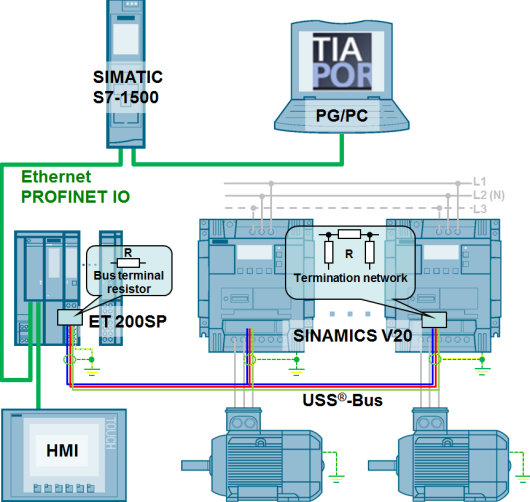
Speed Control of a SINAMICS V20 with SIMATIC S7-1500 and SIMATIC ET 200SP via USS® Protocol
The SINAMICS V20 is compactly designed and can be adjusted individually to the requirements of the application as well as the demands of the users via various options (such as external BOP, connecting cables, filters, brake resistors, shielding, ...). The compact and rezistent devices are tailored for the operation of pumps, fans, compressors and conveyor systems, as well as for simple drive tasks in the processing and production industry.
Drive connection by means of USS® protocol
Cyclic write/read access of a SIMATIC S7-1200 to selected SINAMICS V20 process/control data whose transmission is supported by a STEP7 system instruction.
Acyclic write/read access of a SIMATIC S7-1200 to selected SINAMICS V20 data that is exchanged via parameter accesses via STEP7 system instruction.
Distributed connection of the drives via SIMATIC ET 200SP.
The above tasks are supported by a KTP600 operator panel so that you can control the drives via their control word bits, specify speed setpoint values, monitor status bits and read out actual speed values. You can furthermore conveniently read out and change a number of inverter data and parameters.
Solution
The SINAMICS V20 drives are connected to the SIMATIC controller via decentralized ET 200SP stations. Into the ET 200SP PtP, communication modules can be plugged, where each of them can serve up to 16 SINAMICS V20 via the USS® bus. The user function blocks work with the STEP7 system instructions USS_Port_Scan, USS_Drive_Control, USS_Read_Param and USS_Write_Param. The operater panel KTP600 can be simulated on the TIA portal, so the hardware concerned is not absolutely necessary. The application example supports a hardware configuration with 1 ET 200SP, which contains 1 PtP module. This allows you to connect up to 16 drives. How to expand the configuration to more peripheral stations with more PtP modules see the application description.
Downloads
https://support.industry.siemens.com/cs/attachments/90468030/90468030_V20_at_ET200SP_USS_V101_en.pdf
https://support.industry.siemens.com/cs/attachments/90468030/90468030_V20_at_ET200SP_USS_proj_V15_V1d0.zip
https://support.industry.siemens.com/cs/attachments/90468030/90468030_V20_at_ET200SP_USS_lib_V15_V1d0.zip
https://support.industry.siemens.com/cs/attachments/90468030/90468030_V20_at_ET200SP_USS_proj_V14_V1d0.zip
https://support.industry.siemens.com/cs/attachments/90468030/90468030_V20_at_ET200SP_USS_lib_V14_V1d0.zip
https://support.industry.siemens.com/cs/attachments/90468030/90468030_v20_at_et200sp_uss_proj_v13_v1d0.zip
https://support.industry.siemens.com/cs/attachments/90468030/90468030_v20_at_et200sp_uss_lib_v13_v1d0.zip
https://support.industry.siemens.com/cs/attachments/90468030/90468030_v20_at_et200sp_uss_proj_v12_v1d0.zip
https://support.industry.siemens.com/cs/attachments/90468030/90468030_v20_at_et200sp_uss_lib_v12_v1d0.zip
https://ulozto.net/tamhle/SSGfkCdiSP0j
https://bayfiles.com/DbUfc944o7/90468030_v20_at_et200sp_uss_lib_v12_v1d0_zip
https://bayfiles.com/F6Uec14cof/90468030_V20_at_ET200SP_USS_lib_V14_V1d0_zip
https://bayfiles.com/HdU2c54eoc/90468030_v20_at_et200sp_uss_lib_v13_v1d0_zip
https://bayfiles.com/J3U6c543oc/90468030_V20_at_ET200SP_USS_lib_V15_V1d0_zip
https://bayfiles.com/L6Ucc346of/90468030_V20_at_ET200SP_USS_proj_V14_V1d0_zip
https://bayfiles.com/PdUfc24eo0/90468030_V20_at_ET200SP_USS_proj_V15_V1d0_zip
https://bayfiles.com/T1Ubcf4co8/90468030_v20_at_et200sp_uss_proj_v13_v1d0_zip
https://bayfiles.com/V5Uecb43o1/90468030_v20_at_et200sp_uss_proj_v12_v1d0_zip
https://bayfiles.com/X2U9c840od/90468030_V20_at_ET200SP_USS_V101_en_pdf
https://bayfiles.com/h7V5c54eoa/V20_op_instr_1019_en-US_pdf |
|
| Back to top |
|
|
gert
Member 3
Joined: 02 Jan 2015
Posts: 645
|
| Posted: 31/05/2020 17:33 Post subject: SINAMICS V20: When use USS/Modbus to control V20 |
|
|
SINAMICS V20: When use USS/Modbus to control V20, it can't start up directly
https://support.industry.siemens.com/cs/document/109780220/
When the drive is in "ON Inhibit" state (r2=6), it must get the switch off command to get in "Ready" state.
When you use "USS/MODBUS on RS485" as control resource (p700=5), the SINAMICS V20 can be in "ON Inhibit" state and does not switch on in below situations:
Situation 1: The communication is not established between Host device and SINAMICS V20
Situation 2: F72 occurs, and the fault is not reset
This "ON Inhibit" statue prevents the SINAMICS V20 from a direct start-up. In this case, r2 shows the value 6.
The bits "ON/OFF1" and "Acknowlege" need a signal change from false to true to execute there function.
To start the drive you have to:
Set "ON/OFF1" bit to false and "Acknowlege" bit to true
This will change from state "On Inhibit" to "Ready" (r2=1)
Set "ON/OFF1" bit to true to start the drive ( It's recommended to reset "Acknowlege" bit to false)
Typical sequence for USS in the control word is:
16#04FE - switch off ("ON/OFF1" (bit 0) = false, "Acknowledge" (bit 7) = true, all other enables are set)
This will change from state "On Inhibit" to "Ready" (r2=1)
16#047F - switch on ("ON/OFF1" (bit 0) = true, "Acknowledge" (bit 7) = false, all other enables are set)
Typical sequence for Modbus RTU is:
Set register 40006 to 0 (Switch off) and register 40007 to 1 (Acknowledge faults)
This will change from state "On Inhibit" to "Ready" (r2=1)
Set register 40006 to 1 (Switch on) and register 40007 to 0 (Prepare new acknowledge )
The register 40004 must be 1 for operation (RUN enable).
SINAMICS V20 Operating Instructions
https://support.industry.siemens.com/cs/attachments/109773836/V20_op_instr_1019_en-US.pdf |
|
| Back to top |
|
|
rizwan4
Junior
Joined: 31 Aug 2018
Posts: 15
|
| Posted: 15/06/2020 13:51 Post subject: SINAMICS V20 |
|
|
SINAMICS V20: Why does the speed fluctuate when I set the setpoint via an analog input.
https://support.industry.siemens.com/cs/document/109780402/sinamics-v20%3A-why-does-the-speed-fluctuate-when-i-set-the-setpoint-via-an-analog-input
If you give the setpount via an analog input to the inverter, the setpoint rounding (P1130 to P1133) can only be filly used.
If you have set rounding times (in P1130 to P1133) in the SINAMICS V20 and specify the speed setpoint via an analog input, the speed will fluctuate constantly between the specified value and the max frequency as soon as you give the ON command.
The description of the parameter P1130 in the SINAMICS V20 operating instructions (see entry ID 109773836 ) also contains a corresponding note:
Rounding times are not recommended when analog inputs are used, since they would result in overshoot / undershoot in the converter response.
Remedy
Do not use the rounding by setting P1130 to P1133 to 0.00. (preferred solution).
If you need a rounding (P1130 to P1133 not equal to 0), then use the discontinuous smoothing by setting P1134 to 1. |
|
| Back to top |
|
|
gert
Member 3
Joined: 02 Jan 2015
Posts: 645
|
| Posted: 01/07/2020 16:42 Post subject: Acyclic communication between S7-1200 and V20 via Modbus |
|
|
Acyclic communication between S7-1200 and V20 via Modbus
https://support.industry.siemens.com/cs/document/109780737/
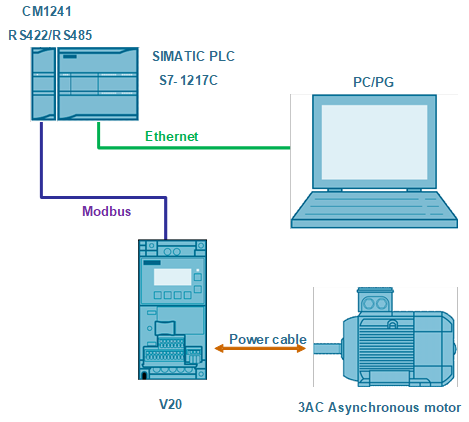
Effective from the firmware version V03.96.00.00 of SINAMICS V20 drive, it supports DS47 in Modbus communication. Then all parameters in V20 drive can be accessed via acyclic communication.
Overview of the automation task
Requirements
TIA Portal from V15.1
SINAMICS V20 from FW 3.96
Downloads
https://support.industry.siemens.com/cs/attachments/109780737/109780737_Modbus_Acyclic_Communication_between_S7-1200_and_V20_DOC_en.pdf
https://support.industry.siemens.com/cs/attachments/109780737/109780737_Acyclic_communication_between_SINAMICS_V20_and_S7-1200_via_DS47.zip
https://ulozto.net/tamhle/S6RtS9lIWfBD
https://anonfiles.com/P9f2A8D8o0/V03.96.00.00_zip
https://anonfiles.com/RcfeA0D8oa/109780737_Acyclic_communication_between_SINAMICS_V20_and_S7-1200_via_DS47_zip
https://anonfiles.com/V5f6A5Deoa/109780737_Modbus_Acyclic_Communication_between_S7-1200_and_V20_DOC_en_pdf |
|
| Back to top |
|
|
|

 FAQ
FAQ Search
 Memberlist
 Usergroups
 Register
 Profile
 Log in to check your private messages
 Log in


