| View previous topic :: View next topic |
| Author |
Message |
gert
Member 3


Joined: 02 Jan 2015
Posts: 645
|
 Posted: 05/11/2019 19:29 Post subject: SINAMICS G/S: PROFINET Connection with LabVIEW Posted: 05/11/2019 19:29 Post subject: SINAMICS G/S: PROFINET Connection with LabVIEW |
 |
|
SINAMICS G/S: PROFINET Connection with LabVIEW
https://support.industry.siemens.com/cs/document/99684399/sinamics-g-s%3A-profinet-connection-with-labview
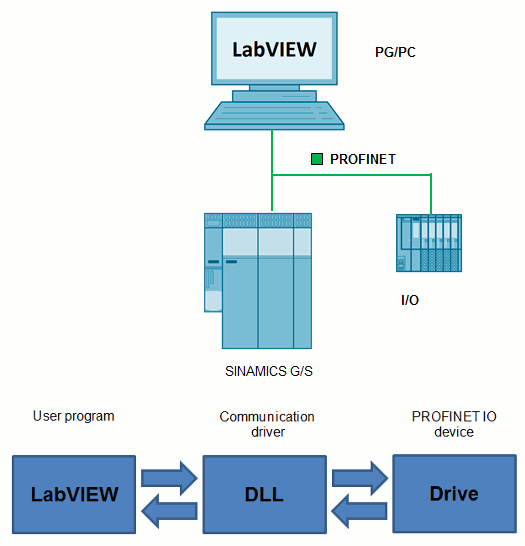
A SINAMICS converter with PROFINET interface should be connected to a PC with the software LabVIEW from National Instruments.
A SINAMICS converter with PROFINET interface is to be connected to a PC with the software LabVIEW from National Instruments.
Cyclic and acyclic I/O communication shall be realized via any network interface of the used PC. LabVIEW shall operate as PROFINET controller.
The application example shows how to connect a SINAMICS S120 converter to a standard PC by using a DLL which is integrated and running in LabVIEW. For simpler handling the application example VIs are provided for standard telegrams. Their interface emulates 1:1 the SINAMICS telegram interface:
· Standard telegram 1 (Closed-loop speed control)
· Standard telegram 111 (Basic positioner operation)
· Free telegram configuration
For acyclic communication an example VI is provided to read/write parameters which can be extended when required.
Downloads
https://support.industry.siemens.com/cs/attachments/99684399/99684399_documentation_v30_en.pdf
https://support.industry.siemens.com/cs/attachments/99684399/99684399_PNIO_LIB_v30.zip
https://support.industry.siemens.com/cs/attachments/99684399/99684399_starter_project.zip
https://support.industry.siemens.com/cs/attachments/99684399/99684399_tia_project.zip
Archive
https://support.industry.siemens.com/cs/attachments/99684399/99684399_pn_driver_hsp.zip
https://support.industry.siemens.com/cs/attachments/99684399/99684399_tia_project.zip
https://support.industry.siemens.com/cs/attachments/99684399/99684399_TIA_Project_V13_SP1.zip
https://support.industry.siemens.com/cs/attachments/99684399/99684399_TIA_Project_V14.zip
https://ulozto.net/tam/_w4hAzTohzYNe |
|
| Back to top |
|
 |
gert
Member 3
Joined: 02 Jan 2015
Posts: 645
|
| Posted: 05/02/2020 07:28 Post subject: SINAMICS G/S: PROFINET Connection with LabVIEW |
|
|
SINAMICS G/S: PROFINET Connection with LabVIEW
https://support.industry.siemens.com/cs/document/99684399/sinamics-g-s%3A-profinet-connection-with-labview
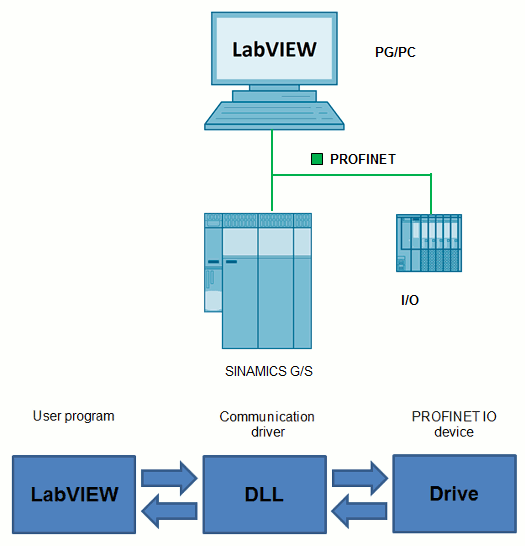
A SINAMICS converter with PROFINET interface should be connected to a PC with the software LabVIEW from National Instruments.
A SINAMICS converter with PROFINET interface is to be connected to a PC with the software LabVIEW from National Instruments.
Cyclic and acyclic I/O communication shall be realized via any network interface of the used PC. LabVIEW shall operate as PROFINET controller.
The application example shows how to connect a SINAMICS S120 converter to a standard PC by using a DLL which is integrated and running in LabVIEW. For simpler handling the application example VIs are provided for standard telegrams. Their interface emulates 1:1 the SINAMICS telegram interface:
· Standard telegram 1 (Closed-loop speed control)
· Standard telegram 111 (Basic positioner operation)
· Free telegram configuration
For acyclic communication an example VI is provided to read/write parameters which can be extended when required.
Licensing
The DLL to be tied into LabVIEW is based on the product “PROFINET driver for controllers”.
A runtime license is required (e.g. single license 6ES7195-3AA05-0XA0).
Downloads
https://support.industry.siemens.com/cs/attachments/99684399/99684399_documentation_v30_en.pdf
https://support.industry.siemens.com/cs/attachments/99684399/99684399_PNIO_LIB_v30.zip
https://support.industry.siemens.com/cs/attachments/99684399/99684399_starter_project.zip
https://support.industry.siemens.com/cs/attachments/99684399/99684399_tia_project.zip
Archive
https://support.industry.siemens.com/cs/attachments/99684399/99684399_pn_driver_hsp.zip
https://support.industry.siemens.com/cs/attachments/99684399/99684399_tia_project.zip
https://support.industry.siemens.com/cs/attachments/99684399/99684399_TIA_Project_V13_SP1.zip
https://support.industry.siemens.com/cs/attachments/99684399/99684399_TIA_Project_V14.zip
https://ulozto.net/tam/_cRFtP5R3Vh0o |
|
| Back to top |
|
|
|

 FAQ
FAQ Search
 Memberlist
 Usergroups
 Register
 Profile
 Log in to check your private messages
 Log in


