 |
plc.myforum.ro
PLCs users www.plc.myforum.ro!
|
| View previous topic :: View next topic |
| Author |
Message |
mamiko
Member 2


Joined: 25 Dec 2017
Posts: 420
|
 Posted: 02/05/2023 20:43 Post subject: SIMOTION SCOUT V5.4 SP3 Posted: 02/05/2023 20:43 Post subject: SIMOTION SCOUT V5.4 SP3 |
 |
|
SIMOTION SCOUT V5.4 SP3
https://support.industry.siemens.com/cs/document/109801441/
SIMOTION SCOUT V5.4 SP3
https://support.industry.siemens.com/cs/attachments/109801441/SCOUT_V5_4_3_0.exe
https://support.industry.siemens.com/cs/attachments/109801441/SCOUT_V5_4_3_0.001
https://support.industry.siemens.com/cs/attachments/109801441/SCOUT_V5_4_3_0.002
https://support.industry.siemens.com/cs/attachments/109801441/SCOUT_V5_4_3_0.003
https://support.industry.siemens.com/cs/attachments/109801441/SCOUT_V5_4_3_0.004
https://support.industry.siemens.com/cs/attachments/109801441/SCOUT_V5_4_3_0.005
https://support.industry.siemens.com/cs/attachments/109801441/SCOUT_V5_4_3_0.006
SIMOTION SCOUT Stand-alone V5.4 SP3
https://support.industry.siemens.com/cs/attachments/109801441/SCOUT_SA_V5_4_3_0.exe
https://support.industry.siemens.com/cs/attachments/109801441/SCOUT_SA_V5_4_3_0.001
https://support.industry.siemens.com/cs/attachments/109801441/SCOUT_SA_V5_4_3_0.002
https://support.industry.siemens.com/cs/attachments/109801441/SCOUT_SA_V5_4_3_0.003
https://support.industry.siemens.com/cs/attachments/109801441/SCOUT_SA_V5_4_3_0.004
https://support.industry.siemens.com/cs/attachments/109801441/SCOUT_SA_V5_4_3_0.005
https://support.industry.siemens.com/cs/attachments/109801441/SCOUT_SA_V5_4_3_0.006
SIMOTION SCOUT TIA V5.4 SP3
https://support.industry.siemens.com/cs/attachments/109801441/SCOUT_TIA_V5_4_3_0.exe
https://support.industry.siemens.com/cs/attachments/109801441/SCOUT_TIA_V5_4_3_0.001
https://support.industry.siemens.com/cs/attachments/109801441/SCOUT_TIA_V5_4_3_0.002 |
|
| Back to top |
|
 |
mamiko
Member 2
Joined: 25 Dec 2017
Posts: 420
|
| Posted: 02/05/2023 20:44 Post subject: STARTER/SCOUT set routing to your SINAMICS in the TIA Portal |
|
|
STARTER/SCOUT: How do you manually set the routing to your SINAMICS in the TIA Portal environment?
https://support.industry.siemens.com/cs/document/109817933/
When configuring SINAMICS converters that have been integrated into TIA Portal with a GSD/GSDML file, it is not possible to set the routing information in TIA Portal. Therefore the routing must be set manually in a STARTER / SCOUT standalone project.
There are some SINAMICS drives that cannot be integrated into a TIA Portal project with Startdrive. Therefore, these drives must be configured via STARTER / SCOUT and integrated into the TIA Portal project using a GSD / GSDML file.
https://support.industry.siemens.com/cs/document/73257075/how-can-you-integrate-a-drive-into-the-tia-portal-via-the-device-master-file- (gsd)
This FAQ shows how a routing connection can be configured from a SIMATIC S7 controller to a SINAMICS drive if the SINAMICS drive has been integrated into the TIA Portal project with a GSD / GSDML file.
Notice
In the following instructions, the SINAMICS S120 is configured in STARTER / SCOUT as an illustration.
The configuration steps are the same for SINAMICS in STARTER and SCOUT.
Hardware requirements
All SINAMICS G11x and G12x from firmware V4.7 support S7 routing.
All SINAMICS S120, G130, G150, S150, S210, MV support S7 routing.
FAQ https://support.industry.siemens.com/cs/document/584459/which-modules-support-the-s7-routing-function-in-s7-subnets
lists which SIMATIC S7 CPUs and CPs support S7 routing.
An online connection via routing can be established if all participants support S7 routing. The detailed requirements for setting up a routing connection to SINAMICS G120 can be found in FAQ: https://support.industry.siemens.com/cs/document/50037141/sinamics-g120- (cu2x0x-2)-sinamics-g120c-requirements-enabling-a-routing-connection
Software requirements
STARTER/SCOUT
The SINAMICS drives are implemented in the "Devices and Networks" view and connected to the SIMATIC controller .
The SINAMICS drives have been commissioned and can be reached directly via the PROFINET interface.
You can download the current STARTER version
https://support.industry.siemens.com/cs/attachments/26233208/STARTER_V54_SP2_HF1_Programm_Part_1.zip
https://support.industry.siemens.com/cs/attachments/26233208/STARTER_V54_SP2_HF1_Programm_Part_2.zip
You can download the current SCOUT version
https://support.industry.siemens.com/cs/document/109801441/simotion-scout-scout-stand-alone-und-scout-tia-v5-4-sp3
After completing the configuration, the hardware configuration is loaded into the SIMATIC controller
Routed connection to PROFINET IO Devices
Requirements
A TIA Portal project is configured with a SIMATIC S7-1500 and a SINAMICS S120 PROFINET GSDML file.
The SIMATIC controller has at least firmware V1.6 or higher.
The hardware configuration has been loaded into the SIMATIC controller and the connection from the PG/PC has already been established via PROFINET.
255.255.255.0 is used as the subnet mask throughout the FAQ.
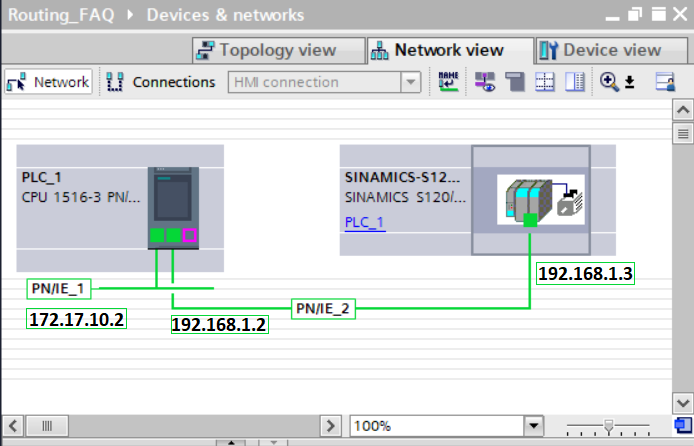
Figure 1: Devices & networks
Step 1
Switch to the network view of TIA Portal.
Select the network (here PROFINET) to which the drive to be accessed is connected.
In the lower part of the screen, in the "Properties" tab, you can read the subnet ID of the selected network in the "General" tab.

Figure 2: S7 subnet ID
Information
The routing tables between the PROFINET networks are automatically generated by TIA Portal and transferred to the SIMATIC controller during the download.
Step 2
Since STARTER has no system connection to TIA Portal, the routing information between TIA Portal and STARTER must be adjusted manually.
Switch to STARTER.
In the project navigator, select the relevant drive and right-click to open the context menu.
Select "Target device online access" and switch to the "Addresses module" tab.
In the mask that opens, select the option "Accessable via network transition".
Enter the S7 subnet ID determined from TIA Portal (here 1A37-0002) and the first gateway (here 172.17.10.2).
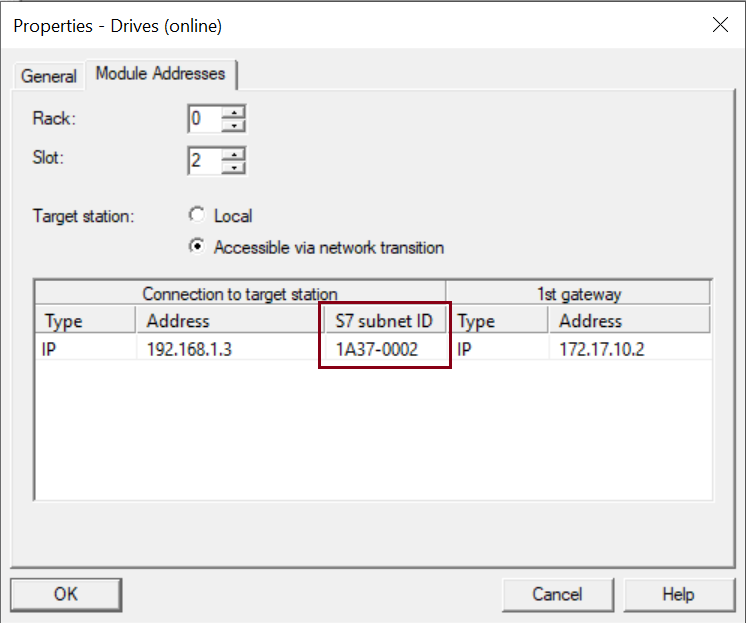
Figure 3: Online access
Information
In this case, the first gateway is the IP address of the CPU interface to which you are connected via your PG/PC device. If additional routers are used (remote maintenance), the IP address of the first router must be specified.
Then exit the mask with "OK".
The online connection to the drive can now be established in STARTER.
Routed connection to PROFIBUS Slaves
Requirements
A TIA Portal project is configured with a SIMATIC S7-1500 and a SINAMICS S120 PROFIBUS GSD file.
The SIMATIC controller has at least firmware V1.6 or higher.
The hardware configuration has been loaded into the SIMATIC controller and the connection from the PG/PC to the S7-1500 has already been established via PROFINET.
255.255.255.0 is used as the subnet mask throughout the FAQ.
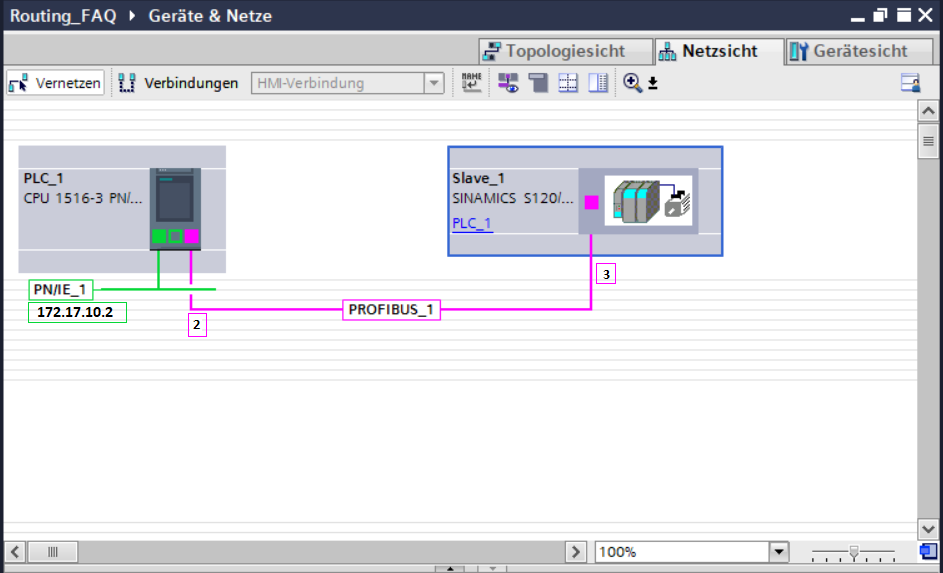
Figure 4: Devices & networks
Step 1
Go to the network view of TIA Portal.
Select the network (here PROFIBUS) to which the drive to be accessed is connected.
In the lower part of the screen, in the "Properties" tab, you can read the subnet ID of the selected network in the "General" tab.
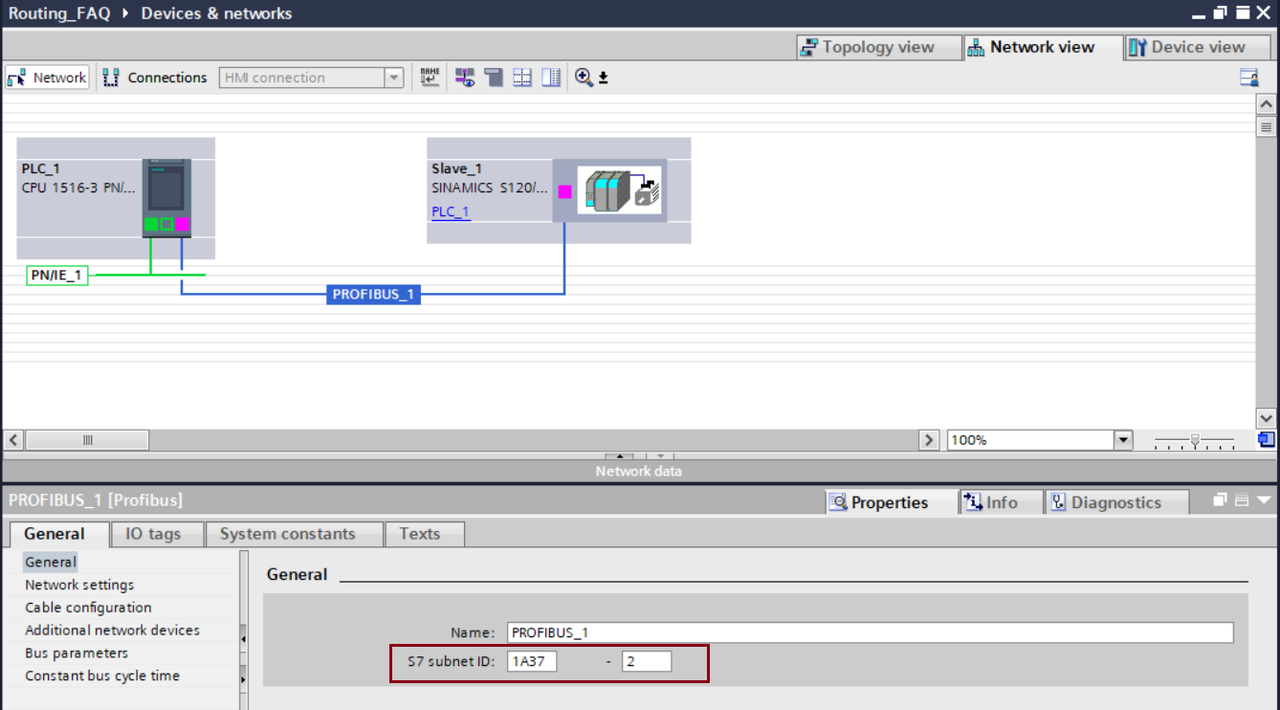
Figure 5: S7 subnet ID
Step 2
Since STARTER has no system connection to TIA Portal, the routing information between TIA Portal and STARTER must be adjusted manually.
Switch to STARTER.
In the project navigator, select the relevant drive and right-click to open the context menu.
Select "Target device online access" and switch to the "Addresses module" tab.
In the mask that opens, select the option "Accessable via network transition".
Enter the S7 subnet ID determined from TIA Portal (here 1A37-0002) and the first gateway (here 172.17.10.2)
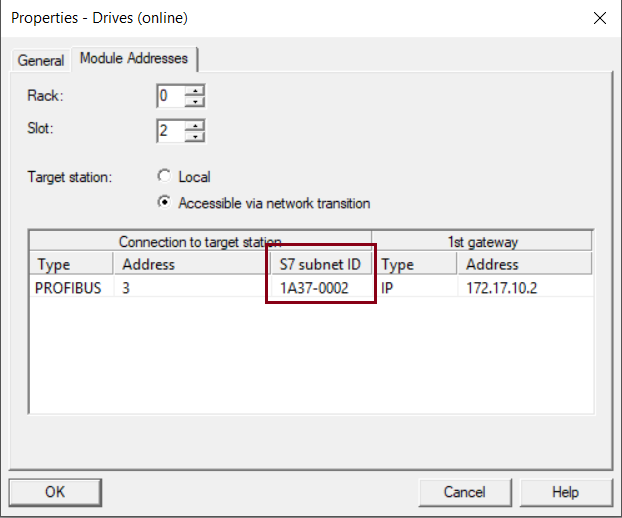
Figure 6: Online access
Information
In this case, the first gateway is the IP address of the CPU interface to which you are connected via your PG/PC device. If additional routers are used (remote maintenance), the IP address of the first router must be specified.
Then exit the mask with "OK".
The online connection to the drive can now be established in STARTER. |
|
| Back to top |
|
|
|
|
You cannot post new topics in this forum
You cannot reply to topics in this forum
You cannot edit your posts in this forum
You cannot delete your posts in this forum
You cannot vote in polls in this forum
|
Powered by phpBB © 2001, 2005 phpBB Group
Fa-ti si tu propriul forum GRATUIT, pe www.myforum.ro |
 FAQ
FAQ Search
 Memberlist
 Usergroups
 Register
 Profile
 Log in to check your private messages
 Log in


