| View previous topic :: View next topic |
| Author |
Message |
gamax
Member

Joined: 15 Jul 2016
Posts: 131
|
 Posted: 22/08/2017 14:50 Post subject: SIMOTION SCOUT V5.1 HF1 / 5.2 SP1 Posted: 22/08/2017 14:50 Post subject: SIMOTION SCOUT V5.1 HF1 / 5.2 SP1 |
 |
|
SIMOTION SCOUT V5.1 HF1
https://support.industry.siemens.com/cs/document/109749385/
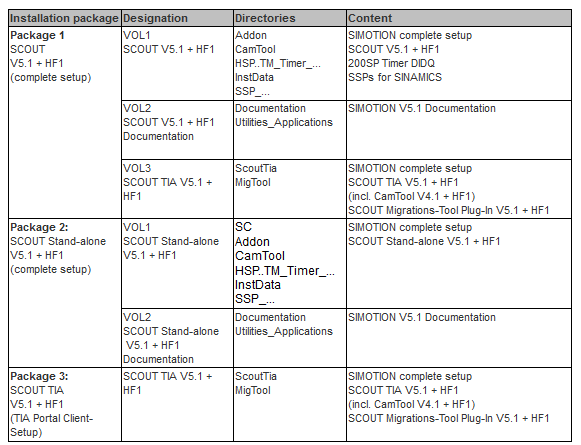
Requirements for the installation:
For SCOUT, SIMATIC STEP 7 V5.6 must be installed on the engineering computer. The SIMOTION SCOUT V5.1 HF1 is a complete installation of SCOUT.
For SCOUT TIA, TIA Portal Framework V14 SP1 must be installed on the engineering computer (SCOUT TIA is a TIA Portal client setup). We recommend that you use the latest update of TIA Portal V14 SP1.
https://support.industry.siemens.com/cs/attachments/109749385/Read_OSS.zip
New functions are available with SIMOTION V5.1.
The most important new functions are:
SIMOTION in the TIA Portal V14 SP1 with SCOUT TIA V5.1
Support of the Windows 10 operating system for SCOUT and SCOUT TIA
Simulation SIMOSIM
Expansions for object-orientated programming (OOP)
https://support.industry.siemens.com/cs/attachments/109749349/Simotion_New_Features_V51_EN.pdf
Projects, which were created with older versions, can be upgraded to the new version (e.g. if the existing project is to be extended to include functions of version V5.1 HF1).
A description is provided in the readme or in the manual.
https://support.industry.siemens.com/cs/attachments/109749349/SIMOTION_inside_the_TIA_Portal_-_Details.pdf
https://support.industry.siemens.com/cs/attachments/109749349/Readme.pdf
SIMOTION SCOUT V5.1 HF1
https://support.industry.siemens.com/cs/attachments/109749385/SCOUT_V5_1_0_1.exe
https://support.industry.siemens.com/cs/attachments/109749385/SCOUT_V5_1_0_1.001
https://support.industry.siemens.com/cs/attachments/109749385/SCOUT_V5_1_0_1.002
https://support.industry.siemens.com/cs/attachments/109749385/SCOUT_V5_1_0_1.003
https://support.industry.siemens.com/cs/attachments/109749385/SCOUT_V5_1_0_1.004
https://support.industry.siemens.com/cs/attachments/109749385/SCOUT_V5_1_0_1.005
https://support.industry.siemens.com/cs/attachments/109749385/SCOUT_V5_1_0_1.006
https://support.industry.siemens.com/cs/attachments/109749385/SCOUT_V5_1_0_1.007
https://support.industry.siemens.com/cs/attachments/109749385/SCOUT_V5_1_0_1.008
https://support.industry.siemens.com/cs/attachments/109749385/SCOUT_V5_1_0_1.009
https://support.industry.siemens.com/cs/attachments/109749385/SCOUT_V5_1_0_1.010
https://support.industry.siemens.com/cs/attachments/109749385/SCOUT_V5_1_0_1.011
https://support.industry.siemens.com/cs/attachments/109749385/SCOUT_V5_1_0_1.012
https://support.industry.siemens.com/cs/attachments/109749385/SCOUT_V5_1_0_1.013
https://support.industry.siemens.com/cs/attachments/109749385/SCOUT_V5_1_0_1.014
https://support.industry.siemens.com/cs/attachments/109749385/SCOUT_V5_1_0_1.015
SIMOTION SCOUT Stand-alone V5.1 HF1
https://support.industry.siemens.com/cs/attachments/109749385/SCOUT_SA_V5_1_0_1.exe
https://support.industry.siemens.com/cs/attachments/109749385/SCOUT_SA_V5_1_0_1.001
https://support.industry.siemens.com/cs/attachments/109749385/SCOUT_SA_V5_1_0_1.002
https://support.industry.siemens.com/cs/attachments/109749385/SCOUT_SA_V5_1_0_1.003
https://support.industry.siemens.com/cs/attachments/109749385/SCOUT_SA_V5_1_0_1.004
https://support.industry.siemens.com/cs/attachments/109749385/SCOUT_SA_V5_1_0_1.005
https://support.industry.siemens.com/cs/attachments/109749385/SCOUT_SA_V5_1_0_1.006
https://support.industry.siemens.com/cs/attachments/109749385/SCOUT_SA_V5_1_0_1.007
https://support.industry.siemens.com/cs/attachments/109749385/SCOUT_SA_V5_1_0_1.008
https://support.industry.siemens.com/cs/attachments/109749385/SCOUT_SA_V5_1_0_1.009
https://support.industry.siemens.com/cs/attachments/109749385/SCOUT_SA_V5_1_0_1.010
https://support.industry.siemens.com/cs/attachments/109749385/SCOUT_SA_V5_1_0_1.011
https://support.industry.siemens.com/cs/attachments/109749385/SCOUT_SA_V5_1_0_1.012
https://support.industry.siemens.com/cs/attachments/109749385/SCOUT_SA_V5_1_0_1.013
https://support.industry.siemens.com/cs/attachments/109749385/SCOUT_SA_V5_1_0_1.014
https://support.industry.siemens.com/cs/attachments/109749385/SCOUT_SA_V5_1_0_1.015
https://support.industry.siemens.com/cs/attachments/109749385/SCOUT_SA_V5_1_0_1.016
https://support.industry.siemens.com/cs/attachments/109749385/SCOUT_SA_V5_1_0_1.017
SIMOTION SCOUT TIA V5.1 HF1
https://support.industry.siemens.com/cs/attachments/109749385/SCOUT_TIA_V5_1_0_1.exe
https://support.industry.siemens.com/cs/attachments/109749385/SCOUT_TIA_V5_1_0_1.001
https://support.industry.siemens.com/cs/attachments/109749385/SCOUT_TIA_V5_1_0_1.002
https://support.industry.siemens.com/cs/attachments/109749385/SCOUT_TIA_V5_1_0_1.003
https://support.industry.siemens.com/cs/attachments/109749385/SCOUT_TIA_V5_1_0_1.004
SIMOTION at a glance
https://support.industry.siemens.com/cs/ww/en/view/109480700
Last edited by gamax on 16/05/2018 20:11; edited 3 times in total |
|
| Back to top |
|
 |
wobb
Junior

Joined: 08 Jan 2018
Posts: 3
|
| Posted: 09/01/2018 18:43 Post subject: |
|
|
| thank you! |
|
| Back to top |
|
|
gamax
Member
Joined: 15 Jul 2016
Posts: 131
|
| Posted: 16/05/2018 20:20 Post subject: SIMOTION SCOUT V5.2 SP1 - SCOUT TIA V5.2 SP1 |
|
|
SIMOTION SCOUT V5.2 SP1 - SCOUT TIA V5.2 SP1
https://support.industry.siemens.com/cs/document/109755392/
Important information
| Quote: | After starting the .exe, please ensure that the length of the selected extraction path is no longer than 32 characters. If that will be ignored, the extraction will be aborted with an error and the software can't be installed.
For SCOUT V5.2 SP1 in connection with STEP 7 V5.6 is the usage of HF3 for STEP 7 V5.6 recommended and released.
STEP 7 V5.6 HF4 must not be used.
In SCOUT, SCOUT SA and SCOUT TIA V5.2 SP1 in the combination with Microsoft Office 64-Bit, it may be not possible any more to open SIMOTION projects
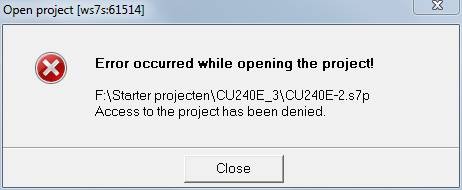
If, after installing other software (in special MS Office), when opening a project in SIMATIC S7 T Config, SIMOTION SCOUT, STARTER or Sizer, you get the error message indicating that the project is write-protected or already open, it might be possible to clear this situation with a repair or an update of the "Microsoft Access Database Engine".
For example, the following error messages might appear:

If you confirm with "Yes", the following message is displayed:
Remedy
Repair the "Microsoft Database Engine 2007 (English)" by restarting the "ACERedist.msi" file from the
S7 Technology, Scout, Starter or Sizer DVD or from the unpacked installation package and then selecting "Repair" followed by "Fix Errors". You then restart the computer.
If you cannot access "ACERedist.msi", you can also download and install the 32-bit version of Microsoft Access Database Engine 2010 Redistributable.
http://www.microsoft.com/en-us/download/details.aspx?displaylang=en&id=13255
Then restart the computer. |
Readme:
https://support.industry.siemens.com/cs/attachments/109755392/Read_OSS.zip
SIMOTION SCOUT V5.2 SP1
https://support.industry.siemens.com/cs/attachments/109755392/SCOUT_V5_2_1_0.exe
https://support.industry.siemens.com/cs/attachments/109755392/SCOUT_V5_2_1_0.001
https://support.industry.siemens.com/cs/attachments/109755392/SCOUT_V5_2_1_0.002
https://support.industry.siemens.com/cs/attachments/109755392/SCOUT_V5_2_1_0.003
https://support.industry.siemens.com/cs/attachments/109755392/SCOUT_V5_2_1_0.004
https://support.industry.siemens.com/cs/attachments/109755392/SCOUT_V5_2_1_0.005
https://support.industry.siemens.com/cs/attachments/109755392/SCOUT_V5_2_1_0.006
https://support.industry.siemens.com/cs/attachments/109755392/SCOUT_V5_2_1_0.007
https://support.industry.siemens.com/cs/attachments/109755392/SCOUT_V5_2_1_0.008
https://support.industry.siemens.com/cs/attachments/109755392/SCOUT_V5_2_1_0.009
https://support.industry.siemens.com/cs/attachments/109755392/SCOUT_V5_2_1_0.010
https://support.industry.siemens.com/cs/attachments/109755392/SCOUT_V5_2_1_0.011
https://support.industry.siemens.com/cs/attachments/109755392/SCOUT_V5_2_1_0.012
https://support.industry.siemens.com/cs/attachments/109755392/SCOUT_V5_2_1_0.013
https://support.industry.siemens.com/cs/attachments/109755392/SCOUT_V5_2_1_0.014
https://support.industry.siemens.com/cs/attachments/109755392/SCOUT_V5_2_1_0.015
https://support.industry.siemens.com/cs/attachments/109755392/SCOUT_V5_2_1_0.016
SIMOTION SCOUT Stand-alone V5.2 SP1
https://support.industry.siemens.com/cs/attachments/109755392/SCOUT_SA_V5_2_1_0.exe
https://support.industry.siemens.com/cs/attachments/109755392/SCOUT_SA_V5_2_1_0.001
https://support.industry.siemens.com/cs/attachments/109755392/SCOUT_SA_V5_2_1_0.002
https://support.industry.siemens.com/cs/attachments/109755392/SCOUT_SA_V5_2_1_0.003
https://support.industry.siemens.com/cs/attachments/109755392/SCOUT_SA_V5_2_1_0.004
https://support.industry.siemens.com/cs/attachments/109755392/SCOUT_SA_V5_2_1_0.005
https://support.industry.siemens.com/cs/attachments/109755392/SCOUT_SA_V5_2_1_0.006
https://support.industry.siemens.com/cs/attachments/109755392/SCOUT_SA_V5_2_1_0.007
https://support.industry.siemens.com/cs/attachments/109755392/SCOUT_SA_V5_2_1_0.008
https://support.industry.siemens.com/cs/attachments/109755392/SCOUT_SA_V5_2_1_0.009
https://support.industry.siemens.com/cs/attachments/109755392/SCOUT_SA_V5_2_1_0.010
https://support.industry.siemens.com/cs/attachments/109755392/SCOUT_SA_V5_2_1_0.011
https://support.industry.siemens.com/cs/attachments/109755392/SCOUT_SA_V5_2_1_0.012
https://support.industry.siemens.com/cs/attachments/109755392/SCOUT_SA_V5_2_1_0.013
https://support.industry.siemens.com/cs/attachments/109755392/SCOUT_SA_V5_2_1_0.014
https://support.industry.siemens.com/cs/attachments/109755392/SCOUT_SA_V5_2_1_0.015
https://support.industry.siemens.com/cs/attachments/109755392/SCOUT_SA_V5_2_1_0.016
https://support.industry.siemens.com/cs/attachments/109755392/SCOUT_SA_V5_2_1_0.017
https://support.industry.siemens.com/cs/attachments/109755392/SCOUT_SA_V5_2_1_0.018
SIMOTION SCOUT TIA V5.2 SP1
https://support.industry.siemens.com/cs/attachments/109755392/SCOUT_TIA_V5_2_1_0.exe
https://support.industry.siemens.com/cs/attachments/109755392/SCOUT_TIA_V5_2_1_0.001
https://support.industry.siemens.com/cs/attachments/109755392/SCOUT_TIA_V5_2_1_0.002
https://support.industry.siemens.com/cs/attachments/109755392/SCOUT_TIA_V5_2_1_0.003
https://support.industry.siemens.com/cs/attachments/109755392/SCOUT_TIA_V5_2_1_0.004
The following downloads are also available as a single download from the Internet Product Support pages. The components are also includes in the download of SIMOTION SCOUT and SCOUT Stand-alone (= installation package 1 and 2).
SIMOTION C kernel/firmware V5.2 SP1
https://support.industry.siemens.com/cs/document/31263919/simotion-c-firmware- (kernel)?lc=en-ww
SIMOTION D kernel/firmware V5.2 SP1
https://support.industry.siemens.com/cs/document/31045047/simotion-d-firmware- (kernel)?lc=en-ww
SIMOTION Firmware Support Package (FWSP) for device update tool
https://support.industry.siemens.com/cs/document/33119786/simotion-firmware-support-package?lc=en-ww |
|
| Back to top |
|
|
badrtavir
Junior
Joined: 11 May 2018
Posts: 1
|
| Posted: 20/05/2018 16:28 Post subject: |
|
|
| Thank you!!! |
|
| Back to top |
|
|
gamax
Member
Joined: 15 Jul 2016
Posts: 131
|
| Posted: 31/07/2018 12:50 Post subject: STDoc V1.5 for SIMOTION SCOUT SCOUT TIA V5.2 |
|
|
STDoc V1.5 for SIMOTION SCOUT, SCOUT Stand-alone und SCOUT TIA V5.2
https://support.industry.siemens.com/cs/document/109757268/
STDoc allows the automated generation of documentation for SIMOTION software. The results are linked HTML-files. This provides on the one hand a fast navigation over several program parts and thanks to a better typography and help full formatting it is much easier to read. On the other hand is by using of STDoc the documentation process directly integrated into the development.
A permanent reminder for documentation is offered with STDoc and with the presentable results a stimulus arises to provide proper software documentation.
Preconditions for installation/usage
For a working STDoc on the engineering PC an already installed SIMOTION SCOUT or SCOUT TIA V4.5 or higher version is needed. For a generation of documentation the related exe-file must be started. Beside of the SCOUT-installation, Microsoft .NET framework with a minimum version 4.6.1 is required. STDoc itself is not needed to install via a particular installation routine. The software persists out of two different EXE-files, which have to be started for the generation process:
STDoc-ClassicScout.exe
STDoc-TiaScout.exe
The automated generation of a documentation with STDoc bases on deosebit commentary characters in the source code of the software. That means, before a generation of documentation is possible, an adding of special characters in the source code is necessary. Therefore a study of the included manual is absolutely recommended for getting a high-quality result.
Download
https://support.industry.siemens.com/cs/attachments/109757268/STDoc-Manual.pdf
https://support.industry.siemens.com/cs/attachments/109757268/STDoc-ShortReference.pdf
https://support.industry.siemens.com/cs/attachments/109757268/109757268_STDoc-1.5-V15.zip |
|
| Back to top |
|
|
gamax
Member
Joined: 15 Jul 2016
Posts: 131
|
| Posted: 17/10/2018 16:43 Post subject: SIMOTION SCOUT V5.1 HF6 |
|
|
SIMOTION SCOUT V5.1 HF6
https://support.industry.siemens.com/cs/document/109760548/simotion-scout-scout-stand-alone-and-scout-tia-v5-1-hf6
Installation package 1: SIMOTION SCOUT V5.1 HF6
https://support.industry.siemens.com/cs/attachments/109760548/SCOUT_V5_1_0_6.exe
https://support.industry.siemens.com/cs/attachments/109760548/SCOUT_V5_1_0_6.001
https://support.industry.siemens.com/cs/attachments/109760548/SCOUT_V5_1_0_6.002
https://support.industry.siemens.com/cs/attachments/109760548/SCOUT_V5_1_0_6.003
https://support.industry.siemens.com/cs/attachments/109760548/SCOUT_V5_1_0_6.004
https://support.industry.siemens.com/cs/attachments/109760548/SCOUT_V5_1_0_6.005
https://support.industry.siemens.com/cs/attachments/109760548/SCOUT_V5_1_0_6.006
https://support.industry.siemens.com/cs/attachments/109760548/SCOUT_V5_1_0_6.007
Installation package 2: SIMOTION SCOUT stand-alone V5.1 HF6
https://support.industry.siemens.com/cs/attachments/109760548/SCOUT_SA_V5_1_0_6.exe
https://support.industry.siemens.com/cs/attachments/109760548/SCOUT_SA_V5_1_0_6.001
https://support.industry.siemens.com/cs/attachments/109760548/SCOUT_SA_V5_1_0_6.002
https://support.industry.siemens.com/cs/attachments/109760548/SCOUT_SA_V5_1_0_6.003
https://support.industry.siemens.com/cs/attachments/109760548/SCOUT_SA_V5_1_0_6.004
https://support.industry.siemens.com/cs/attachments/109760548/SCOUT_SA_V5_1_0_6.005
https://support.industry.siemens.com/cs/attachments/109760548/SCOUT_SA_V5_1_0_6.006
https://support.industry.siemens.com/cs/attachments/109760548/SCOUT_SA_V5_1_0_6.007
https://support.industry.siemens.com/cs/attachments/109760548/SCOUT_SA_V5_1_0_6.008
https://support.industry.siemens.com/cs/attachments/109760548/SCOUT_SA_V5_1_0_6.009
Installation package 3: SIMOTION SCOUT TIA V5.1 HF6
https://support.industry.siemens.com/cs/attachments/109760548/SCOUT_TIA_V5_1_0_6.exe
https://support.industry.siemens.com/cs/attachments/109760548/SCOUT_TIA_V5_1_0_6.001
https://support.industry.siemens.com/cs/attachments/109760548/SCOUT_TIA_V5_1_0_6.002
https://support.industry.siemens.com/cs/attachments/109760548/SCOUT_TIA_V5_1_0_6.003
https://support.industry.siemens.com/cs/attachments/109760548/SCOUT_TIA_V5_1_0_6.004
Installation package 4: SIMOSIM V5.2 SP1 HF3
https://support.industry.siemens.com/cs/attachments/109760548/simosim_V5.2.1.3.zip
SIMOTION C kernel/firmware V5.1 HF1
https://support.industry.siemens.com/cs/document/31263919/simotion-c-firmware- (kernel)
SIMOTION D kernel/firmware V5.1 HF1
https://support.industry.siemens.com/cs/document/31045047/simotion-d-firmware- (kernel)
SIMOTION Firmware Support Package (FWSP) for device update tool,
https://support.industry.siemens.com/cs/document/33119786/simotion-firmware-support-package |
|
| Back to top |
|
|
gamax
Member
Joined: 15 Jul 2016
Posts: 131
|
| Posted: 06/08/2019 14:41 Post subject: SIMOTION SCOUT V5.3 SP1 |
|
|
SIMOTION SCOUT V5.3 SP1
https://support.industry.siemens.com/cs/document/109766964/simotion-scout-scout-stand-alone-and-scout-tia-v5-3-sp1
https://support.industry.siemens.com/cs/attachments/109766963/Simotion_New_Features_V531_EN.pdf
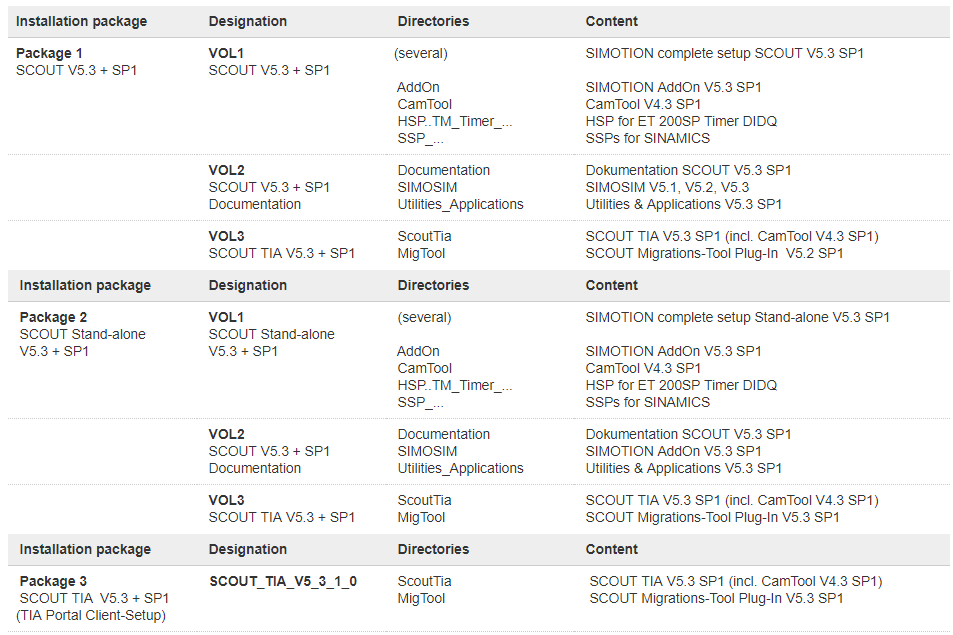
SIMOTION SCOUT V5.3 SP1
https://support.industry.siemens.com/cs/attachments/109766964/SCOUT_V5_3_1_0.exe
https://support.industry.siemens.com/cs/attachments/109766964/SCOUT_V5_3_1_0.001
https://support.industry.siemens.com/cs/attachments/109766964/SCOUT_V5_3_1_0.002
https://support.industry.siemens.com/cs/attachments/109766964/SCOUT_V5_3_1_0.003
https://support.industry.siemens.com/cs/attachments/109766964/SCOUT_V5_3_1_0.004
https://support.industry.siemens.com/cs/attachments/109766964/SCOUT_V5_3_1_0.005
https://support.industry.siemens.com/cs/attachments/109766964/SCOUT_V5_3_1_0.006
https://support.industry.siemens.com/cs/attachments/109766964/SCOUT_V5_3_1_0.007
https://support.industry.siemens.com/cs/attachments/109766964/SCOUT_V5_3_1_0.008
https://support.industry.siemens.com/cs/attachments/109766964/SCOUT_V5_3_1_0.009
https://support.industry.siemens.com/cs/attachments/109766964/SCOUT_V5_3_1_0.010
https://support.industry.siemens.com/cs/attachments/109766964/SCOUT_V5_3_1_0.011
https://support.industry.siemens.com/cs/attachments/109766964/SCOUT_V5_3_1_0.012
https://support.industry.siemens.com/cs/attachments/109766964/SCOUT_V5_3_1_0.013
https://support.industry.siemens.com/cs/attachments/109766964/SCOUT_V5_3_1_0.014
https://support.industry.siemens.com/cs/attachments/109766964/SCOUT_V5_3_1_0.015
https://support.industry.siemens.com/cs/attachments/109766964/SCOUT_V5_3_1_0.016
SIMOTION SCOUT Stand-alone V5.3 SP1
https://support.industry.siemens.com/cs/attachments/109766964/SCOUT_SA_V5_3_1_0.exe
https://support.industry.siemens.com/cs/attachments/109766964/SCOUT_SA_V5_3_1_0.001
https://support.industry.siemens.com/cs/attachments/109766964/SCOUT_SA_V5_3_1_0.002
https://support.industry.siemens.com/cs/attachments/109766964/SCOUT_SA_V5_3_1_0.003
https://support.industry.siemens.com/cs/attachments/109766964/SCOUT_SA_V5_3_1_0.004
https://support.industry.siemens.com/cs/attachments/109766964/SCOUT_SA_V5_3_1_0.005
https://support.industry.siemens.com/cs/attachments/109766964/SCOUT_SA_V5_3_1_0.006
https://support.industry.siemens.com/cs/attachments/109766964/SCOUT_SA_V5_3_1_0.007
https://support.industry.siemens.com/cs/attachments/109766964/SCOUT_SA_V5_3_1_0.008
https://support.industry.siemens.com/cs/attachments/109766964/SCOUT_SA_V5_3_1_0.009
https://support.industry.siemens.com/cs/attachments/109766964/SCOUT_SA_V5_3_1_0.010
https://support.industry.siemens.com/cs/attachments/109766964/SCOUT_SA_V5_3_1_0.011
https://support.industry.siemens.com/cs/attachments/109766964/SCOUT_SA_V5_3_1_0.012
https://support.industry.siemens.com/cs/attachments/109766964/SCOUT_SA_V5_3_1_0.013
https://support.industry.siemens.com/cs/attachments/109766964/SCOUT_SA_V5_3_1_0.014
https://support.industry.siemens.com/cs/attachments/109766964/SCOUT_SA_V5_3_1_0.015
https://support.industry.siemens.com/cs/attachments/109766964/SCOUT_SA_V5_3_1_0.016
https://support.industry.siemens.com/cs/attachments/109766964/SCOUT_SA_V5_3_1_0.017
https://support.industry.siemens.com/cs/attachments/109766964/SCOUT_SA_V5_3_1_0.018
SIMOTION SCOUT TIA V5.3 SP1
https://support.industry.siemens.com/cs/attachments/109766964/SCOUT_TIA_V5_3_1_0.exe
https://support.industry.siemens.com/cs/attachments/109766964/SCOUT_TIA_V5_3_1_0.001
https://support.industry.siemens.com/cs/attachments/109766964/SCOUT_TIA_V5_3_1_0.002
https://support.industry.siemens.com/cs/attachments/109766964/SCOUT_TIA_V5_3_1_0.003
https://support.industry.siemens.com/cs/attachments/109766964/SCOUT_TIA_V5_3_1_0.004
Compatibility list of software products in the SIMOTION environment
https://support.industry.siemens.com/cs/attachments/18857317/Compatibility_5_3_1_0_SIMOTION_SCOUT.pdf
Requirements for the installation:
For SCOUT, SIMATIC STEP 7 V5.6 SP1 must be installed on the engineering computer. The SIMOTION SCOUT V5.3 SP1 is a complete installation of SCOUT.
For SCOUT TIA, the TIA Portal Framework V15.1 must be installed on the engineering computer (SCOUT TIA is a TIA Portal client setup). We recommend that you use the latest update of TIA Portal V15.1. |
|
| Back to top |
|
|
|

 FAQ
FAQ Search
 Memberlist
 Usergroups
 Register
 Profile
 Log in to check your private messages
 Log in


