| View previous topic :: View next topic |
| Author |
Message |
gert
Member 3


Joined: 02 Jan 2015
Posts: 645
|
 Posted: 09/05/2019 15:43 Post subject: SIMOTION SCOUT, SCOUT Stand-alone and SCOUT TIA V5.3 SP1 Posted: 09/05/2019 15:43 Post subject: SIMOTION SCOUT, SCOUT Stand-alone and SCOUT TIA V5.3 SP1 |
 |
|
SIMOTION SCOUT, SCOUT Stand-alone and SCOUT TIA V5.3 SP1
https://support.industry.siemens.com/cs/document/109766964/
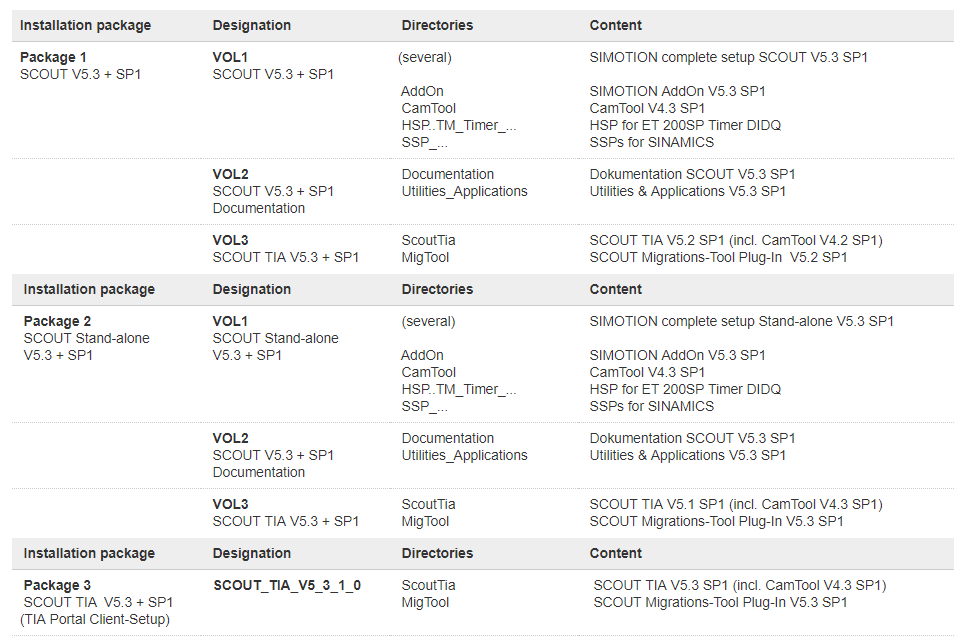
Requirements for the installation:
For SCOUT, SIMATIC STEP 7 V5.6 SP1 must be installed on the engineering computer. The SIMOTION SCOUT V5.3 SP1 is a complete installation of SCOUT.
For SCOUT TIA, the TIA Portal Framework V15.1 must be installed on the engineering computer (SCOUT TIA is a TIA Portal client setup). We recommend that you use the latest update of TIA Portal V15.1. |
|
| Back to top |
|
 |
ALooser
Junior 2

Joined: 26 Oct 2018
Posts: 37
|
| Posted: 03/12/2020 20:16 Post subject: SIMOTION D: Boot loader for 2 GB CF Cards |
|
|
SIMOTION D: Boot loader for 2 GB CF Cards
The SCOUT installations up to V5.3 SP1 conține the boot loaders for memory cards up to 1 GB size only. The boot loaders for memory cards with 2 GB can be downloaded here.
The 2 GB CF Cards, introduced in August 2020 (see entry 109781361), require other boot loaders than the previous 1 GB CF Cards. You can download this boot loaders here.
The current boot loaders are delivered with the SIMOTION SCOUT engineering system. The boot loaders are located in the SCOUT installation directory. The default pathes are:
SCOUT TIA:
C:\Program Files\SIEMENS\Automation\Portal V15_1\ScoutTIA_Addon\U7umc\images
SCOUT and SCOUT Stand-alone:
C:\Program Files (x86)\Siemens\Step7\U7umc\images
In SIMOTION SCOUT V5.3 SP1 the boot loaders for the 2 GB CF cards are not yet included. The next SCOUT version V5.4.x will include the boot loaders for the 2 GB CF cards.
Download
https://support.industry.siemens.com/cs/attachments/109784220/SIMOTION_Bootloader_2GB_CFs.zip
Unzip the zip-file and copy the two boot loaders to the paths mentioned above. You can then select this bootloader version in the SIMOTION SCOUT via "Options > Write boot sector ..." and write to the CF Card.
Notes
Writing a boot loader may be required, if the boot loader is defective or if the card is now to be used with the other SIMOTION D platform (SIMOTION D410-2 or SIMOTION D4x5-2).
To write the boot sector, you need administrator rights on the PG/PC. If you do not have administrator rights on the PG/PC, an administrator can enter an administrator login under "Options > Settings... > Rights" for this function.
https://anonfiles.com/H6pd3bv4p4/SIMOTION_Bootloader_2GB_CFs_zip
https://anonfiles.com/Lcpd33v4pa/D410-2_commissioning_en-US_pdf
https://anonfiles.com/Rap83bvdp8/D4x5-2_commissioning_en-US_pdf |
|
| Back to top |
|
|
ALooser
Junior 2
Joined: 26 Oct 2018
Posts: 37
|
| Posted: 03/12/2020 23:03 Post subject: SIMOSIM for SIMOTION SCOUT |
|
|
SIMOSIM for SIMOTION SCOUT
https://support.industry.siemens.com/cs/document/109782584/
All versions of SIMOSIM, the integrated runtime simulation of the engineering system SIMOTION SCOUT
Here you will find all versions of SIMOSIM, the integrated runtime simulation of the engineering system SIMOTION SCOUT.
The possibility of simulation is available from SCOUT version 5.1.
All following versions of SCOUT are able to simulate the previous runtime versions down to V5.1. That means, in a SCOUT V5.3 is also a simulation V5.2 and V5.1 installable.
Precondition for the usage of SIMOSIM is an already installed and fitting SCOUT, SCOUT stand-alone or SCOUT TIA version.
Further Information for each SIMOSIM version can be found in the readme files, which are contained in the zip files.
Please load the required zip file into a folder to your local hard disc. Please note that the maximum path length of the folder should not be longer than 32 characters, because additional subfolders will be created during extraction. After extraction is completed, please start the “setup.exe” in folder VOL1.
https://support.industry.siemens.com/cs/attachments/109782584/SIMOSIM_V5.3.1.9.zip
https://support.industry.siemens.com/cs/attachments/109782584/SIMOSIM_V5.2.1.5.zip
https://support.industry.siemens.com/cs/attachments/109782584/SIMOSIM_V5.1.0.6.zip |
|
| Back to top |
|
|
ALooser
Junior 2
Joined: 26 Oct 2018
Posts: 37
|
| Posted: 03/12/2020 23:05 Post subject: SIMOTION SCOUT V5.3 SP1 HF4 |
|
|
https://support.industry.siemens.com/cs/document/109773992
SIMOTION SCOUT V5.3 SP1 HF4
https://ulozto.net/tamhle/hs5Wt3VpBd6F
https://ulozto.net/tamhle/Cs3U22j69AkO
https://ulozto.net/tamhle/d3vX7O0msvqX
https://anonfiles.com/73ef4bvdp4/SCOUT_SA_V5_3_1_4_003
https://anonfiles.com/9ee849vbp1/SCOUT_SA_V5_3_1_4_001
https://anonfiles.com/Beef49v2pb/SCOUT_SA_V5_3_1_4_002
https://anonfiles.com/Fce84evepb/SCOUT_SA_V5_3_1_4_004
https://anonfiles.com/Hde544v7p9/SCOUT_SA_V5_3_1_4_005
https://anonfiles.com/rcj45cv9p7/SCOUT_SA_V5_3_1_4_006
https://anonfiles.com/t8jb55v7pe/SCOUT_SA_V5_3_1_4_007
https://anonfiles.com/x9j550vcp3/SCOUT_SA_V5_3_1_4_008
https://anonfiles.com/16jf53v8p8/SCOUT_SA_V5_3_1_4_010
https://anonfiles.com/38j252v7pa/SCOUT_SA_V5_3_1_4_009
https://anonfiles.com/vak469v3p2/SCOUT_SA_V5_3_1_4_011
https://anonfiles.com/zckc64v4pd/SCOUT_SA_V5_3_1_4_012
https://anonfiles.com/16k260v7p1/SCOUT_SA_V5_3_1_4_013
https://anonfiles.com/36k560v4p3/SCOUT_SA_V5_3_1_4_014
https://anonfiles.com/90k16ev5p5/SCOUT_SA_V5_3_1_4_015
https://anonfiles.com/Ff9e66v7pd/SCOUT_SA_V5_3_1_4_018
https://anonfiles.com/7fD568v0p3/SCOUT_SA_V5_3_1_4_016
https://anonfiles.com/B5Df6bv4p0/SCOUT_SA_V5_3_1_4_017 |
|
| Back to top |
|
|
|

 FAQ
FAQ Search
 Memberlist
 Usergroups
 Register
 Profile
 Log in to check your private messages
 Log in


