| View previous topic :: View next topic |
| Author |
Message |
markodiaz
Junior

Joined: 08 Dec 2017
Posts: 18
|
 Posted: 03/04/2023 19:49 Post subject: SIMATIC WinCC V8.0 Posted: 03/04/2023 19:49 Post subject: SIMATIC WinCC V8.0 |
 |
|
SIMATIC WinCC V8.0
links
https://teraboxapp.com/s/1FmBSwpSsUgKC589cMcLosw |
|
| Back to top |
|
 |
markodiaz
Junior
Joined: 08 Dec 2017
Posts: 18
|
| Posted: 05/04/2023 08:00 Post subject: SIMATIC WinCC V8.0 options download |
|
|
SIMATIC WinCC V8.0 options download
| Code: | WinCC/ODK V8.0
WinCC/IndustrialDataBridge V8.0
WinCC/Audit V8.0
WinCC/Calendar Scheduler V8.0
WinCC/Performance Monitor V8.0
WinCC/ProAgent V8.0
WinCC/ODK V8.0
SIMATIC_WinCC_AC_V8.0.iso |
download links
https://teraboxapp.com/s/1LsK2MqKA4_G8De6zTpxXXg |
|
| Back to top |
|
|
djabber
Junior
Joined: 02 Oct 2018
Posts: 12
|
| Posted: 05/04/2023 19:41 Post subject: Authorize Wincc v18 |
|
|
Authorize Wincc v8
https://teraboxapp.com/s/1ZoeNH2qSYdtSOggisKXJcA
Use ALM to authorize |
|
| Back to top |
|
|
valz
Member 3


Joined: 26 Jul 2015
Posts: 771
|
| Posted: 26/04/2023 14:44 Post subject: Server not available. Cannot connect to server |
|
|
What do you do if you receive the error message "Server not available. Cannot connect to server" when opening WinCC Explorer on the OS server?
https://support.industry.siemens.com/cs/document/109817829/
You receive the error message "Server not available. Cannot connect to server" when opening WinCC Explorer on the server.
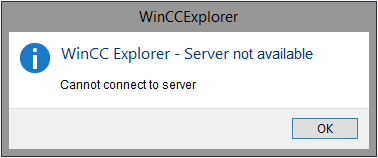
Fig. 01
Remedy
Open the System Information on the OS server.
Check in the System Information if the service "CCDBUtils" is available under "Software Environment > Services" and in which file path the "CCDBUtils.exe" is located.
The following file paths are possible:
C:\Program Files (x86)\Common Files\Siemens\commonarchiving
C:\Program Files (x86)\Siemens\commonarchiving
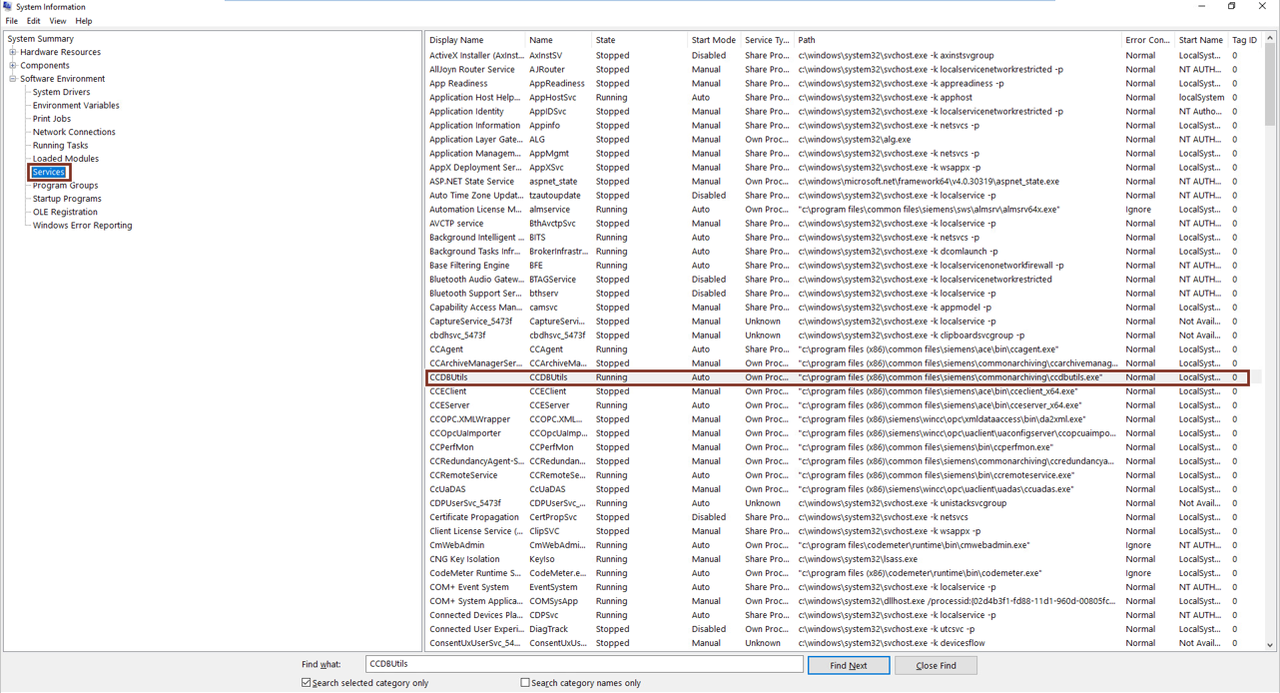
Fig. 02
Open the command prompt as administrator.
Enter one of the following commands depending on the file path.
C:\Program Files (x86)\Common Files\Siemens\commonarchiving>CCDBUtils.exe /service
C:\Program Files (x86)\Siemens\commonarchiving>CCDBUtils.exe /service |
|
| Back to top |
|
|
mamiko
Member 2


Joined: 25 Dec 2017
Posts: 420
|
| Posted: 04/05/2023 14:36 Post subject: Calling an acoustic signal via script in WinCC V7 / V8 |
|
|
Calling an acoustic signal via script in WinCC V7 / V8
https://support.industry.siemens.com/cs/document/748844/
How do I start an acoustic signal via a script in WinCC?
1. Using a Sound File
1.1 Starting Sound
Notes
The requirement for this function is that a sound card is installed.
For WinCC Runtime, start the "Media Player" included with Microsoft Windows and the corresponding sound file (wav file, for example) using the following script.
If necessary replace the first parameter of the call of "PlaySoundA" with the valid path of the sound file that you want to play.
The Media Player is started hidden and does not terminate automatically after playing the sound.
Further information about the command line parameters of the Windows Media Player is available here: Microsoft.
C Script Code
| Code: |
#include "apdefap.h"
void OnClick(char* lpszPictureName, char* lpszObjectName, char* lpszPropertyName, UINT nFlags, int x, int y)
{
#pragma code ("Winmm.dll ")
VOID WINAPI PlaySoundA ( char* pszSound, char* hmode, DWORD dwflag );
#pragma code()
PlaySoundA("C:\\Winnt.400\\Media\\tada.wav",NULL,1);
} |
Explanation of the function PlaySoundA:
Parameter char* pszSound:
Here you specify the complete path to the location of your sound file.
Parameter char* hmode:
Here you always specify 0.
Parameter DWORD dwflag.
SND_SYNC = 0x0000: The sound file is played once and the script waits until it has been played completely.
SND_ASYNC = 0x0001: The sound file is played once and the script is processed in parallel.
SND_NODEFAULT = 0x0002: If the sound file cannot be found, nothing is played; no default value, for example is played.
SND_LOOP = 0x0008: Repeats the sound file until the next PlaySoundA call arrives (only possible with 0x0001) => always specify 0x0009.
You can also combine these parameters through bit-by-bit assignment (for example: SND_ASYNC | SND_LOOP)
1.2 Stopping Sound
This is how you stop the sound again when an event occurs later, when acknowledging a message, for example:
Copy the above-mentioned C script.
Replace the path to the sound file with NULL when calling PlaySoundA. To do this, parameterize the function as follows: PlaySoundA(NULL, NULL, 1);
Link the script to the relevant system event.
2. Addressing the Internal Loudspeaker
Note: If you address the internal speaker, the computer does not need a sound card.
If you want to use the beep of the computer's internal loudspeaker instead of a sound file, then use the following C script:
| Code: | #include "apdefap.h"
void OnClick(char* lpszPictureName, char* lpszObjectName, char* lpszPropertyName, UINT nFlags, int x, int y)
{
#pragma code ("Kernel32.dll")
BOOL Beep( DWORD dwFreq, DWORD dwDuration);
//dwFreq defines the frequency of the beep in Hertz
//dwDuration specifies the duration of the beep in milliseconds
#pragma code()
Beep(1000,100);
//Example: Frequency 1000 Hertz, 100 milliseconds
} |
|
|
| Back to top |
|
|
mamiko
Member 2
Joined: 25 Dec 2017
Posts: 420
|
| Posted: 10/07/2023 15:33 Post subject: WinCC V8.0 |
|
|
WinCC V8.0
https://support.industry.siemens.com/cs/document/109822105/
Download
https://support.industry.siemens.com/cs/attachments/109822105/WinCC_V8_0.exe
https://support.industry.siemens.com/cs/attachments/109822105/WinCC_V8_0.001
https://support.industry.siemens.com/cs/attachments/109822105/WinCC_V8_0.002
https://support.industry.siemens.com/cs/attachments/109822105/WinCC_V8_0.003
https://ulozto.net/file/i56nixdJFYqG/wincc-v8-0-exe
[URL=https://www.file-upload.net/download-15166169/WinCC_V8_0.exe.html]WinCC_V8_0.exe[/URL] |
|
| Back to top |
|
|
mamiko
Member 2
Joined: 25 Dec 2017
Posts: 420
|
| Posted: 09/08/2023 14:34 Post subject: Demo project for SIMATIC WinCC V8.0 |
|
|
Demo project for SIMATIC WinCC V8.0
https://support.industry.siemens.com/cs/document/109823232/
This demo project shows a visualization example of an electronics production.
In addition to proven functions such as the integrated controls for analyzing process data and alarms, the project also shows some highlights of the new functionalities of SIMATIC WinCC V8.0:
Integration of 3D scenes: Clear error localization and new way of navigation
Extended functionalities for WinCC/WebUX, the HTML5-based web client
Interconnection of faceplates with detail images (pop-up)
New dynamic graphics (SVGs) for dashboards
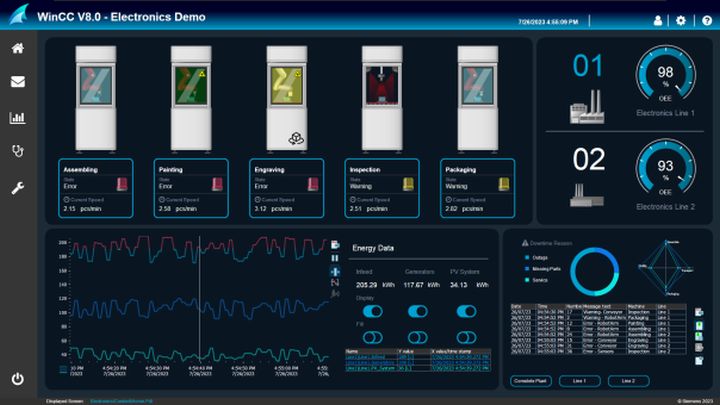
Demo project
https://support.industry.siemens.com/cs/attachments/109823232/ElectronicsDemoHD.zip
https://support.industry.siemens.com/cs/attachments/109823232/109823232_WinCC_V8.0_DemoProject_V1_EN.pdf
https://ulozto.net/tamhle/OkBSGcojq0ut/
[URL=https://www.file-upload.net/download-15176163/109823232_WinCC_V8.0_DemoProject_V1_EN.pdf.html]109823232_WinCC_V8.0_DemoProject_V1_EN.pdf[/URL]
[URL=https://www.file-upload.net/download-15176164/ElectronicsDemoHD.zip.html]ElectronicsDemoHD.zip[/URL] |
|
| Back to top |
|
|
valz
Member 3
Joined: 26 Jul 2015
Posts: 771
|
| Posted: 19/12/2023 19:50 Post subject: Update 4 (12/2023) for WinCC V8.0 |
|
|
Update 4 (12/2023) for WinCC V8.0
https://support.industry.siemens.com/cs/document/109818723/
Download
https://support.industry.siemens.com/cs/attachments/109818723/WinCC_V8_0_Upd4.exe
https://support.industry.siemens.com/cs/attachments/109818723/WinCC_V8_0_Upd4.001
https://support.industry.siemens.com/cs/attachments/109818723/WinCC_V8_0_Upd4.002 |
|
| Back to top |
|
|
mamiko
Member 2
Joined: 25 Dec 2017
Posts: 420
|
| Posted: 04/04/2024 20:24 Post subject: Migration of WinCC Projects from V4 to V8 |
|
|
Migration of WinCC Projects from V4 to V8
How do you migrate SIMATIC WinCC projects to new versions of WinCC from V4 to V8?
The attached PDF documents provide detailed instructions for migrating SIMATIC WinCC projects from V4 to V8. Information is also given about the order numbers and licenses required plus everything you need to know about upgrading a WinCC project.
Notes
Please note that upgraded WinCC projects can no longer be opened with previous versions of WinCC. Make a backup of your project before upgrading.
Detailed information is available in the WinCC Online Help under the keywords "Migration" and "Upgrade".
The OPC XML Client communication channel is no longer available as of WinCC V8.0.
The function of the PROFIBUS FMS channel is dependent on the version of SIMATIC NET. Up to WinCC V7.2 the channel can be used without any restrictions. With WinCC V7.3 you can use PROFIBUS FMS with the SIMATIC NET version V7.1. With WinCC WinCC V7.4 and higher this version of SIMATIC NET is incompatible, which means that you cannot use PROFIBUS FMS in WinCC.
Prior to use, check the compatibility of the required version of SIMATIC NET up to version V7.1 with your operating system.
Information and the link to the CompaTool are available in Entry ID 64847781.
With WinCC V7.0 SP2 and higher the "Windows DDE" channel is no longer included in the delivery. Use the "OPC" channel instead. Remove the "Windows DDE" channel before migration.
If the quantity framework of the license used before migration no longer exists, the next largest license comes automatically during migration.
Example:
License before migration: V6.2 RT (256)
License after migration: V7.0 RT (512)
Backup archives from WinCC V6.0 to V6.2 SP1 (SQL Server 2000) cannot be opened with WinCC V7.4 or higher. You must migrate these via an intermediate step up to WinCC V7.3 (maximum SQL Server 2008).
From SIMATIC WinCC V7.2 onwards you use the tool integrated in the WinCC Explorer: Convert Project Data.
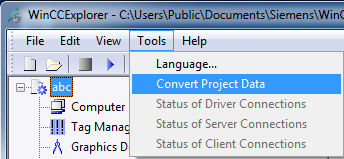
[URL=http://depositfiles.com/files/fv0x3dy4r]http://depositfiles.com/files/fv0x3dy4r[/URL]
[URL=http://depositfiles.com/files/kc9y9dhjv]http://depositfiles.com/files/kc9y9dhjv[/URL]
[URL=http://depositfiles.com/files/a72xgzk58]http://depositfiles.com/files/a72xgzk58[/URL] |
|
| Back to top |
|
|
rohit02988
Member

Joined: 24 Jun 2013
Posts: 175
|
| Posted: 11/10/2026 16:46 Post subject: Need Wincc Audit V8.1 |
|
|
Hi,
Need Wincc Audit v8.1, Please share the link |
|
| Back to top |
|
|
|

 FAQ
FAQ Search
 Memberlist
 Usergroups
 Register
 Profile
 Log in to check your private messages
 Log in


