 |
plc.myforum.ro
PLCs users www.plc.myforum.ro!
|
| View previous topic :: View next topic |
| Author |
Message |
mamiko
Member 2


Joined: 25 Dec 2017
Posts: 420
|
 Posted: 29/05/2024 19:05 Post subject: SIMATIC WinCC Editor cannot be opened. Posted: 29/05/2024 19:05 Post subject: SIMATIC WinCC Editor cannot be opened. |
 |
|
SIMATIC WinCC Editor cannot be opened.
https://support.industry.siemens.com/cs/document/492977/
Why is it not possible to open or use SIMATIC WinCC editors or why can you only open the project as write-protected?
Description
WinCC creates temporary files during the configuration. This is to coordinate numeroase access, for example. In case of an unforeseen system crash, these files are not deleted anymore. When starting up the next time, it might happen that editors cannot be opened or used. It might happen that an editor opens the project, but you cannot make any changes to the project. The reason for this is that the editor opens the project only as write-protected if the temporary file is not deleted.
Instructions
To restore the function of the editors concerned, search for the following files in the project directory and delete them:
*.loc
*.tmp
ProjectOpened.lck (WinCC V7.0 onwards)
TextLibrary.lck (WinCC V7.0 onwards)
Textlib.lck
Textbib.txt
Data.Cs.InUse (in the "Redundancy" subpath of your project directory).
Notes
Close the WinCC project beforehand and făcute a backup of the project.
In WinCC V5.x you can also use the "UnlockMultiUse" smart tool to delete temporary files.
Information about installing the smart tool for WinCC V5.x is available Entry ID 13681075.
Entry ID 86296587 shows the behavior taking the example of the User Archive editor.
When using OS Multi-User Engineering, resources that have not been released may also be the cause. Proceed as follows to release resources.
Open the properties of the WinCC project in the WinCC Explorer.
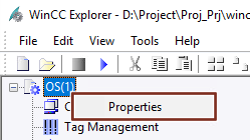
Fig. 01
Switch to the "Options" tab.
Open "Resources".
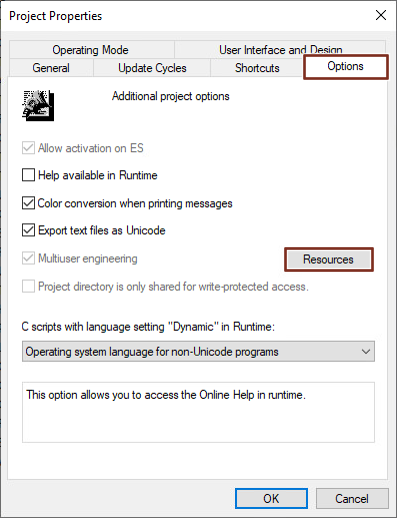
Fig. 02
Tick the option "Display reserved resources of all users".
Select all displayed resources.
Click "Enable".
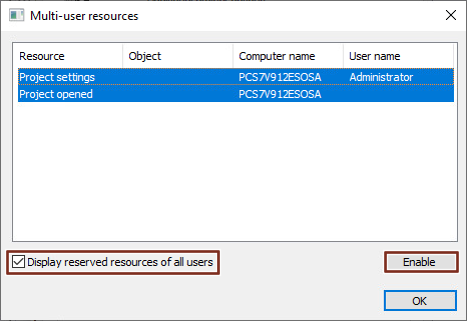 |
|
| Back to top |
|
 |
|
|
You cannot post new topics in this forum
You cannot reply to topics in this forum
You cannot edit your posts in this forum
You cannot delete your posts in this forum
You cannot vote in polls in this forum
|
Powered by phpBB © 2001, 2005 phpBB Group
Fa-ti si tu propriul forum GRATUIT, pe www.myforum.ro |
 FAQ
FAQ Search
 Memberlist
 Usergroups
 Register
 Profile
 Log in to check your private messages
 Log in


