 |
plc.myforum.ro
PLCs users www.plc.myforum.ro!
|
| View previous topic :: View next topic |
| Author |
Message |
Kadhfey
Junior

Joined: 16 Feb 2022
Posts: 4
|
 Posted: 26/08/2022 19:34 Post subject: SIMATIC S7-1500/S7-1500T: Standard application axis control Posted: 26/08/2022 19:34 Post subject: SIMATIC S7-1500/S7-1500T: Standard application axis control |
 |
|
SIMATIC S7-1500/S7-1500T: Standard application axis control
https://support.industry.siemens.com/cs/document/109749348/
Function blocks for simple and central control of the basic motion control functions of axes (technology objects) of a SIMATIC S7-1500 or S7-1500T. The central view of each axis via this standard application enables easy programming, fast commissioning and direct testing of your application.
"LAxisBasics" library
"LAxisCtrl" library
Comparison of the functional scope of the two variants
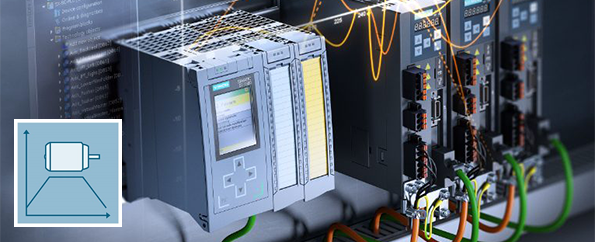
Two variants of the application example are available:
"LAxisBasics" library
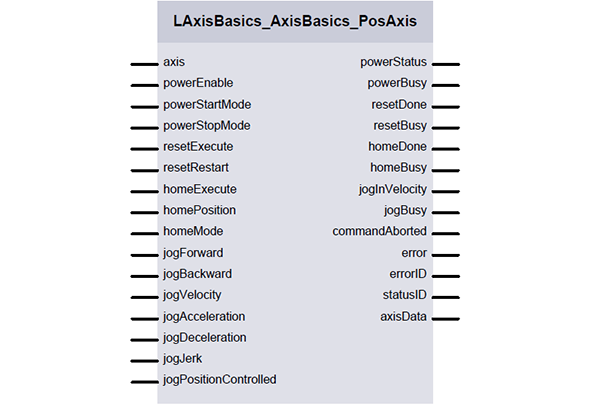
This variant supplies blocks for the basic functions for controlling and diagnosing axes (axis enable, homing and jogging). The example shows the application of the integrated PLCopen functions and can be extended by you as required.
"LAxisCtrl" library
This standard application provides an axis function block with very extensive functions for simple control of axes. You do not need to familiarize yourself with the code of the axis block, you only use the interface of the block, which behaves according to PLCopen.
Both variants of the application example differ in their basic configuration. Switching between the two variants is only possible with changes in the user program.
You can access a variant for SIMOTION in entry ID 48816191
A comparison of the functional scope of the two variants can be found in the table at the end of this entry.
"LAxisBasics" library
The blocks of the "LAxisBasics" library enable you to control and monitor technology objects of the axis type (speed, positioning, synchronous axis) in the basic functions.
The axis-type-specific blocks offer the following basic functions:
Axis enable (power)
Homing
Moving in jog mode (jog)
Status information (StatusWord, WarningWord, ErrorWord and ErrorDetail) in plain text.
Two additional modules also contain the following functions:
Moving of an axis between two selectable positions for commissioning and servicing purposes
Moving an axis to a fixed stop with a predefinable clamping force
The "LAxisBasics" library and the appropriate example project is mainly created in the programming language LAD/FBD and shows the call and application of the PLCopen blocks used. You can use the included functions immediately, as well as extend them by individual functions .
The integration into the user program can be done in all available programming languages, e.g. LAD/FBD or SCL.
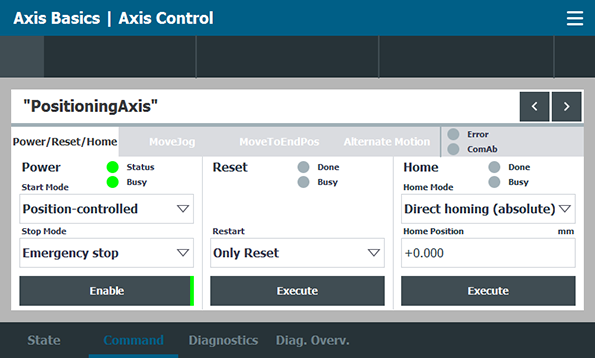
The "LAxisBasics" library contains HMI operating screens for all functions and displays, which have a modular structure and can optionally be transferred into customized user programs.
Downloads "LAxisBasics"
Version 2
https://support.industry.siemens.com/cs/attachments/109749348/109749348_AxisBasics_DOC_v20_en.pdf
https://support.industry.siemens.com/cs/attachments/109749348/109749348_LAxisBasics_LIB_v20_TIAP17.zip
https://support.industry.siemens.com/cs/attachments/109749348/109749348_LAxisBasics_PROJ_v20_TIAP17.zip
Version 1
https://support.industry.siemens.com/cs/attachments/109749348/109749348_AxisBasics_DOC_v13_en.pdf
https://support.industry.siemens.com/cs/attachments/109749348/109749348_LAxisBasics_LIB_v13_TIAP17.zip
https://support.industry.siemens.com/cs/attachments/109749348/109749348_LAxisBasics_PROJ_v13_TIAP17.zip
https://support.industry.siemens.com/cs/attachments/109749348/109749348_LAxisBasics_LIB_v13_TIAP16.zip
https://support.industry.siemens.com/cs/attachments/109749348/109749348_LAxisBasics_PROJ_v13_TIAP16.zip
https://support.industry.siemens.com/cs/attachments/109749348/109749348_LAxisBasics_LIB_v13_TIAP15-1.zip
https://support.industry.siemens.com/cs/attachments/109749348/109749348_LAxisBasics_PROJ_v13_TIAP15-1.zip
"LAxisCtrl" library
The standard application with the blocks of the "LAxisCtrl" library enables you to easily control extensive motion control functions of the axis type technology objects. By viewing the axis via a central block, programming and commissioning of axes can be made considerably easier. As an application developer, you do not need to familiarize yourself with the code of the axis module. You only use the interface of the block that behaves according to PLCopen. Technological peculiarities, e.g. when replacing cam disc synchronization, are taken into account internally in the module. A separate function module is available for each axis type (speed, positioning, synchronous axis, external encoder), whose interface is respectively tailored to the available functions of the axis type. The axis blocks therefore contain the sum of the inputs and outputs of the integrated PLCopen blocks. The uniform configuration of the different axis blocks makes it easy to switch between the different axis types.
The block for a synchronous axis provides the following extensive functions, for example:
Axis enable
Homing
Moving in jog mode
Positioning
Torque reduction and fixed stop detection
Gearing
Cam disk synchronization
Convenient provision of status information (StatusWord, WarningWord, ErrorWord)
A detailed overview of the features can be found in the table at the end of the entry.
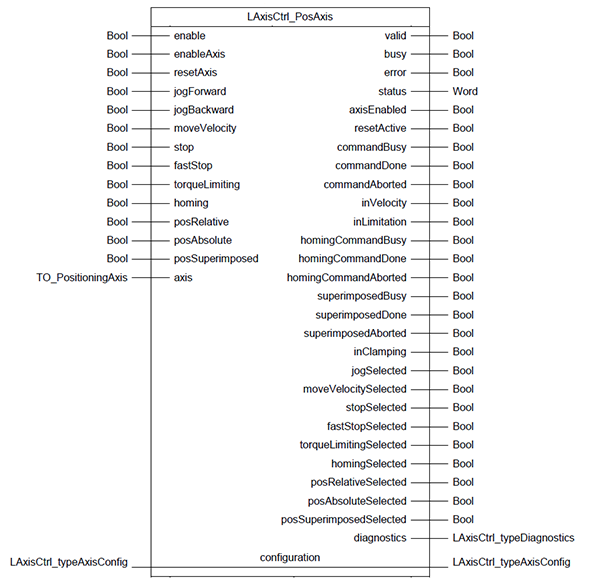
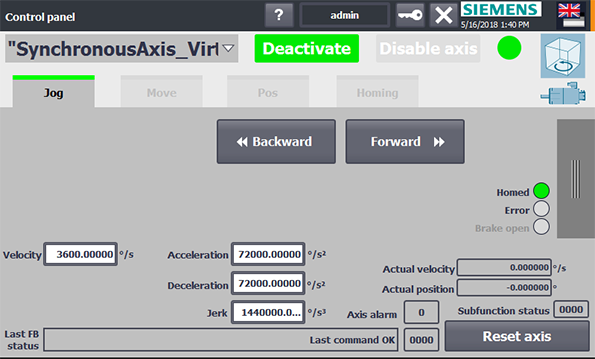
The integration into individual user programs can be done in all available programming languages, e.g. LAD/FBD or SCL. Due to the extensive functionality, the configuration of the commands, e.g. for dynamics and position specifications, are not via individual block inputs, but via a variable structure of the "LAxisCtrl_typeAxisConfig" data type. HMI screens as control panel for single axes are also available in the example project.
The "AxisCtrl" axis function block is also used as a basis in higher-level technological software modules, such as multi belt control, which are published as industry-specific standard applications in Industry Online Support.
Downloads "LAxisCtrl"
STEP 7 Professional V17 (TIA Portal)
https://support.industry.siemens.com/cs/attachments/109749348/LAxisCtrl_DBAnyBased_AxisBasedFunctionalities_SIMATIC_V1_2_en_07_2021.pdf
https://support.industry.siemens.com/cs/attachments/109749348/LAxisCtrl_DBAnyBased_V1_2_1.zip
https://support.industry.siemens.com/cs/attachments/109749348/LAxisCtrl_AxisBasedFunctionalities_SIMATIC_V1_2_en_07_2021.pdf
https://support.industry.siemens.com/cs/attachments/109749348/LAxisCtrl_V1_2_1.zip
https://support.industry.siemens.com/cs/attachments/109749348/LAxisCtrl_Addon_V1_2_0.zip
STEP 7 Professional V16 (TIA Portal)
https://support.industry.siemens.com/cs/attachments/109749348/LAxisCtrl_DBAnyBased_V1_1_1.zip
https://support.industry.siemens.com/cs/attachments/109749348/LAxisCtrl_V1_1_1.zip
https://support.industry.siemens.com/cs/attachments/109749348/LAxisCtrl_Addon_V1_1_1.zip
STEP 7 Professional V15 (TIA Portal)
https://support.industry.siemens.com/cs/attachments/109749348/LAxisCtrl_AxisBasedFunctionalities_SIMATIC_V1_0_en_12_2017.pdf
https://support.industry.siemens.com/cs/attachments/109749348/LAxisCtrl_V1_0_4.zip
https://support.industry.siemens.com/cs/attachments/109749348/LAxisCtrl_Example_V1_0_4.zip
STEP 7 Professional V14 SP1 (TIA Portal)
https://support.industry.siemens.com/cs/attachments/109749348/LAxisCtrl_AxisBasedFunctionalities_SIMATIC_V1_0_en_04_2017.pdf
https://support.industry.siemens.com/cs/attachments/109749348/LAxisCtrl_V1_0_3.zip
https://support.industry.siemens.com/cs/attachments/109749348/LAxisCtrl_Example_V1_0_3.zip
STEP 7 Professional V13 SP2 (TIA Portal)
https://support.industry.siemens.com/cs/attachments/109749348/LAxisCtrl_V13_V1_0_2.zip
https://ulozto.net/tamhle/i2WVgXHfsqUS/
https://fastshare.cz/22678697/laxisctrl-v13-v1-0-2.zip
https://fastshare.cz/22678698/laxisctrl-example-v1-0-3.zip
https://fastshare.cz/22678699/laxisctrl-axisbasedfunctionalities-simatic-v1-0-en-04-2017.pdf
https://fastshare.cz/22678700/laxisctrl-v1-0-3.zip
https://fastshare.cz/22678701/laxisctrl-example-v1-0-4.zip
https://fastshare.cz/22678702/laxisctrl-v1-0-4.zip
https://fastshare.cz/22678703/laxisctrl-axisbasedfunctionalities-simatic-v1-0-en-12-2017.pdf
https://fastshare.cz/22678704/laxisctrl-addon-v1-1-1.zip
https://fastshare.cz/22678705/laxisctrl-dbanybased-v1-1-1.zip
https://fastshare.cz/22678706/laxisctrl-v1-1-1.zip
https://fastshare.cz/22678708/laxisctrl-addon-v1-2-0.zip
https://fastshare.cz/22678709/laxisctrl-v1-2-1.zip
https://fastshare.cz/22678711/laxisctrl-axisbasedfunctionalities-simatic-v1-2-en-07-2021.pdf
https://fastshare.cz/22678712/laxisctrl-dbanybased-axisbasedfunctionalities-simatic-v1-2-en-07-2021.pdf
https://fastshare.cz/22678713/laxisctrl-dbanybased-v1-2-1.zip
https://fastshare.cz/22678714/readme-oss.zip
https://fastshare.cz/22678715/109749348-laxisbasics-proj-v13-tiap15-1.zip
https://fastshare.cz/22678716/109749348-laxisbasics-lib-v13-tiap15-1.zip
https://fastshare.cz/22678717/109749348-laxisbasics-proj-v13-tiap16.zip
https://fastshare.cz/22678718/109749348-laxisbasics-lib-v13-tiap16.zip
https://fastshare.cz/22678719/109749348-laxisbasics-proj-v13-tiap17.zip
https://fastshare.cz/22678720/109749348-laxisbasics-lib-v13-tiap17.zip
https://fastshare.cz/22678721/109749348-axisbasics-doc-v13-en.pdf
https://fastshare.cz/22678722/109749348-laxisbasics-lib-v20-tiap17.zip
https://fastshare.cz/22678724/109749348-laxisbasics-proj-v20-tiap17.zip
https://fastshare.cz/22678725/109749348-axisbasics-doc-v20-en.pdf
[URL=https://dfiles.eu/files/iwpfjc7rh]109749348_LAxisBasics_PROJ_v20_TIAP17.zip[/URL]
[URL=https://dfiles.eu/files/0w9tqj5ln]109749348_AxisBasics_DOC_v20_en.pdf[/URL]
[URL=https://dfiles.eu/files/ga4mie3ny]109749348_AxisBasics_DOC_v13_en.pdf[/URL]
[URL=https://dfiles.eu/files/ct8oqe0td]109749348_LAxisBasics_LIB_v20_TIAP17.zip[/URL]
[URL=https://dfiles.eu/files/jz54jep6y]109749348_LAxisBasics_LIB_v13_TIAP17.zip[/URL]
[URL=https://dfiles.eu/files/b8dy65z05]LAxisCtrl_DBAnyBased_V1_2_1.zip[/URL]
[URL=https://dfiles.eu/files/1xzskg0du]109749348_LAxisBasics_PROJ_v13_TIAP16.zip[/URL]
[URL=https://dfiles.eu/files/pzl6e0bnk]109749348_LAxisBasics_PROJ_v13_TIAP15-1.zip[/URL]
[URL=https://dfiles.eu/files/dof6p7y17]109749348_LAxisBasics_LIB_v13_TIAP16.zip[/URL]
[URL=https://dfiles.eu/files/eyk3ey2ld]109749348_LAxisBasics_PROJ_v13_TIAP17.zip[/URL]
[URL=https://dfiles.eu/files/j4bisu6ls]109749348_LAxisBasics_LIB_v13_TIAP15-1.zip[/URL]
[URL=https://dfiles.eu/files/21xit4a2z]ReadMe_OSS.zip[/URL]
[URL=https://dfiles.eu/files/860brow0c]LAxisCtrl_Example_V1_0_3.zip[/URL]
[URL=https://dfiles.eu/files/zatpq9zsg]LAxisCtrl_AxisBasedFunctionalities_SIMATIC_V1_2_en_07_2021.pdf[/URL]
[URL=https://dfiles.eu/files/pd1666sbn]LAxisCtrl_V1_2_1.zip[/URL]
[URL=https://dfiles.eu/files/kkp2lg3pk]LAxisCtrl_DBAnyBased_V1_1_1.zip[/URL]
[URL=https://dfiles.eu/files/z5uoki4o3]LAxisCtrl_Example_V1_0_4.zip[/URL]
[URL=https://dfiles.eu/files/yx2llazph]LAxisCtrl_DBAnyBased_AxisBasedFunctionalities_SIMATIC_V1_2_en_07_2021.pdf[/URL]
[URL=https://dfiles.eu/files/ru817ucky]LAxisCtrl_V1_1_1.zip[/URL]
[URL=https://dfiles.eu/files/mt4ag6s9a]LAxisCtrl_Addon_V1_2_0.zip[/URL]
[URL=https://dfiles.eu/files/xuiaobbw5]LAxisCtrl_V13_V1_0_2.zip[/URL]
[URL=https://dfiles.eu/files/ysn8q5ksn]LAxisCtrl_AxisBasedFunctionalities_SIMATIC_V1_0_en_12_2017.pdf[/URL]
[URL=https://dfiles.eu/files/jxpsh5k2z]LAxisCtrl_V1_0_3.zip[/URL]
[URL=https://dfiles.eu/files/kdqq4o852]LAxisCtrl_AxisBasedFunctionalities_SIMATIC_V1_0_en_04_2017.pdf[/URL]
[URL=https://dfiles.eu/files/rsxytet64]LAxisCtrl_V1_0_4.zip[/URL]
[URL=https://dfiles.eu/files/yb110ins6]LAxisCtrl_Addon_V1_1_1.zip[/URL] |
|
| Back to top |
|
 |
|
|
You cannot post new topics in this forum
You cannot reply to topics in this forum
You cannot edit your posts in this forum
You cannot delete your posts in this forum
You cannot vote in polls in this forum
|
Powered by phpBB © 2001, 2005 phpBB Group
Fa-ti si tu propriul forum GRATUIT, pe www.myforum.ro |
 FAQ
FAQ Search
 Memberlist
 Usergroups
 Register
 Profile
 Log in to check your private messages
 Log in


