| View previous topic :: View next topic |
| Author |
Message |
Kuse2288
Junior

Joined: 15 Apr 2020
Posts: 4
|
 Posted: 16/04/2020 08:53 Post subject: Simatic IPC277D Recovery Tools and Software Posted: 16/04/2020 08:53 Post subject: Simatic IPC277D Recovery Tools and Software |
 |
|
Hi,
does anyone have the Recovery Tools DVD's for this kind of Panel PC?
I have such a Panel (15" Touch, Intel Atom E660, 2GB Ram) , i also have the licencses for them, unluckily the backup i have made is destroyed..., wanted to upgrade the OS and during this some complications occured. I made a Backup from the PC but the Backup won't work. Luckily i safed the licenses before i tried this.
And the next point is, that i can't find the Recovery DVD's... i think it should be 2 of them but i can't find them... searched nearly 3 days for them but no chance...
So my question, does anyone have them and could upload them for me...
The Siemens Support told me i can't get them from Siemens unless i have an Account at Siemens but since i changed my job i don't have an Account anymore... and can't create a new one without being a company or a part of one.
I hope someone can help me! |
|
| Back to top |
|
 |
oou30797
Junior
Joined: 20 Sep 2018
Posts: 5
|
| Posted: 16/04/2020 14:58 Post subject: |
|
|
| http://plc.myforum.ro/viewtopic.php?t=399&sid=a4d73e4fb1d02dde4d2e83cd4c056dcc |
|
| Back to top |
|
|
Kuse2288
Junior
Joined: 15 Apr 2020
Posts: 4
|
| Posted: 16/04/2020 22:04 Post subject: |
|
|
Thnx oou30797,
the Partition Creation Tool do i have, i mean the DVD's with the WES7 and the Recovery Data's... |
|
| Back to top |
|
|
tfqnbjfjhggk
Junior
Joined: 30 Aug 2018
Posts: 3
|
| Posted: 16/04/2020 23:02 Post subject: |
|
|
| Kuse2288 wrote: | Thnx oou30797,
the Partition Creation Tool do i have, i mean the DVD's with the WES7 and the Recovery Data's... |
If you do have this tool then install what Operating System was in that pc and then install drivers.
I suppose you can download BIOS
https://support.industry.siemens.com/cs/document/109763408/bios-downloads-for-simatic-ipcs-simatic-tablet-pcs-simatic-field-pgs-sinumerik-pcu-and-simotion-p320
SIMATIC Industry PC Panel Drivers and Tools
https://support.industry.siemens.com/cs/document/109749144/simatic-industry-pc-panel-drivers-and-tools
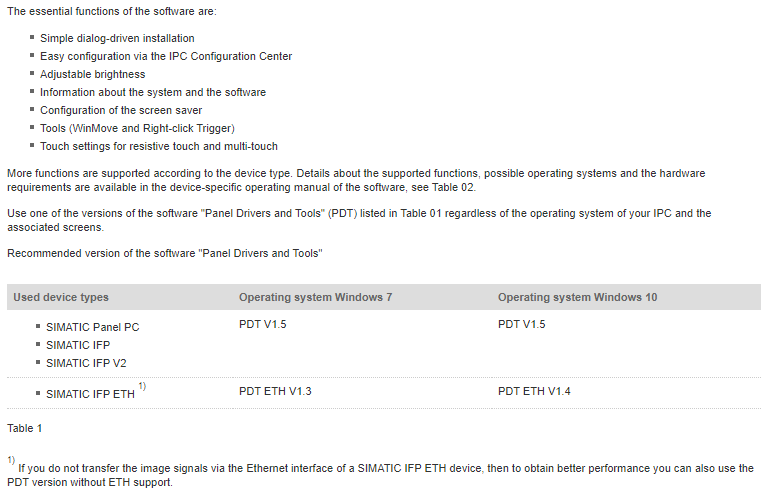
Use one of the versions of the software "Panel Drivers and Tools" (PDT) listed in Table 01 regardless of the operating system of your IPC and the associated screens.
Recommended version of the software "Panel Drivers and Tools"
1) If you do not transfer the image signals via the Ethernet interface of a SIMATIC IFP ETH device, then to obtain better performance you can also use the PDT version without ETH support.
https://cache.industry.siemens.com/dl/files/654/109778654/att_1016495/v1/MT_ipc_pdt_user_manual_en-US_en-US.pdf
https://cache.industry.siemens.com/dl/files/587/109768587/att_989454/v1/TK_ipc_pdt_user_manual_en-US_en-US.pdf
https://cache.industry.siemens.com/dl/files/586/109768586/att_989452/v1/T_ipc_pdt_user_manual_en-US_en-US.pdf
https://vshare.is/d937g3q6oe/PDT_01.05.00.00_01.00.00.14_zip
https://vshare.is/da5eg1qfo9/PDT_ETH_01.03.00.00_01.05.00.10_zip
https://vshare.is/l863g9qaoa/PDT_ETH_01.04.00.00_01.01.00.31_zip |
|
| Back to top |
|
|
Kuse2288
Junior
Joined: 15 Apr 2020
Posts: 4
|
| Posted: 17/04/2020 12:51 Post subject: |
|
|
@tfqnbjfjhggk thnx,
that's maybe the thing i needed  , ,
so now i have the next problem... tried to install WES7, but during the first startup i get the message: Windows installation failed cause of unexpected failure, anyone an idea what could happened here? |
|
| Back to top |
|
|
edeconsys
Junior 2

Joined: 05 Aug 2013
Posts: 37
|
| Posted: 11/05/2020 22:29 Post subject: |
|
|
| tfqnbjfjhggk wrote: | | Kuse2288 wrote: | Thnx oou30797,
the Partition Creation Tool do i have, i mean the DVD's with the WES7 and the Recovery Data's... |
If you do have this tool then install what Operating System was in that pc and then install drivers.
I suppose you can download BIOS
https://support.industry.siemens.com/cs/document/109763408/bios-downloads-for-simatic-ipcs-simatic-tablet-pcs-simatic-field-pgs-sinumerik-pcu-and-simotion-p320
SIMATIC Industry PC Panel Drivers and Tools
https://support.industry.siemens.com/cs/document/109749144/simatic-industry-pc-panel-drivers-and-tools
Use one of the versions of the software "Panel Drivers and Tools" (PDT) listed in Table 01 regardless of the operating system of your IPC and the associated screens.
Recommended version of the software "Panel Drivers and Tools"
1) If you do not transfer the image signals via the Ethernet interface of a SIMATIC IFP ETH device, then to obtain better performance you can also use the PDT version without ETH support.
https://cache.industry.siemens.com/dl/files/654/109778654/att_1016495/v1/MT_ipc_pdt_user_manual_en-US_en-US.pdf
https://cache.industry.siemens.com/dl/files/587/109768587/att_989454/v1/TK_ipc_pdt_user_manual_en-US_en-US.pdf
https://cache.industry.siemens.com/dl/files/586/109768586/att_989452/v1/T_ipc_pdt_user_manual_en-US_en-US.pdf
https://vshare.is/d937g3q6oe/PDT_01.05.00.00_01.00.00.14_zip
https://vshare.is/da5eg1qfo9/PDT_ETH_01.03.00.00_01.05.00.10_zip
https://vshare.is/l863g9qaoa/PDT_ETH_01.04.00.00_01.01.00.31_zip |
Hi, can you reupload?
Please... |
|
| Back to top |
|
|
maersk
Member 3


Joined: 17 Aug 2014
Posts: 891
|
| Posted: 12/05/2020 13:40 Post subject: SIMATIC Industry PC Panel Drivers and Tools |
|
|
SIMATIC Industry PC Panel Drivers and Tools
https://ulozto.net/tamhle/iWxG0y57QyEC
mirror
https://bayfiles.com/pcO07ayfo2/T_ipc_pdt_user_manual_en-US_en-US_1_pdf
https://bayfiles.com/nbOb7by6oa/MT_ipc_pdt_user_manual_en-US_en-US_1_pdf
https://bayfiles.com/r3O076yboe/ETHT_ipc_pdt_user_manual_en-US_en-US_pdf
https://bayfiles.com/v8O47fy2oe/ETHMT_ipc_pdt_user_manual_en-US_en-US_pdf
https://bayfiles.com/x2Oc75ydoc/D_ipc_pdt_user_manual_en-US_en-US_pdf
https://bayfiles.com/zcO87fydob/MT_ipc_pdt_user_manual_en-US_en-US_pdf
https://bayfiles.com/3fO27dy7o8/T_ipc_pdt_user_manual_en-US_en-US_pdf
https://bayfiles.com/56Ob73yco5/TK_ipc_pdt_user_manual_en-US_en-US_pdf
https://bayfiles.com/7fO97eybo0/IAM2_0706_en_pdf
https://bayfiles.com/j1V177ycoe/PDT_01.05.00.00_01.00.00.14_zip
https://bayfiles.com/36Vc77y0o6/PDT_ETH_01.03.00.00_01.05.00.10_zip
https://bayfiles.com/D5V372ydo6/PDT_ETH_01.04.00.00_01.01.00.31_zip
mirror
[URL=https://www.file-upload.net/download-14071738/IAM2_0706_en.pdf.html]IAM2_0706_en.pdf[/URL]
[URL=https://www.file-upload.net/download-14071736/MT_ipc_pdt_user_manual_en-US_en-US1.pdf.html]MT_ipc_pdt_user_manual_en-US_en-US1.pdf[/URL]
[URL=https://www.file-upload.net/download-14071737/T_ipc_pdt_user_manual_en-US_en-US1.pdf.html]T_ipc_pdt_user_manual_en-US_en-US1.pdf[/URL]
[URL=https://www.file-upload.net/download-14071740/ETHMT_ipc_pdt_user_manual_en-US_en-US.pdf.html]ETHMT_ipc_pdt_user_manual_en-US_en-US.pdf[/URL]
[URL=https://www.file-upload.net/download-14071741/ETHT_ipc_pdt_user_manual_en-US_en-US.pdf.html]ETHT_ipc_pdt_user_manual_en-US_en-US.pdf[/URL]
[URL=https://www.file-upload.net/download-14071739/D_ipc_pdt_user_manual_en-US_en-US.pdf.html]D_ipc_pdt_user_manual_en-US_en-US.pdf[/URL]
[URL=https://www.file-upload.net/download-14071744/TK_ipc_pdt_user_manual_en-US_en-US.pdf.html]TK_ipc_pdt_user_manual_en-US_en-US.pdf[/URL]
[URL=https://www.file-upload.net/download-14071742/MT_ipc_pdt_user_manual_en-US_en-US.pdf.html]MT_ipc_pdt_user_manual_en-US_en-US.pdf[/URL]
[URL=https://www.file-upload.net/download-14071743/T_ipc_pdt_user_manual_en-US_en-US.pdf.html]T_ipc_pdt_user_manual_en-US_en-US.pdf[/URL]
[URL=https://www.file-upload.net/download-14071750/PDT_ETH_01.03.00.00_01.05.00.10.zip.html]PDT_ETH_01.03.00.00_01.05.00.10.zip[/URL]
[URL=https://www.file-upload.net/download-14071765/PDT_ETH_01.04.00.00_01.01.00.31.zip.html]PDT_ETH_01.04.00.00_01.01.00.31.zip[/URL]
[URL=https://www.file-upload.net/download-14071764/PDT_01.05.00.00_01.00.00.14.zip.html]PDT_01.05.00.00_01.00.00.14.zip[/URL]
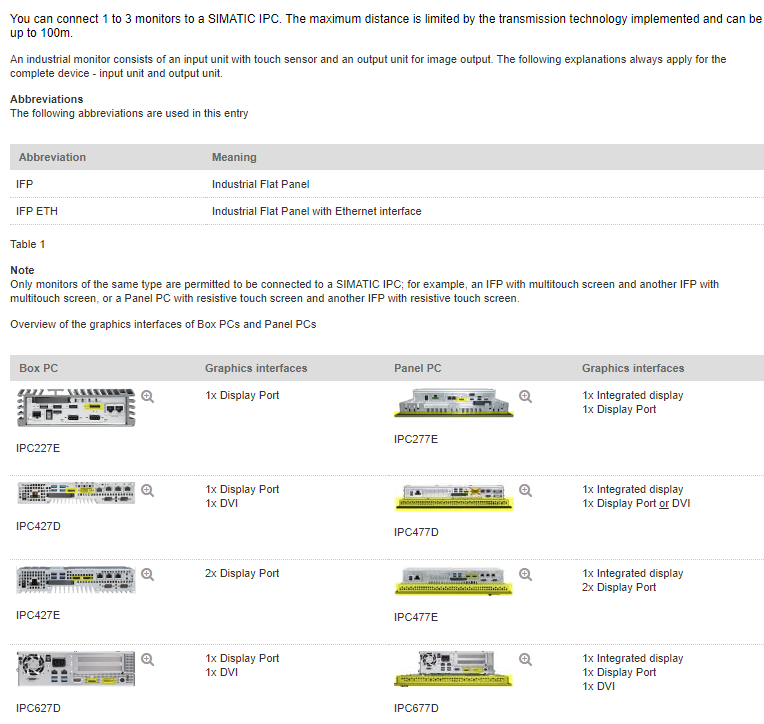
Note
The maximum number of industrial monitors you can connect to a SIMATIC IPC is given in
How many industrial monitors (IFPs) can you connect to one SIMATIC IPC?
https://support.industry.siemens.com/cs/document/109483774/how-many-industrial-monitors- (ifps)-can-you-connect-to-one-simatic-ipc
 |
|
| Back to top |
|
|
Dog55aeu
Junior
Joined: 03 Oct 2018
Posts: 3
|
| Posted: 17/06/2020 18:32 Post subject: For installing windows on hmi ipc |
|
|
For installing windows on hmi ipc follow:
Download Windows Embedded Standard 7 Service Pack 1 Evaluation Edition or Windows7 Standard where apply
https://www.microsoft.com/en-us/download/details.aspx?id=11887
How to Download and Install Windows 7 Embedded Tutorial 2019
https://www.youtube.com/watch?v=DXwsk2w9FJg
Use for partition on IPC
http://plc.myforum.ro/viewtopic.php?t=399&sid=a4d73e4fb1d02dde4d2e83cd4c056dcc
Drivers
http://plc.myforum.ro/simatic-ipc277d-recovery-tools-and-software-vt12793.html
BIOS downloads for SIMATIC IPCs, SIMATIC Tablet PCs, SIMATIC Field PGs, SINUMERIK PCU and SIMOTION P320
https://support.industry.siemens.com/cs/document/109763408/bios-downloads-for-simatic-ipcs-simatic-tablet-pcs-simatic-field-pgs-sinumerik-pcu-and-simotion-p320
SIMATIC IPC427C / HMI IPC 477C / HMI IPC 477C PRO / HMI IPC 577C
https://support.industry.siemens.com/cs/document/109763408/bios-downloads-for-simatic-ipcs-simatic-tablet-pcs-simatic-field-pgs-sinumerik-pcu-and-simotion-p320
Bundles with SIMATIC Software and Windows Embedded Standard 7 for SIMATIC IPC427C, SIMATIC HMI IPC477C and SIMATIC HMI IPC477C PRO
https://support.industry.siemens.com/cs/document/55268313/bundles-with-simatic-software-and-windows-embedded-standard-7-for-simatic-ipc427c-simatic-hmi-ipc477c-and-simatic-hmi-ipc477c-pro
For drivers make a request to
https://support.industry.siemens.com/tf/ww/en/header/supportrequest/
BIOS IPC477C
https://bayfiles.com/r6x4EaAcod/SIMATIC_IPC427C_HMIIPC477C_HMIIPC477CPRO_HMIIPC577C_V120105_zip |
|
| Back to top |
|
|
|

 FAQ
FAQ Search
 Memberlist
 Usergroups
 Register
 Profile
 Log in to check your private messages
 Log in


