| View previous topic :: View next topic |
| Author |
Message |
gert
Member 3


Joined: 02 Jan 2015
Posts: 645
|
 Posted: 10/04/2018 13:57 Post subject: SIMATIC HMI Control Panels - Innovative Stil and Operation Posted: 10/04/2018 13:57 Post subject: SIMATIC HMI Control Panels - Innovative Stil and Operation |
 |
|
SIMATIC HMI Control Panels - Innovative Stil and Operation
https://support.industry.siemens.com/cs/document/91174767/
Plants and machines are becoming increasingly complex and therefore more and more difficult to operate. For this reason, designing an intuitive and graphically appealing user interface is becoming more important. With the "HMI Template Suite", Siemens provides you an attractive template to visualize your plant. By using SiVArc, you can generate standard elements and adjust the visualization to your system.
The "HMI Template Suite" provides you
| Code: | an intuitive operating concept, optimized for touch operation
the possibility of seamlessly integrating your own content into this operating concept
examples for the visualization of different HMI-screens
the possibility to generate the visualization with SiVArc automatically (optional) |
The following video illustrates how to integrate the visualization into your project:
https://cdnsecakmi.kaltura.com/s/p/2110741/sp/211074100/serveFlavor/entryId/1_zrf397im/v/11/ev/12/flavorId/1_or4pm01e/fileName/HMI_Template_Setup_V1.mp4/name/a.mp4
Downloads
https://support.industry.siemens.com/cs/attachments/91174767/91174767_HMITemplateSuite_Doc_en.pdf
https://support.industry.siemens.com/cs/attachments/91174767/91174767_LhmiTemplateSuite_TIAV15.zip
Using templates and HMI styles to făcute efficient and unique user interfaces
The basics are taught in the SITRAIN course "SIMATIC WinCC machine based".
https://cdnsecakmi.kaltura.com/s/p/2110741/sp/211074100/serveFlavor/entryId/1_55z5n9fm/v/1/flavorId/1_xhyjaaxl/fileName/91174767_Design_Usability_EN.mp4/name/a.mp4
HMI styles are used to uniquely define the color and design parameters for all objects and controls across any device. The advanced properties of the elements and the option to define styles across projects now give you more ways to customize the design of your machine with just a few clicks. Meeting the estetică expectations of your customers by using HMI styles
Download templates
https://support.industry.siemens.com/cs/attachments/91174767/91174767_Design_Usability_en.pdf
https://support.industry.siemens.com/cs/attachments/91174767/91174767_Design_Usability_Examples_en.pdf
https://support.industry.siemens.com/cs/attachments/91174767/91174767_HMI_Navigation.zip
Download HMI styles
https://support.industry.siemens.com/cs/attachments/91174767/91174767_hmi_styles_en.pdf
https://support.industry.siemens.com/cs/attachments/91174767/91174767_HMI_Styles.zip |
|
| Back to top |
|
 |
dlugaz
Junior

Joined: 27 May 2020
Posts: 1
|
| Posted: 27/05/2020 08:41 Post subject: |
|
|
| Does any one have a mirror for the HMI template suite v15? Siemens deleted it from their website |
|
| Back to top |
|
|
gert
Member 3
Joined: 02 Jan 2015
Posts: 645
|
| Posted: 27/05/2020 19:46 Post subject: |
|
|
https://ulozto.net/tamhle/Qyszmchepxsg
https://bayfiles.com/77S2v835o5/109754400_READMEOSS_2020-03-09_09-03-50_html
https://bayfiles.com/B6Sav83do8/109754400_SimaticHmiOptionPlusManager_V30_DOC_en_pdf
https://bayfiles.com/D1S9ve3fo3/OSS-EPPlus_zip
https://bayfiles.com/FcS7v139o0/109754400_SimaticHmiOptionPlusManager_V3_Setup_zip
https://bayfiles.com/5dV5v538o7/109754400_SimaticHmiOptionPlus_V30_DOC_en_pdf
https://bayfiles.com/B3Y2v13aoa/109754400_SimaticHmiOptionPlus_V20_DOC_en_pdf
https://bayfiles.com/7dhbw231o1/109754400_SimaticHmiOptionPlus_V3_Setup_zip
https://bayfiles.com/r1k1wb3do3/109754400_SimaticHmiOptionPlus_LIB_V30_zip
https://bayfiles.com/t2kbwe39o5/109754400_SimaticHmiOptionPlus_PROJ_V20_zip
https://bayfiles.com/z5k6we3bo5/109754400_SimaticHmiOptionPlus_LIB_V20_zip
https://bayfiles.com/9ak1wa34od/109754400_SimaticHmiOptionPlus_PROJ_V30_zip
https://bayfiles.com/Lek9wb3fo7/106226404_HMI_Toolbox_WinCC_Professional_V15.1_DOC_en_1_pdf
https://bayfiles.com/N0k2wd36oa/106226404_HMI_Toolbox_WinCC_Comfort_Adv_V16_DOC_en_pdf
https://bayfiles.com/Xck1w13fof/106226404_LHmiToolbox_WinCC_Professional_V15.1_1_zip
https://bayfiles.com/b6l2wc37oe/106226404_SiemensIconFont_zip
https://bayfiles.com/dcl0w833o7/HmiEng_zip
https://bayfiles.com/hal6w838of/109754400_SimaticHmiOptionPlus_V2_Setup_zip
https://bayfiles.com/l4l7wc35o7/Libraries_WinCC_Professional_V14_SP1_zip
https://bayfiles.com/x9l3w532o5/Documentations_V14_en_zip
https://bayfiles.com/D3m1w736ob/106226404_HmiToolbox_WinCC_Professional_V15.1_1_zip
https://bayfiles.com/Pdm3w53eob/106226404_HMI_Toolbox_WinCC_Comfort_Adv_V15_DOC_en_1_pdf
https://bayfiles.com/Nenawe3coe/ExampleProject_Panels_WinCC_Advanced_V14_SP1_zip
https://bayfiles.com/Rencw932o4/ExampleProject_WinCC_Professional_V14_SP1_zip
https://bayfiles.com/V5nfw331o3/106226404_HMI_Toolbox_WinCC_Professional_V15_DOC_en_1_pdf
https://bayfiles.com/b4o4w631o9/106226404_LHmiToolbox_WinCC_Professional_V15_1_zip
https://bayfiles.com/j8oaw33dof/106226404_HmiToolbox_WinCC_Comfort_Adv_CODE_V16_zip
https://bayfiles.com/xcofw33bo4/106226404_HmiToolbox_WinCC_Professional_V15_1_zip
https://bayfiles.com/zdo9w43dod/106226404_LHmiToolbox_WinCC_Comfort_Adv_CODE_V16_zip
https://bayfiles.com/11oew031o5/109476153_Remote_Panels_PackNGo_V16_DOC_en_pdf
https://bayfiles.com/33o7we34o5/Libraries_Panels_WinCC_Advanced_V14_SP1_zip
https://bayfiles.com/59ofwd3eoa/109476153_Remote_Panels_HTML_V16_DOC_en_pdf
https://bayfiles.com/7do3w938of/109476153_Remote_SmartServer_V16_Library_zip
https://bayfiles.com/95o9w037o3/109476153_Remote_Panels_RTAdv_V16_Tool_zip
https://bayfiles.com/B7oewa30o8/109476153_Remote_Panels_RTAdv_V16_DOC_en_pdf
https://bayfiles.com/D3odwd33o6/109476153_Remote_Panels_General_V16_DOC_en_pdf
https://bayfiles.com/Hbo9wb31o5/109476153_Remote_Panels_VPN_V16_DOC_en_pdf
https://bayfiles.com/Jdo9w733of/91174767_HMI_Styles_zip
https://bayfiles.com/L0oaw43doa/109476153_Remote_Panels_HTML_V16_CODE_zip
https://bayfiles.com/P3o4w236od/91174767_Icons_zip
https://bayfiles.com/V4o7w63bof/109476153_Remote_Panels_RTAdv_V16_CODE_zip
https://bayfiles.com/b4pbw830o2/91174767_HMITemplateSuiteUnified_V10_DOC_en_pdf
https://bayfiles.com/pdp8w03doc/91174767_HMITemplateSuiteWizard_1.0.0_Setup_zip
https://bayfiles.com/H7p3w434o0/106226404_ExampleProject_zip
https://bayfiles.com/T0p2wc36oa/106226404_LHmiToolbox_WinCC_Professional_V15.1_zip
https://bayfiles.com/Zcp0w338o4/106226404_ExampleProject_Professional_zip
https://bayfiles.com/jaq6we3co0/106226404_ExampleProject_Panels_Advanced_PRJ_V14_zip
https://bayfiles.com/t4r4wf3fo6/106226404_HmiToolbox_WinCC_Professional_V15.1_zip
https://bayfiles.com/J7t3w03fo7/106226404_HmiToolbox_WinCC_Comfort_Adv_V15.1_zip
https://bayfiles.com/Let9wd39o5/106226404_HmiToolbox_WinCC_Comfort_Adv_V15_1_zip
https://bayfiles.com/Rbt9w333od/106226404_LHmiToolbox_WinCC_Comfort_Adv_V15_1_zip
https://bayfiles.com/X2t3wc33oe/106226404_LHmiToolbox_WinCC_Professional_V15_zip
https://bayfiles.com/Zat7w43cod/106226404_LHmiToolbox_WinCC_Comfort_Adv_V15.1_zip
https://bayfiles.com/b7uaw538o5/ReadMe_OSS_HmiTemplateWizard_V1_html
https://bayfiles.com/d0u9wd3co4/ReadMe_OSS_IconsMaterialDesign_htm
https://bayfiles.com/pbu6wf35o7/106226404_HmiToolbox_WinCC_Professional_V15_zip
https://bayfiles.com/74u2w639oe/HMI_Template_Suite_Libraries_V16_WinCC_Unified_zip
https://bayfiles.com/Dfu4wc3bo0/91174767_HMITemplateSuite_V3_DOC_en_pdf
https://bayfiles.com/Feu3w03eo5/91174767_HMITemplateSuiteV2_zip
https://bayfiles.com/Pbu8w33cob/HMI_Template_Suite_Libraries_V16_CODE_zip
https://bayfiles.com/7evcwb30o1/106226404_LHmiToolbox_WinCC_Comfort_Adv_V15_zip
https://bayfiles.com/jfwfwf30o2/106226404_HmiToolbox_WinCC_Comfort_Adv_V15_zip |
|
| Back to top |
|
|
gert
Member 3
Joined: 02 Jan 2015
Posts: 645
|
| Posted: 02/07/2020 20:56 Post subject: HMI Template Suite V16 |
|
|
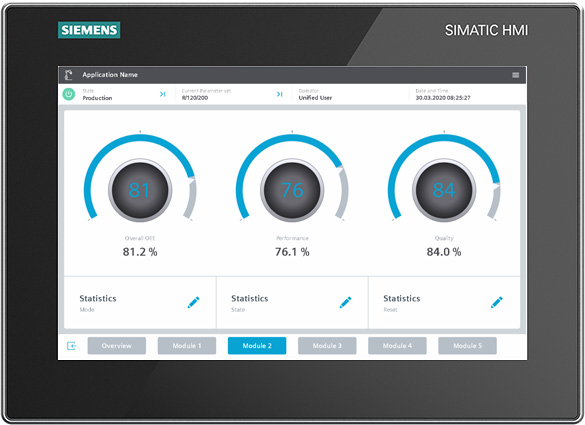
HMI stil with the HMI Template Suite
https://support.industry.siemens.com/cs/document/91174767/
The "HMI Template Suite" provides you
an intuitive operating concept, optimized for touch operation
the possibility of seamlessly integrating your own content into this operating concept
examples for the visualization of different HMI-screens the HMI Template Wizard, to create your HMI with preconfigured screens and screens objects (only for SIMATIC WinCC Unified)
Downloads for TIA Portal V16
https://ulozto.net/tamhle/K2S8TUstAc5F
https://anonfiles.com/12mcN3D3of/91174767_HMITemplateSuite_V3_DOC_en_pdf
https://anonfiles.com/55m2N4D2o4/91174767_HMITemplateSuiteUnified_V10_DOC_en_pdf
https://anonfiles.com/Jcm0N3D1o1/91174767_HMITemplateSuiteWizard_1.0.0_Setup_zip
https://anonfiles.com/N9m6N8Dao9/HMI_Template_Suite_Libraries_V16_WinCC_Unified_zip
https://anonfiles.com/XamcNbD4o7/HMI_Template_Suite_Libraries_V16_CODE_zip |
|
| Back to top |
|
|
|

 FAQ
FAQ Search
 Memberlist
 Usergroups
 Register
 Profile
 Log in to check your private messages
 Log in


