| View previous topic :: View next topic |
| Author |
Message |
maersk
Member 3


Joined: 17 Aug 2014
Posts: 891
|
 Posted: 12/11/2015 20:46 Post subject: SIMATIC Automation Tool Posted: 12/11/2015 20:46 Post subject: SIMATIC Automation Tool |
 |
|
SIMATIC Automation Tool - the commissioning and service operation tool for S7-1200, S7-1500 including ET 200SP CPU and decentralized IO modules
After a control program is created and verified with the Siemens TIA Portal software, the SIMATIC Automation Tool can be used in the field for operating and maintaining automation networks.
Automation Tool operations:
Scan an Ethernet network and identify all devices connected to the network
Assign addresses (IP, subnet, gateway) and station name (PROFINET device)
Set the time in a CPU to the current time in your PG/PC
Download a program to a CPU (no failsafe programs)
Put a CPU in RUN or STOP mode
Backup/Restore CPU data to/from a backup file (no failsafe)
Flash the lights on a CPU to help physically locate the CPU
Upload fault information from a CPU
Read the diagnostic log from a CPU
Reset a CPU to factory default settings
Update firmware in a CPU and attached modules
Document and save your network information
in a standard text .csv file or
an encrypted & password protected .sat file
New Features:
Support S7-1500 Compact/FailSafe* CPUs incl. central modules and backup/restore
Support S7-1200 Failsafe* CPUs incl. central modules
Support ET200SP Standard/Failsafe* CPUs incl. central modules and backup/restore
Support firmware update of decentralized IO devices – PROFINET and PROFIBUS
Improve application & communication performance and usability
Skin the application to look like TIA Portal
Query the Siemens Support Site (SIOS) for all available FW versions
Column filter to more clearness by setting operstions to modules with same characteristic
https://support.industry.siemens.com/dl/files/300/98161300/att_831399/v2/simatic_automation_tool_v01_00_02.zip?download=true&retCode=ok
https://support.industry.siemens.com/dl/files/300/98161300/att_117097/v2/simatic_automation_tool_v01_00_01_00_01_22_00_01.zip?download=true&retCode=ok
https://support.industry.siemens.com/dl/files/300/98161300/att_858086/v1/simatic_automation_tool_v02_00_00.zip?download=true&retCode=ok
https://cache.industry.siemens.com/dl/files/300/98161300/att_861269/v1/AutomationToolReleaseNotes_V2_201509_en.pdf?download=true |
|
| Back to top |
|
 |
maersk
Member 3
Joined: 17 Aug 2014
Posts: 891
|
| Posted: 10/08/2016 20:17 Post subject: Simatic Automation Tool V2.01 |
|
|
Simatic Automation Tool V2.01
https://support.industry.siemens.com/dl/files/300/98161300/att_889989/v2/simatic_automation_tool_v02_01_00.zip |
|
| Back to top |
|
|
plioko86
Junior

Joined: 20 Aug 2014
Posts: 2
|
| Posted: 09/01/2017 16:42 Post subject: |
|
|
| Hello. Can anybody give a link for new version V02.01.01, because download from Siemens web site is restricted. |
|
| Back to top |
|
|
maersk
Member 3
Joined: 17 Aug 2014
Posts: 891
|
| Posted: 10/01/2017 13:25 Post subject: |
|
|
| plioko86 wrote: | | Hello. Can anybody give a link for new version V02.01.01, because download from Siemens web site is restricted. |
SIMATIC Automation Tool - the commissioning and service operation tool for S7-1200, S7-1500 including ET 200SP CPU and decentralized IO modules
https://support.industry.siemens.com/cs/document/98161300/simatic-automation-tool-the-commissioning-and-service-operation-tool-for-s7-1200-s7-1500-including-et-200sp-cpu-and-decentralized-io-modules
simatic automation tool v02.01.00
https://cache.industry.siemens.com/dl/files/300/98161300/att_889999/v1/AutomationToolReleaseNotes_V2_1_201607_en-US.pdf
https://support.industry.siemens.com/dl/files/300/98161300/att_889989/v2/simatic_automation_tool_v02_01_00.zip
simatic automation tool v02.01.01
Update version V02.01.01 replaces version V02.01.00 and improves the behaviour:
support program download based on S7-1200 firmware version V4.2
support program download based on S7-1500 firmware version V2.0
firmware update ET200ECO PN, 6ES7141-6BF00-0AB0
6GK7 542-1AX00-0XE0 CM 1542-1 update firmware correctly
program download with password - projects with changed firmware versions
https://cache.industry.siemens.com/dl/files/300/98161300/att_903774/v1/AutomationToolUserGuide_V2_1_1_201610_en-US.pdf
https://support.industry.siemens.com/dl/files/300/98161300/att_903771/v1/simatic_automation_tool_v02_01_01.zip
simatic_automation_tool_v02_01_01.zip 282.2 MB
| Code: | | https://mega.nz/#!CwdFBASL!TvQ_1ylwP0-sdyPPDZXqQxLGi0-7Ej7jxE6JA3t5uY8 |
|
|
| Back to top |
|
|
plioko86
Junior
Joined: 20 Aug 2014
Posts: 2
|
| Posted: 10/01/2017 21:36 Post subject: |
|
|
| Thank you. |
|
| Back to top |
|
|
ALooser
Junior 2

Joined: 26 Oct 2018
Posts: 37
|
| Posted: 21/04/2019 10:03 Post subject: Simatic Automation Tool 3.1 SP1 SP2 |
|
|
Simatic Automation Tool 3.1 SP1 SP2
https://openload.cc/2cNdMcganf/Simatic_Automation_Tool_V3_1_SP1_rar
https://openload.cc/ycVbM0genf/SIMATIC_Automation_Tool_V3_1_SP2_rar |
|
| Back to top |
|
|
maersk
Member 3
Joined: 17 Aug 2014
Posts: 891
|
| Posted: 31/01/2020 20:49 Post subject: SIMATIC Automation Tool |
|
|
SIMATIC Automation Tool
https://support.industry.siemens.com/cs/document/98161300/simatic-automation-tool-the-commissioning-and-service-operation-tool-for-simatic-modules
Automation tool operations:
| Code: | Scan to PROFINET / Ethernet network and identify all devices connected to the network
Flash device LEDs or HMI screens to physically locate a device
Create a table that maps the accessible devices on the network
Assign addresses (IP, subnet, gateway) and station name (PROFINET device)
Set the time in a CPU to the current time in your PG / PC
Download a program to a CPU (support failsafe programs needs at least V3.1) and HMI panels
Put a CPU in RUN or STOP mode
Perform a CPU memory reset
Backup / Restore CPU or HMI data to / from a backup file (failsafe needs at least V3.1)
Upload service data from a CPU
Read the diagnostic log from a CPU
Reset a CPU to factory default settings
Update firmware in a CPU and attached modules
Upload, download, or delete Recipe data (stored at SMC) from a CPU
Upload or delete Data log data (stored at SMC) from a CPU
Document and save your network information
in a standard text .csv file or
an encrypted & password protected .sat file
API support to fabricate custom .NET applications based on the functionality available in the SIMATIC Automation Tool |
https://support.industry.siemens.com/cs/attachments/98161300/SIMATIC_Automation_Tool_V3_1_SP4.exe
https://support.industry.siemens.com/cs/attachments/98161300/SAT.ReadMe.OSS.V3.1.SP4.en-US.rtf
https://support.industry.siemens.com/cs/attachments/98161300/SAT.UserGuide.V3.1.SP4.en-US.pdf
https://support.industry.siemens.com/cs/attachments/98161300/SAT.ProductInformation.V3.1.SP4.en-US.pdf
https://support.industry.siemens.com/cs/attachments/98161300/SAT.InstallationNotes.V3.1.SP4.en-US.pdf
m1
https://ulozto.net/tam/_9j3MeEVKbCnB
m2
[url=https://www102.zippyshare.com/v/9omarstj/file.html]SAT.InstallationNotes.V3.1.SP4.en-US.pdf[/url]
[url=https://www102.zippyshare.com/v/noADqBrA/file.html]SAT.ProductInformation.V3.1.SP4.en-US.pdf[/url]
[url=https://www102.zippyshare.com/v/UPocFipP/file.html]SAT.UserGuide.V3.1.SP4.en-US.pdf[/url]
[url=https://www102.zippyshare.com/v/WHe1ebJP/file.html]SAT.ReadMe.OSS.V3.1.SP4.en-US.rtf[/url]
[url=https://www102.zippyshare.com/v/LN3jUuk6/file.html]SIMATIC_Automation_Tool_V3_1_SP4.exe[/url]
m3
https://bayfiles.com/t6c8u6Sen2/SAT.ProductInformation.V3.1.SP4.en-US_pdf
https://bayfiles.com/v2ceu5S9n5/SAT.InstallationNotes.V3.1.SP4.en-US_pdf
https://bayfiles.com/71c5ueScna/SAT.UserGuide.V3.1.SP4.en-US_pdf
https://bayfiles.com/Jalcu0S4nb/SIMATIC_Automation_Tool_V3_1_SP4_exe |
|
| Back to top |
|
|
uday.khyler
Junior
Joined: 09 Aug 2020
Posts: 1
|
| Posted: 09/09/2020 18:13 Post subject: |
|
|
| Could you upload v4.0? |
|
| Back to top |
|
|
maersk
Member 3
Joined: 17 Aug 2014
Posts: 891
|
| Posted: 08/10/2020 18:57 Post subject: SIMATIC Automation Tool v4.0 |
|
|
| uday.khyler wrote: | | Could you upload v4.0? |
Transfer tool - the tool which supports the user when commissioning, servicing and maintaining SIMATIC devices
https://support.industry.siemens.com/cs/document/109782475/
Similar to the SIMATIC Automation Tool (SAT tool) [here link to https://support.industry.siemens.com/cs/ww/de/view/98161300], this tool allows to perform commissioning and service activities on SIMATIC S7-1200 and S7-1500 independently of TIA Portal under LINUX.
SAT 4.0 for Windows
https://ulozto.net/file/6BDLVubp3PYj/simatic-automation-tool-v4-0-exe
https://bayfiles.com/14l67bd0p9/SIMATIC_Automation_Tool_V4_0_exe
[URL=https://www.file-upload.net/download-14316152/SIMATIC_Automation_Tool_V4_0.exe.html]SIMATIC_Automation_Tool_V4_0.exe[/URL]
https://anonfiles.com/5dle74d6p8/SIMATIC_Automation_Tool_V4_0_exe
[url=https://www73.zippyshare.com/v/9qrADMPG/file.html]SIMATIC_Automation_Tool_V4_0.exe[/url]
SAT 3.0 for Linux
https://ulozto.net/file/CR1l0JZWTO1C/transfertool-v03-00-00-07-singlelicense-zip
[URL=https://www.file-upload.net/download-14316156/TransferTool_V03.00.00.07_SingleLicense.zip.html]TransferTool_V03.00.00.07_SingleLicense.zip[/URL]
[url=https://www109.zippyshare.com/v/hnf75Ag7/file.html]TransferTool_V03.00.00.07_SingleLicense.zip[/url]
https://anonfiles.com/l4q477d7p0/TransferTool_V03.00.00.07_SingleLicense_zip
https://bayfiles.com/h0q776dep4/TransferTool_V03.00.00.07_SingleLicense_zip |
|
| Back to top |
|
|
ALooser
Junior 2
Joined: 26 Oct 2018
Posts: 37
|
| Posted: 17/11/2020 20:22 Post subject: |
|
|
[URL=https://www.file-upload.net/download-14368254/SIMATIC_Automation_Tool_V4_0_SP1.exe.html]SIMATIC_Automation_Tool_V4_0_SP1.exe[/URL]
https://ulozto.net/file/ZVTxGBaXp1S4/simatic-automation-tool-v4-0-sp1-exe
[url=https://www95.zippyshare.com/v/W7N8cbex/file.html]SIMATIC_Automation_Tool_V4_0_SP1.exe[/url]
https://anonfiles.com/J0l6K5q8pe/SIMATIC_Automation_Tool_V4_0_SP1_exe |
|
| Back to top |
|
|
ALooser
Junior 2
Joined: 26 Oct 2018
Posts: 37
|
| Posted: 01/02/2021 17:56 Post subject: LINUX Transfer tool SIMATIC devices |
|
|
Transfer tool - the tool which supports the user when commissioning, servicing and maintaining SIMATIC devices
https://support.industry.siemens.com/cs/document/109782475/
Similar to the SIMATIC Automation Tool (SAT tool) [here link to https://support.industry.siemens.com/cs/ww/de/view/98161300
], this tool allows to perform commissioning and service activities on SIMATIC S7-1200 and S7-1500 independently of TIA Portal under LINUX.
Functionalities of the transfer tool
Address assignment (IP, subnet, gateway) and station name change (PROFINET Device)
Program download to CPU (F-programs cannot be transferred)
RUN/STOP operating mode changeover
Reset to factory settings
Firmware update of the CPU
The stated functions can be executed as mass operations, i.e. they can be transferred to different devices by means of LINUX script as shell command.
The trial version supports the following devices
| Code: | CPU 1211C
CPU 1212C
CPU 1212FC
CPU 1214C
CPU 1214FC
CPU 1215C
CPU 1215FC
CPU 1217C
CPU 1510SP-1 PN
CPU 1510SP F-1 PN
CPU 1511-1 PN
CPU 1511C-1 PN
CPU 1511F-1 PN
CPU 1511T-1 PN
CPU 1511TF-1 PN
CPU 1512C-1 PN
CPU 1512SP-1 PN
CPU 1512SP F-1 PN
CPU 1513-1 PN
CPU 1513F-1 PN
CPU 1515-2 PN
CPU 1515F-2 PN
CPU 1516-3 PN
CPU 1518-4 PN
CPU 1518F-4
|
https://ulozto.net/tamhle/JxhoiJLq42AH/
https://fastshare.cz/15712664/transfertool-v03.00.00.07-singlelicense.zip
[URL=https://www.file-upload.net/download-14463728/TransferTool_V03.00.00.07_SingleLicense.zip.html]TransferTool_V03.00.00.07_SingleLicense.zip[/URL]
https://anonfiles.com/L9oaE4E9p2/TransferTool_V03.00.00.07_SingleLicense_zip |
|
| Back to top |
|
|
ALooser
Junior 2
Joined: 26 Oct 2018
Posts: 37
|
| Posted: 01/02/2021 18:10 Post subject: SIMATIC Automation Compare Tool |
|
|
SIMATIC Automation Compare Tool - for the comparison of LAD/FBD blocks
https://support.industry.siemens.com/cs/document/109768730/
Functionalities of the SIMATIC Automation Compare Tool
Integration of the Version Control Interface (VCI) for direct start from the TIA Portal
Explicit start in Windows for the comparison of LAD/FBD blocks which have been exported, for example, via Openness from a TIA project in XML format.
SIMATIC Automation Tool - the commissioning and service operation tool for SIMATIC modules
https://support.industry.siemens.com/cs/document/98161300/
Automation tool operations:
| Code: | Scan a PROFINET / Ethernet network and identify all devices connected to the network
Flash device LEDs or HMI screens to physically locate a device
Create a table that maps the accessible devices on the network
Assign addresses (IP, subnet, gateway) and station name (PROFINET device)
Set the time in a CPU to the current time in your PG / PC
Download a program to a CPU and HMI panels
Put a CPU in RUN or STOP mode
Perform a CPU memory reset
Backup / Restore CPU or HMI data to / from a backup file
Upload service data from a CPU
Upload of service data from ET200 devices
Read the diagnostics buffer from a CPU
Reset a CPU to factory default settings
Update firmware in a CPU and attached modules
Ability to load firmware update files on devices and activate the new firmware later
Support for CPUs connected through a CM (Communications Module) or CP (Communications Processor)
Upload, download, or delete Recipe data (stored at SMC) from a CPU
Upload or delete data log data (stored at SMC) from a CPU
Information in Device table for CPUs: TIA Portal version and configured CPU version
Document and save your network information
In a standard text .csv file or
An encrypted & password protected .sat file
Use the API to create custom .NET applications based on the functionality available in the SIMATIC Automation Tool
Advanced features:
Up to 10 concurrent connections.
Scheduler for scheduling device operations on a time and frequency of your choosing
Card browser for working with files and folders on SIMATIC memory cards in your CPUs
Archiving capabilities for SAT projects and associated file data
Ability to insert numeroase devices in one operation
Support for devices behind a NAT router |
Download
https://ulozto.net/tamhle/MjPQitOK4k5M/
https://fastshare.cz/15712818/sat.readme.oss.v4.0-sp1-en-us.rtf
https://fastshare.cz/15712831/actoolv08.msi
https://fastshare.cz/15712832/sat.userguide.v4.0.sp1.en-us-en-us.pdf
https://fastshare.cz/15712859/simatic-automation-tool-v4-0-sp1.exe
https://fastshare.cz/15712950/transfertool-v03.00.00.07-singlelicense.zip
https://anonfiles.com/90tcE6E9p9/SAT.ReadMe.OSS.V4.0_SP1_en_US_rtf
https://anonfiles.com/Bdt8EcE3pa/SAT.UserGuide.V4.0.SP1.en-US_en-US_pdf
https://anonfiles.com/hax4EaEcpc/TransferTool_V03.00.00.07_SingleLicense_zip
https://anonfiles.com/v5x1E4E5p7/ACToolV08_msi
https://anonfiles.com/974dE0E5p8/SIMATIC_Automation_Tool_V4_0_SP1_exe
https://bayfiles.com/Z8t0E5E1p3/SAT.ReadMe.OSS.V4.0_SP1_en_US_rtf
https://bayfiles.com/d8ucE7Eep2/SAT.UserGuide.V4.0.SP1.en-US_en-US_pdf
https://bayfiles.com/Vdw9EbEfp5/TransferTool_V03.00.00.07_SingleLicense_zip
https://bayfiles.com/f8xcE4Eepa/ACToolV08_msi
https://bayfiles.com/x347E1Efpa/SIMATIC_Automation_Tool_V4_0_SP1_exe |
|
| Back to top |
|
|
ybmom
Junior
Joined: 13 Jun 2018
Posts: 3
|
| Posted: 03/03/2021 14:02 Post subject: |
|
|
You can get the firmware also with Automation Tool?
Information in Device table for CPUs: TIA Portal version and configured CPU version |
|
| Back to top |
|
|
ALooser
Junior 2
Joined: 26 Oct 2018
Posts: 37
|
| Posted: 26/03/2021 16:16 Post subject: SIMATIC Automation Tool SDK 4.0 SP2 |
|
|
SIMATIC Automation Tool SDK 4.0 SP2
https://support.industry.siemens.com/cs/document/109780920/
https://anonfiles.com/cbK2L0m5u9/SAT_SDK.InstallationNotes.V4.0.SP2.en-US_en-US_pdf
https://anonfiles.com/ocK7Lfmau8/SAT_SDK.UserGuide.V4.0.SP2.en-US_en-US_pdf
https://anonfiles.com/sfKeL6m3u2/SAT.SDK.ReadMe.OSS.V4.0_SP2_en_US_pdf
https://anonfiles.com/iab9M5m1ua/SIMATIC_Automation_Tool_SDK_V4_0_SP2_exe
https://ulozto.net/tamhle/FdWKZwRTkoVz/ |
|
| Back to top |
|
|
theflash
Junior
Joined: 16 Mar 2012
Posts: 14
|
| Posted: 27/03/2021 03:57 Post subject: Re: SIMATIC Automation Tool SDK 4.0 SP2 |
|
|
| ALooser wrote: | SIMATIC Automation Tool SDK 4.0 SP2
https://support.industry.siemens.com/cs/document/109780920/
https://anonfiles.com/cbK2L0m5u9/SAT_SDK.InstallationNotes.V4.0.SP2.en-US_en-US_pdf
https://anonfiles.com/ocK7Lfmau8/SAT_SDK.UserGuide.V4.0.SP2.en-US_en-US_pdf
https://anonfiles.com/sfKeL6m3u2/SAT.SDK.ReadMe.OSS.V4.0_SP2_en_US_pdf
https://anonfiles.com/iab9M5m1ua/SIMATIC_Automation_Tool_SDK_V4_0_SP2_exe
https://ulozto.net/tamhle/FdWKZwRTkoVz/ |
Thanks for the update, could you please upload the 3.1 SP2 of SDK, this installation requires old version.
Thanks a lot! |
|
| Back to top |
|
|
ALooser
Junior 2
Joined: 26 Oct 2018
Posts: 37
|
| Posted: 27/03/2021 12:30 Post subject: Re: SIMATIC Automation Tool SDK 4.0 SP2 |
|
|
| theflash wrote: | | ALooser wrote: | SIMATIC Automation Tool SDK 4.0 SP2
https://support.industry.siemens.com/cs/document/109780920/
https://anonfiles.com/cbK2L0m5u9/SAT_SDK.InstallationNotes.V4.0.SP2.en-US_en-US_pdf
https://anonfiles.com/ocK7Lfmau8/SAT_SDK.UserGuide.V4.0.SP2.en-US_en-US_pdf
https://anonfiles.com/sfKeL6m3u2/SAT.SDK.ReadMe.OSS.V4.0_SP2_en_US_pdf
https://anonfiles.com/iab9M5m1ua/SIMATIC_Automation_Tool_SDK_V4_0_SP2_exe
https://ulozto.net/tamhle/FdWKZwRTkoVz/ |
Thanks for the update, could you please upload the 3.1 SP2 of SDK, this installation requires old version.
Thanks a lot! |
You do not need.
Just go on SIA2.ini and edit as in picture
;must have SAT SDK V3.1 SP2 or later installed
;{Registry};{HKEY_LOCAL_MACHINE\SOFTWARE\Siemens\Automation\_InstalledSW\SIMATICAutomationToolSDK\EditionMain\Release};{REGSZ};{>=};{V3.1.2.0_8.7.0.1};{TermMessage38};{1}
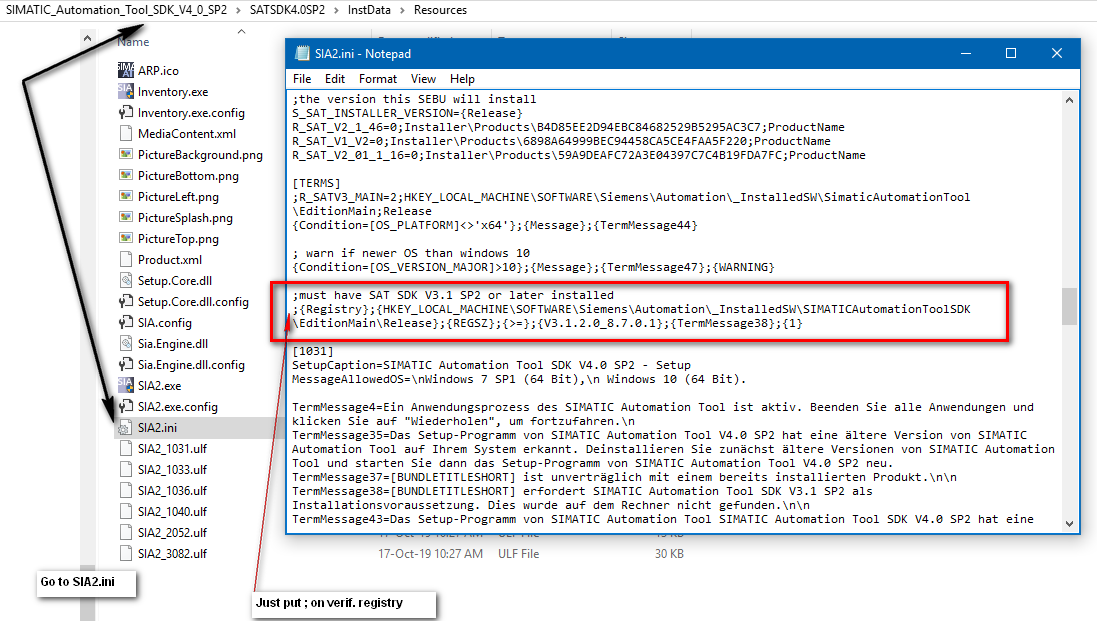
Install and enjoy... |
|
| Back to top |
|
|
blb1000
Junior
Joined: 29 Jun 2019
Posts: 3
|
| Posted: 05/06/2021 06:56 Post subject: |
|
|
 |
|
| Back to top |
|
|
Azgykzebop
Junior
Joined: 04 Mar 2022
Posts: 1
|
| Posted: 02/05/2022 21:42 Post subject: |
|
|
| need it too..newest version.. |
|
| Back to top |
|
|
ALooser
Junior 2
Joined: 26 Oct 2018
Posts: 37
|
| Posted: 07/05/2022 18:51 Post subject: SIMATIC Automation Tool |
|
|
| Azgykzebop wrote: | | need it too..newest version.. |
SIMATIC Automation Tool SDK SP3
https://support.industry.siemens.com/cs/document/109780920/
SIMATIC Automation Tool SP3
https://support.industry.siemens.com/cs/document/98161300/
https://ulozto.net/tamhle/4VtB6mmnnE8g/
https://anonfiles.com/Zf71Wbdey4/SIMATIC_Automation_Tool_V4_0_SP3_exe
https://anonfiles.com/Pa9bWad9y4/SIMATIC_Automation_Tool_SDK_V4_0_SP3_exe
[URL=https://www.file-upload.net/download-14921633/SIMATIC_Automation_Tool_SDK_V4_0_SP3.exe.html]SIMATIC_Automation_Tool_SDK_V4_0_SP3.exe[/URL]
[URL=https://www.file-upload.net/download-14921631/SIMATIC_Automation_Tool_V4_0_SP3.exe.html]SIMATIC_Automation_Tool_V4_0_SP3.exe[/URL]
[url=https://www49.zippyshare.com/v/8loc2fbC/file.html]SIMATIC_Automation_Tool_SDK_V4_0_SP3.exe[/url]
[url=https://www49.zippyshare.com/v/kFOEZlbU/file.html]SIMATIC_Automation_Tool_V4_0_SP3.exe[/url] |
|
| Back to top |
|
|
|

 FAQ
FAQ Search
 Memberlist
 Usergroups
 Register
 Profile
 Log in to check your private messages
 Log in


