 |
plc.myforum.ro
PLCs users www.plc.myforum.ro!
|
| View previous topic :: View next topic |
| Author |
Message |
nrobnik
Junior

Joined: 24 Mar 2021
Posts: 1
|
 Posted: 24/03/2021 22:46 Post subject: Siemens watchdog timer question (PN/PN couplers) Posted: 24/03/2021 22:46 Post subject: Siemens watchdog timer question (PN/PN couplers) |
 |
|
Asking here for more information as I've come to the end of my (limited) networking knowledge. We are currently working on a pretty big production line so a lot of CPUs, frequency drivers, etc. CPUs are communicating via PN/PN couplers. If the data transfer on PN/PN couplers does not finish in time (watchdog timer expires) the whole line goes into emergency stop. We fixed all the problems we identified (faulty cables, segreagated cabinets, etc.), but still watchdog timer (default setting is 3 cycles/2ms) is still triggered on a regular basis. I've searched for clear information on this, but I am wondering is this. Is there a specific formula/recommendation on what to set the watchdog timers?
Is it the normal program cycle time, network congestion (how to measure that), etc. Any info would be much appreciated. |
|
| Back to top |
|
 |
electro
Junior 2

Joined: 26 Apr 2012
Posts: 21
|
| Posted: 24/03/2021 23:59 Post subject: |
|
|
| Have you checked (are you sure) there are no loops on your network topology? |
|
| Back to top |
|
|
DeepP
Junior
Joined: 10 Oct 2018
Posts: 1
|
| Posted: 25/03/2021 18:45 Post subject: Re: Siemens watchdog timer question (PN/PN couplers) |
|
|
| nrobnik wrote: | Asking here for more information as I've come to the end of my (limited) networking knowledge. We are currently working on a pretty big production line so a lot of CPUs, frequency drivers, etc. CPUs are communicating via PN/PN couplers. If the data transfer on PN/PN couplers does not finish in time (watchdog timer expires) the whole line goes into emergency stop. We fixed all the problems we identified (faulty cables, segreagated cabinets, etc.), but still watchdog timer (default setting is 3 cycles/2ms) is still triggered on a regular basis. I've searched for clear information on this, but I am wondering is this. Is there a specific formula/recommendation on what to set the watchdog timers?
Is it the normal program cycle time, network congestion (how to measure that), etc. Any info would be much appreciated. |
use proneta for a first analisys
http://plc.myforum.ro/profinet-commissioning-and-diagnostics-tool-proneta-vt4316.html
if you still do not solve
The PROFINET Bus Analyzer (BANY) is a solution
https://support.industry.siemens.com/cs/document/109745817/
Timers are set in a descending order on your network from IO Controllers down...
A network topology could be useful |
|
| Back to top |
|
|
ubozella
Junior
Joined: 23 Sep 2018
Posts: 6
|
| Posted: 25/03/2021 19:16 Post subject: |
|
|
TH LINK PROFINET PROFINET Diagnostics Independent from Controller and Control Room
https://industrial.softing.com/products/network-management-tools/th-link-profinet-profinet-diagnostics-independent-from-controller-and-control-room.html
Industrial Network Diagnostic & Monitoring Tool
Comprehensive network diagnostics tool that enables permanent network monitoring & management
TH SCOPE is a software product for industrial network diagnostics and network management. Geared to plant operators and maintenance personnel, TH SCOPE is an all-in-one, easy-to-use solution for permanent monitoring and predictive maintenance, for acceptance testing and for troubleshooting. Combined with TH LINK components, the product supports PROFIBUS, PROFINET, EtherNet/IP and Modbus TCP protocols.
https://industrial.softing.com/products/network-management-tools/industrial-network-diagnostic-monitoring-tool.html
But you need to buy TH LINK PROFINET |
|
| Back to top |
|
|
ubozella
Junior
Joined: 23 Sep 2018
Posts: 6
|
| Posted: 25/03/2021 20:31 Post subject: Re: Siemens watchdog timer question (PN/PN couplers) |
|
|
| nrobnik wrote: | Asking here for more information as I've come to the end of my (limited) networking knowledge. We are currently working on a pretty big production line so a lot of CPUs, frequency drivers, etc. CPUs are communicating via PN/PN couplers. If the data transfer on PN/PN couplers does not finish in time (watchdog timer expires) the whole line goes into emergency stop. We fixed all the problems we identified (faulty cables, segreagated cabinets, etc.), but still watchdog timer (default setting is 3 cycles/2ms) is still triggered on a regular basis. I've searched for clear information on this, but I am wondering is this. Is there a specific formula/recommendation on what to set the watchdog timers?
Is it the normal program cycle time, network congestion (how to measure that), etc. Any info would be much appreciated. |
I do not think you need now a profinet analyzer. I supposed you are using real-time communication
What you shoul do is as follows:
1.Watchdog time
The watchdog time (PN/PN Coupler) is the time interval that an IO controller or IO device permits, without receiving IO data. If the IO device(PN/PN Coupler) is not supplied by the IO controller with data within the watchdog time, the IO device(PN/PN Coupler) detects the missing frames and outputs substitute values. This is reported in the IO controller as a station failure.
In STEP 7, the watchdog time is made up from an integral numeroase of the update time and can be set by the user.
2. Send clock
The period of time between two consecutive communication cycles. The send clock is the shortest possible interval in data exchange and thus also the smallest value that can be set for the update time.
3. Relationship between the update time and send clock
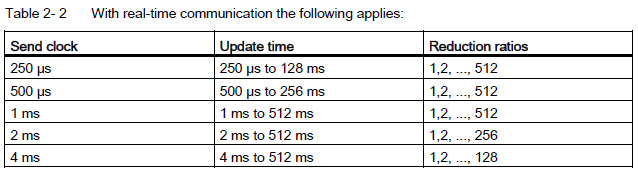
The calculated update times are reduction ratios (1, 2, 4, 8, ..., 512) of the send clock. The minimum possible update time thus depends on the minimum send clock of the IO controller that can be set and the efficiency of the IO controller and IO device. Depending on the send clock, it can be that only some of the reduction ratios are available (STEP 7 guarantees this through a pre-selection).
The following tables illustrate the dependency of the update time that can be set on the send clock, using an example of the CPU 1516-3 PN/DP. The update times satisfy the requirements of the PROFINET standard IEC 61158.
With real-time communication the following applies:
So in In STEP 7, the watchdog time is made up from an integral multiple of the update time and can be set by the user.
You can configure ..meaning increase....the watchdog time in the "Number of accepted update cycles with missing IO
data" field the same for all couplers.
1.So what is the firmware of PN/PN Coupler?
2. Are you using IRT Communication?
3. Are you using redundancy?
Please
https://cache.industry.siemens.com/dl/files/658/35837658/att_77702/v1/pn_pn_coupler_hardware_manual_en-US_en-US.pdf
https://cache.industry.siemens.com/dl/files/629/109762629/att_968843/v1/pn_pn_coupler_hardware_product_info_en-US_en-US.pdf
https://support.industry.siemens.com/dokumentation/PDFTopicDownload.aspx?DocVersionId=128678580235&TopicId=114238237963&Lang=en
https://cache.industry.siemens.com/dl/files/930/19289930/att_70488/v1/Von_PROFIBUS_DP_nach_PROFINET_IO_en-US.pdf
https://cache.industry.siemens.com/dl/files/856/49948856/att_897210/v1/profinet_step7_v16_function_manual_en-US_en-US.pdf
https://cache.industry.siemens.com/dl/files/532/44319532/att_71389/v1/pn_pn_coupler_hardware_manual_en-US_en-US.pdf |
|
| Back to top |
|
|
|
|
You cannot post new topics in this forum
You cannot reply to topics in this forum
You cannot edit your posts in this forum
You cannot delete your posts in this forum
You cannot vote in polls in this forum
|
Powered by phpBB © 2001, 2005 phpBB Group
Fa-ti si tu propriul forum GRATUIT, pe www.myforum.ro |
 FAQ
FAQ Search
 Memberlist
 Usergroups
 Register
 Profile
 Log in to check your private messages
 Log in


