| View previous topic :: View next topic |
| Author |
Message |
Heisenberg_007
Junior

Joined: 04 Oct 2018
Posts: 4
|
 Posted: 05/10/2018 09:20 Post subject: Siemens S120 Ethernet login username/password Posted: 05/10/2018 09:20 Post subject: Siemens S120 Ethernet login username/password |
 |
|
Hi Friends
I work on Siemens S120 system where i am facing A30042 alarm problem in Double motor Module. As it requires to reset the Parameter P251 i need to login in D435 module. I connected Ethernet Cable and laptop, configured IP and entered via 192.168.214.1/index.mcs
For reseting the P251 i need to login in 192/168.214.1/watch.mcs
where it requires username and password.
please help me to find the username and password and if anyone else has faced such problem do let me know and share your experience
Regards
Heisenberg
India  |
|
| Back to top |
|
 |
Mettrroo
Junior
Joined: 05 Oct 2018
Posts: 3
|
| Posted: 05/10/2018 19:06 Post subject: Access level |
|
|
Check P0011, P0012, P0013
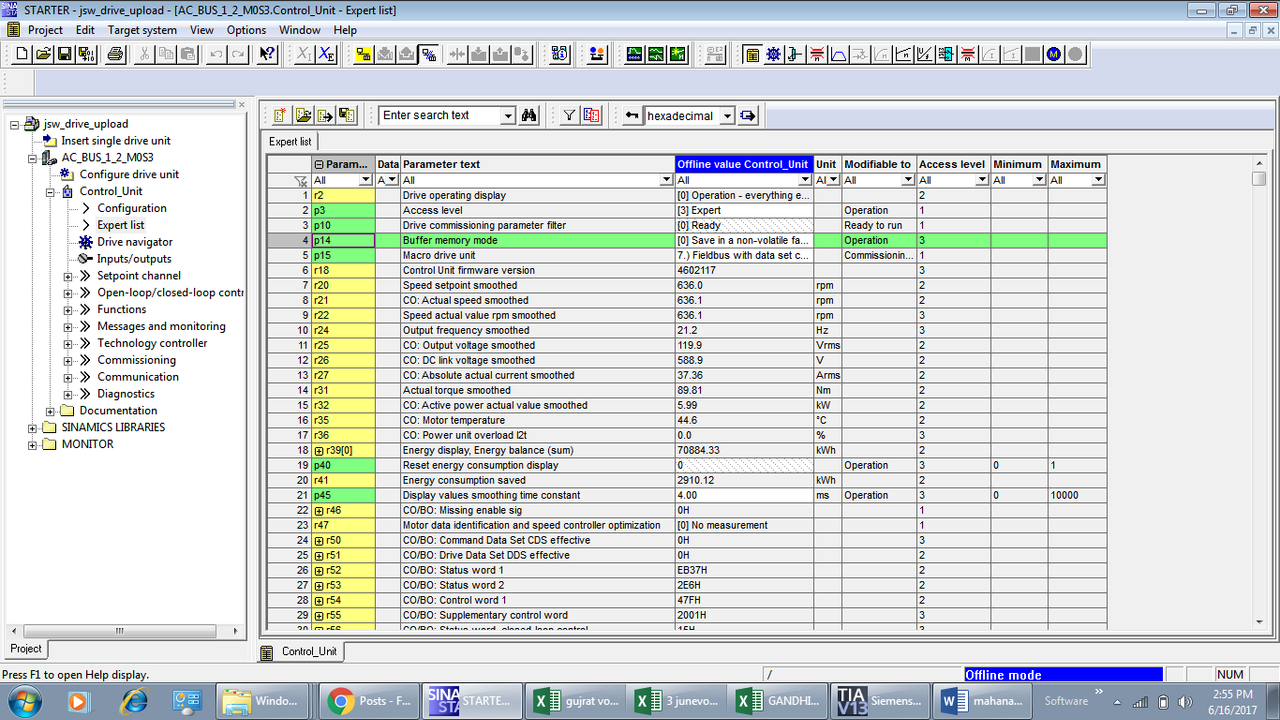
Access level
The parameters are subdivided into access levels. The SINAMICS S List Manual specifies in
which access level the parameter is displayed and can be changed. The required access
levels 0 to 4 can be set in p0003.
Access level
0 User-defined - Parameter from the user-defined list (p0013)
1 Standard - Parameters for the simplest operator functions (e.g. p1120 = ramp function
generator ramp-up time).
2 Extended - Parameters to handle the basic functions of the device.
3 Expert - Expert knowledge is already required for this parameter (e.g. knowledge
about BICO parameterization).
4 Service - Please atingere your local Siemens office for the password for parameters
with access level 4 (Service). It must be entered into p3950.
Note - Parameter p0003 is CU-specific (belongs to Control Unit). |
|
| Back to top |
|
|
Mettrroo
Junior
Joined: 05 Oct 2018
Posts: 3
|
| Posted: 05/10/2018 19:10 Post subject: |
|
|
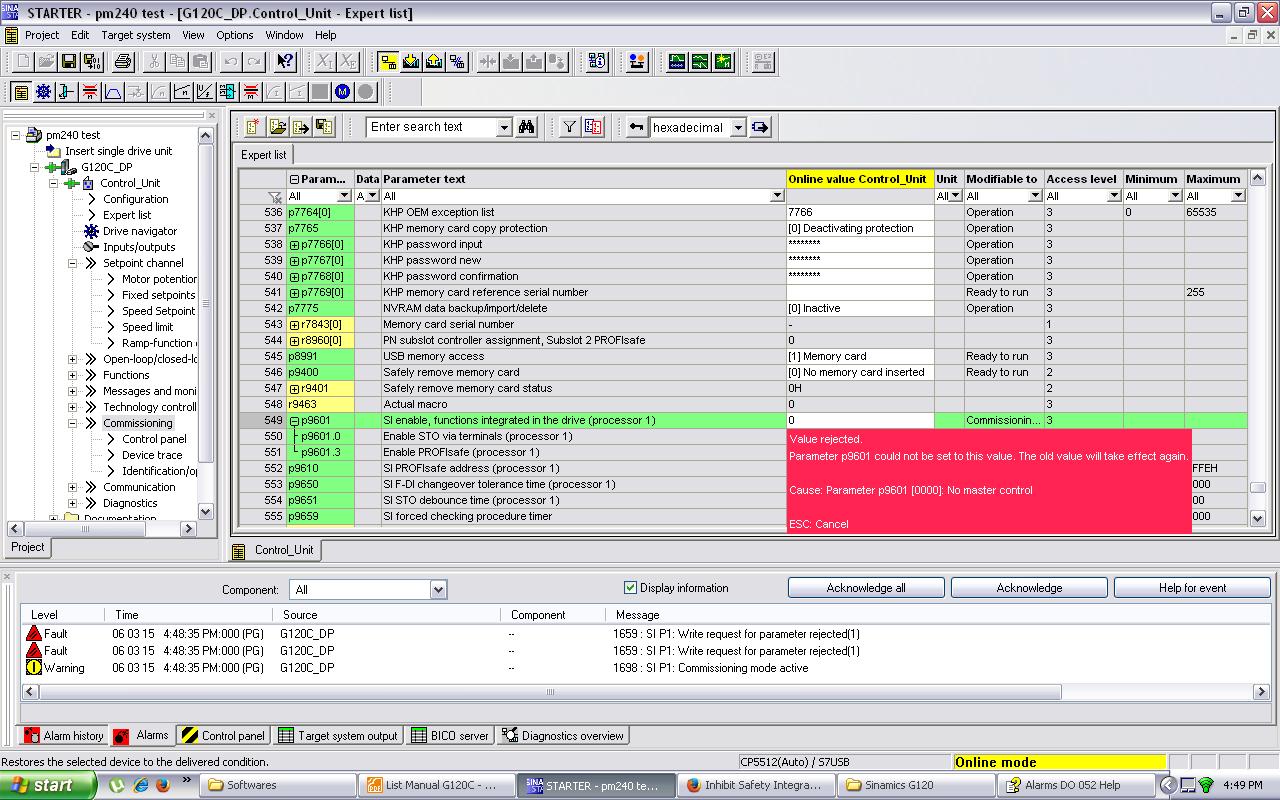
P10=95
p9761= insert password ( 12345H)
P9601= not changing.
 |
|
| Back to top |
|
|
Mettrroo
Junior
Joined: 05 Oct 2018
Posts: 3
|
| Posted: 05/10/2018 19:17 Post subject: |
|
|
| factory password of G120 for safety is 12345 |
|
| Back to top |
|
|
Heisenberg_007
Junior
Joined: 04 Oct 2018
Posts: 4
|
| Posted: 06/10/2018 04:06 Post subject: Ethernet/user web page |
|
|
thanks bro for your reply
but i do not wanna connection from starter/scout
i just wanna login through Ethernet/user web to S120's D435 unit via lan cable. |
|
| Back to top |
|
|
EndOFF
Junior
Joined: 02 Oct 2018
Posts: 2
|
| Posted: 06/10/2018 12:01 Post subject: |
|
|
try
ftp login user-> simotion
ftp password -> simotion |
|
| Back to top |
|
|
Heisenberg_007
Junior
Joined: 04 Oct 2018
Posts: 4
|
| Posted: 06/10/2018 12:12 Post subject: |
|
|
| EndOFF wrote: | try
ftp login user-> simotion
ftp password -> simotion |
Thanks man
This is what i required |
|
| Back to top |
|
|
EndOFF
Junior
Joined: 02 Oct 2018
Posts: 2
|
| Posted: 06/10/2018 12:49 Post subject: Resetting the security level from normal to low |
|
|
Resetting the security level from natural to low
If the user forgets to edit the UserDataBase.xml during initial commissioning, it will no longer be possible to access FTP, web services, or access-protected pages during use.
If there is no mechanical access to the memory card or the device, this can be achieved with the SCOUT function "Delete user data on card". After setting up the user administration, the project must be downloaded again.
Alternatives without SCOUT:
Setting the service selector switch to position "8" restores security level low (SIMOTION IT
service mode). Using this method, the device can always be reset to security level low by
hardware means. The following behavior must be taken into account:
● The "Service mode" is activated by turning the SVC switch to position "8".
● If the switch is already set to "8" at ramp-up, it is ignored (protection against forgetfulness).
● The service mode stops immediately when position "8" is exited.
● The service mode stops automatically after 120 minutes.
● It is possible to retrigger 120 minute timeout at any time by turning the switch briefly from
"8" to "7" and back, for example.
● The service mode is indicated (as for underlicensing) through slow red flashing of the SF
LED.
● In service mode, a login with an OPC UA Client is always possible, irrespective of the selected password and user name or the set read and write rights.
As an alternative to switch position "8," security level low can also be activated via a simotion.ini file in the main directory of the CF card.
To achieve this, use a text editor (such as Notepad) to fabricate a file called simotion.ini Add the following text: SERVICE_SELECTOR_MODE=8
You must use a text editor and may not use any formatting in the text.
To exit security level low again, undo the changes you have made. |
|
| Back to top |
|
|
|

 FAQ
FAQ Search
 Memberlist
 Usergroups
 Register
 Profile
 Log in to check your private messages
 Log in


