 |
plc.myforum.ro
PLCs users www.plc.myforum.ro!
|
| View previous topic :: View next topic |
| Author |
Message |
maersk
Member 3


Joined: 17 Aug 2014
Posts: 891
|
 Posted: 06/12/2019 16:24 Post subject: Selection aid for safety application examples Posted: 06/12/2019 16:24 Post subject: Selection aid for safety application examples |
 |
|
Selection aid for safety application examples
https://support.industry.siemens.com/cs/document/109773295/selection-aid-for-safety-application-examples
You will find a large number of application examples on the topic of safety in automation on the Industry Online Support pages. Through the specification of categories, the Safety Selector allows you to quickly find the suitable safety application examples in the Industry Online Support.
User interface of the Safety Selector
The user interface of the Safety Selector is divided into the areas for entering the filter criteria (1) "Selection of configuration" and the area containing the filtered entries (4) "Application examples".
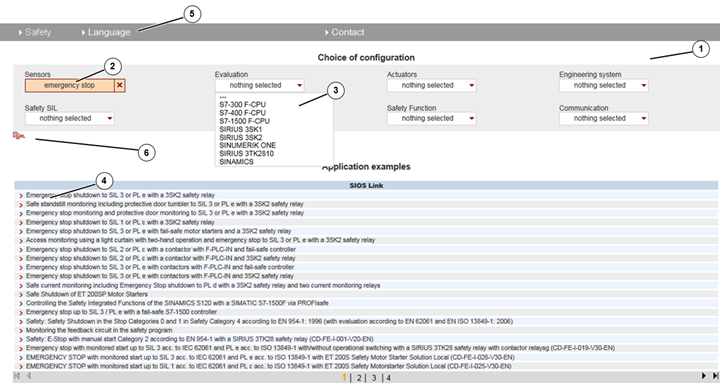
Operation
1. In the "Selection of configuration" area, 8 selection boxes with safety categories are available to you with which you can filter the safety application examples: (sensors, processing unit, actuators, engineering system, safety SIL, safety PL, safety function, communication).
2. If you select a value in a selection box (e.g. the value "Emergency stop" in the "Sensors" category here), the application examples are filtered according to this criterion in the output area.
3. All selection options that are no longer possible due to the previously made selection are then automatically suppressed from the other selection boxes.
4. All safety entries are filtered according to the selected categories in the output area. Clicking on one of the entries takes you directly to the entry page, from which you can download the example code and the documentation.
5. You can initialize the Safety Selector and change the interface language in the menu area.
6. You can save the filtered configuration of the safety selector as url string by clicking on the URL symbol.
https://www.automation.siemens.com/perfdata/SelectSafetyBID.aspx |
|
| Back to top |
|
 |
|
|
You cannot post new topics in this forum
You cannot reply to topics in this forum
You cannot edit your posts in this forum
You cannot delete your posts in this forum
You cannot vote in polls in this forum
|
Powered by phpBB © 2001, 2005 phpBB Group
Fa-ti si tu propriul forum GRATUIT, pe www.myforum.ro |
 FAQ
FAQ Search
 Memberlist
 Usergroups
 Register
 Profile
 Log in to check your private messages
 Log in


