 |
plc.myforum.ro
PLCs users www.plc.myforum.ro!
|
| View previous topic :: View next topic |
| Author |
Message |
valz
Member 3


Joined: 26 Jul 2015
Posts: 771
|
 Posted: 07/02/2022 16:50 Post subject: SCADA Export for TIA Portal WinCC Runtime V7 Posted: 07/02/2022 16:50 Post subject: SCADA Export for TIA Portal WinCC Runtime V7 |
 |
|
Why is it not possible to establish a connection to a PLC S7-1500 V2.9 / S7-1200 V4.5 with WinCC Runtime V7?
https://support.industry.siemens.com/cs/document/109805946/
The SIMATIC CPUs with new firmware version S7-1500 ≥ V2.9 / S7-1200 ≥ V4.5 communicate with WinCC Runtime V7.5 SP2 Update 4 and higher via TLS protocol. To establish a connection from WinCC Runtime to a CPU with newer firmware, you have to exchange the certificate of the TLS protocol.
S7-1500/S7-1200 CPUs with firmware version V2.9/4.5 or higher support the safe communication available with TIA Portal V17 or higher. To ensure that the communication partners automatically communicate "securely", their connection mechanisms must be set to the highest possible security procedure. For security reasons, as of WinCC Runtime V7.5 SP2 Update 4 it is mandatory to communicate via the new TLS protocol V1.3. In order to establish a connection from WinCC to these CPUs, you have to renew the certificate of the TLS protocol in the WinCC project accordingly.
Requirements
"Secure Communication" is configured for the S7 controller in the TIA Portal project.
The AS has been compiled in the TIA Portal.
General procedure
1. Download the tool SIMATIC SCADA Export for TIA Portal and install it in the TIA Portal.
https://support.industry.siemens.com/cs/document/109748955/
2. Export the AS data from the TIA Portal project with the tool "SIEMENS SIMATIC SCADA Export": For this, in the TIA Portal project in the pop-up menu of the PLC you select the entry "Export to SIMATIC SCADA" (right click -> desired CPU -> Properties) as ZIP file (Export*.zip).
3. Connection in communication channel
a) Configure new WinCC project: Făcute the desired connection in the communication channel "SIMATIC S7-1200, S7-1500 Channel".
b) Change existing WinCC project: Select the connection already created in the communication channel "SIMATIC S7-1200, S7-1500 Channel".
4. To import the exported AS data in the WinCC Tag Management, you select the item "AS Symbol -> Load from file" in the pop-up menu of the connection. To do this, select the ZIP file exported in point 2 (Export*.zip).
5. Select the desired data records to load. The available controller data is loaded. The necessary certificates are also transferred at the same time.
6. To import the required certificates, confirm the corresponding prompt with "Yes".
7. Now, when you restart the Runtime, the connection to the CPU is established.
Note
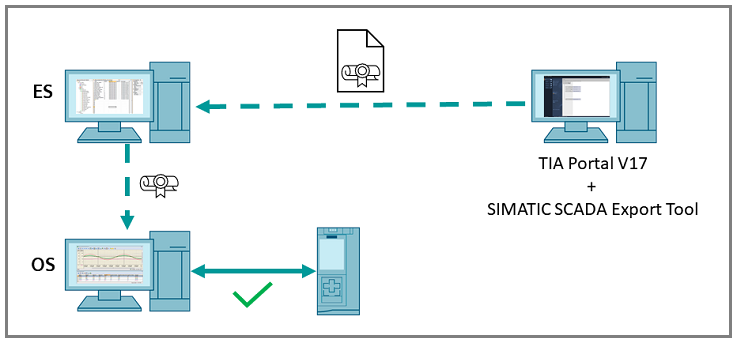
If you use ES-OS Load, that is, you load the WinCC project from the Engineering Station (ES) to a Runtime Station (OS) (Operator Station/OS is on a separate computer, WinCC Runtime is not run on the Engineering Station/ES) the following applies:
The certificate for the TLS protocol is transferred to the OS by means of ES-OS loading (Target System -> OS Loading). That means, here it is enough to import the certificate on the ES beforehand.
However, the Delta Loading function is not yet fully supported here. To ensure that the updated certificate is used by WinCC Runtime after the delta loading, the Runtime must be restarted on the OS.
Alternatively, you have to perform a complete download.
Note
If you need to remove already loaded certificates, proceed as follows:
WinCC Explorer -> Tag Management -> Mark desired connection -> via right-click "Delete certificate".
Further Information
https://support.industry.siemens.com/cs/mdm/109792611
https://support.industry.siemens.com/cs/mdm/109792641
https://support.industry.siemens.com/cs/attachments/109798498/109798498_WinCC_V7_TLS_Certificate_en.pdf
https://support.industry.siemens.com/cs/attachments/109799540/109799540_en_Security-Features_in_TIA_Portal_V17.pdf
https://support.industry.siemens.com/cs/document/59216666/what-should-you-watch-out-for-when-downloading-from-the-wincc-pcs-7-engineering-station-to-the-operator-station- (es-os-download) |
|
| Back to top |
|
 |
|
|
You cannot post new topics in this forum
You cannot reply to topics in this forum
You cannot edit your posts in this forum
You cannot delete your posts in this forum
You cannot vote in polls in this forum
|
Powered by phpBB © 2001, 2005 phpBB Group
Fa-ti si tu propriul forum GRATUIT, pe www.myforum.ro |
 FAQ
FAQ Search
 Memberlist
 Usergroups
 Register
 Profile
 Log in to check your private messages
 Log in


