| View previous topic :: View next topic |
| Author |
Message |
atiqur36eee
Junior

Joined: 03 Dec 2016
Posts: 2
|
 Posted: 01/07/2021 11:47 Post subject: Save PLC (s7 1200) Values in a Excel file of PC Posted: 01/07/2021 11:47 Post subject: Save PLC (s7 1200) Values in a Excel file of PC |
 |
|
I want to save PLC/HMI (TP 700, Siemens) value in a excel compus in another
computer. Anyone can help ? |
|
| Back to top |
|
 |
seaplobykx
Junior
Joined: 03 Oct 2018
Posts: 10
Location: UK
|
| Posted: 01/07/2021 13:11 Post subject: |
|
|
| https://plcdatatools.com/plcdatareader/?gclid=EAIaIQobChMIsNKxltzB8QIVbPx3Ch2imQUnEAAYASABEgLdj_D_BwE |
|
| Back to top |
|
|
seaplobykx
Junior
Joined: 03 Oct 2018
Posts: 10
Location: UK
|
| Posted: 01/07/2021 13:31 Post subject: Acquisition and Monitoring with the SIMATIC S7-1200 |
|
|
Process Data Acquisition and Monitoring with the SIMATIC S7-1200 / S7-1500 (Data Logging)
https://support.industry.siemens.com/cs/document/64396156/
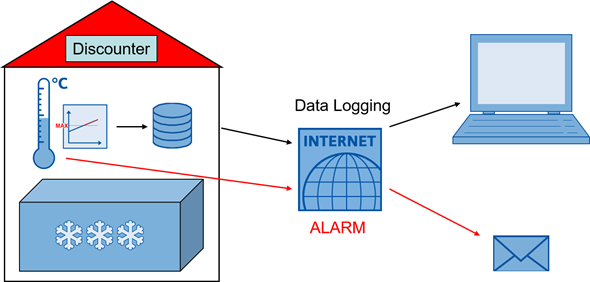
The STEP 7 (TIA Portal) development environment provides for the SIMATIC S7-1200 / S7-1500 the "Data log" instructions.
These instructions allow you to store process data in the flash memory (S7-1200 CPU or memory card) in CSV format (comma-separated values).
This contributes to reducing the CPU's load memory pressure.
The integrated PLC Web server allows you to conveniently access these files and analyze them, for example, in Microsoft Excel.
The SIMATIC S7-1200 / S7-1500 has routing capability, which enables remote access via the Internet.
For secure communication, the connection via a VPN tunnel (VirtualPrivateNetwork) with the appropriate hardware is a suitable solution.
With the "TMAIL_C" instruction, emails can be sent via secure communication using an existing account with an SMTP (SimpleMailTransferProtocol) server email service provider. This function is used to implement the alarm message as well as the sending of the data log as attachment.
The CSV files can also be archived automatically via the API (ApplicationProgrammingInterface) of the SIMATIC Automation Tool V3.
https://support.industry.siemens.com/cs/attachments/64396156/64396156_S7-1x00_DataLogging_DOC_V4.0_en.pdf
https://support.industry.siemens.com/cs/attachments/64396156/64396156_S7-1x00_DataLogging_TiaV16_CODE_V4.0.zip
https://support.industry.siemens.com/cs/attachments/64396156/64396156_SAT_UploadDataLog_SatV3.1.4_EXE_V1.4.zip
https://support.industry.siemens.com/cs/attachments/64396156/64396156_S7-1200_DataLogging_DOC_v3d0d1_en.pdf
https://support.industry.siemens.com/cs/attachments/64396156/64396156_S7-1200_DataLogging_PROJ_v3d0.zip
https://support.industry.siemens.com/cs/attachments/64396156/64396156_SAT_UploadDataLog_SatV313_EXE_V132.zip |
|
| Back to top |
|
|
Bftbd346
Junior
Joined: 21 Oct 2018
Posts: 12
|
| Posted: 01/07/2021 13:38 Post subject: Re: Save PLC (s7 1200) Values in a Excel file of PC |
|
|
| atiqur36eee wrote: | I want to save PLC/HMI (TP 700, Siemens) value in a excel format in another
computer. Anyone can help ? |
check this
Create/Write to EXCEL file from WinCC RT (HMI RT)
https://www.youtube.com/watch?v=EyEBh7z96hc
Export PLC Tags to Excel
https://www.youtube.com/watch?v=qu5JEWTRwjA
Linking Excel to Siemens S7-1200 CPU
https://www.youtube.com/watch?v=QUl6HP4XwZ8 |
|
| Back to top |
|
|
seaplobykx
Junior
Joined: 03 Oct 2018
Posts: 10
Location: UK
|
| Posted: 01/07/2021 14:11 Post subject: OPC UA Client Library for Microsoft Excel |
|
|
OPC UA Client Library for Microsoft Excel
Access to the OPC UA Server of a SIMATIC S7-1500 via Excel VBA.
Solution
Accessing directly from Microsoft Excel the OPC UA Server of a SIMATIC S7 controller (e.g. S7-1500) is a very frequent application case. An object library establishes the connection between Excel and the OPC UA Server and thus provides very easy access to the variables of an OPC UA server. In this example, the OPC UA Excel Client created with the object library communicates with the OPC UA server of a SIMATIC S7-1500.
The SIMATIC S7-1500 OPC UA server is engineered and configured via TIA Portal. Client and Server are connected via Ethernet and communicate via OPC UA via TCP/IP.
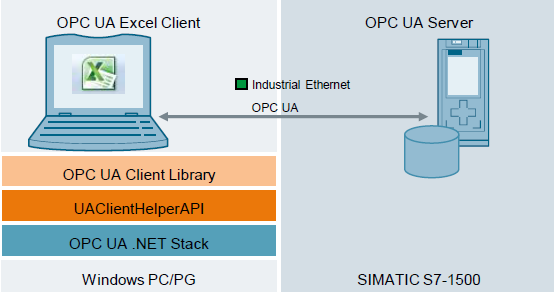
Fig. 1
The following functions are implemented in the object library:
GetEndPoints
Connect/Disconnect
ReadValues/WriteValues
ReadStructUdt
RegisterNodeIDs/UnregisterNodeIDs
Subscribe/ Unsubscribe
AddMonitorItem/RemoveMonitorItem
CallMethod
The OPC UA Client Library uses internally the class C# "UAClientHelperAPI" from the entry "OPC UA .NET Client for the SIMATIC S7-1500 OPC UA Server
https://support.industry.siemens.com/cs/attachments/109748892/109748892_OPC_UA_ClientLibrary_DOC_V2_1_en.pdf
https://support.industry.siemens.com/cs/attachments/109748892/109748892_OPC_UA_ClientLibrary_CODE_V2_1.zip
Creating of OPC UA clients with .NET and helper class
https://support.industry.siemens.com/cs/document/109737901/creating-of-opc-ua-clients-with-net-and-helper-class
To create an OPC UA client, the Helper class "UAClientHelperAPI" implements the most important functions of the .NET stack of the OPC Foundation in its own C# class. The helper class can be found in the attached application example.
The client supports the following functions:
Searching and finding server:
Creating and ending sessions
Navigating in the address space
Reading and writing tags and attributes
Subscribing tags
Calling methods
Client example for the OPC UA server of a SIMATIC S7-1500
As of firmware 2.0 of SIMATIC S7-1500 an integrated OPC UA Server has been added to the control system. This enables an additional option of direct process data exchange of the SIMATIC S7‑1500 with a wide variety of other systems that support OPC UA.
The SIMATIC S7-1500 OPC UA server is planned and configured via the TIA Portal. The OPC UA Client is created in C# / .NET and internally uses the freely accessible OPC UA .NET stack of the OPC foundation. For easier individual implementations of a .NET client the “UAClientHelperAPI” C# class is included in delivery. This class summarizes the basic functions of the .NET stack of the OPC Foundation and considerably facilitates the use of the basic functions for you. Client and server are connected via Ethernet and communicate through OPC UA via TCP/IP.
Documentation and example project
https://support.industry.siemens.com/cs/attachments/109737901/109737901_OPC_UA_Client_S7-1500_DOKU_V13_en.pdf
https://support.industry.siemens.com/cs/attachments/109737901/109737901_OPC_UA_Client_S7-1500_CODE_V13.zip |
|
| Back to top |
|
|
hutaf
Junior
Joined: 15 Dec 2018
Posts: 2
|
| Posted: 01/07/2021 14:19 Post subject: |
|
|
use datalogger
[url=https://www.solidfiles.com/v/a4PQx55NQ2g5M]DataLogger v2.0.rar[/url] |
|
| Back to top |
|
|
SdwPlc
Junior
Joined: 02 Nov 2021
Posts: 2
|
| Posted: 02/11/2021 16:03 Post subject: Excel Add-In without the need of OPC or other software |
|
|
There's an Excel Add-In by which you can read and write data directly from a S7 PLC in Excel named 'S7 Excel Connect'. You can get 14 days trial on https://www.automation-portal.com
Last edited by SdwPlc on 24/03/2022 13:16; edited 1 time in total |
|
| Back to top |
|
|
vabulqa
Junior
Joined: 21 Feb 2022
Posts: 1
|
| Posted: 01/03/2022 20:50 Post subject: |
|
|
| Have you an untrialed solution? |
|
| Back to top |
|
|
|

 FAQ
FAQ Search
 Memberlist
 Usergroups
 Register
 Profile
 Log in to check your private messages
 Log in


