| View previous topic :: View next topic |
| Author |
Message |
grig100
Member 3


Joined: 01 Jan 2015
Posts: 752
|
 Posted: 24/10/2017 17:58 Post subject: MC_Power object can be enabled requirements Posted: 24/10/2017 17:58 Post subject: MC_Power object can be enabled requirements |
 |
|
Which requirements have to be fulfilled before a technology object can be enabled via "MC_Power"?
https://support.industry.siemens.com/cs/document/109750297/
Before a technology object can be enabled without error via "MC_Power", all the necessary sensors (encoders) and actuators (drives) must be available for the technology object.
Using the Motion Control instruction "MC_POWER" you can enable or lock a technology object via the "Input" parameter. Before setting the "Enable" parameter to True, the parameterized sensors (encoders) and actuators (drives) should be available for the technology object. Since the CPU usually starts up faster than the connected IOs, in most cases the technology object cannot be enabled immediately after the CPU startup.
Checking the availability of the technology objects
You can check the complete availability of a technology object via the variable "CommunicationOK" (data type: Bool) in the following structured data types:
Sensors (encoders) TO_Struct_StatusSensor
Actuators (drives) TO_Struct_StatusDrive
Special points:
TO_ExternalEncoder: There is no actuator (drive) on this TO.
TO_SpeedAxis: There is no sensor (encoder) on this TO.
The following example shows a technology object opened in the DB editor with the two structured variables "statusSensor" and "statusDrive" and the "CommunicationOK" signals contained in them.

Fig. 1
Programming example for triggering "MC_Power"
Triggering of the input "Enable" of the Motion Control instruction "MC_Power" can then be done as follows:
The technology object is enabled only when the enable signal ("DB".enable) is set and the corresponding sensor (encoder) and actuator (drive) are available for the technology object.

Fig. 2
Before calling the instruction (for the used axis) you still have to copy the data (enabling of the sensors and actuators) into the data block variables.
Note
If the technology object is enabled via the "MC_Power" instruction before the sensor and actuator interfaces (".CommunicationOK") have the True signal, then, depending on the configuration, there might be alarm messages like "Encoder driver/actuator driver not initialized during startup" or "Adjustment cannot be restored", for example. |
|
| Back to top |
|
 |
ee567
Junior

Joined: 17 Sep 2018
Posts: 1
|
| Posted: 19/09/2018 06:31 Post subject: s7 tech 4.2 links update |
|
|
can someone update s7 technology links
i would be much obliged of your kind act.[/b] |
|
| Back to top |
|
|
Ghertye
Junior
Joined: 27 Aug 2018
Posts: 2
|
| Posted: 19/09/2018 07:32 Post subject: Re: s7 tech 4.2 links update |
|
|
| ee567 wrote: | can someone update s7 technology links
i would be much obliged of your kind act.[/b] |
All the links are available..  what's your question?? what's your question??
S7 Technology V3.0 SP2
https://userscloud.com/ss2udvt5yf0l
https://userscloud.com/mi0b8aqaebjf
S7 Technology V4.2.
https://userscloud.com/y881qfpya8gf/SIMATIC_Technology_V4.2.part01.rar https://userscloud.com/z6v68cxteji8/SIMATIC_Technology_V4.2.part02.rar
https://userscloud.com/8h96qpn6hmu3/SIMATIC_Technology_V4.2.part03.rar
https://userscloud.com/kkooqwlr52oz/SIMATIC_Technology_V4.2.part04.rar
https://userscloud.com/hj4j1qwqtwgc/SIMATIC_Technology_V4.2.part05.rar
https://userscloud.com/xovmn1g98dgu/SIMATIC_Technology_V4.2.part06.rar
https://userscloud.com/y00fo6vanrvv/SIMATIC_Technology_V4.2.part07.rar
https://userscloud.com/5qs5f6xz65ru/SIMATIC_Technology_V4.2.part08.rar
https://userscloud.com/n8sagx0pe127/SIMATIC_Technology_V4.2.part09.rar
https://userscloud.com/z6vimyeg3ipg/SIMATIC_Technology_V4.2.part10.rar
https://userscloud.com/p56htirhi71k/SIMATIC_Technology_V4.2.part11.rar
https://userscloud.com/hxn4y0g2qln3/SIMATIC_Technology_V4.2.part12.rar
https://userscloud.com/qdhkslczjuoa/SIMATIC_Technology_V4.2.part13.rar
https://userscloud.com/1y9sy6oxuvpg/SIMATIC_Technology_V4.2.part14.rar
https://userscloud.com/umz1na9flhz6/SIMATIC_Technology_V4.2.part15.rar
https://userscloud.com/qk42lz7vczve/SIMATIC_Technology_V4.2.part16.rar
https://userscloud.com/o8olrbnear7v/SIMATIC_Technology_V4.2.part17.rar
https://userscloud.com/t2lwd1zp1tlx/SIMATIC_Technology_V4.2.part18.rar
https://userscloud.com/s1oj5jarqbh1/SIMATIC_Technology_V4.2.part19.rar
S7 Technology V4.2.3
http://www.solidfiles.com/d/dd1f7edb08/s7technology_v4_2_3.exe
https://cache.industry.siemens.com/dl/files/913/74797913/att_90508/s1/s7technology_v4_2_3.001?download=true
https://cache.industry.siemens.com/dl/files/913/74797913/att_90510/s1/s7technology_v4_2_3.002?download=true
https://cache.industry.siemens.com/dl/files/913/74797913/att_90517/s1/s7technology_v4_2_3.003?download=true
https://cache.industry.siemens.com/dl/files/913/74797913/att_90520/s1/s7technology_v4_2_3.004?download=true
S7 Technology V4.2.4
http://www.solidfiles.com/d/dd24e86989/S7Technology_V4_2_4.exe
https://cache.automation.siemens.com/dnl/DE/DEyODA1MwAA_94737712_DL/S7Technology_V4_2_4.001
https://cache.automation.siemens.com/dnl/jE/jEzMjE0OQAA_94737712_DL/S7Technology_V4_2_4.002
https://cache.automation.siemens.com/dnl/DY/DY3ODU5AAAA_94737712_DL/S7Technology_V4_2_4.003
https://cache.automation.siemens.com/dnl/DM/DMwOTc5AAAA_94737712_DL/S7Technology_V4_2_4.004
https://cache.automation.siemens.com/dnl/zM/zM5MjIxAAAA_94737712_DL/S7Technology_V4_2_4.005
S7 Technology v4.2.4
S7Technology_V4_2_4.exe
https://mega.nz/# !7YYRzbpB!R6Eert7dianRTYkeaUpCWO7WDqf2xKUDCegN-gBBSYw
s7technology_v4_2_4.005
https://mega.nz/# !7URgVDbC!pyOHI3GpbBmuVwdepdlOzY_dVvxjU_K8Xuhata8N2rQ
s7technology_v4_2_4.004
https://mega.nz/# !2YBSlCJK!6nmLhdEmiVt8puuKZ7TenkjaVRjF-26TD5L9tu9G8sQ
s7technology_v4_2_4.003
https://mega.nz/# !XMYHyaZT!0hwMiJrwfyb6ZcGeXmUKKM5SfmC65KL1HRdsRwaDEUI
s7technology_v4_2_4.002
https://mega.nz/# !aF5BHAAR!D_kumX3_Mi3A5LLFhMupq3VeaxrkfcX9Zec5F1XRMaU
s7technology_v4_2_4.001
https://mega.nz/# !yVJQ0BIR!s8uFTRTs5ZFSDfwRzPVovsY3gxHuPltSEi4pOeEI6uA
Trial Version/Service Pack for S7-Technology V4.2 SP4
https://support.industry.siemens.com/cs/document/94737712/trial-version-service-pack-for-s7-technology-v4-2-sp4
https://support.industry.siemens.com/cs/attachments/94737712/S7Technology_V4_2_4.exe
https://mega.co.nz/#F !GdVUUBID!u3w-dFrIssD4ncO26rfNJg
https://support.industry.siemens.com/cs/attachments/94737712/S7Technology_V4_2_4.001
https://support.industry.siemens.com/cs/attachments/94737712/S7Technology_V4_2_4.002
https://support.industry.siemens.com/cs/attachments/94737712/S7Technology_V4_2_4.003
https://support.industry.siemens.com/cs/attachments/94737712/S7Technology_V4_2_4.004
https://support.industry.siemens.com/cs/attachments/94737712/S7Technology_V4_2_4.005
S7 Technology V4.2 SP5
https://cache.industry.siemens.com/dl/files/475/109749475/att_929872/s1/S7Technology_V4_2_5.exe |
|
| Back to top |
|
|
gamax
Member

Joined: 15 Jul 2016
Posts: 131
|
| Posted: 06/08/2019 14:43 Post subject: SIMOTION SCOUT V5.3 SP1 |
|
|
SIMOTION SCOUT V5.3 SP1
https://support.industry.siemens.com/cs/document/109766964/simotion-scout-scout-stand-alone-and-scout-tia-v5-3-sp1
https://support.industry.siemens.com/cs/attachments/109766963/Simotion_New_Features_V531_EN.pdf
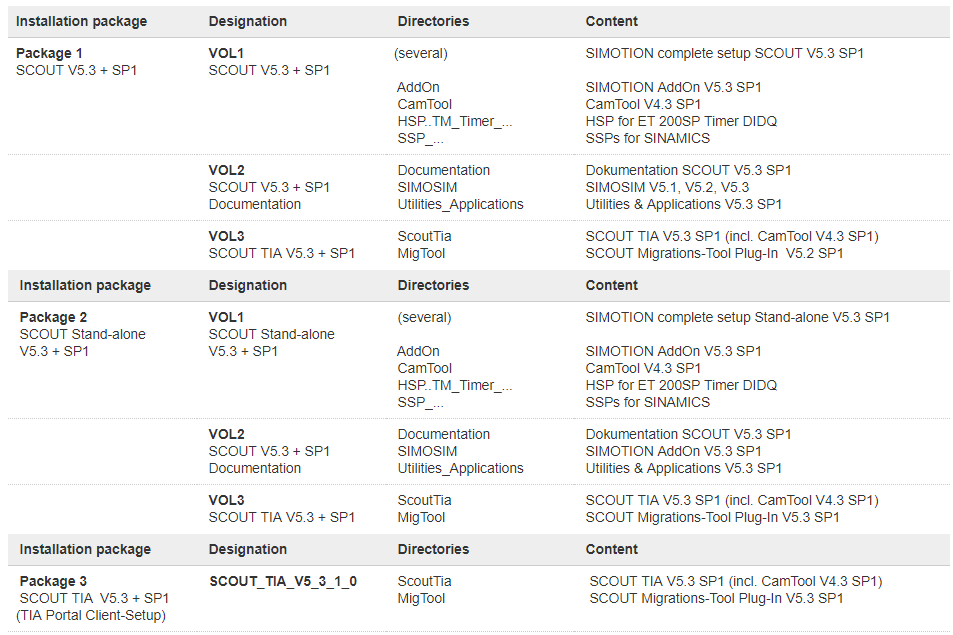
SIMOTION SCOUT V5.3 SP1
https://support.industry.siemens.com/cs/attachments/109766964/SCOUT_V5_3_1_0.exe
https://support.industry.siemens.com/cs/attachments/109766964/SCOUT_V5_3_1_0.001
https://support.industry.siemens.com/cs/attachments/109766964/SCOUT_V5_3_1_0.002
https://support.industry.siemens.com/cs/attachments/109766964/SCOUT_V5_3_1_0.003
https://support.industry.siemens.com/cs/attachments/109766964/SCOUT_V5_3_1_0.004
https://support.industry.siemens.com/cs/attachments/109766964/SCOUT_V5_3_1_0.005
https://support.industry.siemens.com/cs/attachments/109766964/SCOUT_V5_3_1_0.006
https://support.industry.siemens.com/cs/attachments/109766964/SCOUT_V5_3_1_0.007
https://support.industry.siemens.com/cs/attachments/109766964/SCOUT_V5_3_1_0.008
https://support.industry.siemens.com/cs/attachments/109766964/SCOUT_V5_3_1_0.009
https://support.industry.siemens.com/cs/attachments/109766964/SCOUT_V5_3_1_0.010
https://support.industry.siemens.com/cs/attachments/109766964/SCOUT_V5_3_1_0.011
https://support.industry.siemens.com/cs/attachments/109766964/SCOUT_V5_3_1_0.012
https://support.industry.siemens.com/cs/attachments/109766964/SCOUT_V5_3_1_0.013
https://support.industry.siemens.com/cs/attachments/109766964/SCOUT_V5_3_1_0.014
https://support.industry.siemens.com/cs/attachments/109766964/SCOUT_V5_3_1_0.015
https://support.industry.siemens.com/cs/attachments/109766964/SCOUT_V5_3_1_0.016
SIMOTION SCOUT Stand-alone V5.3 SP1
https://support.industry.siemens.com/cs/attachments/109766964/SCOUT_SA_V5_3_1_0.exe
https://support.industry.siemens.com/cs/attachments/109766964/SCOUT_SA_V5_3_1_0.001
https://support.industry.siemens.com/cs/attachments/109766964/SCOUT_SA_V5_3_1_0.002
https://support.industry.siemens.com/cs/attachments/109766964/SCOUT_SA_V5_3_1_0.003
https://support.industry.siemens.com/cs/attachments/109766964/SCOUT_SA_V5_3_1_0.004
https://support.industry.siemens.com/cs/attachments/109766964/SCOUT_SA_V5_3_1_0.005
https://support.industry.siemens.com/cs/attachments/109766964/SCOUT_SA_V5_3_1_0.006
https://support.industry.siemens.com/cs/attachments/109766964/SCOUT_SA_V5_3_1_0.007
https://support.industry.siemens.com/cs/attachments/109766964/SCOUT_SA_V5_3_1_0.008
https://support.industry.siemens.com/cs/attachments/109766964/SCOUT_SA_V5_3_1_0.009
https://support.industry.siemens.com/cs/attachments/109766964/SCOUT_SA_V5_3_1_0.010
https://support.industry.siemens.com/cs/attachments/109766964/SCOUT_SA_V5_3_1_0.011
https://support.industry.siemens.com/cs/attachments/109766964/SCOUT_SA_V5_3_1_0.012
https://support.industry.siemens.com/cs/attachments/109766964/SCOUT_SA_V5_3_1_0.013
https://support.industry.siemens.com/cs/attachments/109766964/SCOUT_SA_V5_3_1_0.014
https://support.industry.siemens.com/cs/attachments/109766964/SCOUT_SA_V5_3_1_0.015
https://support.industry.siemens.com/cs/attachments/109766964/SCOUT_SA_V5_3_1_0.016
https://support.industry.siemens.com/cs/attachments/109766964/SCOUT_SA_V5_3_1_0.017
https://support.industry.siemens.com/cs/attachments/109766964/SCOUT_SA_V5_3_1_0.018
SIMOTION SCOUT TIA V5.3 SP1
https://support.industry.siemens.com/cs/attachments/109766964/SCOUT_TIA_V5_3_1_0.exe
https://support.industry.siemens.com/cs/attachments/109766964/SCOUT_TIA_V5_3_1_0.001
https://support.industry.siemens.com/cs/attachments/109766964/SCOUT_TIA_V5_3_1_0.002
https://support.industry.siemens.com/cs/attachments/109766964/SCOUT_TIA_V5_3_1_0.003
https://support.industry.siemens.com/cs/attachments/109766964/SCOUT_TIA_V5_3_1_0.004
Compatibility list of software products in the SIMOTION environment
https://support.industry.siemens.com/cs/attachments/18857317/Compatibility_5_3_1_0_SIMOTION_SCOUT.pdf
Requirements for the installation:
For SCOUT, SIMATIC STEP 7 V5.6 SP1 must be installed on the engineering computer. The SIMOTION SCOUT V5.3 SP1 is a complete installation of SCOUT.
For SCOUT TIA, the TIA Portal Framework V15.1 must be installed on the engineering computer (SCOUT TIA is a TIA Portal client setup). We recommend that you use the latest update of TIA Portal V15.1. |
|
| Back to top |
|
|
grig100
Member 3
Joined: 01 Jan 2015
Posts: 752
|
| Posted: 20/08/2019 11:36 Post subject: SIMOTION: Standard application Axis Control |
|
|
SIMOTION: Standard application Axis Control
https://support.industry.siemens.com/cs/document/48816191/simotion%3A-standard-application-axis-control
The axis control function blocks provide basic motion control functionalities for SIMOTION and ease and speed up the commissioning of axes.
For SIMATIC S7-1500 / S7-1500T version see
https://support.industry.siemens.com/cs/document/109749348/simatic-s7-1500-s7-1500t%3a-standard-application-axis-control
The function blocks can be called in every programming language in the user program, e.g. ST or LAD/FBD.A web-based control panel is available in the example project.
The following motion control functionalities are provided by the "Axis Control" blocks:
| Code: | Enable / disable axis
Reset of an axis (acknowledgement of the errors at the technology object / restart of the technology object)
Jogging (incremental / continuous)
Move axis at velocity / speed setpoint (position-controlled / non position-controlled)
Stop / fast stop
Homing (active / passive / setting of a position value / absolute encoder adjustment)
Positioning (relative / absolute)
Superimposed positioning
Gearing (relative / absolute)
Camming (relative / absolute, offset and scaling, cyclic and non-cyclic cams, different synchronization modes)
Phasing (setting of an offset for an existing synchronous operation)
Unconditionally opening and closing of the holding brake |
For implementing the function block libraty in SIMOTION SCOUT (STEP 7 V5.x) see also
"ProjectGenerator SIMOTION easyProject".
https://support.industry.siemens.com/cs/ww/en/view/51339107
https://support.industry.siemens.com/cs/attachments/51339107/51339107_ProjectGenerator_V1_4.pdf
https://support.industry.siemens.com/cs/attachments/51339107/51339107_SIMOTION_ProjectGenerator_Parameter_Manual_V1_4.pdf
https://support.industry.siemens.com/cs/attachments/51339107/51339107_SIMATIC_ProjectGenerator_Parameter_Manual_V1_4.pdf
https://support.industry.siemens.com/cs/attachments/51339107/ChangeLog_ProjectGenerator.pdf
https://support.industry.siemens.com/cs/attachments/51339107/ReleaseNotes_ProjectGenerator_V1_4_4.pdf
https://support.industry.siemens.com/cs/attachments/51339107/51339107_ProjectGenerator_V1_4_4.zip
Downloads SIMOTION SCOUT / SIMOTION SCOUT TIA
https://support.industry.siemens.com/cs/attachments/48816191/SIMOTION_Axis_Function_Block_V1_3.pdf
https://support.industry.siemens.com/cs/attachments/48816191/ReleaseNotes_LMCBasic_SIMOTION_V1_3_6.pdf
https://support.industry.siemens.com/cs/attachments/48816191/48816191_LMCBasic_SIMOTION_V1_3_6.zip |
|
| Back to top |
|
|
arm1612
Junior
Joined: 16 May 2016
Posts: 2
|
| Posted: 21/10/2019 16:32 Post subject: |
|
|
Hi All,
Can someone update the link for S7 Technology V4.2. Very appreciate if i can get the software. |
|
| Back to top |
|
|
Ghertye
Junior
Joined: 27 Aug 2018
Posts: 2
|
| Posted: 21/10/2019 19:41 Post subject: |
|
|
S7-Technology V4.2
| Code: | | https://mega.nz/#F!GdVUUBID!u3w-dFrIssD4ncO26rfNJg |
https://ulozto.net/tam/_gKyhWa25MF7F
Trial Version/Service Pack for S7-Technology V4.2 SP4
https://support.industry.siemens.com/cs/document/94737712/trial-version-service-pack-for-s7-technology-v4-2-sp4
S7 Technology V4.2.3
http://www.solidfiles.com/d/dd1f7edb08/s7technology_v4_2_3.exe
https://cache.industry.siemens.com/dl/files/913/74797913/att_90508/s1/s7technology_v4_2_3.001?download=true
https://cache.industry.siemens.com/dl/files/913/74797913/att_90510/s1/s7technology_v4_2_3.002?download=true
https://cache.industry.siemens.com/dl/files/913/74797913/att_90517/s1/s7technology_v4_2_3.003?download=true
https://cache.industry.siemens.com/dl/files/913/74797913/att_90520/s1/s7technology_v4_2_3.004?download=true
S7 Technology V4.2.4
http://www.solidfiles.com/d/dd24e86989/S7Technology_V4_2_4.exe
https://cache.automation.siemens.com/dnl/DE/DEyODA1MwAA_94737712_DL/S7Technology_V4_2_4.001
https://cache.automation.siemens.com/dnl/jE/jEzMjE0OQAA_94737712_DL/S7Technology_V4_2_4.002
https://cache.automation.siemens.com/dnl/DY/DY3ODU5AAAA_94737712_DL/S7Technology_V4_2_4.003
https://cache.automation.siemens.com/dnl/DM/DMwOTc5AAAA_94737712_DL/S7Technology_V4_2_4.004
https://cache.automation.siemens.com/dnl/zM/zM5MjIxAAAA_94737712_DL/S7Technology_V4_2_4.005 |
|
| Back to top |
|
|
|

 FAQ
FAQ Search
 Memberlist
 Usergroups
 Register
 Profile
 Log in to check your private messages
 Log in


