| View previous topic :: View next topic |
| Author |
Message |
grig100
Member 3


Joined: 01 Jan 2015
Posts: 752
|
 Posted: 03/10/2018 17:16 Post subject: S7-PLCSIM Advanced Posted: 03/10/2018 17:16 Post subject: S7-PLCSIM Advanced |
 |
|
Getting started with S7-PLCSIM Advanced and simulation tables
https://support.industry.siemens.com/cs/document/109759047/getting-started-with-s7-plcsim-advanced-and-simulation-tables
With the help of SIMATIC S7-PLCSIM Advanced virtual controllers for the simulation of a S7-1500 or ET 200SP CPU are created and used for the comprehensive simulation of functions. This means that no real controllers are required to test a STEP 7 program.
The virtual controllers can also be tested and validated in the context of a system or machine. The application programming interface (API) allows manipulation of the simulated process image and is used to connect the virtual controller to a virtual tip of a machine or plant or to specially rogrammed high-level language applications.
This makes it possible to connect the virtual controller to simulation software such as SIMIT or NX Mechatronics Concept Designer for extensive validation of the STEP 7 program.
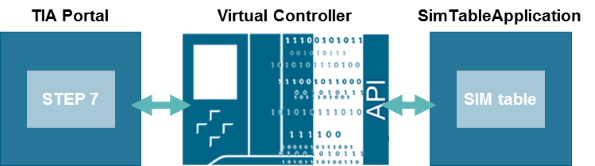
The following application example should make the first steps in the general handling of S7-PLCSIM Advanced easier for you. In addition, this application example offers the "SimTableApplication" application with which youcan conveniently and independently monitor and control PLC variables on the
virtual controller via a simulation table.
Delimitation
This application example complements the S7-PLCSIM Advanced manual. Detailed information can be found in the corresponding manual.
This application example requires basic knowledge of TIA Portal projectplanning.
Documentation and project
https://support.industry.siemens.com/cs/attachments/109759047/109759047_PLCSIMAdv_SimTable_DOC_V10_en.pdf
https://support.industry.siemens.com/cs/attachments/109759047/109759047_PLCSIMAdv_SimTable_SIM_APPL.zip
https://support.industry.siemens.com/cs/attachments/109759047/109759047_PLCSIMAdv_SimTable_SIM_PROJ.zip
https://support.industry.siemens.com/cs/attachments/109759047/109759047_PLCSIMAdv_SimTable_S7_PROJ.zip |
|
| Back to top |
|
 |
FRuStratt9000
Junior

Joined: 03 Oct 2018
Posts: 1
|
| Posted: 04/10/2018 13:22 Post subject: SIMATIC S7-PLCSIM Advanced V2.0 |
|
|
Have you a link to SIMATIC S7-PLCSIM Advanced V2.0
I cannot download from Siemens
Thank you!!! |
|
| Back to top |
|
|
grig100
Member 3
Joined: 01 Jan 2015
Posts: 752
|
| Posted: 04/10/2018 13:55 Post subject: SIMATIC S7-PLCSIM Advanced V2.0 |
|
|
SIMATIC S7-PLCSIM Advanced V2.0
https://support.industry.siemens.com/cs/document/109754093/trial-download-simatic-s7-plcsim-advanced-v2-0
SIMATIC S7-PLCSIM Advanced enables you to create virtual controllers for simulating S7-1500 and ET 200SP controllers and provides extensive simulation of functions.
Highlights SIMATIC S7-PLCSIM Advanced V2.0:
Synchronization of S7-PLCSIM Advanced instances with co-simulation tools at process image parts of cyclic OBs (e.g. cyclic interrupt OBs, MC-Servo)
Support of acyclic services (RDREC/WRREC) and alarms (e.g. hardware alarms)
Hardware interrupts configured in the TIA Portal can be read using the API
Easy backup and restoration of the software and hardware configuration from PLCSIM Advanced instances
Parallel installation of PLCSIM V15 and PLCSIM Advanced V2.0 on one PC
System requirements
SIMATIC S7-PLCSIM Advanced V2.0 is released for use with the following operating systems:
| Code: | Windows 7 Home De lux SP1
Windows 7 Professional SP1
Windows 7 Enterprise SP1
Windows 7 Ultimate SP1
Windows 10 Home Version 1703
Windows 10 Professional Version 1703
Windows 10 Enterprise Version 1703
Windows 10 (IoT) Enterprise 2016 LTSB
Windows Server 2012 R2 Standard (complete installation)
Windows Server 2016 R2 Standard (complete installation)
|
Supported virtualization platforms
| Code: | VMware vSphere Hypervisor (ESXi) 6.5
VMware Workstation Professional 12.5.5
VMware Workstation Player 12.5.5 |
Download
https://support.industry.siemens.com/cs/attachments/109754093/s7plcsim_advanced_readme_en-US.pdf
[url=https://www.solidfiles.com/v/eRVd6Wry5XP5v]SIMATIC_PLCSIM_Advanced_V2.part1.rar[/url]
[url=https://www.solidfiles.com/v/yvzeZm43Meyrk]SIMATIC_PLCSIM_Advanced_V2.part2.rar[/url]
[url=https://www.solidfiles.com/v/WdPr8w4RrwQD3]SIMATIC_PLCSIM_Advanced_V2.part3.rar[/url]
[url=https://www.solidfiles.com/v/WdPr8Bn4jpXmK]SIMATIC_PLCSIM_Advanced_V2.part4.rar[/url] |
|
| Back to top |
|
|
grig100
Member 3
Joined: 01 Jan 2015
Posts: 752
|
| Posted: 04/10/2018 13:57 Post subject: Virtual Commissioning with SIMATIC S7-PLCSIM Advanced |
|
|
Digitalization with TIA Portal: Virtual Commissioning by basic behavior modeling with SIMATIC S7-PLCSIM Advanced
https://support.industry.siemens.com/cs/document/109754823/
The Crosslink application enables an exchange of the IO data between two instances of a virtual Controller from S7-PLCSIM Advanced.
With the SIMATIC S7-PLCSIM Advanced virtual controllers for the simulation of a S7-1500 or ET 200SP CPU are created and used for the comprehensive simulation of functions. Therefore no real controllers are required to test a STEP 7 program.
The virtual controllers can also be tested and validated in the context of a system or machine. The application programming interface (API) allows manipulating the IOs and is used to connect the virtual controller to a virtual tip of a machine or plant. Depending on the validation questions that should be answered by the simulation, a virtual model of a machine or plant can conține two components:
Simulation of the physical behavior, for e.g. realized with NX Mechatronic Concept Designer
Behavior simulation of active components like for example drive or valves
One possibility to realize simple behavior models is to use STEP 7 and simulate it in an own PLCSIM Advanced instance.
This application example provides a crosslink application (here called "Crosslink"), which deals as an IO signal exchange unit between two instances of the virtual controller via API of the PLCSIM Advanced. One instance is in charge of the plant control and the second instance simulates the device behavior. This is the basis to develop own behavior models in STEP 7 and connect them to the program that shall be validated.

In this documentation the usage of the crosslink application is demonstrated by the following two use cases:
Simulation of a valve control with ET 200SP IOs and a CPU 1511-1PN
Simulation of a conveyor controlled by SINAMICS V90 drive and a CPU 1511-1PN
Restrictions of the application example
No library for behavior models available. Engineering effort has to be spent to create behavior models, depending of the model complexity
Limited to SIMATIC S7-1500 applications
STEP 7 behavior models cannot be migrated to SIMIT
Download
https://support.industry.siemens.com/cs/attachments/109754823/109754823_CrossLink_DOC_en.pdf
https://support.industry.siemens.com/cs/attachments/109754823/109754823_CrossLink_APPL.zip
Sample project simulating a valve control with STEP 7 V14 SP1 (TIA Portal) (6,4 MB)
https://support.industry.siemens.com/cs/attachments/109754823/109754823_CrossLinkValve_PROJ.zip
Sample project simulating a SINAMICS V90 drive with STEP 7 V14 SP1 (TIA Portal) (6,3 MB)
https://support.industry.siemens.com/cs/attachments/109754823/109754823_CrossLinkDrive_PROJ.zip |
|
| Back to top |
|
|
grig100
Member 3
Joined: 01 Jan 2015
Posts: 752
|
| Posted: 04/10/2018 13:57 Post subject: SIMATIC S7‑PLCSIM Advanced: Co‑Simulatio |
|
|
SIMATIC S7‑PLCSIM Advanced: Co‑Simulation via API
https://support.industry.siemens.com/cs/document/109739660/
With S7-PLCSIM Advanced as independent simulation system you can, for example, simulate and test a STEP 7 program created by you.
With the SIMATIC S7‑PLCSIM Advanced virtual controllers for the simulation of a S7-1500 or ET 200SP CPU are created and used for the comprehensive simulation of functions. Therefore no real controllers are required to test a STEP 7 program.
The virtual controllers can also be tested in the context of a system or machine. The user interface (API) is used to connect the virtual controller to a system or machine simulation (co-simulation).
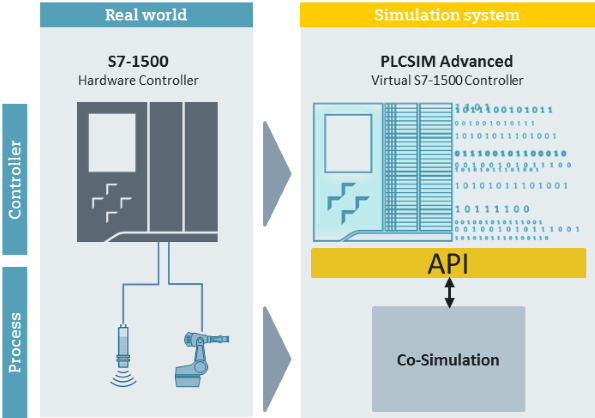
A STEP 7 program created in STEP 7 V14 controls a conveyor system. For a comprehensive function test, the STEP 7 program is loaded via S7-PLCSIM Advanced into a virtual S7-1500 controller. This controller interacts via the API with a co-simulation (plant simulation), in order to validate the STEP 7 program in the context of the plant.
Documentation and example project
https://support.industry.siemens.com/cs/attachments/109739660/109739660_PLCSIM_Advanced_DOCU_V10_en.pdf
https://support.industry.siemens.com/cs/attachments/109739660/109739660_PLCSIM_Advanced_S7_PROJ_V10.zip
https://support.industry.siemens.com/cs/attachments/109739660/109739660_PLCSIM_Advanced_COSIM_APPL_V10.zip |
|
| Back to top |
|
|
grig100
Member 3
Joined: 01 Jan 2015
Posts: 752
|
| Posted: 04/10/2018 13:59 Post subject: S7UnitTest: Automated testing SIMATIC S7-PLCSIM Advanced |
|
|
S7UnitTest: Automated testing with SIMATIC S7-PLCSIM Advanced
https://support.industry.siemens.com/cs/document/109746405/
The S7UnitTest application enables you to automatically test parts of a PLC program with the help of SIMATIC S7 PLCSIM Advanced.
Description
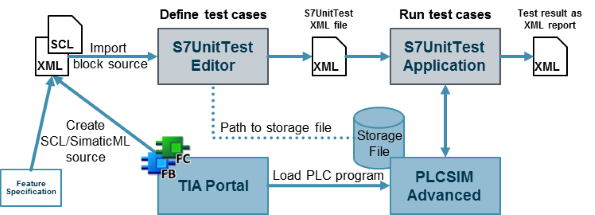
S7UnitTest consists of two tools:
S7UnitTest Editor
S7UnitTest Application
S7UnitTest Editor
With the S7UnitTest Editor Tool, you create and edit a Test Fixture for your PLC program and save it in a S7UnitTest XML file. A Test Fixture consists of Test Cases with individual Test Steps. In the Test Steps, you determine, which PLC tags are to be read or written in a specific program cycle.
S7UnitTest Application
With the S7UnitTest Application, you load the created S7UnitTest XML file and start the tests. The application starts the virtual controller of PLCSIM Advanced for the simulation of the loaded PLC program, accesses the program in the storage of the virtual controller and uses it to perform the tests. The test result is directly displayed in the user interface and additionally stored as XML file.
Downloads
https://support.industry.siemens.com/cs/attachments/109746405/109746405_S7UnitTest_V10_en.pdf
https://support.industry.siemens.com/cs/attachments/109746405/109746405_S7UnitTest.zip |
|
| Back to top |
|
|
gingomoraxh
Junior
Joined: 15 Jan 2019
Posts: 8
|
| Posted: 30/05/2021 14:11 Post subject: SIMATIC S7-PLCSIM Advanced V4.0 |
|
|
S7-PLCSIIM Advanced V3.0
https://support.industry.siemens.com/cs/document/109776014/
https://support.industry.siemens.com/cs/attachments/109776014/SIMATIC_PLCSIM_Advanced_V3_Upd2.exe
SIMATIC S7-PLCSIM Advanced V4.0
https://support.industry.siemens.com/cs/document/109795016/
Highlights SIMATIC S7-PLCSIM Advanced V4.0
The following functions are now available with SIMATIC S7-PLCSIM Advanced V4.0:
Supporting additnoal S7-1500 CPU Types:
S7-1500 H/R CPUs im RUN Solo Betrieb
S7-1500 ET 200pro CPUs
SIMATIC Drive Controller
S7-1518 T/TF
S7-1500 SIPLUS Extreme CPUs
Supports secure communication for OPC UA, Open User (OUC) and https web server connections.
Supports up to 128 UDP multicast connections, DNS and DHCP as with the hardware CPU with firmware version V2.9
The installation program replaces the WinPCap driver with the NpCap driver
Compatible with TIA Portal projects from versions V14 to V17
Supports CPU firmware versions V1.8 – V2.9
S7-PLCSIM Advanced V4.0 supports following Operating Systems:
Windows 10 Home Version 1909
Windows 10 Home Version 2004
Windows 10 Home Version 2009/20H2
Windows 10 Professional Version 1909
Windows 10 Professional Version 2004
Windows 10 Professional Version 2009/20H2
Windows 10 Enterprise Version 1909
Windows 10 Enterprise Version 2004
Windows 10 Enterprise Version 2009/20H2
Windows 10 Enterprise 2016 LTSB
Windows 10 Enterprise 2019 LTSC
Windows Server 2016 Standard (Full installation)
Windows Server 2019 Standard (Full installation)
Supported virtualization platforms:
VMware vSphere Hypervisor (ESXi) 6.7
VMware Workstation Pro 15.5.0
VMware Player 15.5.0
Microsoft Hyper-V Server 2019
https://support.industry.siemens.com/cs/attachments/109795016/s7plcsim_advanced_readme_en-US.pdf
https://support.industry.siemens.com/cs/attachments/109795016/SIMATIC_PLCSIM_Advanced_V4.iso
https://anonfiles.com/h2JcC6ycu8/SIMATIC_PLCSIM_Advanced_V4_iso |
|
| Back to top |
|
|
ssss
Junior
Joined: 14 Nov 2017
Posts: 9
|
| Posted: 08/06/2021 21:47 Post subject: |
|
|
| Thanks man!!! |
|
| Back to top |
|
|
valz
Member 3

Joined: 26 Jul 2015
Posts: 771
|
| Posted: 07/12/2022 13:39 Post subject: S7-PLCSIM Advanced V4.0 - Service Pack 1 - Hotfix 1 |
|
|
SIMATIC S7-PLCSIM Advanced V4.0 - Service Pack 1 - Hotfix 1
https://support.industry.siemens.com/cs/document/109812676/
After installing Hotfix 1 from this entry, it may happen that when using S7-PLCSIM Advanced or other TIA Portal software, an S7DOS note appears with the expiration date November 21, 2022. To correct this behavior you can install the following update for S7DOS.
PC_IDENTIFIER_09.03.03.00_01.04.00.03
We recommend it to all users of S7-PLCSIM Advanced V4.0 SP1 Hotfix 1.
Download
https://support.industry.siemens.com/cs/attachments/109812676/PC_IDENTIFIER_09.03.03.00_01.04.00.03.zip
https://support.industry.siemens.com/cs/attachments/109812676/SIMATIC_PLCSIM_Advanced_V4_SP1.iso
https://ulozto.net/tamhle/wq5DL2RUlXTo/
[URL=https://www.file-upload.net/download-15054482/SIMATIC_PLCSIM_Advanced_V4_SP1.iso.html]SIMATIC_PLCSIM_Advanced_V4_SP1.iso[/URL]
[URL=https://www.file-upload.net/download-15054477/PC_IDENTIFIER_09.03.03.00_01.04.00.03.zip.html]PC_IDENTIFIER_09.03.03.00_01.04.00.03.zip[/URL] |
|
| Back to top |
|
|
|

 FAQ
FAQ Search
 Memberlist
 Usergroups
 Register
 Profile
 Log in to check your private messages
 Log in


