| View previous topic :: View next topic |
| Author |
Message |
rott
Senior

Joined: 23 Aug 2011
Posts: 2266
|
 Posted: 16/02/2015 22:51 Post subject: S7-PCT V3.3 for IO-Link Master Posted: 16/02/2015 22:51 Post subject: S7-PCT V3.3 for IO-Link Master |
 |
|
S7-PCT V3.3 for IO-Link Master
Homepage:
https://support.industry.siemens.com/cs/#document/32469496
The Port Configuration Tool (PCT) is a PC-based software for parameterizing Siemens IO-Link master modules, and IO-Link devices of other manufacturers.
The IO-Link Devices are integrated using the standardized device description “IODD“, which is available from the relevant manufacturer. S7-PCT supports both the version V1.0 and V1.1 of the IODD.
All available IO-Link Devices from Siemens are already included in the Hardware Selection Catalog of S7-PCT.
S7-PCT is called up via the hardware configuration of the IO-Link Master out of STEP 7, but can also be started “stand alone“, if the IO-Link Master is not connected to a SIMATIC controller, or if STEP 7 is not used.
The PCT version 3.3 is also required if you are using STEP 7 version 13 SP1.

Installation requirements:
S7-PCT V3.3 is a 32-Bit application and is released for use on the following operating systems:
• MS Windows 7 32 Bit Ultimate, Professional and Enterprise (Standard Installation), with or without SP1. The Windows XP mode under Windows 7 is not released, however.
• MS Windows 7 64 Bit Ultimate, Professional and Enterprise, with or without SP1
• MS Windows Server 2008 R2 (64 Bit), with or without SP1
• MS Windows 8.1 64 Bit Professional and Enterprise
• MS Windows Server 2012 R2 64 Bit
The executability of S7-PCT V3.3 on all other operating systems cannot be guaranteed; their use is at your own risk.
Download:
https://support.industry.siemens.com/cs/attachments/32469496/S7-PCT_V3_3_Liesmich.zip
https://support.industry.siemens.com/cs/attachments/32469496/S7-PCT_V3_3.zip
https://support.industry.siemens.com/cs/attachments/32469496/S7PCT_Supported_Modules.zip |
|
| Back to top |
|
 |
gert
Member 3


Joined: 02 Jan 2015
Posts: 645
|
| Posted: 29/07/2015 17:44 Post subject: S7 PCT V3.3 HF2 |
|
|
S7-PCT V3.3 HF2 for IO-Link Master
https://support.industry.siemens.com/cs/attachments/32469496/S7-PCT_V3.3_Readme.zip
S7 PCT V3.3 HF2 Setup:
S7-PCT_V3.3_HF2.zip (368,7 MB)
https://support.industry.siemens.com/cs/attachments/32469496/S7-PCT_V3.3_HF2.zip |
|
| Back to top |
|
|
gert
Member 3
Joined: 02 Jan 2015
Posts: 645
|
| Posted: 13/02/2017 16:00 Post subject: S7-PCT V3.4 HF2 for IO-Link Master |
|
|
S7-PCT V3.4 HF2 for IO-Link Master
https://support.industry.siemens.com/cs/document/32469496/s7-pct-v3-4-hf2-for-io-link-master
Installation requirements:
S7-PCT V3.4 HF2 is a 32-bit application which has been released for use with the following operating systems:
• MS Windows 7 32 Bit Ultimate, Professional and Enterprise (standard installation), without respectively with SP1.
However, the Windows XP mode under Windows 7 has not been released.
• MS Windows 7 64 Bit Ultimate, Professional and Enterprise, without respectively with SP1
• MS Windows Server 2008 R2 (64-bit), without respectively with SP1
• MS Windows 8.1 64-bit Professional and Enterprise
• MS Windows Server 2012 R2 64-bit
• MS Windows 10, 64 Bit Home, Professional and Enterprise
https://support.industry.siemens.com/cs/attachments/32469496/S7-PCThttps://support.industry.siemens.com/cs/attachments/32469496/S7-PCT_V3.4_HF2.zip_V3.4_HF2_Readme.zip |
|
| Back to top |
|
|
gert
Member 3
Joined: 02 Jan 2015
Posts: 645
|
| Posted: 21/03/2018 16:02 Post subject: PCT V3.5 Update 1 for IO-Link Master |
|
|
S7-PCT V3.5 Update 1 for IO-Link Master
https://support.industry.siemens.com/cs/document/32469496/
The Port Configuration Tool ("PCT") is a PC-based software for parameterizing Siemens IO-Link master modules and third-party IO-Link devices.
The IO-Link devices are integrated using the standardized device description "IODD" which can be obtained from the relevant device manufacturer. S7-PCT supports both IODD versions 1.0 and V1.1.
All IO-Link devices available to Siemens are already available in the hardware selection catalog of S7-PCT.
S7-PCT is called up via the IO-Link master hardware configuration of STEP 7, but it can also be started in "standalone" mode if the IO-Link master is not operated on a SIMATIC controller or no STEP 7 is used.
You can find additional information on the IO-LINK on the Internet at:
http://w3.siemens.com/mcms/automation/en/industrial-communications/io-link/Pages/Default.aspx

Download:
https://support.industry.siemens.com/cs/attachments/32469496/S7-PCT_V3.5_Update1_Readme.zip
https://support.industry.siemens.com/cs/attachments/32469496/S7-PCT_V3.5_Update1.zip |
|
| Back to top |
|
|
gert
Member 3
Joined: 02 Jan 2015
Posts: 645
|
| Posted: 09/12/2019 18:58 Post subject: S7-PCT V3.5 SP1 for IO-Link Master |
|
|
S7-PCT V3.5 SP1 for IO-Link Master
https://support.industry.siemens.com/cs/document/32469496/s7-pct-v3-5-sp1-for-io-link-master
he Port Configuration Tool ("PCT") is a PC-based software for parameterizing Siemens IO-Link master modules and third-party IO-Link devices.
The IO-Link devices are integrated using the standardized device description "IODD" which can be obtained from the relevant device manufacturer. S7-PCT supports both IODD versions 1.0 and V1.1.
All IO-Link devices available to Siemens are already available in the hardware selection catalog of S7-PCT.
S7-PCT is called up via the IO-Link master hardware configuration of STEP 7, but it can also be started in "standalone" mode if the IO-Link master is not operated on a SIMATIC controller or no STEP 7 is used.
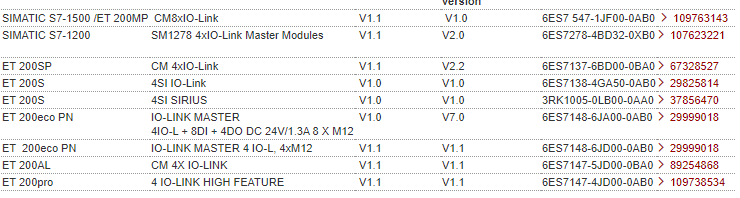
Supported IO-Link masters:
The following IO-Link masters can be configured with S7-PCT V3.5 SP1:
Installation requirements:
S7-PCT V3.5 is a 32-bit application which has been released for use with the following operating systems:
• MS Windows 7 SP1 64-bit Ultimate, Professional and Enterprise
• MS Windows 8.1 64-bit Professional and Enterprise
• MS Windows 10, 64-bit Home, Professional and Enterprise
• MS Windows Server 2008 R2 StdE SP1 64-bit
• MS Windows Server 2012 R2 StdE 64-bit
• MS Windows Server 2016 64-bit
There is no guarantee that S7-PCT V3.5 SP1 will run on other operating systems. The user does so at their own risk.
Download:
https://support.industry.siemens.com/cs/attachments/32469496/S7-PCT_V3.5_SP1_Readme.zip
https://support.industry.siemens.com/cs/attachments/32469496/S7-PCT_V3.5_SP1.zip
How do you parameterize IO-Link master and devices across gateways with the S7 Port Configuration Tool (S7-PCT)?
https://support.industry.siemens.com/cs/document/87611392/how-do-you-parameterize-io-link-master-and-devices-across-gateways-with-the-s7-port-configuration-tool- (s7-pct)
With S7-PCT it is possible to configure the IO-Link master of the ET200 and use IODD to parameterize connect IO Link devices.
Gateways in different constellations are supported here. This entry shows the gateways where it is possible to configure the IO-Link master and devices and the constellations where it is not possible.
With S7-PCT it is possible to configure the IO-Link master of the ET200 and use IODD to parameterize connect IO Link devices.
Gateways in different constellations are supported here. This entry shows the gateways where it is possible to configure the IO-Link master and devices and the constellations where it is not possible.
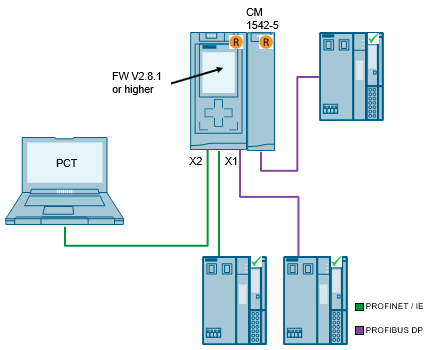
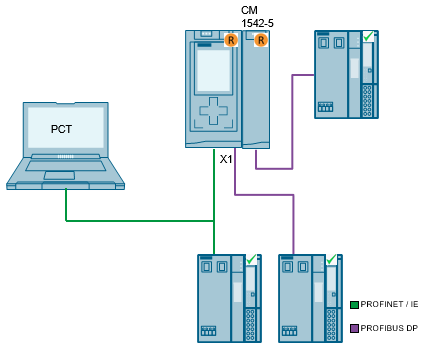
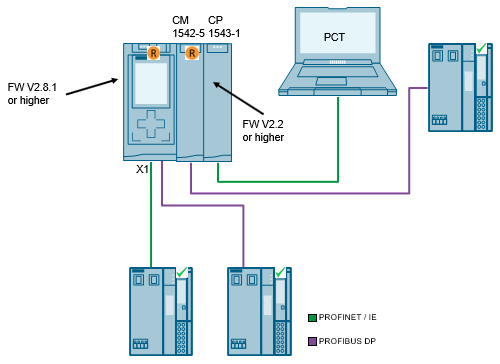
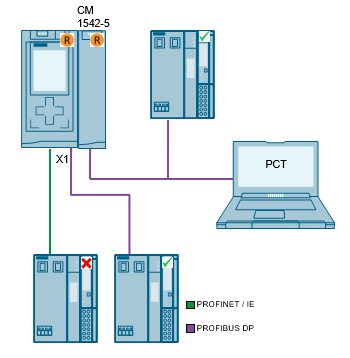
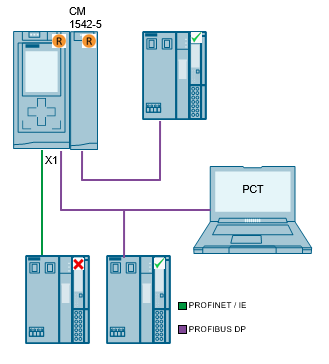
Constellation with S7-1500
The following screens show the constellations in which the IO-Link master can be reached from STEP 7 using S7-PCT. With V2.8.1 of CPU firmware the "IP Forwarding" feature was imported. In order to this it`s not necessary anymore to connect S7-PCT to the same IE interface as the IO-Link master.
Constellation with S7-400
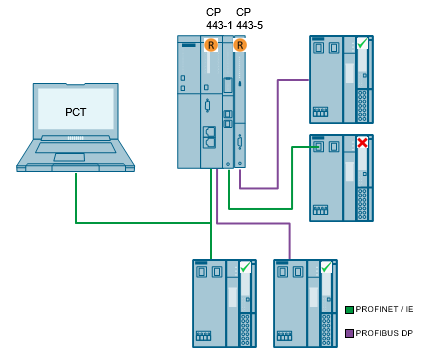
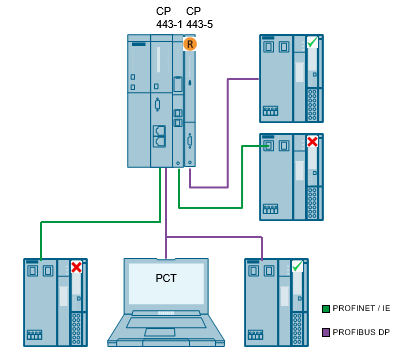
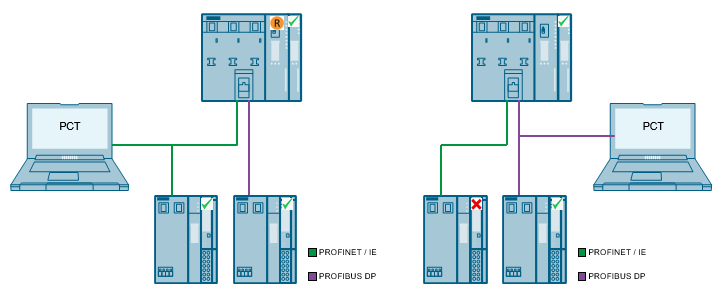
The following screens show the constellations in which the IO-Link master can be reached from STEP 7 using S7-PCT
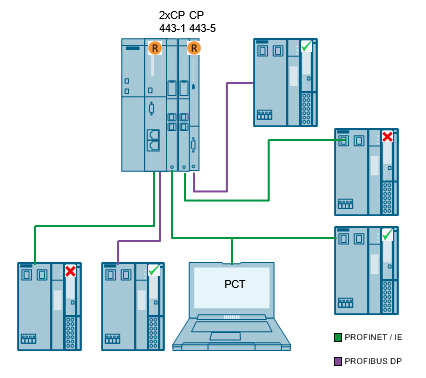
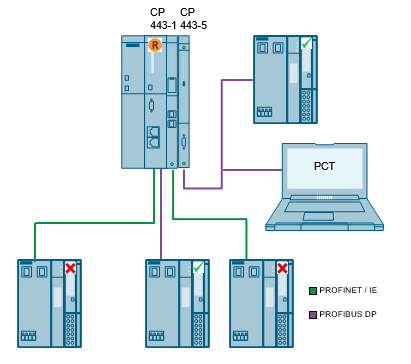
Constellation with S7-300
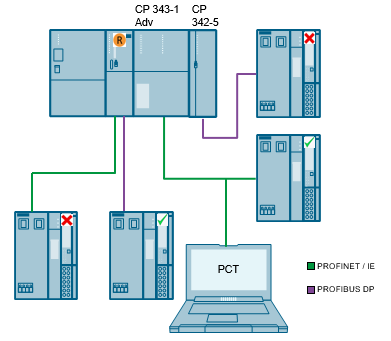
The following screens show the constellations in which the IO-Link master can be reached from STEP 7 using S7-PCT.
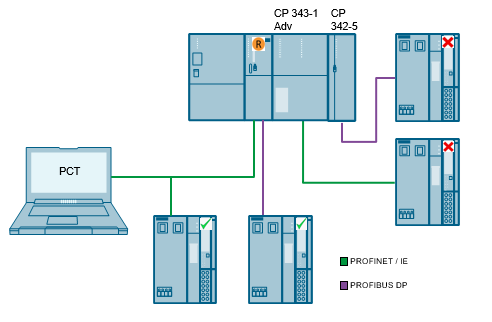
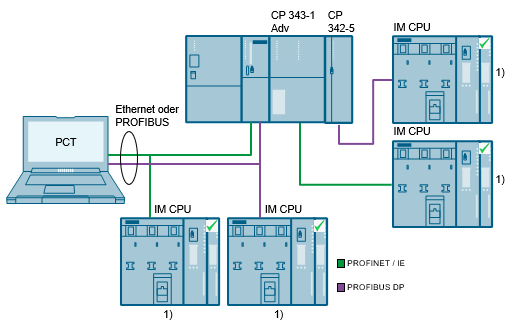
Constellation with IM CPU
The following screens show the constellations in which the IO-Link master can be reached from STEP 7 using S7-PCT.
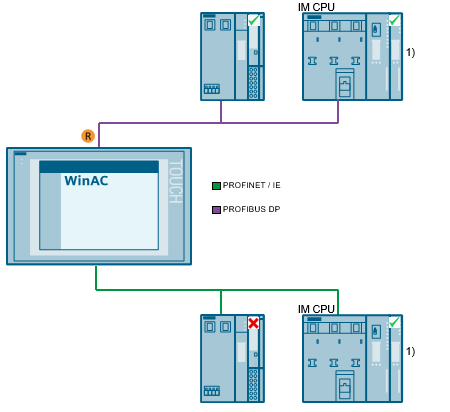
1) Requires a PG/PC station assigned in the project (for STEP 7 < V12).
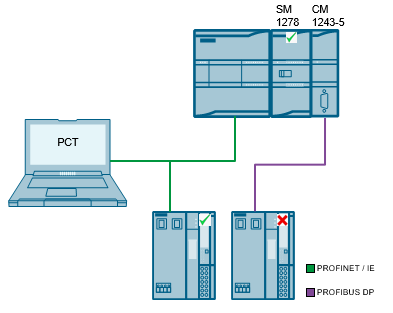
Constellation with S7-1200
The following screens show the constellations in which the IO-Link master can be reached from STEP 7 using S7-PCT.
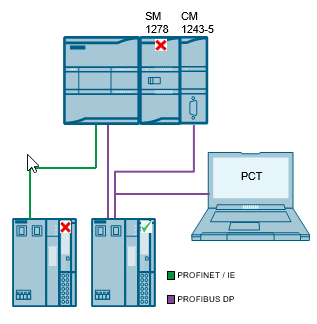
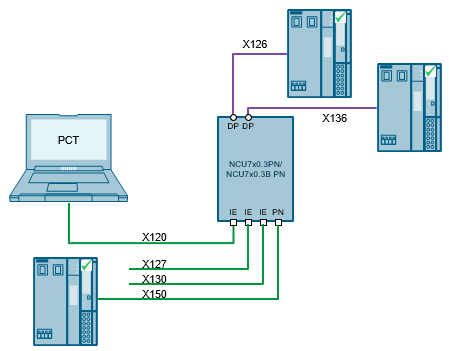
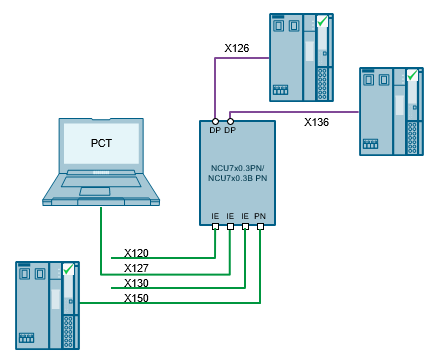
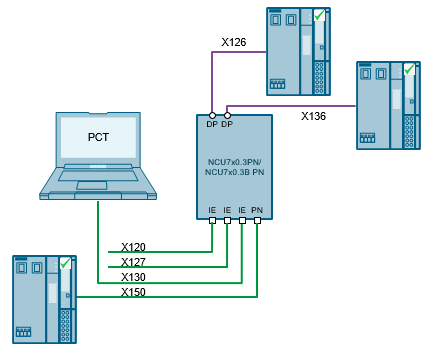
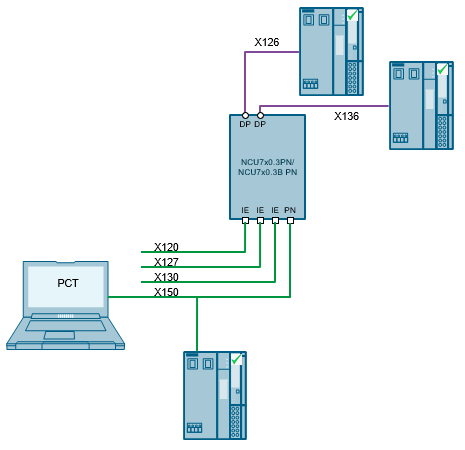
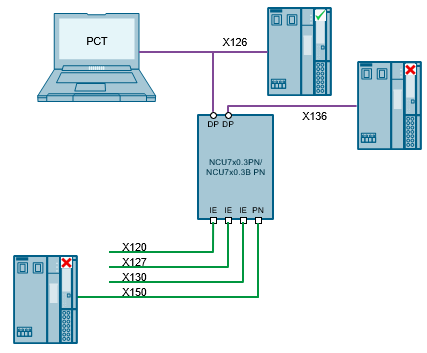
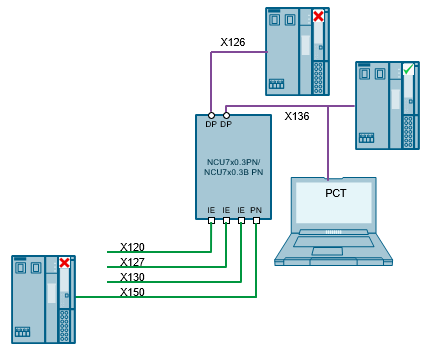
Constellation with SINUMERIK
The following screens show the constellations in which the IO-Link master can be reached from STEP 7 using S7-PCT.
Acyclic Read and Write with the IO-Link Library
https://support.industry.siemens.com/cs/document/82981502/acyclic-read-and-write-with-the-io-link-library
Application of the "Siemens IO-Link Devices" block library
https://support.industry.siemens.com/cs/document/90529409/application-of-the-siemens-io-link-devices-block-library
This application uses a concrete example to illustrate the simple connection of Siemens IO-Link devices to a SIMATIC S7-CPU using block library "Siemens IO-Link Devices".
Systematic diagnostic concepts and efficient handling of parameter data are demanded in automation technology on all levels. It is imperative here that sensors and switching devices are integrated into the automation compound.
Communication IO-Link offers new possibilities through intelligent connection of sensors and switching devices to the control level. Main topics are switching, protecting and monitoring on field level.
The IO-Link system consists of an IO-Link master and one or several IO-Link devices (sensors or actuators). The IO-Link master works as interface for superimposed control and controls the communication with the connected IO-Link devices.
Solution
The solution consists of two parts:
the Siemens IO-Link Devices library for STEP 7 V5.5 SP3 and STEP 7 V13 SP1, incl. Documentation
one application example for STEP 7 V13, incl. Documentation
The library provides function blocks and UDTs for all IO-Link devices from the Siemens portfolio which standardizes and facilitates the communication with the IO-Link devices. The function blocks have a uniform interface for the individual devices. Per read/write job, only the data record specified at the input is read/written.
Die application illustrates the usage of the SIEMENS IO-Link Devices library using three scenarios with SIRIUS IO-Link components. The following scenarios are realized for various IO-Link master and PNIO controllers:
Simple reading and writing of data records.
Generating a program alarm using a diagnostic data record.
Save and restore the configuration parameters.
The operation is handled via a WinCC user interface.
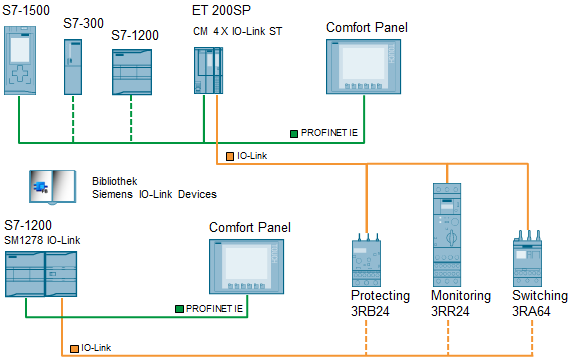
Hardware setup
The following scheme shows the hardware setup of the application:
https://ulozto.net/tam/_vQoxIVgIMjch |
|
| Back to top |
|
|
AnteSavilt
Member 2


Joined: 13 Feb 2018
Posts: 264
Location: Croatia
|
| Posted: 01/10/2020 17:42 Post subject: S7-PCT V3.5 SP2 for IO-Link Master |
|
|
S7-PCT V3.5 SP2 for IO-Link Master
https://support.industry.siemens.com/cs/document/32469496/
The Port Configuration Tool ("PCT") is a PC-based software for parameterizing Siemens IO-Link master modules and third-party IO-Link devices.
The IO-Link devices are integrated using the standardized device description "IODD" which can be obtained from the relevant device manufacturer. S7-PCT supports both IODD versions 1.0 and V1.1.
All IO-Link devices available at Siemens are already included in the hardware selection catalog of S7-PCT.
S7-PCT is called up via the IO-Link master hardware configuration of STEP 7, but it can also be started in "standalone" mode if the IO-Link master is not operated on a SIMATIC controller or if no STEP 7 is used.
Download
https://ulozto.net/file/EC0PlIvHDrtH/s7-pct-v3-5-sp2-zip
[URL=https://www.file-upload.net/download-14308463/S7-PCT_V3.5_SP2.zip.html]S7-PCT_V3.5_SP2.zip[/URL]
https://anonfiles.com/p3Sdp6b1p1/S7-PCT_V3.5_SP2_zip |
|
| Back to top |
|
|
|

 FAQ
FAQ Search
 Memberlist
 Usergroups
 Register
 Profile
 Log in to check your private messages
 Log in


