| View previous topic :: View next topic |
| Author |
Message |
Sinastudio7
Junior

Joined: 08 Jul 2018
Posts: 1
|
 Posted: 28/04/2019 06:54 Post subject: s7 connection Posted: 28/04/2019 06:54 Post subject: s7 connection |
 |
|
| hi,I have a 214-1hg40-0xb0 PlC. In the tia v13 sp1 program I'm having trouble creating a s7 connection with a pc. When this connection is created, in the connection section only opc communication with plc is established, but when I select the 214-1hg30-0xb0 model, two connections will be created in the connection section. |
|
| Back to top |
|
 |
gaty
Member


Joined: 01 Mar 2017
Posts: 188
|
| Posted: 28/04/2019 11:02 Post subject: which protocols does the S7-1200 support |
|
|
Firstly read what means S7-Connection (Communication between 2 PLCs Server-Client) and how can be implemented.
S7 Connection means you have to establish a connection between 2 S7 Controllers(PLC) using native functions PUt, GET...
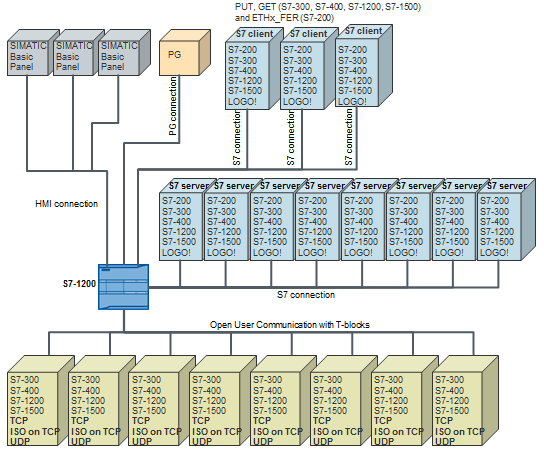
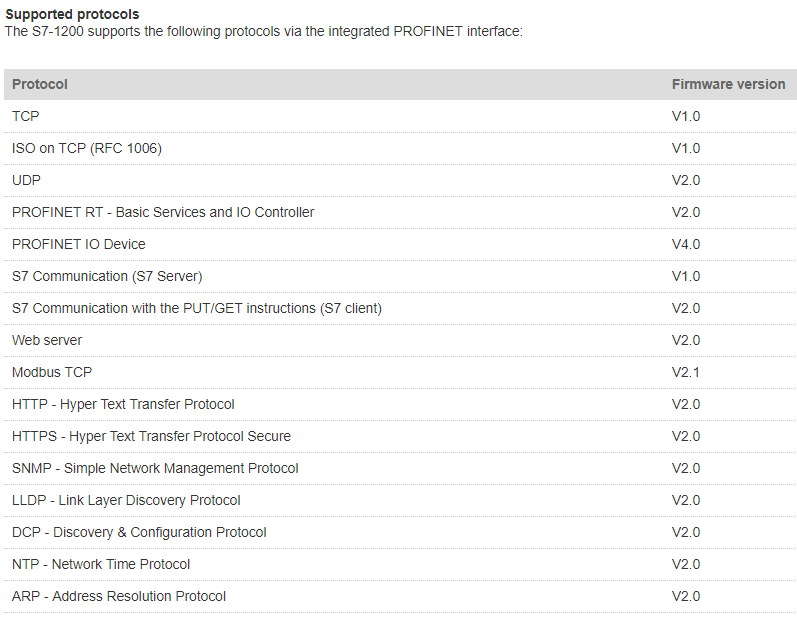
With which devices can the S7-1200 communicate via the integrated PROFINET interface and which protocols does the S7-1200 support?
https://support.industry.siemens.com/cs/document/38051505/with-which-devices-can-the-s7-1200-communicate-via-the-integrated-profinet-interface-and-which-protocols-does-the-s7-1200-support
Communication partners of the S7-1200
The S7-1200 CPU communicates with the devices below via the integrated PROFINET interface:
Other S7-CPUs (S7-200, S7-300, S7-400, S7-1200 and S7-1500)
Programming devices
HMI devices (like SIMATIC Basic Panels and SIMATIC Comfort Panels)
Devices which support open user communication
Maximum number of simultaneous, asynchronous communication connections
The S7-1200 CPU supports the following maximum number of simultaneous, asynchronous communication connections:
S7 communication
3 connections for a passive S7-1200 CPU communicating with an active S7 CPU or LOGO!, this means the S7-1200 is S7 server. The active S7 CPU or LOGO! establishes the connection and uses PUT and GET instructions (S7-300, S7-400, S7-1200 and S7-1500) or the ETHx_XFER instruction (S7-200) to read and write data.
8 connections for an active S7-1200 CPU communicating with a passive S7 CPU or LOGO!, this means the S7-1200 is S7 client. The active S7 CPU establishes the connection and uses the PUT and GET instructions to read and write data.
PROFINET and PROFIBUS
S7-1200 CPU with firmware version V2.02 to V2.2
For PROFINET the S7-1200 CPU supports a maximum of 8 PROFINET IO devices and 128 submodules, whichever is reached first. PROFIBUS supports a maximum of 16 DP slaves on one DP master with a maximum of 256 submodules per DP slave.
A maximum of 16 DP slaves and IO devices altogether is supported.
S7-1200 CPU with firmware version V3.0 or higher
With firmware version V3.0 and higher the S7-1200 CPU supports 16 PROFINET IO devices with a maximum of 256 submodules. PROFIBUS supports 32 DP slaves with a maximum of 512 submodules per DP slave.
Integrated PROFINET interface of the S7-1200
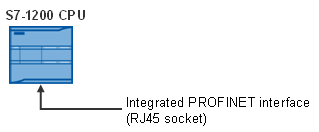
The integrated PROFINET interface of the S7-1200 CPU is implemented as an RJ45 socket.
SIMATIC S7-1200 Easy Book
https://support.industry.siemens.com/cs/attachments/39710145/s71200_easy_book_en-US_en-US.pdf |
|
| Back to top |
|
|
gaty
Member
Joined: 01 Mar 2017
Posts: 188
|
| Posted: 28/04/2019 11:03 Post subject: configure and program an S7 connection |
|
|
How do you configure and program an S7 connection and the FB15 "PUT" and FB14 "GET" function blocks for data transfer between an S7-1200 CPU and an S7-300 CPU?
https://support.industry.siemens.com/cs/document/92269951/how-do-you-configure-and-program-an-s7-connection-and-the-fb15-put-and-fb14-get-function-blocks-for-data-transfer-between-an-s7-1200-cpu-and-an-s7-300-cpu
The document below describes the following:
How to configure the S7-1200 in STEP 7 V15
How to configure the S7-300 in STEP 7 V5.5 SP3 and how to configure the S7 connection
https://support.industry.siemens.com/cs/attachments/92269951/s7communication_s7-1200_s7-300_en.pdf
https://support.industry.siemens.com/cs/attachments/92269951/s7communication.zip |
|
| Back to top |
|
|
gaty
Member
Joined: 01 Mar 2017
Posts: 188
|
| Posted: 28/04/2019 11:04 Post subject: Data Synchronization with S7 Communicationseveral S7-1200 |
|
|
Data Synchronization with S7 Communication between several S7-1200 Substations and one S7-1500/300 Head PLC
https://support.industry.siemens.com/cs/document/40556214/data-synchronization-with-s7-communication-between-several-s7-1200-substations-and-one-s7-1500-300-head-plc
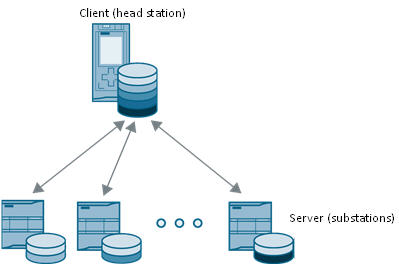
Consistent Data Synchronization with S7 Communication between several Substations and one Head-end Station
https://support.industry.siemens.com/cs/attachments/40556214/40556214_S7-Komm_Sync_DOKU_V2_0_en.pdf
STEP 7 project (SIMATIC STEP 7 V12)
https://support.industry.siemens.com/cs/attachments/40556214/40556214_S7-Comm_Sync_CODE_v2_0.zip |
|
| Back to top |
|
|
gaty
Member
Joined: 01 Mar 2017
Posts: 188
|
| Posted: 28/04/2019 11:05 Post subject: Data synchronization over open communication |
|
|
Data synchronization over open communication between numeroase field devices (S7-1200) and a head PLC (S7-1200/ S7-300/ WinAC) (Set 17).
https://support.industry.siemens.com/cs/document/39040038/data-synchronization-over-open-communication-between-multiple-field-devices- (s7-1200)-and-a-head-plc-(s7-1200-s7-300-winac)-(set-17)
he application example demonstrates with a concrete example the data synchronization between one head PLC and several field PLCs.
For synchronization tasks and the exchange of control and status information between one head PLC and several field PLCs, a performant cyclic communication is needed.
The following points must be noted here:
Supply of all the field PLCs with the same or different sets of data from the head PLC (down sync).
Updating the sets of data from all the field PLCs in the head PLC (up sync).
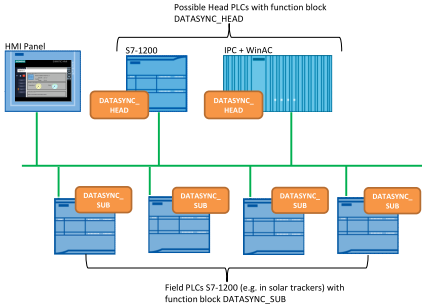
For solving the task, the block DATASYNC_X has been developed, which automatically assumes the control of the data synchronization:
Function block DATASYNC_HEAD for the head PLC
Function block DATASYNC_SUB for the field PLC
The application example is demonstrated with a concrete example - the control of solar trackers. The expression solar tracker means solar energy systems which can be tracked according to the position of the sun to ensure the best possible energy yields.
For the field PLC, a CPU S7-1200 is used in this example. For the head PLC, this solution uses two types of devices:
An S7-1200 controller
An S7-300/400/ IPC with WinAC
The head PLC sequentially establishes an ISO-on-TCP communication connection with each field PLC and terminates it again. Data is sent to the field PLCs and data is received from them. After all field PLCs have been operated, the process is repeated.
The data communication among the PLCs is displayed in images by the HMI panel.
Project (TIA Portal V13 SP1)
https://support.industry.siemens.com/cs/attachments/39040038/39040038_DATASYNC_DOKU_V31_en.pdf
https://support.industry.siemens.com/cs/attachments/39040038/39040038_datasync_code_v22.zip |
|
| Back to top |
|
|
gaty
Member
Joined: 01 Mar 2017
Posts: 188
|
| Posted: 28/04/2019 11:06 Post subject: How do you program the "GET" and "PUT" i |
|
|
How do you program the "GET" and "PUT" instructions in the user program of the SIMATIC S7-1200 CPU in order to transfer more than 160 bytes of data?
https://support.industry.siemens.com/cs/document/65975617/how-do-you-program-the-get-and-put-instructions-in-the-user-program-of-the-simatic-s7-1200-cpu-in-order-to-transfer-more-than-160-bytes-of-data
ou must call the instructions below in the user program in order to transfer data with the SIMATIC S7-1200 CPU over a configured S7 connection.
GET for reading data from the partner CPU
PUT for writing data to the partner CPU
The S7 connection does not have to be configured on both sides, because the communication over S7 connections using "GET" and "PUT" is based on the server-client principle.
Description of the S7 program
This sample program shows how to call the "GET" and "PUT" instructions sequentially in the user program of the SIMATIC S7-1200 CPU in order to transfer more than 160 bytes of data over an S7 connection.
The "GET" instruction is called three times in a row with the same connection number so that 400 bytes of data can be received.
The "PUT" instruction is called twice in a row with the same connection number so that 240 bytes of data can be received.
The file below gives a detailed description of the user program.
https://support.industry.siemens.com/cs/attachments/65975617/put_get_sequencer_s7-1200_en.pdf
https://support.industry.siemens.com/cs/attachments/65975617/put_get_sequencer_s7-1200.zip |
|
| Back to top |
|
|
gaty
Member
Joined: 01 Mar 2017
Posts: 188
|
| Posted: 28/04/2019 11:07 Post subject: How do you connect a PC station to an S7-1200 with OPC? |
|
|
Your project...
How do you connect a PC station to an S7-1200 with OPC?
https://support.industry.siemens.com/cs/document/39960679/how-do-you-connect-a-pc-station-to-an-s7-1200-with-opc
This entry shows you how to connect a PC station to an S7-1200 using OPC.
A PC station and S7-1200 are configured together in a project in the TIA Portal
The document below describes how to configure a PC station, an S7-1200 and an S7 connection in the TIA Portal to exchange data between a SIMATIC NET OPC server and an S7-1200 CPU.
Requirements
TIA Portal (STEP 7 Professional V12 SP1 Upd2 or higher) is required for configuring the S7-1200, the PC station and the S7 connection.
SIMATIC NET DVD V12 or higher is required for the communication.
https://support.industry.siemens.com/cs/attachments/39960679/39960679_s7-1200_opc_simatic-net_tia-portal_e.pdf
The PC-Station and S7-1200 are configured in different projects
In order to be able to exchange data between the SIMATIC NET OPC server and the S7-1200 CPU the PC station and S7-1200 are configured in different projects.
The PC station and the S7 connection are configured in NCM PC or STEP 7 V5.5 SP3.
S7-1200 is configured in the TIA Portal (STEP 7 Basic or Professional V12 SP1 Upd2 or higher).
https://support.industry.siemens.com/cs/attachments/39960679/39960679_s7-1200_opc_simatic-net_ncm-pc_e.pdf |
|
| Back to top |
|
|
gaty
Member
Joined: 01 Mar 2017
Posts: 188
|
| Posted: 28/04/2019 11:08 Post subject: |
|
|
Hope you understood what I mean..???!!!
Good luck!!! |
|
| Back to top |
|
|
gaty
Member
Joined: 01 Mar 2017
Posts: 188
|
| Posted: 28/04/2019 11:13 Post subject: |
|
|
What are the differences between the PUT and GET instructions for S7 communication and S7 basic communication?
https://support.industry.siemens.com/cs/document/109474590/what-are-the-differences-between-the-put-and-get-instructions-for-s7-communication-and-s7-basic-communication
Overview of the PUT and GET instructions for S7 communication and S7 basic communication
PUT and GET
The "PUT" and "GET" instructions are used for communication via S7 connections. The "PUT" instruction writes data to the remote connection partner. The "GET" instruction reads data out of the remote connection partner.
PUT_S and GET_S
You use the PUT_S instruction in S7-300 to write data to a remote CPU. You use the GET_S instruction in S7-300 to read data from a remote CPU. Here the S7 connection can be both via the integrated interface and via a CP.
PUT_E and GET_E
The PUT_E and GET_E instructions support only S7 connections via the integrated PROFINET interface. You can specify up to 4 source and target areas for these instructions. These four areas must not be more than 160 bytes of data all together.
X_PUT and X_GET
The X_PUT and X_GET instructions are used for S7 basic communication via MPI. You use the X_PUT instruction to write data to a communication partner which is outside your own S7 station. You use the X_GET to read data from communication partner outside your own S7 station.
I_PUT and I_GET
You use the unilateral communication function I_GET to read an S7 tag from a communication partner in your own automation station.
You use the I_PUT instruction to write an S7 tag to a communication partner in your own automation station.
The communication partner can be place centrally or remotely and is identified by its logical module address.
Further Information
Sample applications for the PUT and GET instructions are available in the following entries:
https://support.industry.siemens.com/cs/document/82212115/how-do-you-configure-and-program-an-s7-connection-and-the-put-and-get-communication-instructions-for-data-transfer-between-two-s7-1500-cpus
https://support.industry.siemens.com/cs/document/65975617/how-do-you-program-the-get-and-put-instructions-in-the-user-program-of-the-simatic-s7-1200-cpu-in-order-to-transfer-more-than-160-bytes-of-data
https://support.industry.siemens.com/cs/document/1819293/sample-program%3a-s7-communication-with-the-blocks-sfb14- (-get-)-and-sfb15-(-put-)-with-s7-400
https://support.industry.siemens.com/cs/document/18610307/how-do-you-program-communication-blocks-fb14-get-and-fb15-put-for-data-exchange-in-the-s7-program-of-an-s7-300-cpu |
|
| Back to top |
|
|
gaty
Member
Joined: 01 Mar 2017
Posts: 188
|
| Posted: 28/04/2019 11:17 Post subject: |
|
|
How do you configure a specified and an unspecified S7 connection for data exchange between S7-300 and/or S7-400 by way of Industrial Ethernet CPs?
https://support.industry.siemens.com/cs/document/17628518/how-do-you-configure-a-specified-and-an-unspecified-s7-connection-for-data-exchange-between-s7-300-and-or-s7-400-by-way-of-industrial-ethernet-cps
https://support.industry.siemens.com/cs/attachments/17628518/S7_Connection_en.pdf |
|
| Back to top |
|
|
|

 FAQ
FAQ Search
 Memberlist
 Usergroups
 Register
 Profile
 Log in to check your private messages
 Log in


