 |
plc.myforum.ro
PLCs users www.plc.myforum.ro!
|
| View previous topic :: View next topic |
| Author |
Message |
hf08843245
Junior

Joined: 09 Feb 2016
Posts: 6
|
 Posted: 14/11/2019 00:27 Post subject: S7 1200 firmware V4.3.1 Posted: 14/11/2019 00:27 Post subject: S7 1200 firmware V4.3.1 |
 |
|
Hi
I am looking for the S7 1200 6ES7214-1AG40-0XB0, 6ES7 212-1AE40-0XB0
the firmware V4.3.1
I can not download them from Siemens because of the export restriction
thanks |
|
| Back to top |
|
 |
rokat
Junior
Joined: 08 Jun 2019
Posts: 10
|
| Posted: 14/11/2019 11:26 Post subject: |
|
|
SIMATIC Automation Tool - the commissioning and service operation tool for SIMATIC modules
https://support.industry.siemens.com/cs/document/98161300/simatic-automation-tool-the-commissioning-and-service-operation-tool-for-simatic-modules
Automation Tool operations:
| Code: | Scan to PROFINET / Ethernet network and identify all devices connected to the network
Flash device LEDs or HMI screens to locate a device
Create a table that maps the accessible devices on the network
Assign addresses (IP, subnet, gateway) and station name (PROFINET device)
Set the time in a CPU to the current time into your PG / PC
Download a program to a CPU (support failsafe programs needs at least V3.1) and HMI panels
Put a CPU in RUN or STOP mode
Perform a CPU memory reset
Backup / Restore CPU or HMI data to / from a backup file (failsafe needs at least V3.1)
Upload service data from a CPU
Read the diagnostic log from a CPU
Reset a CPU to factory default settings
Update firmware in a CPU and attached modules
Upload, download, or delete Recipe data (stored at SMC) from a CPU
Upload or delete Data log data (stored at SMC) from a CPU
Document and save your network information
in a standard text .csv file or
to encrypted & password protected .sat file
API support to realizate custom .NET applications available in the SIMATIC |
Automation Tool
https://ulozto.net/file/Euf66vosrjN4/simatic-automation-tool-v3-1-sp3-exe
[URL=http://www.filehost.ro/3427104221/SIMATIC_Automation_Tool_V3_1_SP3_exe/]SIMATIC Automation Tool V3 1 SP3 exe[/URL]
Firmware version V4.3 released for S7-1200
https://support.industry.siemens.com/cs/document/109763919/firmware-version-v4-3-released-for-s7-1200
Firmware version V4.3 for S7-1200 CPUs is herewith available.
Firmware version V4.3 enhances the S7-1200 Hardware version V4 feature set.
New features in the V 4.3 release:
Secure Open User Communication (OUC)
system support for SSL / TLS secured communication
Certificate management for CPU
Ability to load certificates created in STEP 7 to the S7-1200 CPU for Secure OUC
Affected CPU types and their download links:
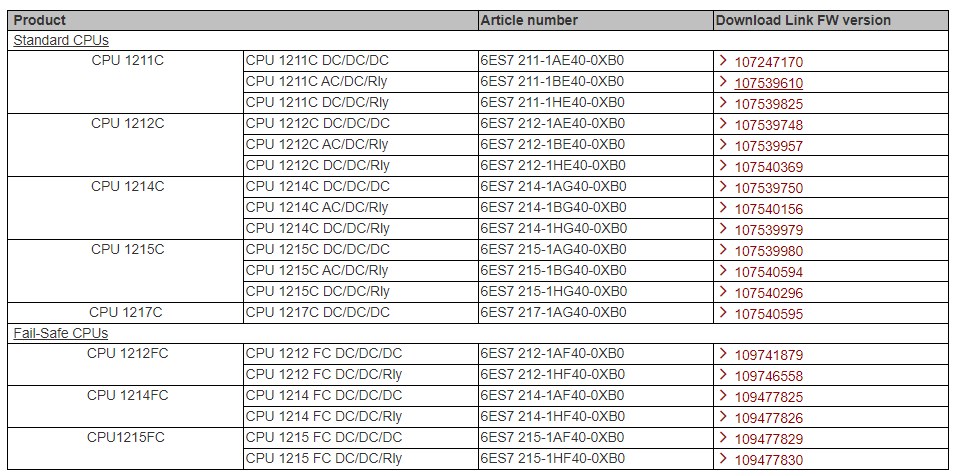
Necessary requirements for running the above modules and functionalities
To configure the SIMATIC S7-1200 CPUs version 4.3 and higher it requires the Engineering System Step7 with version V15.1 and higher, Basic or Professional with Hardware Support Package (HSP) HSP_V15_1_0276_001_S71200_CPU_4.3. 72341852
Compatibility and necessary components
SIMATIC Memory Card
A SIMATIC Memory Card can be used optionally for expanding the CPU load memory, loading the application software or for executing a firmware update.
Compatibility of the hardware and software
Existing SIMATIC S7-1200 CPUs V4 (Article No. 6ES721x-1xx40-0XB0) can be updated to the new CPU firmware 4.3.
An S7-1200 CPU with version 4.3 is replacement compatible with an S7-1200 and firmware version 4.0, 4.1 and 4.2. This enables the use of a real existing CPU with firmware version 4.3 with an engineered V4.0, V4.1 or V4.2 based on an existing TIA portal older versions project. The new firmware features cannot be used in that case.
https://support.industry.siemens.com/cs/attachments/109764129/s71200_system_manual_en-US_en-US.pdf
https://support.industry.siemens.com/cs/attachments/86630375/s7_1500_compare_table_en_mnemo.pdf
Firmware update for CPU 1212C, DC / DC / DC, 8DI / 6DO / 2AI
https://support.industry.siemens.com/cs/document/107539748/firmware-update-for-cpu-1212c-dc-dc-dc-8di-6do-2ai
You can install the CPU firmware update from the Web server, the SIMATIC Automation tool ( 98161300 ), the online diagnostic functions of STEP 7, or by making a memory card using the Siemens customer support website. The S7-1200 System Manual.
If you are using SIMATIC memory card to install the CPU firmware update, retentive memory is retained. However, if you use the Web server or online diagnostic functions of STEP 7 to install the update, retentive memory is lost.
If you are near the Web browser while you are in the process of getting the firmware out of the web server, you want to change the operating mode of the CPU to RUN mode. If this situation happens, you must cycle to the CPU to RUN mode.
https://ulozto.net/file/H8ZVolviPOTG/6es7212-1ae40-0xb0-v04-03-01-zip
[URL=http://www.filehost.ro/3427104222/6ES7212_1AE40_0XB0_V04_03_01_zip/]6ES7212 1AE40 0XB0 V04 03 01 zip[/URL]
Firmware update for CPU 1214C, DC/DC/DC, 14DI/10DO/2AI
https://support.industry.siemens.com/cs/document/107539750/firmware-update-for-cpu-1214c-dc-dc-dc-14di-10do-2ai
You can install the CPU firmware update from the Web server, the SIMATIC Automation tool (98161300), the online diagnostic functions of STEP 7, or by making an SIMATIC memory card using the Siemens customer support Web site that contains the firmware update. The S7-1200 System Manual documents these methods.
If you use an SIMATIC memory card to install the CPU firmware update, retentive memory is retained. However, if you use the Web server or online diagnostic functions of STEP 7 to install the update, retentive memory is lost.
If you close the Web browser while in the process of performing a firmware update from the Web server, you will be unable to change the operating mode of the CPU to RUN mode. If this situation happens, you must cycle power to the CPU to be able to change the CPU to RUN mode.
https://ulozto.net/file/JLEm9mS6dkKM/6es7214-1ag40-0xb0-v04-03-01-zip
[URL=http://www.filehost.ro/3427104224/6ES7214_1AG40_0XB0_V04_03_01_zip/]6ES7214 1AG40 0XB0 V04 03 01 zip[/URL]
Support Packages for the hardware catalog in the TIA Portal (HSP)
https://support.industry.siemens.com/cs/document/72341852/support-packages-for-the-hardware-catalog-in-the-tia-portal- (hsp)
https://ulozto.net/tam/_rIBjqHIVoXUT
https://ulozto.net/file/Q3urwTT1vC3A/tia-portal-v15-hsp-restricted-zip |
|
| Back to top |
|
|
hf08843245
Junior
Joined: 09 Feb 2016
Posts: 6
|
| Posted: 14/11/2019 18:16 Post subject: |
|
|
| thanks |
|
| Back to top |
|
|
panelplc
Junior
Joined: 21 Oct 2012
Posts: 1
Location: fsafsfs
|
| Posted: 17/12/2019 17:52 Post subject: |
|
|
I am looking for the firmware version V4.4 with PLC S71200 CPU 1212C DC/DC/DC ( 6ES7 212-1AE40-0XB0) and PLC S71200 CPU 1214C AC/DC/RL (6ES7 214-1BG40-0XB0)
I can not download them from Siemens
thanks |
|
| Back to top |
|
|
Simko
Junior
Joined: 30 Dec 2015
Posts: 13
|
| Posted: 18/12/2019 08:18 Post subject: |
|
|
| panelplc wrote: |
I am looking for the firmware version V4.4 with PLC S71200 CPU 1212C DC/DC/DC ( 6ES7 212-1AE40-0XB0) and PLC S71200 CPU 1214C AC/DC/RL (6ES7 214-1BG40-0XB0)
I can not download them from Siemens
thanks |
Hi, here are links for download:
PLC S71200 CPU 1212C DC/DC/DC ( 6ES7 212-1AE40-0XB0)
[url]https://mega.nz/#!7uA2FCaJ!9abycvf1_QYTbZGKaAuw_lfL34zDJZfIs-q7yRaLYco[/url]
PLC S71200 CPU 1214C AC/DC/RL (6ES7 214-1BG40-0XB0
[url]https://mega.nz/#!KmBkEKZD!Wgz5Vx3VRMP7GT9w3y4-ZeUWT67QGbIvnMt8j1wH6kk[/url]
 |
|
| Back to top |
|
|
vsd
Junior
Joined: 21 Jan 2020
Posts: 1
|
| Posted: 03/02/2020 09:37 Post subject: Downgrade firmware S7-1200 |
|
|
Hello all,
My S7-1200 1212C 1AE40-0XB0 firmware: V04.03.01, FS: 10
I want to downgrade to firmware V04.02..01 but TIA Automation tool show error "The firmware update failed due to integrity checks."
Please show me can I downgrade it?
Thank you. |
|
| Back to top |
|
|
|
|
You cannot post new topics in this forum
You cannot reply to topics in this forum
You cannot edit your posts in this forum
You cannot delete your posts in this forum
You cannot vote in polls in this forum
|
Powered by phpBB © 2001, 2005 phpBB Group
Fa-ti si tu propriul forum GRATUIT, pe www.myforum.ro |
 FAQ
FAQ Search
 Memberlist
 Usergroups
 Register
 Profile
 Log in to check your private messages
 Log in


