 |
plc.myforum.ro
PLCs users www.plc.myforum.ro!
|
| View previous topic :: View next topic |
| Author |
Message |
valz
Member 3


Joined: 26 Jul 2015
Posts: 771
|
 Posted: 27/03/2023 17:31 Post subject: S7-1200 CPU if its firmware version cannot be selected Posted: 27/03/2023 17:31 Post subject: S7-1200 CPU if its firmware version cannot be selected |
 |
|
How do you load a project into an S7-1200 CPU if its firmware version cannot be selected in the hardware catalog of STEP 7 (TIA Portal)?
https://support.industry.siemens.com/cs/document/109817857/
You can also load the project data into the S7-1200 CPU even if there are differences between the configured module and the destination module (online).
Description
A specific version of STEP 7 Basic or Professional is required to configure a firmware version in the device configuration. For example, to configure the firmware version V4.6 for the S7-1200 CPU you need STEP 7 Basic or Professional V18 (or higher). The following table gives you an overview of the version of STEP 7 Basic or Professional you need to be able to configure the desired firmware version.
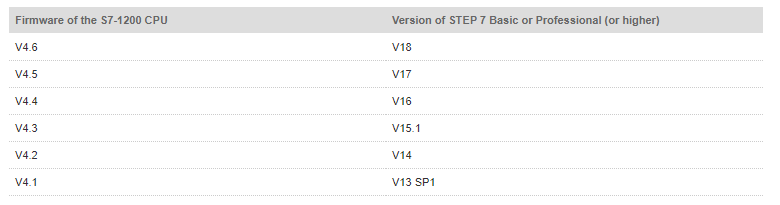
You can also load the project data into a S7-1200 CPU if the firmware version of that CPU is not available in the hardware catalog of STEP 7 Basic or Professional.
If an error message appears during loading, compile the device configuration completely and load the project data into the CPU again.
Proceed as follows:
In the Project tree you right-click the PLC station.
In the pop-up menu you select "Compile > Hardware (rebuild all)".
After successful compilation right-click the PLC station again.
Select "Download to device > Hardware configuration" from the pop-up menu and download the device configuration into the CPU.
If the download is still not possible, reset the CPU to the factory settings. Also delete the memory card.
Note
The configured firmware version and the firmware on the CPU do not have to be identical. Configurations with earlier versions of STEP 7 Basic or Professional that did not yet have a certain firmware status in the catalog can be used in an upward compatible manner.
Example
You had configured the firmware V4.5 in the device configuration for the S7-1200 CPU. However, the last firmware update of your CPU is V4.6. But you can commission the CPU with firmware version V4.6 with the configured firmware version V4.5.
When downloading the project data into the CPU a warning indicates the differences between the CPU (with firmware V4.5) configured in the device configuration and the CPU actually in the rack (with firmware V4.6). Ignore this warning.
The corrections and improvements of firmware V4.6 are implemented and do not require a new configuration with firmware version V4.5.
However, if you want to use the new functions of the S7-1200 CPU added since firmware version V4.6, you have to use STEP 7 Basic or Professional V18 and configure a CPU with firmware V4.6.
Further Information
More information is available via the links:
https://support.industry.siemens.com/cs/document/109744163/how-do-you-load-the-project-data-if-the-version-of-the-firmware-installed-in-the-s7-1500-cpu-cannot-be-selected-in-the-hardware-catalog-of-your-version-of-step-7- (tia-portal)
https://support.industry.siemens.com/cs/document/109763472/why-does-the-delivered-module-have-a-different-article-number-to-the-one-ordered
https://support.industry.siemens.com/cs/document/109476392/how-do-you-upgrade-projects-in-tia-portal-v14-and-higher-that-you-created-with-previous-versions-of-tia-portal
https://support.industry.siemens.com/cs/document/109814248/firmware-v4-6-for-s7-1200-available |
|
| Back to top |
|
 |
|
|
You cannot post new topics in this forum
You cannot reply to topics in this forum
You cannot edit your posts in this forum
You cannot delete your posts in this forum
You cannot vote in polls in this forum
|
Powered by phpBB © 2001, 2005 phpBB Group
Fa-ti si tu propriul forum GRATUIT, pe www.myforum.ro |
 FAQ
FAQ Search
 Memberlist
 Usergroups
 Register
 Profile
 Log in to check your private messages
 Log in


