 |
plc.myforum.ro
PLCs users www.plc.myforum.ro!
|
| View previous topic :: View next topic |
| Author |
Message |
maersk
Member 3


Joined: 17 Aug 2014
Posts: 891
|
 Posted: 07/04/2021 15:50 Post subject: S7-1200 as PN-DP-Gateway Posted: 07/04/2021 15:50 Post subject: S7-1200 as PN-DP-Gateway |
 |
|
S7-1200 as PN-DP-Gateway
Task PROFINET's popularity in the automation industry is increasing continuously. So there is often the task to realize a coupling to PROFIBUS DP networks from existing plants or plants,which could not convert to PROFINET yet. ...
Task
PROFINET's popularity in the automation industry is increasing continuously. So there is often the task to realize a coupling to PROFIBUS DP networks from existing plants or plants,which could not convert to PROFINET yet.
In pure DP networks, this task was solved up to now by DP/DP coupler. But current, there is no suitable product available- means a PN/DP coupler, where the PN part presents oneself as device and the PB part as slave.
Solution
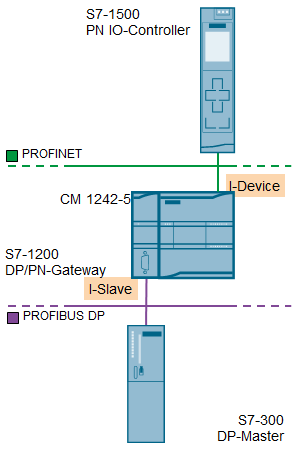
For this task the S7-1200 offers a cost-effective and capable alternative. In conjunction with the PROFIBUS DP communication module CM 1242-5 and the PROFINET I-device function the S7-1200 becomes a gateway between PROFIBUS and the PROFINET system part.
As I-Slave in the PROFIBUS network
As I-Device in the PROFINET IO network.
The S7-1200 transfers cyclic I/O data between the both networks. The data transer is completely transparent.
In this application an S7-300 represents the PROFIBUS system part, an S7-1500 represents the PROFINET system part.
Downloads
https://support.industry.siemens.com/cs/attachments/101495058/101495058_S7-1200_PN_DP_Gateway_DOC_v11_en.pdf
https://support.industry.siemens.com/cs/attachments/101495058/101495058_pn_dp_gateway_code_TIAPv15.1.zip
https://anonfiles.com/P8Q034p6u2/101495058_pn_dp_gateway_code_TIAPv15.1_zip
https://anonfiles.com/R1Q238peu8/101495058_S7-1200_PN_DP_Gateway_DOC_v11_en_pdf |
|
| Back to top |
|
 |
maersk
Member 3
Joined: 17 Aug 2014
Posts: 891
|
| Posted: 07/04/2021 15:53 Post subject: PROFIBUS/PROFINET communication between two projects in TIA |
|
|
How do you configure a PROFIBUS/PROFINET communication between two projects in TIA Portal?
https://support.industry.siemens.com/cs/document/109792607/
For the communication between two projects with the S7-1200/S7-1500 you confecționate a GSDML file for one CPU, which you then install in TIA Portal. You configure the device from this GSDML file in the second project as a distributed IO device.
The following procedure describes the project engineering of the communication between a project with a S7-1200 CPU and a project with a S7-1500 CPU. The S7-1200 CPU is additionally connected to a S7-300 CPU via PROFIBUS. A GSDML file is created for the S7-1200, installed in TIA Portal and the device from the GSDML file is integrated as a distributed IO device in the network of the S7-1500 of the second project.
Create a new project for the S7-1200 in TIA Portal and insert the two CPU modules "CPU 1215C DC/DC/DC" and "CPU 315-2 DP" into the project.
Note
I-Device on the S7-1200 is supported with firmware V4.0 and higher.
Insert a communication module "CM 1242-5" for the S7-1200 and configure the PROFIBUS connection to the S7-300. The assignment of the module "CM 1242-5" to the DP master is automatically done by the networking.
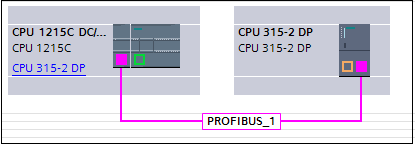
Fig. 1
To configure the I-Slave PFOFIBUS communication, open the properties for the module "CM 1242-5" and add the two transfer areas as shown in the following screen under "DP interface > Operating mode".
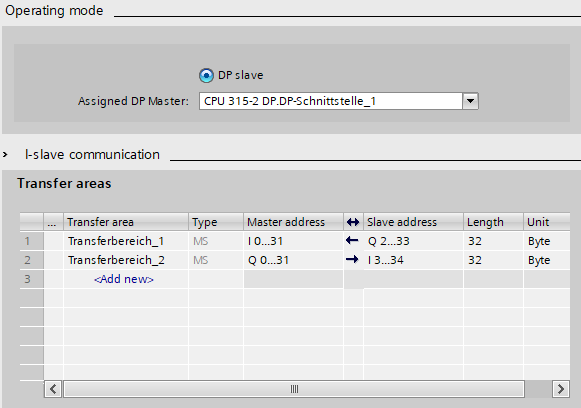
Fig. 2
Open the properties of the S7-1200 CPU and activate under "PROFINET interface [X1] > Operating mode" the function "IO device".
Configure the two transfer areas for the I-device communication as shown in the following figure.
Save and compile your project. After error-free compilation, you can export the GSD file.
Then click "Export" under "Export generic station description file (GSD)" and export the GSDML file to a path on your hard disk.
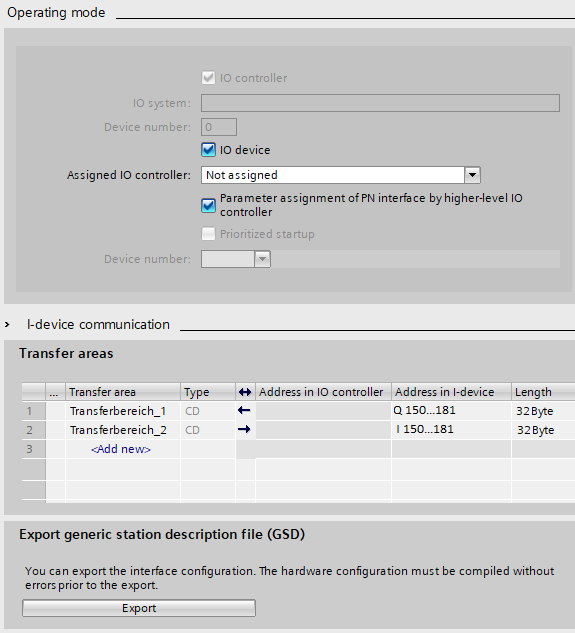
Fig. 3
Install the GSDML file in TIA Portal. How to install GSD files is described in Entry ID: 109738401.
Create a second project in TIA Portal and add the CPU module "CPU 1511-1 PN".
The device from the imported GSDML file is located in the hardware catalog of the Network view under
"Other field devices > PROFINET IO > PLCs & CPs > SIEMENS AG > CPU 1215C DC/DC/DC".
In the Network view, drag and drop the device into the network.
Configure the PROFINET connection between the S7-1500 CPU and the "DP standard slave" ("GSD IO device").
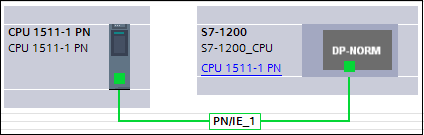
Fig. 4
Configure the transfer areas in the Properties for the CPU module "CPU 1511-1 PN" under "PROFINET interface [X1] > Operating mode".
Note
You must configure the IO data exactly inverted in both projects. |
|
| Back to top |
|
|
|
|
You cannot post new topics in this forum
You cannot reply to topics in this forum
You cannot edit your posts in this forum
You cannot delete your posts in this forum
You cannot vote in polls in this forum
|
Powered by phpBB © 2001, 2005 phpBB Group
Fa-ti si tu propriul forum GRATUIT, pe www.myforum.ro |
 FAQ
FAQ Search
 Memberlist
 Usergroups
 Register
 Profile
 Log in to check your private messages
 Log in


