 |
plc.myforum.ro
PLCs users www.plc.myforum.ro!
|
| View previous topic :: View next topic |
| Author |
Message |
bobmcdougall
Junior

Joined: 30 May 2015
Posts: 3
|
 Posted: 28/10/2015 14:11 Post subject: RSLogix 5000 Who Active Posted: 28/10/2015 14:11 Post subject: RSLogix 5000 Who Active |
 |
|
Hello,
I recently installed RSLv20.03 in addition to the following versions: 13.04, 15.02, 16.04, 17.01, 18.02 and 19.01. I also updated my RSLinx to v3.73. I am having some difficulty in connecting to L35 and L71 controllers. The controller has been okay in the past on another laptop but on this one it's been giving me grief.
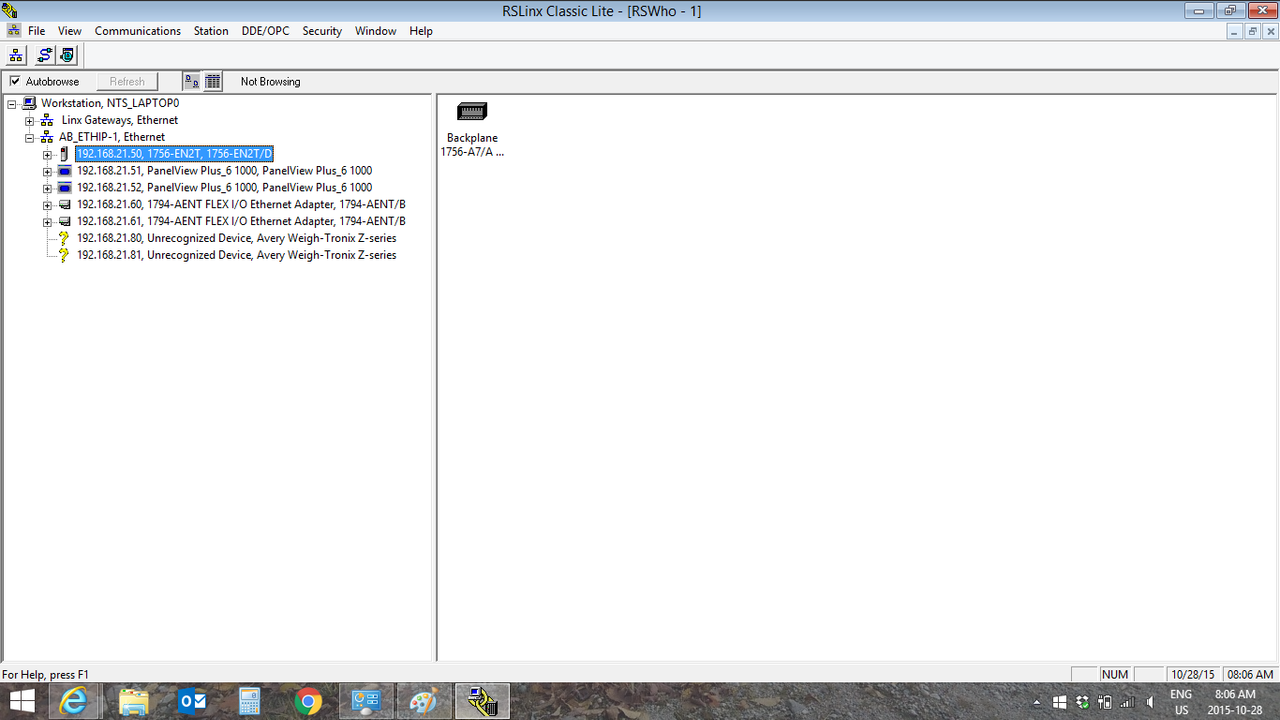
I can get onto the controller without much difficulty in RSLinx, meaning I can see and navigate through the controller and peripheral devices without any issue (other than the weight scales, which isn't a huge issue at this point). When I open my RSLogix and enter Who Active, I try to expland the Ethernet/IP network tree and all my devices show globe/world icons.
I'll attach a screenshot of Linx and Logix below. I've tried to upload the EDS files from the devices and everything appears to be okay. Please let me know if you have any solution to this issue. Thanks.
 |
|
| Back to top |
|
 |
deftjohn
Junior
Joined: 18 Jan 2012
Posts: 1
|
| Posted: 23/07/2017 00:21 Post subject: |
|
|
| I had the same issue, and i tried reinstall all studio 5000 software and it don´t work yet |
|
| Back to top |
|
|
speedygonzales
Junior 2


Joined: 26 Nov 2015
Posts: 36
Location: Mexico
|
| Posted: 23/07/2017 13:07 Post subject: |
|
|
| deftjohn wrote: | | I had the same issue, and i tried reinstall all studio 5000 software and it don´t work yet |
Rockwell Knowledge Base answer to your problem
Cause
The EDS Subsystem was upgraded in multiple software packages with the release of Studio 5000 Version 21 and among various other Rockwell Software products.
The following software packages install the new EDS subsystem:
| Code: | FactoryTalk Services Platform (FTSP)
FactoryTalk View Studio software version 7
RSLinx Enterprise software
RSLinx Classic software
RSLogix 5000 software
RSLogix 5000 Module Profiles
Studio 5000 software
RSNetWorx software
DeviceNet Tag Generator (DNET Tag Gen)
Connected Components Workbench (CCW) software version 3.00 installs RSLinx Classic software version 3.60 |

How it works
If a PC contains all products which have installed the original EDS subsystem, then a version of one of the products which installs the updated EDS subsystem is installed, the EDS components which were registered will be added to the new database and afterwards removed from the registry. Once the EDS subsystem has been converted from Original to Updated, any products installed afterwards will only use the Updated EDS Subsystem (i.e. the database).
Solution 1
If the problem occurs and RSNetWorx software version 10 or 11 is installed, install the following patch for RSNetWorx software versions 10 or 11 to use the new EDS subsystem:
Patch: EDS upgrade forces all products to be upgraded, RSNetWorx 10.01/11.00
Problem
Customers who have an existing setup are forced to upgrade to all products to V21 versions because the EDS subsystem was upgraded by AOP Core 9.04.
Download and install the patches files...
Product: RSNetWorx Patch RAid578291 Version: 11.00.00
[URL=https://userscloud.com/haen3sp9f83w]RSEdsUI.dll - 4.3 MB[/URL]
[URL=https://userscloud.com/xdsw4xx14nai]RSEds.dll - 5.1 MB[/URL]
[URL=https://userscloud.com/ecdo1s6d16ab]RAid578291Binaries_v1100.zip - 5.4 MB[/URL]
[URL=https://userscloud.com/cavd7wmd85zp]Setup_RAid578291_RSNetWorx11.zip - 5.5 MB[/URL]
[URL=https://userscloud.com/v7dcc6dcrix6]Setup_RAid578291_RSNetWorx1001.zip - 5.5 MB[/URL]
[URL=https://userscloud.com/9b9vbhsymcqe]RAid578291Binaries_v1001.zip - 5.4 MB[/URL]
Read how to install:


Solution 2
Install a compatible version of all products which install the Updated EDS Subsystem (based on the table above).
For example, RSLinx Classic software version 2.59.02, RSLogix 5000 software version 20.01, and RSNetWorx software version 11 are installed on a PC. If Studio 5000 software is then installed, RSLinx Classic software would have to be upgraded to 3.51.00 or greater, and RSNetWorx software would have to be upgraded to version 21.
Solution 3
Verify products which are displaying the yellow/gray question marks do not have the Windows XP compatibility mode selected in their shortcut.
If it is checked, uncheck the option in the properties of the shortcut.

For example, if RSLinx Classic 3.51.01 and RSNetWorx version 21.00 are installed on the same PC, make sure the following is true:
Go to Start-->Programs-->Rockwell Software-->RSNetWorx-->RSNetWorx for (DeviceNet, ControlNet, EtherNet/IP)
Right click on the executable and go to Properties
Go to the Compatibility Tab (as shown below) and make sure the Run this program in compatibility mode for: is unchecked
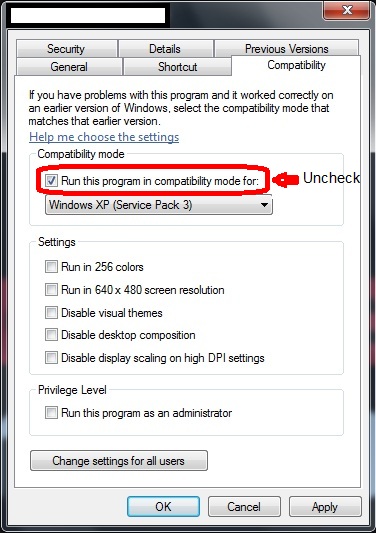
Note: If the above tick box is grayed out, you will need to click Change settings for all users |
|
| Back to top |
|
|
|
|
You cannot post new topics in this forum
You cannot reply to topics in this forum
You cannot edit your posts in this forum
You cannot delete your posts in this forum
You cannot vote in polls in this forum
|
Powered by phpBB © 2001, 2005 phpBB Group
Fa-ti si tu propriul forum GRATUIT, pe www.myforum.ro |
 FAQ
FAQ Search
 Memberlist
 Usergroups
 Register
 Profile
 Log in to check your private messages
 Log in


