| View previous topic :: View next topic |
| Author |
Message |
Dorkust
Junior 2


Joined: 06 Jun 2013
Posts: 41
Location: Canada
|
 Posted: 26/10/2013 07:41 Post subject: RSLogix 5000 (v20) - Fatal Error after install Posted: 26/10/2013 07:41 Post subject: RSLogix 5000 (v20) - Fatal Error after install |
 |
|
I have been using RSLogix5000 v16 and v19 with no problems.
I installed (v20), and now it won't run. Instead I get a fatal error.
I tried:
Please delete ".rnl" file under
C:\Documents and Settings\All Users\Application Data\Rockwell Automation\FactoryTalk Activation (for Windows XP)
C:\ProgramData\Rockwell Automation\FactoryTalk Activation (for Windows Vista or Windows 7)
Reboot computer
If you have still the same issue please
From the local computer, click Start --> Programs --> Rockwell Software --> FactoryTalk Tools --> FactoryTalk Directory Configuration Wizard
Select "network", and give a Windows Admin User credentials
After this the RSLogix 5000 v20.00 software should start without error.
After all this, I still get the error. Any suggestions?
Running Windows 7 (x64). RSLogix v16 and v19 worked flawlessly.
Thanks in advance.
Here's the dump:
Fatal Error!
Application Path: C:\Program Files (x86)\Rockwell Software\RSLogix 5000\ENU\v20\Bin\RS5000.Exe
Elapsed execution time: 17 seconds
Version: V20.00.00 (Release)
Source File: afmainfr.cpp
Line Number: 644
Function/Method: AF_CMainFrameImp::OnTimer
OS Version: Windows 7 64-bit ( - Build 7600)
Thread Id: 00002214 (8724)
Error 0x80042082 (-2147213182)
RxE_LOCALE_CHANGED_BY_OUTSIDE - The locale language settings for RSLogix 5000 was changed.
Call Technical Support.
No project file is currently open.
Last edited by Dorkust on 27/10/2013 16:52; edited 1 time in total |
|
| Back to top |
|
 |
Dorkust
Junior 2
Joined: 06 Jun 2013
Posts: 41
Location: Canada
|
| Posted: 26/10/2013 19:03 Post subject: |
|
|
Nevermind.
I uninstalled the v20 (full) version and installed RSLogix_5000_V20_B11.
Seems to work now. |
|
| Back to top |
|
|
Dorkust
Junior 2
Joined: 06 Jun 2013
Posts: 41
Location: Canada
|
| Posted: 27/10/2013 00:50 Post subject: |
|
|
What a disaster. The B11 version is CPR 9 SP 4. The "full" version is CPR 9 SP 5. My RSLogix 5000 Emulator (CPR 9 SP 5) would not play nice with the B11 version. Uninstalled B11 and busted open the v20 (full); I originally burned on disc. Crossed my fingers and installed the v20 (full) again. It installed and runs fine. Emulator works with this version too.
How do I delete this topic? I just solved my own problem. |
|
| Back to top |
|
|
meviem
Junior

Joined: 05 Oct 2013
Posts: 1
|
| Posted: 16/04/2014 06:33 Post subject: |
|
|
| Dorkust wrote: | What a disaster. The B11 version is CPR 9 SP 4. The "full" version is CPR 9 SP 5. My RSLogix 5000 Emulator (CPR 9 SP 5) would not play nice with the B11 version. Uninstalled B11 and busted open the v20 (full); I originally burned on disc. Crossed my fingers and installed the v20 (full) again. It installed and runs fine. Emulator works with this version too.
How do I delete this topic? I just solved my own problem. |
I have the same problem.. do you have take a special consideration in your last installation? |
|
| Back to top |
|
|
Dorkust
Junior 2
Joined: 06 Jun 2013
Posts: 41
Location: Canada
|
| Posted: 09/05/2014 17:32 Post subject: |
|
|
The v20 (full) unpacked as an .iso
I used PowerISO to extras the file.
Ran setup.exe after extraction. I just couldn't run the program from disc. |
|
| Back to top |
|
|
vakulina
Member

Joined: 27 Dec 2013
Posts: 167
|
| Posted: 10/05/2014 22:48 Post subject: |
|
|
| Dorkust wrote: | The v20 (full) unpacked as an .iso
I used PowerISO to extract the file.
Ran setup.exe after extraction. I just couldn't run the program from disc. |
what happens exactly..what error..on what OS? |
|
| Back to top |
|
|
Dorkust
Junior 2
Joined: 06 Jun 2013
Posts: 41
Location: Canada
|
| Posted: 11/05/2014 01:03 Post subject: |
|
|
| Read the first comment. I explain everything. |
|
| Back to top |
|
|
luke
Junior 2
Joined: 11 May 2014
Posts: 27
|
| Posted: 11/05/2014 21:46 Post subject: Re: RSLogix 5000 (v20) - Fatal Error after install |
|
|
| Dorkust wrote: | I have been using RSLogix5000 v16 and v19 with no problems.
I installed (v20), and now it won't run. Instead I get a fatal error.
I tried:
Please delete ".rnl" file under
C:\Documents and Settings\All Users\Application Data\Rockwell Automation\FactoryTalk Activation (for Windows XP)
C:\ProgramData\Rockwell Automation\FactoryTalk Activation (for Windows Vista or Windows 7)
Reboot computer
If you have still the same issue please
From the local computer, click Start --> Programs --> Rockwell Software --> FactoryTalk Tools --> FactoryTalk Directory Configuration Wizard
Select "network", and give a Windows Admin User credentials
After this the RSLogix 5000 v20.00 software should start without error.
After all this, I still get the error. Any suggestions?
Running Windows 7 (x64). RSLogix v16 and v19 worked flawlessly.
Thanks in advance.
Here's the dump:
Fatal Error!
Application Path: C:\Program Files (x86)\Rockwell Software\RSLogix 5000\ENU\v20\Bin\RS5000.Exe
Elapsed execution time: 17 seconds
Version: V20.00.00 (Release)
Source File: afmainfr.cpp
Line Number: 644
Function/Method: AF_CMainFrameImp::OnTimer
OS Version: Windows 7 64-bit ( - Build 7600)
Thread Id: 00002214 (8724)
Error 0x80042082 (-2147213182)
RxE_LOCALE_CHANGED_BY_OUTSIDE - The locale language settings for RSLogix 5000 was changed.
Call Technical Support.
No project file is currently open. |
RSLogix 5000 V20 software has been tested on the following operating systems:
• Microsoft Windows 7 Professional (64-bit) with Service Pack 1a
So install tthis SP and then Update your system with Turn Windows features on with all the .NET including 3.5SP1 .. |
|
| Back to top |
|
|
foreverengineer
Junior
Joined: 18 Nov 2015
Posts: 1
|
| Posted: 19/11/2015 17:47 Post subject: Just for the record |
|
|
This solution comes from AB knowledge base and worked for me
| Quote: | Problem
RSLogix 5000 software generate the following Fatal Error
Fatal Error! Source File: afmainfr.cpp
Line Number: 653
Function/Method: AF_CMainFrameImp::OnTimer ]OS Version: Windows XP (Service Pack 2 - Build 2600)
Thread Id: 00000274 (628) Error 0x80042082 (-2147213182) RxE_LOCALE_CHANGED_BY_OUTSIDE - The locale language settings for RSLogix 5000 was changed.
Call Technical Support. One project file is currently open
Cause
When the RSLogix 5000 software is built, it is compiled with a specific locale identifier. For example, the English version of RSLogix 5000 is built with the English locale and the German version is built with the German locale.
RSLogix 5000's built locale cannot be changed while the software is running. This is to prevent values (i.e. 1.3) from changing to (i.e.1,3) or something else that could corrupt the project file.
The Fatal Error Handling system is designed to shut down RSLogix 5000 software to prevent potentially harmful changes from being stored in the ACD file.
The error message comes as a result of something running in the RSLogix 5000's process space changing RSLogix 5000's locale.
Solution 1
Since RSLogix 5000 does not have the ability to determine who or what is changing the locale, try to track down who or what is changing the locale.
If RSLogix 5000 has only recently exhibited this behavior, start by determining what other software packages were added/installed from the time RSLogix 5000 was working properly to the time the error started appearing.
Look for additions of new module profiles, new Rockwell Software applications, external routine .dll, or even Microsoft updates to Windows DLLs being used by RSLogix 5000.
If permitted, uninstall the new software and test RSLogix 5000 software again. If the issue goes away and the problem software is found, please report the issue to Technical Support.
Examples
1.A document management application called TortoiseCVS needs to have the language control set to Windows Default, to resolve the problem.
2.Microsoft ASP.NET Web Pages, which is part of Visual Studio Web Developer 2010, has also been reported to cause the problem with RSLogix 5000 version 20 software's Start Page.
3.For Windows 7 users: Go to Control Panel --> Region and Language --> Formats tab. And change Compus to English (United States).
Workaround
A temporary solution for version 20 is to launch a previous version of RSLogix 5000 software (v16-v19) and click Tools --> Options, then select not to Show the Start Page on Startup. Afterwards, version 20 should launch without the Fatal Error.
If there is no previous version of RSLogix 5000 installed you can disable the Start Page by
1.Go to Start --> Run and write Regedit
2.Go to HKEY_Current_User\Software\Rockwell Software\RSLogix 5000\Start Page and set Never Show to 1
Self investigation for the root cause is up to the end user as it's not reproducible for Rockwell at this time. First try launching Visual Studio Web Developer 2010 to click Tools > Options and select International Settings. Try selecting Same As Microsoft Windows and test version 20 with start page enabled. The following thread appears to have some details on setting the default culture for ASP.NET: http://forums.asp.net/t/1092375.aspx/1
Visual Studio 2013 create even more problems and Same As Microsoft Windows settings do not solve the problem. The only workaround available is disabling of RSLogix 5000 start Page.
Solution 2
Go to Region & Language settings in the control panel. The format was set to English(Irish) changed this to English (United States) and re-booting PC this resolved the above issue.
|
|
|
| Back to top |
|
|
RoTaTech
Junior
Joined: 03 Aug 2016
Posts: 1
Location: Ontario, Canada
|
| Posted: 03/08/2016 14:30 Post subject: Re: Just for the record |
|
|
| foreverengineer wrote: | | This solution comes from AB knowledge base and worked for me |
It just worked for me, as well. Thanks for posting it.
_________________
When you throw something away, where is Away? |
|
| Back to top |
|
|
Gerhapen
Junior
Joined: 28 Jun 2017
Posts: 1
|
| Posted: 28/06/2017 16:45 Post subject: Fatal Error Rslogix5000 v.20 Windows 7 Solved |
|
|
This worked for me:
Windows 7 users:
Go to Control Panel --> Region and Language --> Formats tab. And change Format to English (United States). |
|
| Back to top |
|
|
paco_bg
Junior
Joined: 04 Feb 2013
Posts: 1
|
| Posted: 10/11/2017 04:18 Post subject: |
|
|
| Thank you your solution also works for me |
|
| Back to top |
|
|
aldahg97
Junior
Joined: 20 Feb 2018
Posts: 1
|
| Posted: 20/02/2018 06:40 Post subject: |
|
|
| paco_bg wrote: | | Thank you your solution also works for me |
Thank you also works for me on Windows 10 |
|
| Back to top |
|
|
netpaz
Junior 2
Joined: 31 Mar 2013
Posts: 36
|
| Posted: 09/03/2018 14:58 Post subject: Re: Just for the record |
|
|
| foreverengineer wrote: | This solution comes from AB knowledge base and worked for me
| Quote: | Problem
RSLogix 5000 software generate the following Fatal Error
Fatal Error! Source File: afmainfr.cpp
Line Number: 653
Function/Method: AF_CMainFrameImp::OnTimer ]OS Version: Windows XP (Service Pack 2 - Build 2600)
Thread Id: 00000274 (628) Error 0x80042082 (-2147213182) RxE_LOCALE_CHANGED_BY_OUTSIDE - The locale language settings for RSLogix 5000 was changed.
Call Technical Support. One project file is currently open
Cause
When the RSLogix 5000 software is built, it is compiled with a specific locale identifier. For example, the English version of RSLogix 5000 is built with the English locale and the German version is built with the German locale.
RSLogix 5000's built locale cannot be changed while the software is running. This is to prevent values (i.e. 1.3) from changing to (i.e.1,3) or something else that could corrupt the project file.
The Fatal Error Handling system is designed to shut down RSLogix 5000 software to prevent potentially harmful changes from being stored in the ACD file.
The error message comes as a result of something running in the RSLogix 5000's process space changing RSLogix 5000's locale.
Solution 1
Since RSLogix 5000 does not have the ability to determine who or what is changing the locale, try to track down who or what is changing the locale.
If RSLogix 5000 has only recently exhibited this behavior, start by determining what other software packages were added/installed from the time RSLogix 5000 was working properly to the time the error started appearing.
Look for additions of new module profiles, new Rockwell Software applications, external routine .dll, or even Microsoft updates to Windows DLLs being used by RSLogix 5000.
If permitted, uninstall the new software and test RSLogix 5000 software again. If the issue goes away and the problem software is found, please report the issue to Technical Support.
Examples
1.A document management application called TortoiseCVS needs to have the language control set to Windows Default, to resolve the problem.
2.Microsoft ASP.NET Web Pages, which is part of Visual Studio Web Developer 2010, has also been reported to cause the problem with RSLogix 5000 version 20 software's Start Page.
3.For Windows 7 users: Go to Control Panel --> Region and Language --> Formats tab. And change Format to English (United States).
Workaround
A temporary solution for version 20 is to launch a previous version of RSLogix 5000 software (v16-v19) and click Tools --> Options, then select not to Show the Start Page on Startup. Afterwards, version 20 should launch without the Fatal Error.
If there is no previous version of RSLogix 5000 installed you can disable the Start Page by
1.Go to Start --> Run and write Regedit
2.Go to HKEY_Current_User\Software\Rockwell Software\RSLogix 5000\Start Page and set Never Show to 1
Self investigation for the root cause is up to the end user as it's not reproducible for Rockwell at this time. First try launching Visual Studio Web Developer 2010 to click Tools > Options and select International Settings. Try selecting Same As Microsoft Windows and test version 20 with start page enabled. The following thread appears to have some details on setting the default culture for ASP.NET: http://forums.asp.net/t/1092375.aspx/1
Visual Studio 2013 create even more problems and Same As Microsoft Windows settings do not solve the problem. The only workaround available is disabling of RSLogix 5000 start Page.
Solution 2
Go to Region & Language settings in the control panel. The compus was set to English(Irish) changed this to English (United States) and re-booting PC this resolved the above issue.
|
|
Apenas iniciei em modo Adinistrador -  |
|
| Back to top |
|
|
willbe
Junior
Joined: 02 Nov 2014
Posts: 3
Location: indonesia
|
| Posted: 15/03/2018 11:43 Post subject: Re: Just for the record |
|
|
| foreverengineer wrote: | This solution comes from AB knowledge base and worked for me
| Quote: | Problem
3.For Windows 7 users: Go to Control Panel --> Region and Language --> Formats tab. And change Format to English (United States).
|
|
after installing VS Community 2015, come out with this error
and the solution no 3 worked for me |
|
| Back to top |
|
|
netpaz
Junior 2
Joined: 31 Mar 2013
Posts: 36
|
| Posted: 22/05/2018 13:50 Post subject: Re: Fatal Error Rslogix5000 v.20 Windows 7 Solved |
|
|
| Gerhapen wrote: | This worked for me:
Windows 7 users:
Go to Control Panel --> Region and Language --> Formats tab. And change Compus to English (United States). |
Obrigado. |
|
| Back to top |
|
|
kalid fadili
Junior
Joined: 28 Nov 2017
Posts: 1
|
| Posted: 27/06/2018 11:38 Post subject: Re: Fatal Error Rslogix5000 v.20 Windows 7 Solved |
|
|
| Gerhapen wrote: | This worked for me:
Windows 7 users:
Go to Control Panel --> Region and Language --> Formats tab. And change Format to English (United States). |
Thank you mate, it worked for me  |
|
| Back to top |
|
|
newplcman
Junior
Joined: 14 Apr 2016
Posts: 2
|
| Posted: 12/05/2020 20:21 Post subject: Re: Fatal Error Rslogix5000 v.20 Windows 7 Solved |
|
|
| Gerhapen wrote: | This worked for me:
Windows 7 users:
Go to Control Panel --> Region and Language --> Formats tab. And change Format to English (United States). |
Same here. Thanks to this one! |
|
| Back to top |
|
|
lafaz67
Junior
Joined: 26 Aug 2018
Posts: 3
|
| Posted: 13/05/2020 08:39 Post subject: |
|
|
https://rockwellautomation.custhelp.com/app/answers/answer_view/a_id/616474
Studio 5000 / RSLogix 5000 : Fatal Error 0xc0000005 on Windows 8 / 8.1 / 10
Problem
Problem
When opening RSLogix 5000 and/or Studio 5000 Logix Designer software, I receive the following error message:
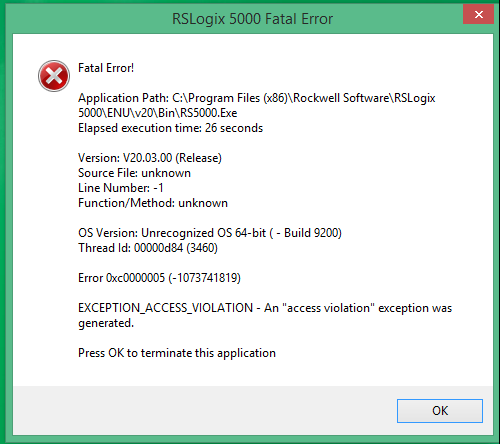
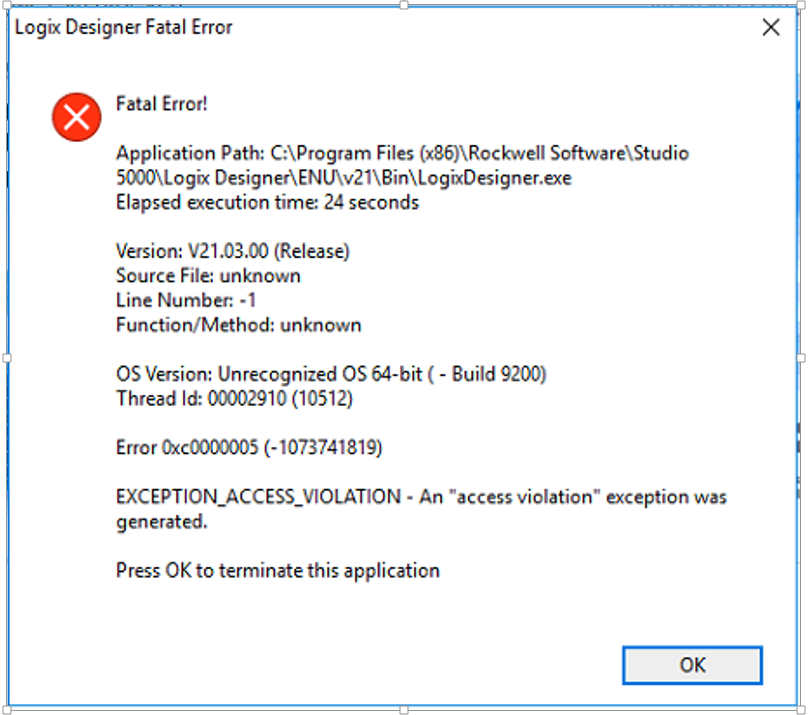
Fatal Error!
Application path: C:\Program Files (x86)\Rockwell Software\RSLogix 5000\ENU\v20\Bin\RS5000.exe
Elapsed Time: XX seconds
Version: V20.03.00
Source File: unknown
Line Number: -1
Function/Method: unknown
OS Version: Unrecognized OS 64-bit ( - Build 9200)
Thread Id: XX
Error 0xc0000005 (-1073741819)
EXCEPTION_ACCESS_VIOLATION - An "access violation" exception was generated.
Environment
RSLogix 5000 v20 and earlier
Studio 5000 Logix Designer v21 - 29
Windows 8 / 8.1 / 10
Solution
Attention
According to the RSLogix 5000 release notes, the only versions compatible with Windows 10 are version 20.04.02 and version 20.05.00. There are no other RSLogix 5000 software versions that are compatible with Windows 8 / 8.1.
Studio 5000 Logix Designer is compatible with Windows 8 / 8.1 from version 24.0x. As for Windows 10, the only compatible versions are 24.02.00, 28.03.00 and 30.0x Future releases will also be compatible. Please check the Product Compatibility and Download Center for the latest information on operating system compatibility. If older versions of the software are re-released, compatibility for newer Windows operating systems may be included.
Solution 1
Please try one of the steps below:
Right click on C:\Program Files (x86)\Rockwell Software\RSLogix 5000\ENU\VXX\Bin\RS5000.exe and choose Run as Administrator
Note: Selecting Run as Administrator on a shortcut does not work.
For Studio 5000 Logix Designer, the EXE file should be C:\Program Files (x86)\Rockwell Software\Studio 5000\Logix Designer\ENU\VXX\Bin\LogixDesigner.exe
Note: XX stands for the number of the version you want to launch, for example: V20, for RSLogix 5000 version 20
Or
Right click on C:\Program Files (x86)\Rockwell Software\RSLogix 5000\ENU\VXX\Bin\RS5000.exe and choose: Troubleshoot compatibility -->Troubleshoot program -->select the option: The program worked in earlier versions of Windows but won’t install or run now --> follow the rest of the instructions displayed by Windows to select the compatibility with Windows XP.
For Studio 5000 Logix Designer, the EXE file should be C:\Program Files (x86)\Rockwell Software\Studio 5000\Logix Designer\ENU\VXX\Bin\LogixDesigner.exe and select the compatibility with Windows 7 or Windows XP SP3.
Note: XX stands for the number of the version you want to launch, for example: V21, for Studio 5000 version 21
For additional help using the compatibility mode in Windows 8.1 please visit this Microsoft support website.
https://support.microsoft.com/en-us/help/15078/windows-10-make-older-apps-or-programs-compatible
If none of the above workarounds resolve the issue, you may need to run this software on a tested and supported operating system. Using a virtual machine is a good way to accomplish this.
Solution 2
Ensure that there are no RSNetwork association file that are in the project and not in the Laptop or PC
[url=http://www.girlshare.ro/3769914967.5]520451.pdf[/url]
[url=http://www.girlshare.ro/3769914968.6]Answer-616474+06May2019.pdf[/url] |
|
| Back to top |
|
|
Le Chat
Member junior


Joined: 12 Jul 2018
Posts: 68
Location: Here
|
| Posted: 19/06/2020 17:29 Post subject: |
|
|
| aldahg97 wrote: | | paco_bg wrote: | | Thank you your solution also works for me |
Thank you also works for me on Windows 10 |
Works for me too
Windows 7 Enterprise SP1
_________________
Hello! |
|
| Back to top |
|
|
kisax003
Junior
Joined: 23 Aug 2020
Posts: 1
|
| Posted: 23/10/2020 01:59 Post subject: |
|
|
Hi everybody!
Both 2 solutions worked.
Win 7 x64, Win 10 x64
RSLogix5k V20.01.00
Big TNX! |
|
| Back to top |
|
|
Loopman3
Junior
Joined: 07 May 2019
Posts: 1
|
| Posted: 13/02/2021 07:23 Post subject: Re: Fatal Error Rslogix5000 v.20 Windows 7 Solved |
|
|
Thanks! the only solution I found
Windows 7 users:
Go to Control Panel --> Region and Language --> Formats tab. And change Format to English (United States).[/quote] |
|
| Back to top |
|
|
Geerbot
Junior
Joined: 30 Oct 2018
Posts: 1
|
| Posted: 08/03/2021 15:30 Post subject: |
|
|
| ok thanks |
|
| Back to top |
|
|
Irontigerzhou
Junior
Joined: 05 May 2021
Posts: 1
|
| Posted: 06/05/2021 15:17 Post subject: |
|
|
Thanks guys, I tried solution 2 in Win 10 for Rslogix5000 v20, change region and language to English, united State, not working, and then try Solution 1,
1.Go to Start --> Run and write Regedit
2.Go to HKEY_Current_User\Software\Rockwell Software\RSLogix 5000\Start Page and set Never Show to 1
Bingo, it work!
now I have Rsemu5000 V20 and Rslogix5000 V20 both running fine in Win10. |
|
| Back to top |
|
|
socrames
Junior
Joined: 15 Jan 2019
Posts: 14
|
| Posted: 18/11/2021 01:23 Post subject: |
|
|
[quote="Irontigerzhou"]Thanks guys, I tried solution 2 in Win 10 for Rslogix5000 v20, change region and language to English, united State, not working, and then try Solution 1,
1.Go to Start --> Run and write Regedit
2.Go to HKEY_Current_User\Software\Rockwell Software\RSLogix 5000\Start Page and set Never Show to 1
Bingo, it work!
now I have Rsemu5000 V20 and Rslogix5000 V20 both running fine in Win10.[/quote]
worked for me, thanks ! |
|
| Back to top |
|
|
|

 FAQ
FAQ Search
 Memberlist
 Usergroups
 Register
 Profile
 Log in to check your private messages
 Log in


