 |
plc.myforum.ro
PLCs users www.plc.myforum.ro!
|
| View previous topic :: View next topic |
| Author |
Message |
fluxwormcore
Junior 2

Joined: 04 Apr 2012
Posts: 30
|
 Posted: 21/01/2019 19:32 Post subject: RSLogix 5000 20.05.00 Posted: 21/01/2019 19:32 Post subject: RSLogix 5000 20.05.00 |
 |
|
| i try to found the installer for RSLogix 5000 20.05.00 if anyone have the installer i really greatful thanks |
|
| Back to top |
|
 |
kama
Member 2

Joined: 08 Dec 2016
Posts: 427
|
| Posted: 04/06/2019 14:00 Post subject: RSLogix5000 20.05.00 |
|
|
RSLogix5000 20.05.00
Software Requirements
| Code: | Operating system and service pack compatibility:
Windows® 10 Professional (64-bit) version 1703
Windows 7 Professional (64-bit) with Service Pack 1
Windows Server 2008 R2 Standard Edition with Service Pack 1
Windows Server 2012 R2 Standard Edition
Windows Server 2016 |
Important:
When installing version 20.05 of the RSLogix 5000 software, Microsoft .NET Framework 4.6 is installed automatically. However, when installed on 32-bit Windows operating systems, .NET Framework 4.6 causes versions 23.00.00 and earlier of the software to fail on startup. Also, when previous versions of the software are installed after 20.05, 24.02, 28.03, 30.00, and later, .NET Framework 4.6 may cause these earlier versions of the software installation to fail.
This version of the software is expected to operate correctly on all other editions and service packs of the following operating systems, but has not been tested:
| Code: | Windows 10 (versions 1607, 1709)
Windows 7
Windows Server 2008 R2
Windows 8
Windows Server 2012 |
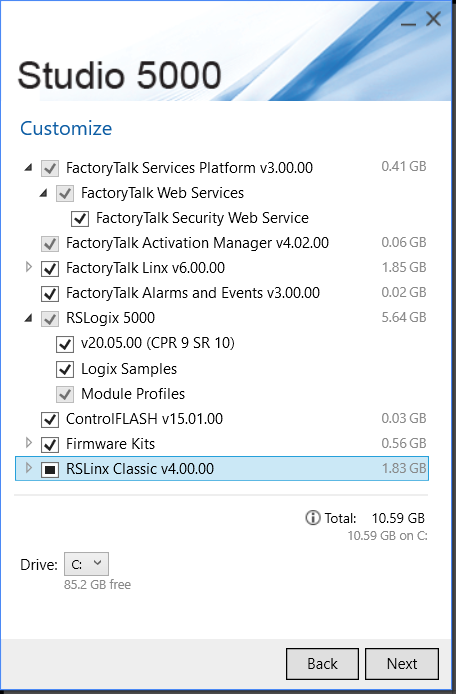
The following prerequisite software is required with this version of RSLogix 5000 software and will be installed with this release:
FactoryTalk® Services Platform v3.00.00
FactoryTalk® Activation Manager v4.02.00
RSLinx Classic v4.00.00
FactoryTalk® Linx™ v6.00.00
FactoryTalk® View Site Edition (SE) software and FLEX Ex communication software are required to use alarming capabilities fully.
RSLogix 5000 v.20.04, v 20.05 Compatibility
| Code: | Before v20.04 was released, RSLogix 5000 supported minor revision compatibility within each major release, with the exception of v20.03. See 565204 - RSLogix 5000 Software, Version 20.03 for information on version 20.03 compatibility restrictions.
RSLogix 5000 v20.04 and 20.05 restores minor revision compatibility for v20. Files created in versions 20.01 and 20.03 can be opened in version 20.04. Version 20.04 allows you to upload and go online with files from version 20.01 and 20.03.
Please review the following information carefully before upgrading.
If users fabricate a new project in v20.04 or 20.05, it will be compatible with other v20 files by default, except v.20.03.
For more information on the v20.03 Product Resiliency Release read
RSLogix 5000 V20.03 FAQ_Rev_2
Compatibility among Minor Revisions if a v20.04 or V20.05 File is Opened in an Older Instance of v20 Software
For v20.01 software
If users created a new file in v20.04, by default, the project is compatible with other v20 software.*
If a v.20.01 file type was opened with v20.04, it will still be able to open in v20.01 software.
If a v20.01 file type was uploaded with v20.04, it will still be able to open in v20.01 software.
If a v20.01 file type was saved with v20.04, it will still be able to open in v20.01.
For v20.03 software
If a v20.03 file type was opened with v20.04, it will still be able to open in v20.03 software.
If a v20.03 file type was uploaded with v20.04, it will still be able to open in v20.03 software.
If a v20.03 file type was saved with v20.04, it will still be able to open in v20.03 software.
If users open a file created in v20.04 file with v20.03 software, the software will break compatibility as if it is opening a v20.01 file. It will prompt the user to change the file to v20.03.
If users upload a file created in v20.04 file with v20.03 software, the software will prompt to change the file to v20.03. User would have to save the uploaded file as a v20.03 file type, and download the v20.03 project.
R
SLogix Emulate 5000 and SoftLogix 5800 environments
For full compatibility with RSLogix 5000 v20.04 RSLogix Emulate 5000 and SoftLogix 5800 v20.04 should be utilized.
As of 16-Oct-2015 SoftLogix5800 v20.04 is not available.
Notes on using v.20.04 RSLogix 5000 with SoftLogix 5800 v20.xx
SoftLogix5800 v20.01
Full compatibility
SoftLogix5800 v20.03
Download of v20.03 created ACD file
Upload into v20.03 created ACD file
Online edits with v20.03 created ACD file
"Out of logic memory in the controller" error will result in the following scenarios
Importing .L5K or .L5X and downloading with RSLogix5000 v20.04 to SoftLogix5800 v20.03
Creating a new file and downloading with RSLogix5000 v20.04 to SoftLogix5800 v20.03
Opening an ACD file created in v20.04 or v20.01 or earlier and downloading with RSLogix5000 v20.04 to SoftLogix5800 v20.03
Downloading an ACD file to SoftLogix5800 v20.00
Steps to convert a v20.03 file to be compatible with earlier v20 software using RSLogix 5000 v20.04
Note: Even though this procedure creates file compatibility with early V20 software, it is still recommend to upgrade all machines to v.20.04 or higher, rather than using initial V20 releases.
Open the v20.03 project in RSLogix 5000 v20.04.
Go to File-->Save As, and save the file type as an .L5K or .L5X file.
Open the exported project in a text editor, and make the following change.
Find the text:
CompatibilityMode:=V20.03 in .L5K format
CompatibilityMode="V20.03" in .L5X format
Changed minor revision numbers:
CompatibilityMode:=20.01 in .L5K format
CompatibilityMode="20.01" in .L5X format
Import .L5K or .L5X file into RSLogix 5000 v20.04, by going to File-->Open and selecting your .L5K or .L5X file.
Save the project. The project is now compatible with v20.01 software offline and online. User must download after conversion process takes place.
After download ConrolNet networks must be rescheduled if used. |
RSLogix5000_20.05.00
| Code: | | https://mega.nz/#F!qFUUFAzY!DUUsg2PBEbO1lVM26PR5Kw |
| Code: | | https://ulozto.net/tam/_L7y2V2VUtc9u |
|
|
| Back to top |
|
|
mauriciogzz
Junior

Joined: 10 Sep 2019
Posts: 1
|
| Posted: 11/08/2020 00:59 Post subject: |
|
|
| how i activate this version? |
|
| Back to top |
|
|
akbar_torkashwand
Member

Joined: 09 Nov 2018
Posts: 228
|
| Posted: 09/11/2022 08:52 Post subject: Re: RSLogix5000 20.05.00 |
|
|
| kama wrote: | RSLogix5000 20.05.00
Software Requirements
| Code: | Operating system and service pack compatibility:
Windows® 10 Professional (64-bit) version 1703
Windows 7 Professional (64-bit) with Service Pack 1
Windows Server 2008 R2 Standard Edition with Service Pack 1
Windows Server 2012 R2 Standard Edition
Windows Server 2016 |
Important:
When installing version 20.05 of the RSLogix 5000 software, Microsoft .NET Framework 4.6 is installed automatically. However, when installed on 32-bit Windows operating systems, .NET Framework 4.6 causes versions 23.00.00 and earlier of the software to fail on startup. Also, when previous versions of the software are installed after 20.05, 24.02, 28.03, 30.00, and later, .NET Framework 4.6 may cause these earlier versions of the software installation to fail.
This version of the software is expected to operate correctly on all other editions and service packs of the following operating systems, but has not been tested:
| Code: | Windows 10 (versions 1607, 1709)
Windows 7
Windows Server 2008 R2
Windows 8
Windows Server 2012 |
The following prerequisite software is required with this version of RSLogix 5000 software and will be installed with this release:
FactoryTalk® Services Platform v3.00.00
FactoryTalk® Activation Manager v4.02.00
RSLinx Classic v4.00.00
FactoryTalk® Linx™ v6.00.00
FactoryTalk® View Site Edition (SE) software and FLEX Ex communication software are required to use alarming capabilities fully.
RSLogix 5000 v.20.04, v 20.05 Compatibility
| Code: | Before v20.04 was released, RSLogix 5000 supported minor revision compatibility within each major release, with the exception of v20.03. See 565204 - RSLogix 5000 Software, Version 20.03 for information on version 20.03 compatibility restrictions.
RSLogix 5000 v20.04 and 20.05 restores minor revision compatibility for v20. Files created in versions 20.01 and 20.03 can be opened in version 20.04. Version 20.04 allows you to upload and go online with files from version 20.01 and 20.03.
Please review the following information carefully before upgrading.
If users create a new project in v20.04 or 20.05, it will be compatible with other v20 files by default, except v.20.03.
For more information on the v20.03 Product Resiliency Release read
RSLogix 5000 V20.03 FAQ_Rev_2
Compatibility among Minor Revisions if a v20.04 or V20.05 File is Opened in an Older Instance of v20 Software
For v20.01 software
If users created a new file in v20.04, by default, the project is compatible with other v20 software.*
If a v.20.01 file type was opened with v20.04, it will still be able to open in v20.01 software.
If a v20.01 file type was uploaded with v20.04, it will still be able to open in v20.01 software.
If a v20.01 file type was saved with v20.04, it will still be able to open in v20.01.
For v20.03 software
If a v20.03 file type was opened with v20.04, it will still be able to open in v20.03 software.
If a v20.03 file type was uploaded with v20.04, it will still be able to open in v20.03 software.
If a v20.03 file type was saved with v20.04, it will still be able to open in v20.03 software.
If users open a file created in v20.04 file with v20.03 software, the software will break compatibility as if it is opening a v20.01 file. It will prompt the user to change the file to v20.03.
If users upload a file created in v20.04 file with v20.03 software, the software will prompt to change the file to v20.03. User would have to save the uploaded file as a v20.03 file type, and download the v20.03 project.
R
SLogix Emulate 5000 and SoftLogix 5800 environments
For full compatibility with RSLogix 5000 v20.04 RSLogix Emulate 5000 and SoftLogix 5800 v20.04 should be utilized.
As of 16-Oct-2015 SoftLogix5800 v20.04 is not available.
Notes on using v.20.04 RSLogix 5000 with SoftLogix 5800 v20.xx
SoftLogix5800 v20.01
Full compatibility
SoftLogix5800 v20.03
Download of v20.03 created ACD file
Upload into v20.03 created ACD file
Online edits with v20.03 created ACD file
"Out of logic memory in the controller" error will result in the following scenarios
Importing .L5K or .L5X and downloading with RSLogix5000 v20.04 to SoftLogix5800 v20.03
Creating a new file and downloading with RSLogix5000 v20.04 to SoftLogix5800 v20.03
Opening an ACD file created in v20.04 or v20.01 or earlier and downloading with RSLogix5000 v20.04 to SoftLogix5800 v20.03
Downloading an ACD file to SoftLogix5800 v20.00
Steps to convert a v20.03 file to be compatible with earlier v20 software using RSLogix 5000 v20.04
Note: Even though this procedure creates file compatibility with early V20 software, it is still recommend to upgrade all machines to v.20.04 or higher, rather than using initial V20 releases.
Open the v20.03 project in RSLogix 5000 v20.04.
Go to File-->Save As, and save the file type as an .L5K or .L5X file.
Open the exported project in a text editor, and make the following change.
Find the text:
CompatibilityMode:=V20.03 in .L5K format
CompatibilityMode="V20.03" in .L5X format
Changed minor revision numbers:
CompatibilityMode:=20.01 in .L5K format
CompatibilityMode="20.01" in .L5X format
Import .L5K or .L5X file into RSLogix 5000 v20.04, by going to File-->Open and selecting your .L5K or .L5X file.
Save the project. The project is now compatible with v20.01 software offline and online. User must download after conversion process takes place.
After download ConrolNet networks must be rescheduled if used. |
RSLogix5000_20.05.00
| Code: | | https://mega.nz/#F!qFUUFAzY!DUUsg2PBEbO1lVM26PR5Kw |
| Code: | | https://ulozto.net/tam/_L7y2V2VUtc9u |
|
thanks so much. but your link has been dead |
|
| Back to top |
|
|
kafuo
Senior


Joined: 01 Oct 2022
Posts: 1536
|
| Posted: 09/11/2022 09:31 Post subject: |
|
|
| check pm |
|
| Back to top |
|
|
ashraf_uddin88
Junior
Joined: 12 Sep 2017
Posts: 3
|
| Posted: 16/02/2023 03:12 Post subject: |
|
|
| Link is dead please update |
|
| Back to top |
|
|
kafuo
Senior
Joined: 01 Oct 2022
Posts: 1536
|
| Posted: 16/02/2023 19:34 Post subject: |
|
|
| ashraf_uddin88 wrote: | | Link is dead please update |
check pm |
|
| Back to top |
|
|
Jorge Luis
Junior
Joined: 27 Feb 2013
Posts: 5
|
| Posted: 01/06/2024 18:06 Post subject: RSLogix 5000 20.05.00 |
|
|
| I try to found the installer for RSLogix 5000 20.05.00 if anyone have the installer i really greatful thanks |
|
| Back to top |
|
|
Doorzan
Senior
Joined: 03 Nov 2018
Posts: 1028
|
| Posted: 01/06/2024 21:37 Post subject: Re: RSLogix 5000 20.05.00 |
|
|
| Jorge Luis wrote: | | I try to found the installer for RSLogix 5000 20.05.00 if anyone have the installer i really greatful thanks |
pm |
|
| Back to top |
|
|
Hans_54
Junior
Joined: 14 Nov 2024
Posts: 2
|
| Posted: 16/11/2024 16:05 Post subject: |
|
|
| please send link |
|
| Back to top |
|
|
Doorzan
Senior
Joined: 03 Nov 2018
Posts: 1028
|
| Posted: 19/11/2024 19:59 Post subject: |
|
|
| Hans_54 wrote: | | please send link |
pm |
|
| Back to top |
|
|
|
|
You cannot post new topics in this forum
You cannot reply to topics in this forum
You cannot edit your posts in this forum
You cannot delete your posts in this forum
You cannot vote in polls in this forum
|
Powered by phpBB © 2001, 2005 phpBB Group
Fa-ti si tu propriul forum GRATUIT, pe www.myforum.ro |
 FAQ
FAQ Search
 Memberlist
 Usergroups
 Register
 Profile
 Log in to check your private messages
 Log in


